• SONAR
  • Setting up Sonar LE with Boss ME-25
2011/02/15 10:58:59
tomas1991
Hey

I got the Boss ME-25, for christmas last year. I installed Sonar LE, that follow with the Boss pedal, and it worked great. A bit of Delay on the monitor, but it was fine. Then one day, i got tired of the delat, and follow tutorials to minimize the delay. Of cause I didn't check if it worked after i changed the settings. I stopped recording for a time, and today when I wanted to start recording again, nothing worked. When opening Sonar, all sound on my computer disappears. And I can''t get the sounds from the Boss ME-25/my guitar, to play in Sonar. 

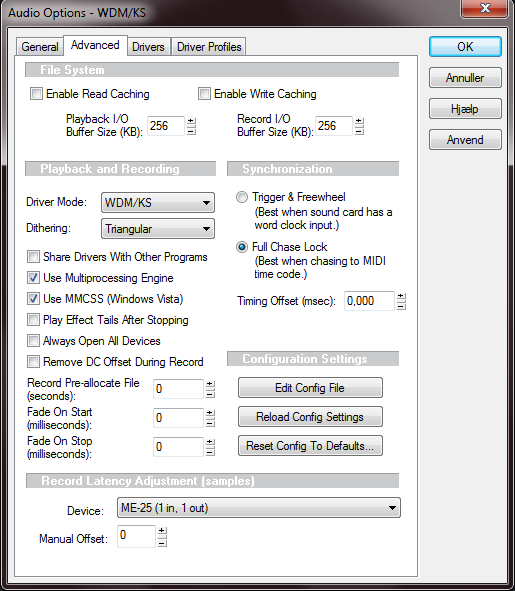
I don't know which settings I changed, other than I think it had something to d, with the drivers.

I know this isn't alot of info, but I hope you guys can help me out.

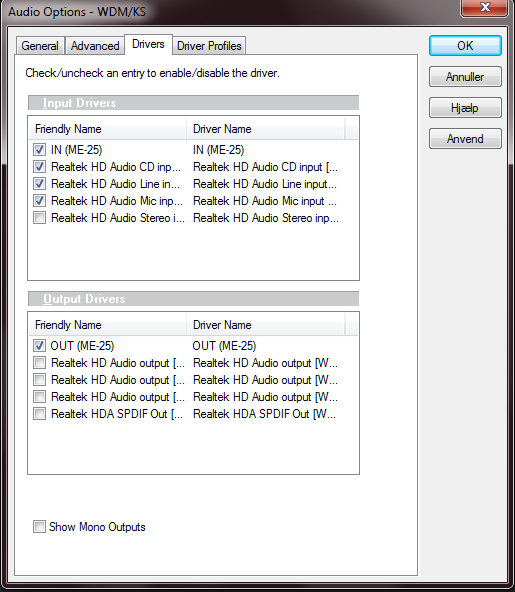
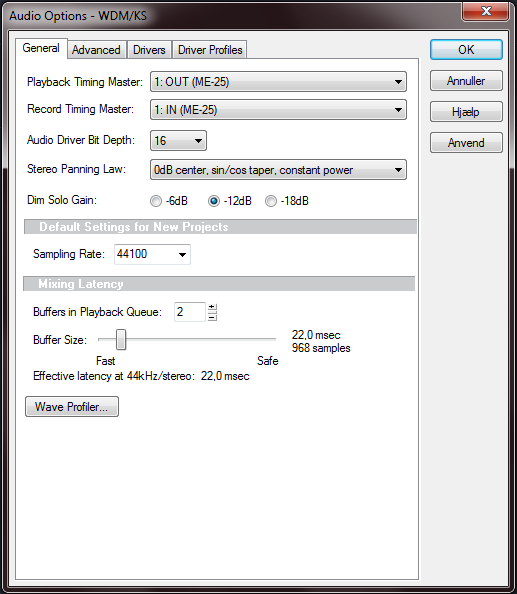
Here is some of the settings I'm using. Hope it'll help a bit:


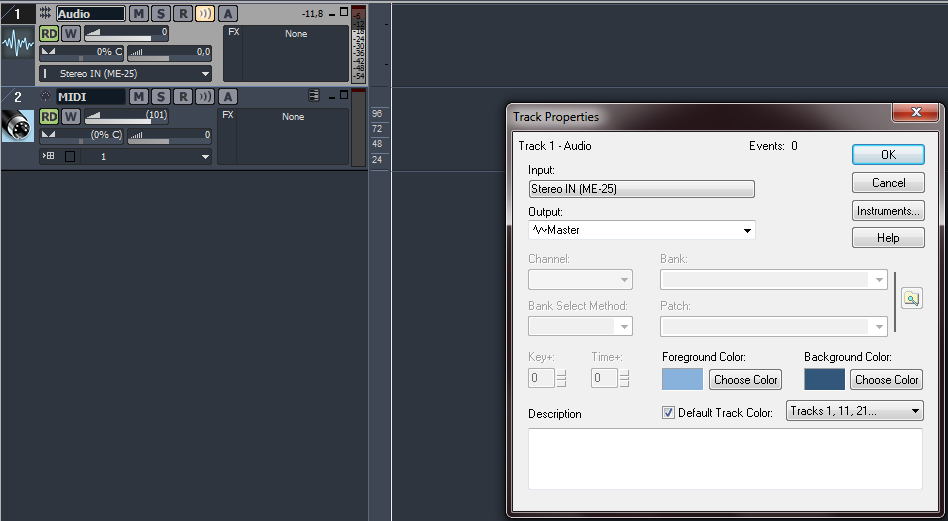
as you can see on this last picture, the track is receiving the sound of the guitar, but I can't hear a thing :S
2011/02/15 12:41:27
tomas1991
Okay I found out, that the output is set to the output on the ME-25 and not to the computer speakers. So how do I change it, so the output will be my computer speakers?

And I can hear, that the delay have come back. Can anyone give any advice on how to eliminate the delay? I and so tired of getting out of rhythm all the time because of the delay 
2011/03/08 17:00:10
ThomasA
Not sure if I can help, but I'm willing to give it a try.
I think you should run Sonar LE in ASIO driver mode. Cakewalk provides a "how to set up sonar" - video in the "Get Started" tread on this forum. You should watch the vid and set your settings accordingly.  If I were you, I'd uncheck all Realtek HD under input drivers, and uncheck ME-25 and check all Realtek HD under output drivers. This might solve your delay problem.
 
See if it works
 
Thomas
2016/07/27 06:00:00
peetsake
I'm experiencing much the same problems it seems, usbing the ME25 causes Sonar to give no input or output options! Have changed soundcard configuration many times, still no input or output options. Hitting brick walls wherever I turn. Gonna use the disc for a target! Not worth it! Very happy with the ME25 though!
 
2016/07/27 15:28:10
200bpm
Try asio4all drivers.  It allows you to use multiple devices for IO at the same time.
 
You can use your ME25 as input, and soundcard as output.  If you have a mini mixer (or even just an amp), you can route the ME25 analog out to it for monitoring while the soundcard plays back the recorded tracks.
2016/07/30 03:35:39
peetsake
Yes, I would love to be able to do this but as I said, as soon as the ME25 is usb-ed, my output options on sonar are ME25 or None and won't change no matter what I do! Extremely frustraiting!
 
2017/02/24 10:39:58
cartesr
Hi I have just recently purchased a Boss Me25 so im new to this. Ive installed Sonar LE but I can not get the sound from the ME25 into Sonar. Ive checked the various FAQ but cannot find an answer. When I checked the preferences and the input and output drivers. the checkbox for ME25 in both instances is greyed out so I cannot tick it. SO I though the driver might be an issue so I tried recording using Audacity and that was fine worked without any changes. Ive tried uploading a screenshot but it doesnt seem to have worked here is the url "http://imgur.com/a/L8btG"


2017/02/24 10:55:05
chuckebaby
cartesr
Hi I have just recently purchased a Boss Me25 so im new to this. Ive installed Sonar LE but I can not get the sound from the ME25 into Sonar. Ive checked the various FAQ but cannot find an answer. When I checked the preferences and the input and output drivers. the checkbox for ME25 in both instances is greyed out so I cannot tick it. SO I though the driver might be an issue so I tried recording using Audacity and that was fine worked without any changes. Ive tried uploading a screenshot but it doesnt seem to have worked here is the url http://imgur.com/a/L8btG


did you install the drivers from here
https://www.boss.info/us/support/by_product/me-25/updates_drivers/
2017/02/24 11:10:47
cartesr
Hi 
Im running Windows 10 so when I connected it downloaded the driver. I think the ME25 driver for windows 10 is fine as I dont think I would be able to record using Audacity which works fine. Im just puzzled as to why the checkboxes for ME25 (which only appear when I connect the Me25 are grey and wont let me select them. 
Ive also gone into the driver itself in Windows and asked it to check for updates and it came back with the driver was the most up to date 
 
thanks 
2017/02/24 11:21:51
IMC80
cartesr
Hi I have just recently purchased a Boss Me25 so im new to this. Ive installed Sonar LE but I can not get the sound from the ME25 into Sonar. Ive checked the various FAQ but cannot find an answer. When I checked the preferences and the input and output drivers. the checkbox for ME25 in both instances is greyed out so I cannot tick it. SO I though the driver might be an issue so I tried recording using Audacity and that was fine worked without any changes. Ive tried uploading a screenshot but it doesnt seem to have worked here is the url "


Hi cartesr,

I used to have the same set up, when I used the ME 25, the MME driver mode was the one that worked for the pedal in Sonar LE.

Hope this helps
12
© 2026 APG vNext Commercial Version 5.1

Use My Existing Forum Account

Use My Social Media Account