2013/03/05 02:03:26
rlrlindsay
Hello, I am new to Music Creator. I have recorded some tracks of myself with an acoustic guitar (actually recorded using Sonar LE) for a demo to a couple of restaurants.

 I have combined 6 samples on to one track by importing each track into Music Creator 6 and now would like to fade each sample so one song will fade before the next one starts. I can't see where or how I can do that. 

There are no technical issues with allowing me to play the track with all samples, there does not seem an obvious way for me to create  another version of the tracks with adjusted volume.

I hope this is making some sense as a question and apologise in advance if not enough information has been given. Thanks for any help.
2013/03/05 08:03:38
Guitarhacker
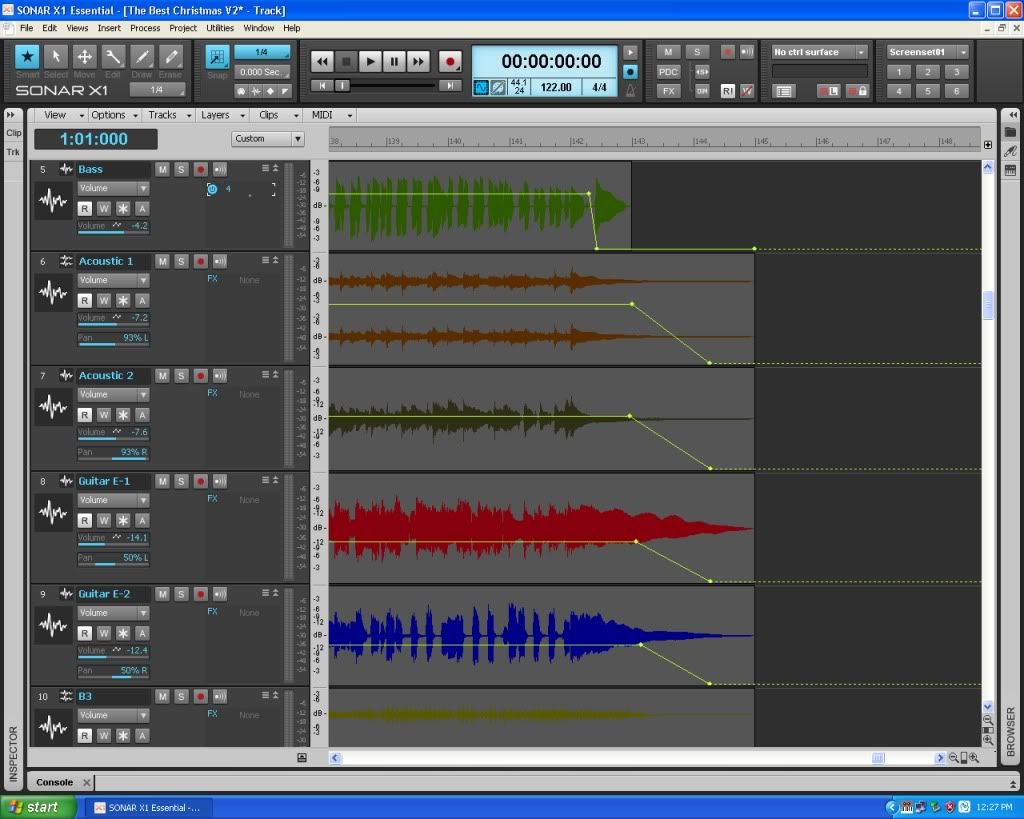
Use envelopes to make the fades. 

I like to add them manually and place the nodes manually then simply drag the nodes and lines connecting them as needed. 

You can place them in tracks and in busses as well to fade or simply control volume levels in the tracks. 

below, you see the envelopes as yellow lines,,,, some are fading the tracks and in track 5, the envelope is used to chop off the last chord. 


.
2013/03/05 13:23:01
Beagle
fades are easier (IMO) if you just drag the fade from the end of the clip.  you can then choose to make the fade linear, fast or slow.

hover your mouse over the top corner of the clip (at the begining of the clip or the end) and a little triangle will appear.  click and drag.
2013/03/05 17:25:58
rlrlindsay
Thanks, so helpful I will try this tonight!! Cheers
2013/03/05 17:27:06
rlrlindsay
And Thks for your reply...this is how we learn!!
© 2025 APG vNext Commercial Version 5.1

Use My Existing Forum Account

Use My Social Media Account