as Ralf said:
To specify the default ProChannel configurationInsert and arrange the ProChannel modules in the desired order. Do one of the following:

To specify the default configuration for tracks. Right-click any empty space in a track’s ProChannel and select Set Modules as Default for Tracks on the pop-up menu.
To specify the default configuration for tracks. Right-click any empty space in a bus’ ProChannel and select Set Modules as Default for Buses on the pop-up menu.
You can also change the placement of the pc to be post or pre as shown below:
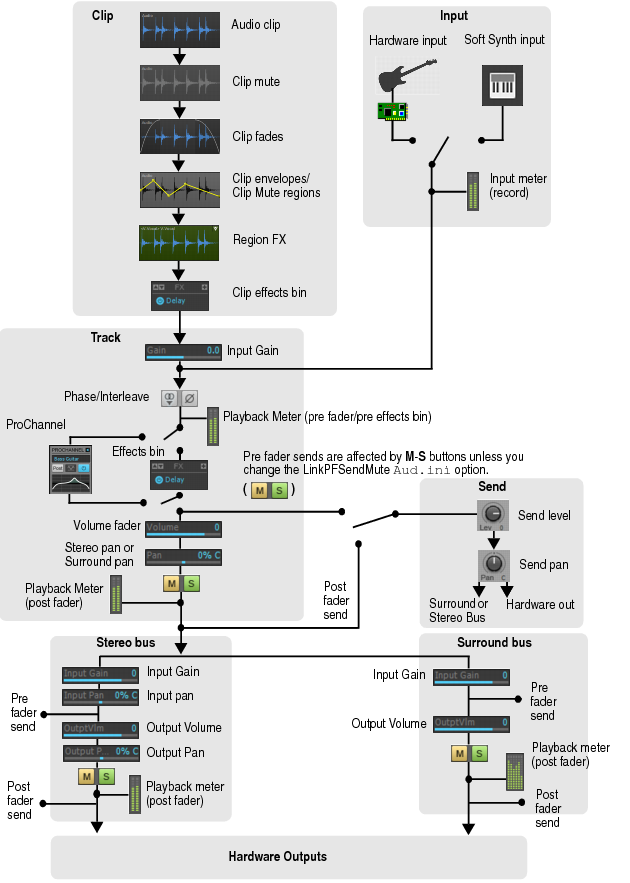
Don't get to caught up in module order, just go by what your ear tells you is best and what sounds best.
Check your meters to make sure your within specs and roll with it. I typically EQ > Compress (so im not boosting those offending frequency's. There are other times I switch it around. Remember sometimes you don't want to send offending frequency's / EQ in to the pre amp. So you can experiment with EQ before pre amp. thus allowing stronger signal without boosting low end or harsh bands.
Logic tells us, sure don't put a potato before the compressor but in my travels I have found the best results were born out of trying new things. Dare to be different (without sounding like crap of course). you will stumble on to better ideas as well.
My way of mixing/routing vocals is a bit unorthodox but Vocals is my strong point and sound the best in my mixes.
My guitars however could use work

.
There is book smart and then there is street smart. Be both.