Solo Guy, I've been kicking this around, just trying to figure out where you are getting tangled up.
The menu options you are seeing suggest that you may be clicking "Open", rather than "Import" from the file menu. They are very different selections.
Also, be sure you are importing to an audio track. A MIDI/Instrument track will not accept an audio file (actually, the Import>Audio option will be greyed out).
To be certain you are working with an audio track, you may want to start with a blank project template, and insert audio tracks as needed.
Before we move forward, let's clear up something about the Cakewalk Project files. These do not contain audio data at all. They hold information about your project, such as track count and type, input/output settings, effects and soft synths used in the project, and bit depth/sample rate settings. They do include reference tags that tell the project which audio files are associated with the project.
Hopefully that explains why you cannot convert an audio file to a CWP file.
Now, there are atleast three ways to import audio into your project, some of which have already been mentioned.
All three require that you first highlight your desired audio track.
Click on the track icon. The border will change color, probably green.
Next:
1. Click File>Import>Audio
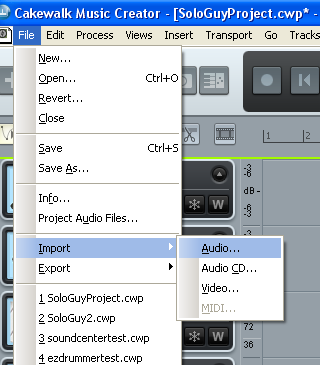
-OR-
2. Right click in the clips pane, and select Import Audio
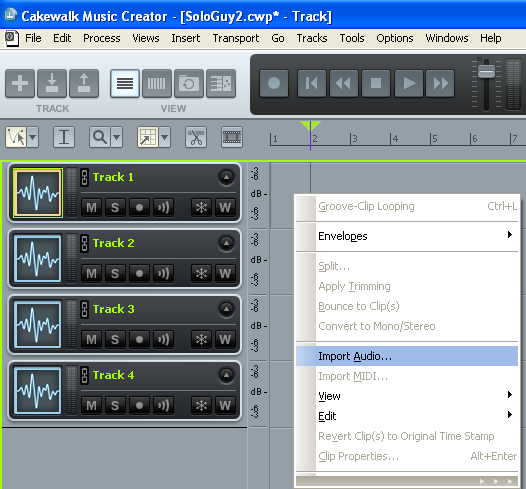
-OR-
3. Click the Import Audio button (artificially tinted red in this view)
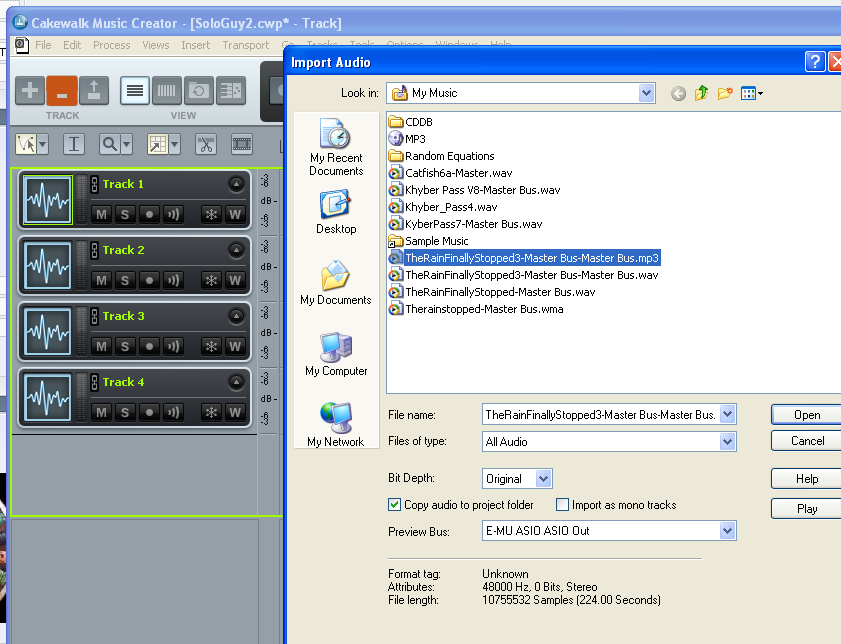
Any of these will bring you to the Import Audio menu, where you can navigate to your desired wav or MP3 file.
Select your file, and click "Open".
Note: the file will be dropped into your project at the current Now Time.
If you want the file to start at the beginning of your project, click "W" on your keyboard first. This will rewind the project to the start time.
Hope that helps.