• SONAR
  • How to save MIDI file with muted tracks? (p.2)
2016/12/15 14:45:33
tdehan
slartabartfast
So it cannot be done.
Next question is: why do you want to do it?
 
Often there is a way to get the result you need without using a feature that does not exist.


With regards as to the why, I have some situations where I don't want certain tracks to play but sometimes I do.  It would be terrific to be able to simply mute the tracks I don't want to play at the time and save it that way.  Instead what I've been doing is creating copies of the original file and deleting certain tracks and saving and naming them so I know what tracks are not there.  If there is an easier way to do that I would appreciate hearing about it.
2017/01/13 16:54:31
tdehan
Ok... let me ask this question.  If I cannot save muted MIDI tracks.  How do I set the volume of individual tracks?  I assume if I can set the volume of individual tracks to zero I should be able to save it.  And then if I want to hear that track at another time I would simply turn the volume back up?
 
Where/how can I change the volume of individual MIDI tracks
 
2017/01/13 17:25:19
bvideo
Look for the volume slider on the track header or inspector in Sonar. Set it to zero. If there are no volume events or envelopes anywhere else, that track will not make sound. Then write your .mid file and see if the track got written, etc.
2017/01/13 17:29:40
tdehan
Unfortunately, I have no idea what the HEADER or INSPECTOR are.  Could you please send a screenshot?
2017/01/13 18:44:29
brundlefly
'Q' is MIDI Volume in this screenshot of a MIDI track header:
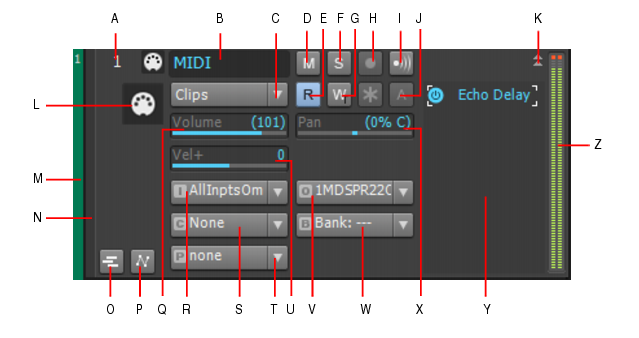
 

When you save a project as a MIDI file, the value of this control will be written to the file as a CC7 continuous controller event. Conversely, when you open such a file, the CC7=0 event will be read into the Volume control widget in SONAR and removed from the clip. Every time you start playback, SONAR sends a CC7 message on the basis of this control setting, so the result is the same as having the event in the MIDI clip.
 
But l'm starting to wonder why you're saving files as .MID at all. Are you working with these files in another application?
2017/01/13 22:59:50
pedro803
I haven't tried it with my new cakewalk sonar -- but in the ancient old cakewalk that I started on -- midi files saved as type 0 would not save the muted value of tracks -- also saving Midi in file type 0 (zero) causes all tracks using the same midi channel to collapse down to one track
 
so if you run a cal to separate the different midi notes on a drum part to different tracks -- then save it as type 0 -- then reopen it your drums will all be back on the same track -- however save it as a type 1 file and it will keep the individual drums separated onto different tracks
 
Try saving your midi file as a midi file type 1 and I think it might save the muted value for certain tracks
2017/01/13 23:02:35
pedro803
just a little further fyi -- if I remember correctly -- the file type 0 -- was optimized for web use back in the early days of the good old interweb -- so it was a way to really streamline those cheesy midi files that use to play when you would open a page 
 
2017/01/13 23:10:16
pedro803
OK -- never mind I just tried it and it didn't work -- in fact saved as type 1 it came back with all the blank tracks showing as muted and when saved as file type 0 the blank tracks did not show as muted 
 
so like I said that used to work on my old cakewalk from 1998 -- of course I am not sure where it changed along the way.  So I guess the one take away of any use to my comment is that if you ever have multiple midi takes that you want to collapse into one track the just put them on the same midi channel and save it as a midi file type 0

backing sheepishly out of the room with my hat in my hand
 
2017/01/13 23:20:40
Cactus Music
There is a danger here if you set a midi files volume to zero and save it, Then you open it and move the volume to say 10, the minute you hit play it will return to zero. 
One of Sonars weaknesses is the event list does not show everything.  I have to open some files < they are my own  creations, in Anvil Studio just to make these changes because there's no way in Sonar to do it. Like PG changes. 
 
What are you using these files for, Live performance? 
2017/01/14 00:22:32
abacab
Cactus Music
There is a danger here if you set a midi files volume to zero and save it, Then you open it and move the volume to say 10, the minute you hit play it will return to zero. 
One of Sonars weaknesses is the event list does not show everything.  I have to open some files < they are my own  creations, in Anvil Studio just to make these changes because there's no way in Sonar to do it. Like PG changes. 
 
What are you using these files for, Live performance? 


Hey Johnny, that's some interesting info for sure!  I have seen some mysterious volume behavior on VST's with acquired MIDI files. When I look in Sonar's event viewer, I cannot see everything that's happening.  I will check out Anvil!
© 2026 APG vNext Commercial Version 5.1

Use My Existing Forum Account

Use My Social Media Account