• SONAR
  • Platinum: How do I record vocals with reverb without tracking reverb? (p.5)
2016/12/28 10:34:39
Sanderxpander
Fortunately, if you're using plugins, it's a lot trickier to "print" reverb than to just apply it non-destructively :)
2016/12/28 10:43:03
tlw
No effect or processing is printed or permanent unless a track or clip is bounced down with effects applied surely? That's kind of where DAWs differ from mixer/processors/tape studios.

So to add a reverb during tracking and not having it present later on just put the reverb in the project, enable track input echo and either turn down the input direct to monitors routing in the interface or just input echo the reverb by putting it on a pre-fader send, turning input echo on on the aux track and vocal track then pull down the vocal track fader.

Then set the interface's direct to output volume as you want it and there you go. Once the vocals are recorded just delete or turn off the reverb. Job done.

Direct monitoring through a DAW generally requires a round-trip latency under about 10 milliseconds. Most interface/PC combinations should be able to manage that. If not, then monitor the vocal direct and the reverb from Sonar.
2016/12/28 10:52:03
dlayna
Bristol_Jonesey
Whenever I record vocals I always start by turning all Fx plugs off.
This should reduce latency to a very small amount. Do this by hitting 'e' on your keyboard.
 
Now add a reverb plugin to your vocal track's Fx bin, right  click the bin and untick Bypass fx Bin
The reverb should now be the only Fx plug in operation.
 
Proceed as above - enable Input Echo and record your vocal.
If the latency is still too high then you'll need to adjust your driver settings


 Hi, thanks for replying.  I'll try this tonight.
 
 
2016/12/28 11:09:56
chuckebaby
Sanderxpander
Of course, everyone has their own workflow :)
Always interesting to read about someone else's process.

Going back to the basics of what reverb is though, of course a reverb has to "do" two things if it has to process two vocal lines (even though the audiostream is blended before they hit the processing), but that's no different from two singers standing in the same room singing two different lines. I personally prefer that to putting them in different rooms singing two different lines. The latter will create unique reflections for each, true, but also a generally wider and thicker spectrum when you sum the two reverbs.

Anyway, if you have a way that works for you and your results are satisfying then don't let my opinion turn you off :)

You bring up some good points. you have made me look at it from a different angle and as someone who can be stubborn in his ways, Im grateful for this.
2016/12/28 11:47:09
dlayna
Hi everyone,
 
I want to thank everyone for responding to my question.  You're all amazing and brilliant!!  Trying the different options has taught me a lot and I know this post will be helping others as well.  
 
In an earlier response, there was mention that the doubling effect may be coming from both the DAW and Presonus Audiobox.  A friend of mine said it could be that I'm hearing both the direct signal and signal through sonar which adds latency, thus causing the "doubling effect."  I had it set right in the middle.  I'll adjust and see if that helps and if not, I may have to adjust the latency settings.  
 
http://support.presonus.com/hc/en-us/articles/210044633-Why-am-I-getting-a-chorus-doubling-effect-when-I-monitor-through-my-DAW-
 
The AudioBox has a feature that allows monitoring either directly through the inputs or from the computer. This is changed by manipulating the "Mixer" knob, shown below:
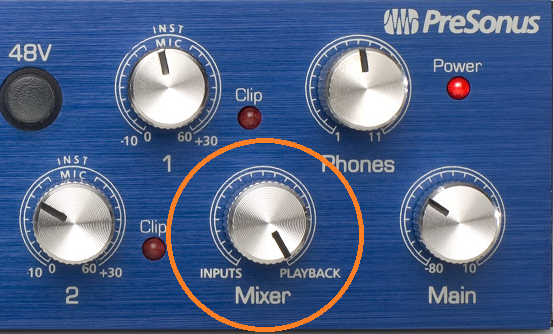
If the knob is turned to inputs, one would only hear what is being played into the device; if the knob is turned to playback, one would hear only what is coming from the computer. If the knob is set in an intermediary position, one would hear both.
Sometimes, if the knob is placed in an intermediary position, this can cause a "chorusing" or "flanging" effect, or even an effect as drastic as a slap-back delay. This is because it takes time for the audio to be processed by the computer, whereas the direct monitor bypasses the computer. Because of this delay, one of the signals is slightly (in the order of milliseconds) behind the direct input monitor, creating this "doubling" phenomena. 
 

http://www.reverbnation.com/dlayna 
 
2016/12/28 11:55:30
dlayna
fireberd
This has been beat to death.  But, My MOTU 896mk3 Hybrid has a reverb option for the singer (or whoever) and it is not sent to the DAW.  Thus the singer can hear reverb but the recorded track is dry.  I've had other recording interface units before the MOTU and they all had the "local" reverb option.  Didn't have to do any tricks in Sonar.


Hi, unfortunately, the Presonus Audiobox does not have any built-in effects :(
 
I'll check out your Motu online.
 
Thanks for responding.
2016/12/28 11:57:13
dlayna
listen
I once again continue to learn as I read the various discussion - this discussion has been helpful...


I agree...I've learned a lot.
2016/12/28 12:10:02
dlayna
DeeringAmps
"Where in the preferences do I change that?  Is it under "Driver Settings" YES!
"or Sync and Caching?" NO!

 
You set latency with the ASIO Panel

unless of course you are using a laptop.
Then you need to research the new WASPI drivers.
Is the UAD a "satellite"?
 
And thanks to Sander:
none of you use effects busses?
(or aux tracks to keep the effects in the Vocal, Guitars, Keys, Drums folders; simplifies the buss view for me)
Of course you can put the verb in the Vocal effects bin, but I'm going to have a verb buss (aux track now) anyway.
Its in my template....
T
 

Hi, my UAD is a "satellite".  I just responded thanking everyone for their input and in that reply I mentioned that it could be that the doubling effect is coming from both the DAW and Audiobox.  I had it set right in the middle and could be hearing both.  
 
The one thing I noticed that I did not do when I  followed your, instructions was that I did not "Mute" the "Dry" setting in the reverb settings.  I'm going to try again and also change the settings on my audiobox mixer.
 
I'm learning a lot from everyone.
2016/12/28 13:04:30
cparmerlee
dlayna
I'm using the Great River Mic-Pre and Presonus Audiobox USB for the mic.  
 

The newer Presonus interfaces have effects built in, but i don't think your unit does. That would be the ideal solution. You can dial in the verb you want in the headphones with practically no latency, but record the track dry in SONAR.
 
=========
 
Check out this video: https://youtu.be/d9YNouY7F8M
 
It seems like this is what you are trying to accomplish.  It is really a great system.  The VSL interfaces have essentially the same features of the newest StudioLive mixers, so you can record dry into SONAR (which I assume is what one would almost always want to do, but you can apply effects and EQ directly into the headphones with practically no latency.
 
Street price for the new 22VSL (2 preamps) is about $170. If you sell your non-VSL box on eBay, then the net would be just a little over $100. I've seen 1818vsl (8 preamps) used on eBay for $250
 
 
2016/12/28 16:36:39
jadonx
I posted earlier on this but here is the blog I learnt from ...http://therecordingrevolu...als-with-reverb/ 
any other thoughts on this regarding use in Sonar..I ve found to be OK
John
© 2026 APG vNext Commercial Version 5.1

Use My Existing Forum Account

Use My Social Media Account