Akito
Max Output Level: -90 dBFS

- Total Posts : 27
- Joined: 2012/09/12 10:29:29
- Status: offline

MIDI Plays Out, But Not In
Hello, I've Googled this question extensively and as of yet have been able to find an answer, so I've decided to finally register here and ask it myself. I apologize if this is in the wrong forum, but it seemed to be the most fitting at the time. Quite a few months ago I purchased a USB MIDI interface (probably the cheap one that everyone says is terrible) and it worked fine for awhile, but has lately decided to stop inputting MIDI. However, it still plays fine when my keyboard is used as an Ouput. The main reason I've avoided asking this question for so long is because, much to my dismay, I'm currently stuck using Sonar LE 4. I would like to upgrade in the future, but lack the money to do so currently. So I'm not sure how many people will be able to help with this. Anyway, so I'm going to provide screenshots to show that everything that I list is correct: 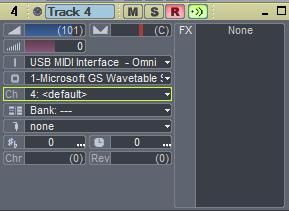 1) The USB MIDI Device is selected as the input. (I have tried selecting a specific channel instead of just "MIDI Omni" as well, but it still doesn't work) 2) The output is clearly selected. (Only using MS WaveSynth as an example. Not something I would typically use.) 3) The channel is set and the keyboard is on that channel. Additionally, I have tried putting it on "None," again to no avail. 4) Although the patch is not set, that would normally just tune it to the Acoustic Grand Piano patch by default. 5) The drop down menu for "Bank" does not give me any options, although it never has, so I don't understand why it won't work now. 6) The track is armed to record and input echo is on, though as previously stated it neither records nor echos. 7) The input device is selected in the MIDI devices menu-  I simply can not think of anything else that could possibly be preventing the MIDI from transmitting. Again, it works perfectly fine wwhen outputting. But it downright refuses to input. It's become bothersome and has kept me from advancing on a good deal of my projects. If anyone has a solution that I may have overlooked, your assistance would be highly welcomed! Thanks in advance!
|
57Gregy
Max Output Level: 0 dBFS

- Total Posts : 14404
- Joined: 2004/05/31 17:04:17
- Location: Raleigh, North Carolina
- Status: offline
Re:MIDI Plays Out, But Not In
2012/09/12 11:44:18
(permalink)
Welcome to the forum.
Did you reboot the MIDI device? Sometimes they lose connectivity and need to be reset. Even my interface sometimes has to be reset. That's done (usually) by disconnecting and reconnecting.
Since the output connection/cable is working, try switching it to the input side to rule out a bad MIDI cable or output on the keyboard.
|
Akito
Max Output Level: -90 dBFS
- Total Posts : 27
- Joined: 2012/09/12 10:29:29
- Status: offline
Re:MIDI Plays Out, But Not In
2012/09/12 11:59:07
(permalink)
I have tried resetting, and even so far as to uninstall the driver and reinstall it. Still, nothing. Switching sides didn't help either.
|
Kalle Rantaaho
Max Output Level: -5 dBFS

- Total Posts : 7005
- Joined: 2006/01/09 13:07:59
- Location: Finland
- Status: offline
Re:MIDI Plays Out, But Not In
2012/09/12 12:02:45
(permalink)
Welcome to the forum!
Everything looks OK to me. I find it a little odd, though, that you look for help about MIDI input/interface, but you don't tell us, what the interface is, nor which kind of keyboard it is connected to and how. Does the light in the low right corner of your screen blink to indicate MIDI traffic? Did the input get mute suddenly in the middle of a project, or gradually? Did you open SONAR one day and noticed it's mute?
Are the plugs in your keyboard and cables OK? Have you recorded MIDI with your mouse in the piano roll and played that with a soft synth?
If all the settings are as before, I guess the interface or the physical connection is broken.
SONAR PE 8.5.3, Asus P5B, 2,4 Ghz Dual Core, 4 Gb RAM, GF 7300, EMU 1820, Bluetube Pre - Kontakt4, Ozone, Addictive Drums, PSP Mixpack2, Melda Creative Pack, Melodyne Plugin etc. The benefit of being a middle aged amateur is the low number of years of frustration ahead of you.
|
Akito
Max Output Level: -90 dBFS
- Total Posts : 27
- Joined: 2012/09/12 10:29:29
- Status: offline
Re:MIDI Plays Out, But Not In
2012/09/12 12:19:23
(permalink)
My apologies. I suppose it slipped my mind. The interface didn't come with a name other than USB MIDI Cable, which I ordered off of Amazon- http://www.amazon.com/Bes...=usb+midi+in+out+cable That's not the same page I ordered it from (I don't believe) but it is the same product. I've not heard too much of it being dysfunctional or anything. Granted, I did figure it would probably not work very good or be easily-breakable given the price, but since it worked as well as it did, I thought it must be something I'm doing. As for the keyboard, it's a Casio CTK-471 (an old model with basically no features, but one I've had for ten years). I'm not sure what other information to give on that. All the ports seem to be without any sort of noticeable physical imperfection. The light in the taskbar and on the MIDI interface itself both blink to signify MIDI output activity, but not any MIDI input activity. Also, the plugs and cables are also without any noticeable imperfections. I've played in the piano roll, and the notes play properly in the piano roll. As for how it happened, I just woke up one day and decided to work on something and it just randomly stopped working when just the day prior it was working perfectly.
|
RobertB
Max Output Level: 0 dBFS
- Total Posts : 11256
- Joined: 2005/11/19 23:40:50
- Location: Fort Worth, Texas
- Status: offline
Re:MIDI Plays Out, But Not In
2012/09/12 22:23:38
(permalink)
That's the nature of electronics. they work fine until they don't.
From what you have shown us, here's what we know:
Sonar recognizes the MIDI device I/O, or it wouldn't appear in the list.
Sonar is not receiving MIDI data from the device.
This means one of two things:
The device is not transmitting data, even though the connection is recognized.
The device is not receiving data from the Casio.
Can you verify that the Casio is transmitting? Perhaps connect it to another system with MIDI input ( a friend perhaps?)
Or connect another keyboard to the MIDI/USB device, if possible.
Process of elimination. Rule out the stuff that works.
My Soundclick Page SONAR Professional, X3eStudio,W7 64bit, AMD Athlon IIx4 2.8Ghz, 4GB RAM, 64bit, AKAI EIE Pro, Nektar Impact LX61,Alesis DM6,Alesis ControlPad,Yamaha MG10/2,Alesis M1Mk2 monitors,Samson Servo300,assorted guitars,Lava Lamp Shimozu-Kushiari or Bob
|
Akito
Max Output Level: -90 dBFS
- Total Posts : 27
- Joined: 2012/09/12 10:29:29
- Status: offline
Re:MIDI Plays Out, But Not In
2012/09/13 07:05:14
(permalink)
Sadly, I'm unable to connect the cable to any other interfaces. I could attempt to plug the device into the a friend of mine's computer and see how well that works, but that might be awhile.
|
Akito
Max Output Level: -90 dBFS
- Total Posts : 27
- Joined: 2012/09/12 10:29:29
- Status: offline
Re:MIDI Plays Out, But Not In
2012/11/17 03:18:29
(permalink)
Hi, I'm reviving this topic to report that I plugged the interface into my new computer and still have yet to get it to record in.
|
57Gregy
Max Output Level: 0 dBFS
- Total Posts : 14404
- Joined: 2004/05/31 17:04:17
- Location: Raleigh, North Carolina
- Status: offline
Re:MIDI Plays Out, But Not In
2012/11/18 11:01:09
(permalink)
I think it may be the interface. That's certainly the least-expensive item to replace.
If you do decide to buy another one, steer clear of anything that says "plug and play".
And to answer another question you had, "The drop down menu for "Bank" does not give me any options, although it never has, so I don't understand why it won't work now", General MIDI only has 1 bank with 128 patches, so there won't be any other bank to select when using the MS GS Wavetable synth, or any other GM device.
|
Akito
Max Output Level: -90 dBFS
- Total Posts : 27
- Joined: 2012/09/12 10:29:29
- Status: offline
Re:MIDI Plays Out, But Not In
2012/11/20 03:53:34
(permalink)
Thanks for the reply! I'm planning on getting a mixer soon and I'm hoping that the mixer I get has a MIDI interface so I can just buy an "in" cable from Guitar Center or something and use the USB interface to record out. I'm not sure how that works, though, since I've never used a mixer before. Thanks again for your assistance.
|