MIDI Tracks Display in Track View - Not Showing MIDI Data Properly

Author
Phonic
Max Output Level: -85 dBFS
  • Total Posts : 291
  • Joined: 2011/04/04 13:13:38
  • Status: offline
2012/06/06 23:10:30 (permalink)

MIDI Tracks Display in Track View - Not Showing MIDI Data Properly

Ok, so it would seem that because I am playing notes that are a higher octave, the tack view is not displaying the MIDI data correctly and it appears as a blank rectangle.
 
How do I get the track view to show the MIDI data regardless of the MIDI data's octave?  I cannot seem to find the redraw option as it exists with audio waveforms.
post edited by Phonic - 2012/06/06 23:52:58

i7 4770k @ 3.5 Ghz 24
GB DDR 3
Windows 7 64 bit
Sonar Platinum Foxboro 64 bit
MOTU 828 MK3
UAD-2 Quad 
#1

1 Reply Related Threads

    HeatherHaze
    Max Output Level: -84 dBFS
    • Total Posts : 334
    • Joined: 2005/07/05 09:35:40
    • Location: Washington DC
    • Status: offline
    Re:MIDI Tracks Display in Track View - Not Showing MIDI Data Properly 2012/06/07 00:10:05 (permalink)
    How do I get the track view to show the MIDI data regardless of the MIDI data's octave? I cannot seem to find the redraw option as it exists with audio waveforms.
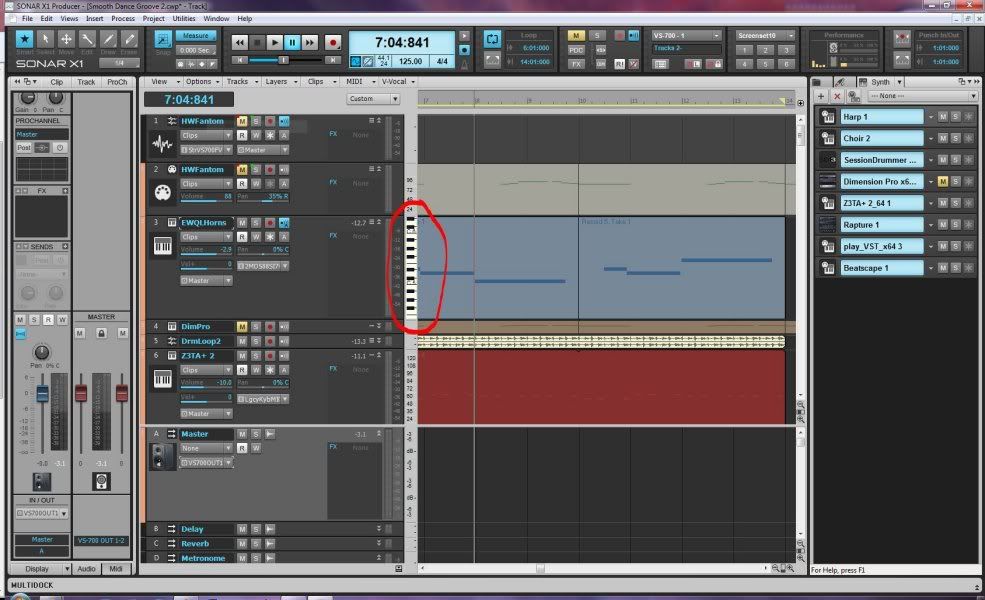
    LEFT click and drag the mouse up or down on the scale in the margin between the clip pane and the track controls (see image below).  This adjusts the vertical zoom of the MIDI clips.  If you RIGHT click and drag, it adjusts the vertical position of the notes in the clip pane.  This gives you precise control of the visible MIDI data for each track in Track View.


    )-|-( HeatherHaze
    http://heatherhaze.com/

    "This will be our reply to violence: to make music more intensely, more beautifully, more devotedly than ever before." ~ Leonard Bernstein

    Cakewalk by Bandlab
    Studio One 3.5, Cubase 9.5
    Intel Core i7  8700, 32Gb RAM
    Focusrite Scarlett 18i20
    V-Studio VS-700
    Slate Raven MTi2
    Windows 10 Professional 64-bit
    ...and a whole bunch of other stuff.
    #2
    Jump to:
    © 2025 APG vNext Commercial Version 5.1