AdamGrossmanLG
Max Output Level: -62 dBFS

- Total Posts : 1436
- Joined: 2014/07/13 03:40:34
- Status: offline
Major MIDI Problems
Hello Everyone,
I am getting extremely frustrated right now. I've been working on a project with about 20 softsynths. I went back to my bass track and dubbed in some write automation with the pitch bend wheel. I *thought* I was modifying ONLY the pitch of my bass track as that is the one I was on and the one that had the Write Automation enabled... however... most of my tracks now are ruined. My other tracks are playing wrong notes!!! How is this even possible? Its like these pitch wheel messages are being sent to ALL my softsynths!!!
First off, how do I revert back?
Secondly, why is this happening?
THANK YOU!!
|
AdamGrossmanLG
Max Output Level: -62 dBFS
- Total Posts : 1436
- Joined: 2014/07/13 03:40:34
- Status: offline

Re: Major MIDI Problems
2016/08/12 00:15:44
(permalink)
woah --- to add.. its effected even LIVE playing on my other tracks. My "D" is now playing a "C" - LIVE!!!! on a track i wasn't even editing!!!!
|
AdamGrossmanLG
Max Output Level: -62 dBFS
- Total Posts : 1436
- Joined: 2014/07/13 03:40:34
- Status: offline
Re: Major MIDI Problems
2016/08/12 00:20:08
(permalink)
to add one more piece of information - while one of those tracks is playing out of key - if I hilight that track and just move the pitch wheel a bit and then let it go back to the center, it then plays the correct pitch!
|
Anderton
Max Output Level: 0 dBFS

- Total Posts : 14070
- Joined: 2003/11/06 14:02:03
- Status: offline
Re: Major MIDI Problems
2016/08/12 00:29:47
(permalink)
SilverBlueMedallion
First off, how do I revert back? Presumably, you "Save As" periodically to guard against potential catastrophic failures. If you can't fix the issue, you'll just have to go back to the most recent version because I also presume you tried undo and it didn't change. Secondly, why is this happening? It sure sounds like something funky happening with your controller. But we have no idea what controller you're using, the status of local control, etc. Could you have hit a transpose button on it?
|
dcumpian
Max Output Level: -34 dBFS

- Total Posts : 4124
- Joined: 2005/11/03 15:50:51
- Status: offline
Re: Major MIDI Problems
2016/08/12 10:43:06
(permalink)
Yeah, you probably can't revert back at this point if you don't have a backup. I would suggest opening each track and deleting any unwanted pitch bend messages. This is easiest in the Event Viewer, but it will be tedious.
Regards,
Dan
Mixing is all about control. My music: http://dancumpian.bandcamp.com/ or https://soundcloud.com/dcumpian Studiocat Advanced Studio DAW (Intel i5 3550 @ 3.7GHz, Z77 motherboard, 16GB Ram, lots of HDDs), Sonar Plat, Mackie 1604, PreSonus Audiobox 44VSL, ESI 4x4 Midi Interface, Ibanez Bass, Custom Fender Mexi-Strat, NI S88, Roland JV-2080 & MDB-1, Komplete, Omnisphere, Lots o' plugins.
|
brundlefly
Max Output Level: 0 dBFS
- Total Posts : 14250
- Joined: 2007/09/14 14:57:59
- Location: Manitou Spgs, Colorado
- Status: offline
Re: Major MIDI Problems
2016/08/12 11:27:49
(permalink)
Select all tracks that shouldn't have pitch bend, use Edit > Select By Filter to select only Wheel events, and delete.
Also, make sure you don't have any MIDI track inputs set to All Inputs - Omni and no synths have MIDI Out enabled where not intended.
SONAR Platinum x64, 2x MOTU 2408/PCIe-424 (24-bit, 48kHz) Win10, I7-6700K @ 4.0GHz, 24GB DDR4, 2TB HDD, 32GB SSD Cache, GeForce GTX 750Ti, 2x 24" 16:10 IPS Monitors
|
pinguinotuerto
Max Output Level: -71 dBFS

- Total Posts : 976
- Joined: 2009/12/01 18:46:41
- Status: offline
Re: Major MIDI Problems
2016/08/12 11:35:56
(permalink)
Hey Brundle and Craig,
I'm not sure about this, but could the option under preferences that allows recording MIDI even without any tracks being armed have anything to do with this, since all other tracks are being affected? Don't know if that affects only notes or all MIDI data coming in. Just a thought.
HP DV7-3085 Laptop (Intel Core i7 720 1.6 GHZ, 6 GB RAM, 1333 MHZ FSB, 2 500GB 7200 RPM Internal HDs, 17" screen), HP 2009m Monitor, 2TB Ext Drive
Line 6 UX8 with PodFarm 2 Platinum 2 Joe Meek VC6Q British Channels
Sonar Platinum & X3e Producer (64 Bit) AD2 w Roland V-Drums (TD4KX2)
Windows 7 Home Premium (64 bit)KRK VXT 8 Monitors
Frontier Alphatrack, Razer Naga Mouse, nanoKontrol2
|
brundlefly
Max Output Level: 0 dBFS
- Total Posts : 14250
- Joined: 2007/09/14 14:57:59
- Location: Manitou Spgs, Colorado
- Status: offline
Re: Major MIDI Problems
2016/08/12 11:47:27
(permalink)
Recording without arming requires the recording track to have focus, and it shouldn't affect writing automation in any case - that has to be enabled per track and is done during playback, not recording.
However, on re-reading the original post, it's a little unclear whether OP was writing track automation or recording Wheel events. Given the symptoms, the latter seems more likely.
SONAR Platinum x64, 2x MOTU 2408/PCIe-424 (24-bit, 48kHz) Win10, I7-6700K @ 4.0GHz, 24GB DDR4, 2TB HDD, 32GB SSD Cache, GeForce GTX 750Ti, 2x 24" 16:10 IPS Monitors
|
pinguinotuerto
Max Output Level: -71 dBFS
- Total Posts : 976
- Joined: 2009/12/01 18:46:41
- Status: offline
Re: Major MIDI Problems
2016/08/12 11:50:05
(permalink)
brundlefly
Recording without arming requires the recording track to have focus, and it shouldn't affect writing automation in any case - that has to be enabled per track and is done during playback, not recording.
Thanks for clarifying. My doubt was because he was writing Pitch Bend info, not regular track automation. I thought maybe the MIDI info was being recorded by the other tracks because of that option in preferences.
HP DV7-3085 Laptop (Intel Core i7 720 1.6 GHZ, 6 GB RAM, 1333 MHZ FSB, 2 500GB 7200 RPM Internal HDs, 17" screen), HP 2009m Monitor, 2TB Ext Drive
Line 6 UX8 with PodFarm 2 Platinum 2 Joe Meek VC6Q British Channels
Sonar Platinum & X3e Producer (64 Bit) AD2 w Roland V-Drums (TD4KX2)
Windows 7 Home Premium (64 bit)KRK VXT 8 Monitors
Frontier Alphatrack, Razer Naga Mouse, nanoKontrol2
|
AdamGrossmanLG
Max Output Level: -62 dBFS
- Total Posts : 1436
- Joined: 2014/07/13 03:40:34
- Status: offline
Re: Major MIDI Problems
2016/08/12 16:19:08
(permalink)
hello, it is an AKAI MPK 25 key. I enabled write automation on ONE track... hit record and messed around with the pitch wheel on ONE track. How could ALL my tracks be effected by the wheel changes I made on ONE track?
Could it be because by default Cakewalk keeps setting each MIDI track input as MIDI OMNI instead of a controller along with no option to change this default?
I am very disappointed here with the way MIDI is working SPlat.
I only had 1 track armed, so how could the pitch wheel be effecting other synths.
Also there are NO pitch wheel events in any of the other tracks, ONLY the one in the one I want. Seems like the pitch wheel from one track is effecting all other tracks.
Thank you for your help!
|
JayCee99
Max Output Level: -83 dBFS

- Total Posts : 353
- Joined: 2011/10/01 12:22:42
- Location: Katy, TX
- Status: offline
Re: Major MIDI Problems
2016/08/12 16:28:06
(permalink)
SilverBlueMedallion
to add one more piece of information - while one of those tracks is playing out of key - if I hilight that track and just move the pitch wheel a bit and then let it go back to the center, it then plays the correct pitch!
When you do that, do all of the tracks play back in key or just the highlighted one?
Sonar Platinum Audio Interface: Focusrite 18i8 ASIO Interface Keys: Korg Kronos 88, Alesis VI25 Windows 8.1 x64 Laptop, 8GB RAM, i7 CPU
|
AdamGrossmanLG
Max Output Level: -62 dBFS
- Total Posts : 1436
- Joined: 2014/07/13 03:40:34
- Status: offline
Re: Major MIDI Problems
2016/08/12 19:38:00
(permalink)
rlared
SilverBlueMedallion
to add one more piece of information - while one of those tracks is playing out of key - if I hilight that track and just move the pitch wheel a bit and then let it go back to the center, it then plays the correct pitch!
When you do that, do all of the tracks play back in key or just the highlighted one?
just the corrected one
|
gustabo
Max Output Level: -49.5 dBFS

- Total Posts : 2591
- Joined: 2009/01/05 17:32:38
- Status: offline
Re: Major MIDI Problems
2016/08/12 19:51:06
(permalink)
Edit > Preferences > Project > MIDI > Other Options > Patch/Controller Searchback Before Play Starts?
Cakewalk by Bandlab - Win10 Pro x64 - StudioCat Platinum Studio DAW - 32 GB Ram - MOTU UltraLite-mk3
M-Audio Keystation 88ES - Akai MPD26 (hot-rodded) - Alesis DM10 - a few guitars, a few amps
Novation Launch Control - Korg nanoKONTROL2 - PreSonus FaderPort - DAW Remote HD on iPad
Adam A7X - Behritone C50A
PreSonus Monitor Station v2 (controlling the mons)
https://www.facebook.com/groups/sonarusergroup/
|
AdamGrossmanLG
Max Output Level: -62 dBFS
- Total Posts : 1436
- Joined: 2014/07/13 03:40:34
- Status: offline
Re: Major MIDI Problems
2016/08/12 19:51:27
(permalink)
gustabo
Edit > Preferences > Project > MIDI > Other Options > Patch/Controller Searchback Before Play Starts?
Disabled
|
AdamGrossmanLG
Max Output Level: -62 dBFS
- Total Posts : 1436
- Joined: 2014/07/13 03:40:34
- Status: offline
Re: Major MIDI Problems
2016/08/12 19:52:52
(permalink)
UPDATE: If I manually put a wheel midi message in and center it on one of my other tracks, it fixes it for ALL tracks!! So the problem is... WHY is the wheel on any track effecting the wheel on other tracks? Also how do i draw an exact "0" value here... this draw tool is not exact: http://imgur.com/a/DTIWW (imgr linking is not working) Thank You!
|
JayCee99
Max Output Level: -83 dBFS
- Total Posts : 353
- Joined: 2011/10/01 12:22:42
- Location: Katy, TX
- Status: offline
Re: Major MIDI Problems
2016/08/13 01:13:22
(permalink)
Are the tracks or clips grouped somehow?
Sonar Platinum Audio Interface: Focusrite 18i8 ASIO Interface Keys: Korg Kronos 88, Alesis VI25 Windows 8.1 x64 Laptop, 8GB RAM, i7 CPU
|
AdamGrossmanLG
Max Output Level: -62 dBFS
- Total Posts : 1436
- Joined: 2014/07/13 03:40:34
- Status: offline
Re: Major MIDI Problems
2016/08/13 08:56:16
(permalink)
rlared
Are the tracks or clips grouped somehow?
not at all.
|
AdamGrossmanLG
Max Output Level: -62 dBFS
- Total Posts : 1436
- Joined: 2014/07/13 03:40:34
- Status: offline
Re: Major MIDI Problems
2016/08/13 09:06:05
(permalink)
Funny enough, the issue seems to resolve itself when i select these 2 to be enabled: http://imgur.com/j7G6TrC (what happened with imgr linking, it no longer shows the picture in the thread?)
|
AdamGrossmanLG
Max Output Level: -62 dBFS
- Total Posts : 1436
- Joined: 2014/07/13 03:40:34
- Status: offline
Re: Major MIDI Problems
2016/08/13 10:15:29
(permalink)
but now this breaks other things. Seriously, seems like Cakewalk still has a lot of MIDI issues to sort out.
|
pwalpwal
Max Output Level: -43 dBFS

- Total Posts : 3249
- Joined: 2015/01/17 03:52:50
- Status: offline
Re: Major MIDI Problems
2016/08/13 11:06:18
(permalink)
SilverBlueMedallion
(what happened with imgr linking, it no longer shows the picture in the thread?)
you need to use the url of the image itself 
|
Anderton
Max Output Level: 0 dBFS
- Total Posts : 14070
- Joined: 2003/11/06 14:02:03
- Status: offline
Re: Major MIDI Problems
2016/08/13 11:29:35
(permalink)
☄ Helpfulby tlw 2016/08/13 21:30:41
SilverBlueMedallion
but now this breaks other things. Seriously, seems like Cakewalk still has a lot of MIDI issues to sort out.
You need to be specific about what "breaks." Also, what happens if you select searchback but not zero controllers? Are you clear about how continuous controllers aren't always continuous, in the sense that sending one value will cause that value to be retained until there's another value sent? This is why when you said "to add one more piece of information - while one of those tracks is playing out of key - if I hilight that track and just move the pitch wheel a bit and then let it go back to the center, it then plays the correct pitch!" it's really expected behavior...SONAR is reacting to a previous pitch bend message, and in this case, you're giving SONAR a new one that's what you wanted. It seems that perhaps the problems you're experiencing may not involve SONAR, but stem from a lack of understanding about how MIDI works. If that's the case, you're looking for problems in the wrong place. Functions like zeroing controllers and searchback are common, so someone versed in MIDI would look at the status of those functions first if experiencing a project not following previous controller settings. If you can be more specific about what "breaks," perhaps we can sort this out for you.
|
AdamGrossmanLG
Max Output Level: -62 dBFS
- Total Posts : 1436
- Joined: 2014/07/13 03:40:34
- Status: offline
Re: Major MIDI Problems
2016/08/13 13:07:04
(permalink)
Anderton
SilverBlueMedallion
but now this breaks other things. Seriously, seems like Cakewalk still has a lot of MIDI issues to sort out.
You need to be specific about what "breaks." Also, what happens if you select searchback but not zero controllers? Are you clear about how continuous controllers aren't always continuous, in the sense that sending one value will cause that value to be retained until there's another value sent? This is why when you said "to add one more piece of information - while one of those tracks is playing out of key - if I hilight that track and just move the pitch wheel a bit and then let it go back to the center, it then plays the correct pitch!" it's really expected behavior...SONAR is reacting to a previous pitch bend message, and in this case, you're giving SONAR a new one that's what you wanted.
It seems that perhaps the problems you're experiencing may not involve SONAR, but stem from a lack of understanding about how MIDI works. If that's the case, you're looking for problems in the wrong place. Functions like zeroing controllers and searchback are common, so someone versed in MIDI would look at the status of those functions first if experiencing a project not following previous controller settings. If you can be more specific about what "breaks," perhaps we can sort this out for you.
Anderton, How is that expected behavior? Track 1 has a pitch wheel change. Track 2 has no pitch wheel changes Track 1's pitch wheel changes effect what is going on in Track 2 somehow. Why on earth would that be expected behavior?
|
JayCee99
Max Output Level: -83 dBFS
- Total Posts : 353
- Joined: 2011/10/01 12:22:42
- Location: Katy, TX
- Status: offline
Re: Major MIDI Problems
2016/08/13 13:23:08
(permalink)
SilverBlueMedallion
Anderton
SilverBlueMedallion
but now this breaks other things. Seriously, seems like Cakewalk still has a lot of MIDI issues to sort out.
You need to be specific about what "breaks." Also, what happens if you select searchback but not zero controllers? Are you clear about how continuous controllers aren't always continuous, in the sense that sending one value will cause that value to be retained until there's another value sent? This is why when you said "to add one more piece of information - while one of those tracks is playing out of key - if I hilight that track and just move the pitch wheel a bit and then let it go back to the center, it then plays the correct pitch!" it's really expected behavior...SONAR is reacting to a previous pitch bend message, and in this case, you're giving SONAR a new one that's what you wanted.
It seems that perhaps the problems you're experiencing may not involve SONAR, but stem from a lack of understanding about how MIDI works. If that's the case, you're looking for problems in the wrong place. Functions like zeroing controllers and searchback are common, so someone versed in MIDI would look at the status of those functions first if experiencing a project not following previous controller settings. If you can be more specific about what "breaks," perhaps we can sort this out for you.
Anderton,
How is that expected behavior?
Track 1 has a pitch wheel change.
Track 2 has no pitch wheel changes
Track 1's pitch wheel changes effect what is going on in Track 2 somehow.
Why on earth would that be expected behavior?
I would try setting up a new song and listing the steps and seeing if the behavior is reproducible. If it's not, then it's either your configuration of your current song, or a possibly SONAR bug that effects something about the setup of your existing song. If the behavior is the same, then it will be easier to diagnose it. Keep it simple. . . just 2 or 3 tracks.
Sonar Platinum Audio Interface: Focusrite 18i8 ASIO Interface Keys: Korg Kronos 88, Alesis VI25 Windows 8.1 x64 Laptop, 8GB RAM, i7 CPU
|
Anderton
Max Output Level: 0 dBFS
- Total Posts : 14070
- Joined: 2003/11/06 14:02:03
- Status: offline
Re: Major MIDI Problems
2016/08/13 14:00:39
(permalink)
SilverBlueMedallion
Anderton
SilverBlueMedallion
but now this breaks other things. Seriously, seems like Cakewalk still has a lot of MIDI issues to sort out.
You need to be specific about what "breaks." Also, what happens if you select searchback but not zero controllers? Are you clear about how continuous controllers aren't always continuous, in the sense that sending one value will cause that value to be retained until there's another value sent? This is why when you said "to add one more piece of information - while one of those tracks is playing out of key - if I hilight that track and just move the pitch wheel a bit and then let it go back to the center, it then plays the correct pitch!" it's really expected behavior...SONAR is reacting to a previous pitch bend message, and in this case, you're giving SONAR a new one that's what you wanted.
It seems that perhaps the problems you're experiencing may not involve SONAR, but stem from a lack of understanding about how MIDI works. If that's the case, you're looking for problems in the wrong place. Functions like zeroing controllers and searchback are common, so someone versed in MIDI would look at the status of those functions first if experiencing a project not following previous controller settings. If you can be more specific about what "breaks," perhaps we can sort this out for you.
Anderton,
How is that expected behavior? It's totally expected behavior if something has been offset by a previous message and you "just move the pitch wheel a bit and then let it go back to the center," as this gives it a new message. Meanwhile, if you've solved one problem but encountered others, as I said, you need to be specific about what "breaks." And I'm still curious what happens if you select searchback but not zero controllers. I'm trying to find a solution for you; re-stating the perceived problem doesn't contribute enough new data to help. For all I know, you're getting a loopback through your controller that's being picked up by the other channel.
|
Klaus
Max Output Level: -84 dBFS

- Total Posts : 320
- Joined: 2009/07/14 07:34:02
- Location: Cologne, Germany
- Status: offline
Re: Major MIDI Problems
2016/08/13 14:01:28
(permalink)
brundlefly
Also, make sure you don't have any MIDI track inputs set to All Inputs - Omni and no synths have MIDI Out enabled where not intended.
Did you check what brundlefly said above? Because in combination with...: SilverBlueMedallion
hello, it is an AKAI MPK 25 key. I enabled write automation on ONE track... hit record and messed around with the pitch wheel on ONE track. How could ALL my tracks be effected by the wheel changes I made on ONE track?
...this could be the reason why pitch wheel data is recorded on other tracks, too.
SONAR Platinum ∞RME HDSPe AIO - Windows 10 64bit - Intel i7 2600K - 16 GB RAM
|
AdamGrossmanLG
Max Output Level: -62 dBFS
- Total Posts : 1436
- Joined: 2014/07/13 03:40:34
- Status: offline
Re: Major MIDI Problems
2016/08/13 15:35:52
(permalink)
Anderton
SilverBlueMedallion
Anderton
SilverBlueMedallion
but now this breaks other things. Seriously, seems like Cakewalk still has a lot of MIDI issues to sort out.
You need to be specific about what "breaks." Also, what happens if you select searchback but not zero controllers? Are you clear about how continuous controllers aren't always continuous, in the sense that sending one value will cause that value to be retained until there's another value sent? This is why when you said "to add one more piece of information - while one of those tracks is playing out of key - if I hilight that track and just move the pitch wheel a bit and then let it go back to the center, it then plays the correct pitch!" it's really expected behavior...SONAR is reacting to a previous pitch bend message, and in this case, you're giving SONAR a new one that's what you wanted.
It seems that perhaps the problems you're experiencing may not involve SONAR, but stem from a lack of understanding about how MIDI works. If that's the case, you're looking for problems in the wrong place. Functions like zeroing controllers and searchback are common, so someone versed in MIDI would look at the status of those functions first if experiencing a project not following previous controller settings. If you can be more specific about what "breaks," perhaps we can sort this out for you.
Anderton,
How is that expected behavior?
It's totally expected behavior if something has been offset by a previous message and you "just move the pitch wheel a bit and then let it go back to the center," as this gives it a new message.
yes - for the SAME track, but not for a track i dont even have in focus.
|
bvideo
Max Output Level: -58 dBFS

- Total Posts : 1707
- Joined: 2006/09/02 22:20:02
- Status: offline
Re: Major MIDI Problems
2016/08/13 17:08:04
(permalink)
To rephrase brundlefly's question that I haven't seen the answer yet:
what was the condition of the echo enable button [*)))] on all midi or instrument tracks tracks?
what was the input selection for all those tracks (e.g. your Akai)?
what was the setting in Edit -> Preferences -> MIDI -> Playback and Recording [] always echo current midi track?
There is a certain combination of these that could transmit wheel motions to multiple tracks. Depending on the last wheel motion transmitted, several tracks could have transmitted your performance of a wheel setting which then persists in the synths they were sent to. These settings could persist until "Zero Controllers ..." is put into effect or until a new wheel motion is performed into those tracks or until a recorded wheel event is encountered in the track.
W10 pro, Sonar Platinum, Alesis Multimix 16 FW, MOTU Express 128, Gigabyte Z370 HD3P, i7 8700K, 16 Gigs, ssd + 2 X 2T disks, D50-MEX, JV80, A90EX, M1REX
|
AdamGrossmanLG
Max Output Level: -62 dBFS
- Total Posts : 1436
- Joined: 2014/07/13 03:40:34
- Status: offline
Re: Major MIDI Problems
2016/08/13 19:47:53
(permalink)
bvideo
To rephrase brundlefly's question that I haven't seen the answer yet:
what was the condition of the echo enable button [*)))] on all midi or instrument tracks tracks?
what was the input selection for all those tracks (e.g. your Akai)?
what was the setting in Edit -> Preferences -> MIDI -> Playback and Recording [] always echo current midi track?
There is a certain combination of these that could transmit wheel motions to multiple tracks. Depending on the last wheel motion transmitted, several tracks could have transmitted your performance of a wheel setting which then persists in the synths they were sent to. These settings could persist until "Zero Controllers ..." is put into effect or until a new wheel motion is performed into those tracks or until a recorded wheel event is encountered in the track.
It was not on all tracks. I never touch that button. The input selection on all midi tracks is MIDI OMNI (not just my AKAI)... I wish it was, but it would take me having to set each one. The default is MIDI OMNI ( i guess that is ANY midi) Edit -> Preferences -> MIDI -> Playback and Recording [checked] always echo current midi track? - CHECKED! "Zero Controllers" resolves the issue, but I would like that disabled for other reasons.
|
tparker24
Max Output Level: -80 dBFS

- Total Posts : 544
- Joined: 2003/11/06 02:42:14
- Status: offline
Re: Major MIDI Problems
2016/08/13 21:45:28
(permalink)
SilverBlueMedallion
The input selection on all midi tracks is MIDI OMNI (not just my AKAI)... I wish it was, but it would take me having to set each one.
You can actually change the input selection on multiple tracks by selecting the Tracks pulldown menu and then clicking "Selected Track Inputs ...", as shown below. (There even used to be a key binding shortcut for that, but it seems to be gone now). 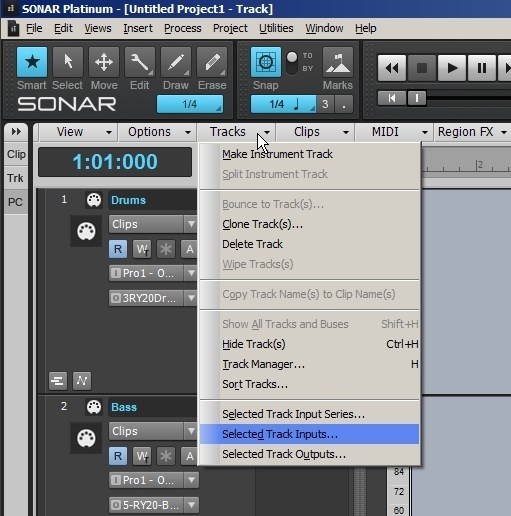
|
brundlefly
Max Output Level: 0 dBFS
- Total Posts : 14250
- Joined: 2007/09/14 14:57:59
- Location: Manitou Spgs, Colorado
- Status: offline
Re: Major MIDI Problems
2016/08/14 11:17:32
(permalink)
Klaus
brundlefly
Also, make sure you don't have any MIDI track inputs set to All Inputs - Omni and no synths have MIDI Out enabled where not intended.
Did you check what brundlefly said above?
Because in combination with...:
SilverBlueMedallion
hello, it is an AKAI MPK 25 key. I enabled write automation on ONE track... hit record and messed around with the pitch wheel on ONE track. How could ALL my tracks be effected by the wheel changes I made on ONE track?
...this could be the reason why pitch wheel data is recorded on other tracks, too.
Yes, this is almost certainly the problem. As mentioned earlier, you write automation on playback. If you record, any armed track will record wheel events as MIDI data instead of writing an automation envelope on the one write-enabled track.
SONAR Platinum x64, 2x MOTU 2408/PCIe-424 (24-bit, 48kHz) Win10, I7-6700K @ 4.0GHz, 24GB DDR4, 2TB HDD, 32GB SSD Cache, GeForce GTX 750Ti, 2x 24" 16:10 IPS Monitors
|