Sir Les
Max Output Level: -67 dBFS

- Total Posts : 1182
- Joined: 2012/07/09 04:56:19
- Location: MONTREAL, QUEBEC, CANADA,
- Status: offline

Metering RMS Peak and my A&L desk meters/ Solved
Hello. Just getting into more of Sonar x3e...And it is working good so far. I have a Question about metering... When I do my recordings, I set my Allen and heath volumes so no clipping happens on the desk...I stay lower than zero/clipping on tracks input from the recording room...Mostly just so the green light indicator flashes on the desk reading a good signal on all input tracks...but never into red on the desk. In Sonar when monitoring , recording desk.. I seem to have things dancing at about -6.0 - -4 on Sonars meters, and I record 16 tracks at once. Once I mix the track volumes I try to stay Just below -6.0 in sonars metering...But my A & L mixing desk reads +9 peaking into +10 when I play back those tracks. Sonars master track reports loudest peak at -5.7 When Playing back audio through Sonar, checking the Volumes with T-racks CS on the master track...using brick wall limiter...I get.. Peak loudness -6.2 - -5.7 average perceived loudness -16 ish RMS -16 ish Seems to be the average dancing states on my mix. So is my A & L Desk reading things wrong?...Do I have to make setting changes to the Sonar preferences metering to match?....Because I do not see how I am to master Close to Zero, if I am almost clipping /maxing out the desk vu's at + 9 just going into +10. I tried to turn down the output volume for the speakers output in windows 7, But that has been taken over by Sonar...So nothing seems to work in that regard...seems a mismatch to me?...and am wondering if I have to go into preferences and play with the metering in there to match up with the desks Vu meters if that is possible?...because I do not want to blow anything on the desk...she is very expensive and important in this. Does not seem to be any switch or knob on the desk itself, to control input from the computer other than play back volume to the monitors...So I would imagine it is set to a standard value...meaning I have to do the tweak via computer...if so? Second...I have read that in t-racks there is a green zone for perceived loudness, and RMS..= around -10 - -9 ish How does one get to those values with out increasing volume output from the computer? ...which in my case would blow my Vu's on the desk trying to do. Thought I would ask ... Thanks and regards!
post edited by Sir Les - 2014/03/23 11:31:41
1. Intel 5960x 3.5mhz , ASUS x99 deluxe u3.1, Asus Thunderbolt ex II, G skills f4 3000 Memory 32GB , ADATA ssd 250GB Main Drive, Lots of WD Red 7200 Mechanical Drives with Black Drives, 14x multi optical Drive, LG Multi Blu Drive, 2X Extern WD Mybooks usb 3.0, AMD r7 270 video card, Motu 828x TB , Motu Midi XT. 2. USING MAC PRO, as win 10 has damaged 2 x99 systems 8.1 is also to blame for the final burnout trying to roll back! 3. Something Wonderful: https://1drv.ms/f/s!AlHkRy9cXBbYpQNvVBCt8r7fQ5PS
|
BJN
Max Output Level: -86 dBFS

- Total Posts : 222
- Joined: 2013/10/09 07:52:48
- Status: offline
Re: Metering RMS Peak and my A&L desk meters
2014/03/22 09:06:11
(permalink)
I can answer some of your questions.
Others can help too.
First up is;
Use the trim in X3 to level match ensuring your interface is set correctly to best match your desk.
rms values and perceived volume. If it doesn't sound loud but meters swinging madly you probably have low end sub bass energy. Use a high pass filter or low shelf.
The ear is most sensitive in the midrange.
Bare in mind that the electronics in your desk are designed operate for best performance within the meters range. If your slamming the meter you step outside what is best for the electronics.
Use the trim in X3 to calibrate to your hardware.
------------------------------------------------------- Magic: when you feel inspired to create which in turn inspires more creation. And the corollary: if magic happens inspiration might flog it to death with numerous retakes. Bart Nettle
|
Sir Les
Max Output Level: -67 dBFS
- Total Posts : 1182
- Joined: 2012/07/09 04:56:19
- Location: MONTREAL, QUEBEC, CANADA,
- Status: offline
Re: Metering RMS Peak and my A&L desk meters
2014/03/22 11:23:22
(permalink)
Ok Thanks, BJN for the help, to try to setup and or resolve this Vol mismatch....I really do not want to blow my desk vu's.
I was using a Template made by Allen & Health for Sonar X1 made by Allen and Heath...and I found Sonar had some templates for my desk which were more setup in terms of control surfaces...I was thinking, most of this volume tweaking was done by the makers of those templates?...But then again I do not see this desk being said to be in support in X3....and seeing as some of the Sonar engine has been recoded...and bug fixes going on...Perhaps..My thinking is in error?...I did not notice this occurring so much in past Sonar builds...But my attention was not focused on that...it was focused on getting Sonar and my PC to work...Now it seems to be working.."MY PC"...and so I am now more focused on the learning curve and proper setup.
So Yes I am being careful with this Desk.. I am noticing it is not right at this point...with template defaults.
Trim is located on the console view in Sonar...from what I can see.
Console view= lifting up the window to expose the whole view of the console... There is a volume knob to turn above the faders...it is set to zero....This is "trim" from my knowledge of mixing desks...I played with this knob.
When I turn this knob down or up...The master volume meter drops or rises in Sonar, and the meter on my desk also in relationship to each other ....is this correctly now showing right values in Sonar as opposed to the tracks feeding it??...Just wanting to make sure....because if the value drops in Sonar and on my desk respectively speaking when turning down or up that knob, it equally reduces or adds by the same amounts to both...the mismatch is still present....cause Sonar will read X and the desk will read Y levels...respectively being reduced and noticed...at this point in this project...
Perhaps I need a test tone?...So I can check this out better and or set up the right volume values without HP, and Low Shelf filtering...to start.?
Then do any volume leveling I may need to do to correct volume mismatch, if there is one...once that is setup right...I can then base my HP and LP and shelving practices more correctly on recorded content, as any over loaded volume or spikes would dictate the need for HP and or LP filtering when noted?
So I will go get some test tones and report back when I try that out.
The odd thing is, through my mixing desk to the monitor speakers M-audio BX8a's updated, the tune rocks!...so I think I got the mix sort of right....in a sort of wrong way....LOL
Perhaps these Monitor speakers are not the best for low end sub frequencies to be display upon...?
I have looked at the EQ frequencies in the Blue cat Plug in on the master track...Low end is a bit higher than the rest of the frequencies...But they want it that way...so they say...so far.
Thanks BJN
Cheers!
Sir Les
1. Intel 5960x 3.5mhz , ASUS x99 deluxe u3.1, Asus Thunderbolt ex II, G skills f4 3000 Memory 32GB , ADATA ssd 250GB Main Drive, Lots of WD Red 7200 Mechanical Drives with Black Drives, 14x multi optical Drive, LG Multi Blu Drive, 2X Extern WD Mybooks usb 3.0, AMD r7 270 video card, Motu 828x TB , Motu Midi XT. 2. USING MAC PRO, as win 10 has damaged 2 x99 systems 8.1 is also to blame for the final burnout trying to roll back! 3. Something Wonderful: https://1drv.ms/f/s!AlHkRy9cXBbYpQNvVBCt8r7fQ5PS
|
Sir Les
Max Output Level: -67 dBFS
- Total Posts : 1182
- Joined: 2012/07/09 04:56:19
- Location: MONTREAL, QUEBEC, CANADA,
- Status: offline
Re: Metering RMS Peak and my A&L desk meters
2014/03/22 13:53:07
(permalink)
 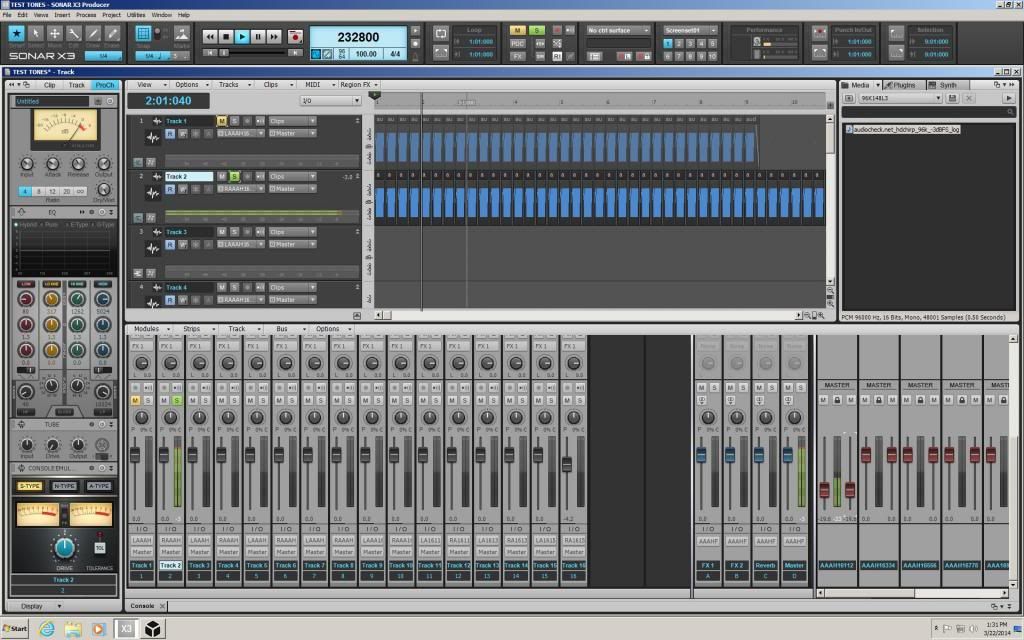 " />  OK I think this Sonar template kind of solves for the test tones...linear track 1, and log track 2, AT: 96khz 48k 1hz a -3dbfs....if you note the red master is down to -19.6 so that the blue master reads -3...this now shows as the same reading of -3 on the A & L mixing desk...So track volume and master volume are now equal....and showing righted on the mixing desk metering vu. Now why is a set standard whistle noise 1 hz on a track reading -3 without reduction set to default )0(...on the track 2 reading -3...and then I having to cut A LOT OF VOLUME on red master 1 to -19.6...To show -3 on the blue master volume?...and then on my desk as correct?...any way I think I solved the problem in this test template....now to apply it to the project? New questions....In my other template I do not have red master busses put on... what is the difference red and blue?..and how to do this?...could save me a few chapters of reading....if some one could help explain and direct? Thanks and cheers! Sir Les
post edited by Sir Les - 2014/03/22 14:34:00
1. Intel 5960x 3.5mhz , ASUS x99 deluxe u3.1, Asus Thunderbolt ex II, G skills f4 3000 Memory 32GB , ADATA ssd 250GB Main Drive, Lots of WD Red 7200 Mechanical Drives with Black Drives, 14x multi optical Drive, LG Multi Blu Drive, 2X Extern WD Mybooks usb 3.0, AMD r7 270 video card, Motu 828x TB , Motu Midi XT. 2. USING MAC PRO, as win 10 has damaged 2 x99 systems 8.1 is also to blame for the final burnout trying to roll back! 3. Something Wonderful: https://1drv.ms/f/s!AlHkRy9cXBbYpQNvVBCt8r7fQ5PS
|
Sir Les
Max Output Level: -67 dBFS
- Total Posts : 1182
- Joined: 2012/07/09 04:56:19
- Location: MONTREAL, QUEBEC, CANADA,
- Status: offline
Re: Metering RMS Peak and my A&L desk meters
2014/03/23 09:05:51
(permalink)
OK Perhaps my question is not clear? I found these red master faders in this Sonar A & L template showing when opened...as a new project...and brought in two test tones...track 1 is a linear 1hz 96khz 48k tone of a whistling sound...track 2 is a log 1hz 96khz 48k tone. The blue meter master fader when played back with out any reduction of track one reads -3dbfs... The red meter master fader also reads -3dbfs without any reduction of track one...reads -3dbfs. The A & L mixing desk vu reads +9 into +10....perhaps analog?...although the range goes from -30 to +16. As the desk vu lights mostly in the +9 range and just goes into the red +16 range I averaged out a +10ish reading of assumption. If it were to stay red in that zone, I would assume a more higher value of +16 would be necessary. Now to get the volume to show -3 on the A & L mixing desk, so it is the same as the blue master vu meter....it seems the red faders need to come down, so that the master blue vu's stay the same -3, but the output of the computer is reduced...so by turning down the red fader to -19.6= -22.6 peak on that red master reading display...I get a vu reading of close to -3 on the A & L mixing desk, with out causing reduction on the track or blue master bus...which is what I am looking to do in my project. Turning the red faders down or up seems to be linked to the computers volume output.....? as it does not seem to effect the Blue master vu's, but does effect the output to the A & L Desk. Seems the track is linked to ch 1/ch1/2 it is stereo...there are nine red master each for different output pair?...I have eight red masters, plus one main L and R. ..I guess I have routing possibilities to each red output...if that is what they are.? Now in my project I used a different Template...I do not see red master volume faders in that template....this is what I think I am looking for to reduce the volume to the desk....cause something is not right and the vu's on the desk do not match up to the showing Blue Vu's readings. So How do I get this "Red master volume control" to show up in my project template I am using? ...what is it called?...So I may read up on it?..or some one can explain in proper terms , what it is, so I do not assume like I have been doing....because I see it in the bus info Pictures in the help file on Busses...But it is not mentioned how to get it to show up, or what it is called. Thanks for any help.... I will keep reading...and watching the tutorial videos I bought ...But a faster line would be to ask the pro's here. Or are the red master faders called trim?...and not the Gain knob at the top of each track and blue buss? cause I am confused now...more mead please. Cheers!
post edited by Sir Les - 2014/03/23 09:21:31
1. Intel 5960x 3.5mhz , ASUS x99 deluxe u3.1, Asus Thunderbolt ex II, G skills f4 3000 Memory 32GB , ADATA ssd 250GB Main Drive, Lots of WD Red 7200 Mechanical Drives with Black Drives, 14x multi optical Drive, LG Multi Blu Drive, 2X Extern WD Mybooks usb 3.0, AMD r7 270 video card, Motu 828x TB , Motu Midi XT. 2. USING MAC PRO, as win 10 has damaged 2 x99 systems 8.1 is also to blame for the final burnout trying to roll back! 3. Something Wonderful: https://1drv.ms/f/s!AlHkRy9cXBbYpQNvVBCt8r7fQ5PS
|
Sir Les
Max Output Level: -67 dBFS
- Total Posts : 1182
- Joined: 2012/07/09 04:56:19
- Location: MONTREAL, QUEBEC, CANADA,
- Status: offline
Re: Metering RMS Peak and my A&L desk meters
2014/03/23 09:52:07
(permalink)
I am faster than the Pros?...I found the red faders...they were hidden on the far right of the console...grab and slide to the left.
Now what are they called, so I can read up?.... or what is the true function?....
Thanks.
1. Intel 5960x 3.5mhz , ASUS x99 deluxe u3.1, Asus Thunderbolt ex II, G skills f4 3000 Memory 32GB , ADATA ssd 250GB Main Drive, Lots of WD Red 7200 Mechanical Drives with Black Drives, 14x multi optical Drive, LG Multi Blu Drive, 2X Extern WD Mybooks usb 3.0, AMD r7 270 video card, Motu 828x TB , Motu Midi XT. 2. USING MAC PRO, as win 10 has damaged 2 x99 systems 8.1 is also to blame for the final burnout trying to roll back! 3. Something Wonderful: https://1drv.ms/f/s!AlHkRy9cXBbYpQNvVBCt8r7fQ5PS
|
BJN
Max Output Level: -86 dBFS
- Total Posts : 222
- Joined: 2013/10/09 07:52:48
- Status: offline
Re: Metering RMS Peak and my A&L desk meters
2014/03/23 09:56:53
(permalink)
Go to console page and scroll up to find the trim knob. Back these down. Put the red out bus back up to zero. Keep all faders at zero while you calibrate the trim knobs.
Yes the test tone is a good idea.
If no pink noise play a mix CD. Most Engineers have a reference CD they carry to listen to when in different studio's. This is a whole subject in itself.
Right now feed a CD thru a couple of channels of Sonar.
Adjust the trims to match the best when fed to your desk.
Then set all trims,except the master bus the same level and save as a template .
Later during your mix you might have to lower the master trim to best match going in your desk.
Also best to keep posts here on the forum short as when too long no one will want to read it.
------------------------------------------------------- Magic: when you feel inspired to create which in turn inspires more creation. And the corollary: if magic happens inspiration might flog it to death with numerous retakes. Bart Nettle
|
John
Forum Host

- Total Posts : 30467
- Joined: 2003/11/06 11:53:17
- Status: offline
Re: Metering RMS Peak and my A&L desk meters
2014/03/23 11:04:50
(permalink)
Are you outputting a single master buss? That is all tracks and buses going to a master buss and then to you hardware outs?
|
Sir Les
Max Output Level: -67 dBFS
- Total Posts : 1182
- Joined: 2012/07/09 04:56:19
- Location: MONTREAL, QUEBEC, CANADA,
- Status: offline
Re: Metering RMS Peak and my A&L desk meters
2014/03/23 11:19:14
(permalink)
Well BJN...I do not see this as being the way...as you put forth...It seems if... as all things are equal from track 1-16, to Blue master vu's and plug ins showing right when soloing...I would assume those readings in Sonar and plug ins are correct....turning down the trim does reduce over all volume of those busses or tracks, but the true values being read or received...in the PC world...those readings are correctly showing as they are...No problem with them being as they are...if true!...and each vu tells they are in Sonar...except in output of the PC to the desk.
The problem is with what is coming out of the PC....it is getting too hot...at -6db in PC LAND...to Mixing console or DESK vu...is all I am worried about......and turning down the output from the PC is all I need to do...I believe....and I can raise the volume with the amp on the desk without raising the Desk's vu monitoring of the PC main output.
Which is why I tried to do this in Windows speaker applet, but it does not respond....as when In sonar it takes control of that....I believe the red master and the output to the desk are in some way assigned to these....if I am reading them correctly?...that is where I need to deduce.....
Now all is true in the Sonar aspect...and No worries about overloading my Desk....Problem solved.
Question...What is the name of the red master volume buss, and or it's function// or where is it located in terms of help files in routing, and how to?...I am sure it is in that reference point of info I will find some instruction to help me understand....Sonar better.
As I have little education in terms of vocabulary and language laws.....My posts do get exceedingly large... Sorry for that... in simple words ....but that is another story to tell the big Kohuna chief in the sky when he comes...as to why I am, what I am...and what made me that way.....wink.
Again thanks for all the help...in a round about way...You helped me find and solve for X.
Blessings! and cheers...
P.S...I still need some direction into the manual...to find. reason...and I will put solved in the title...wink wink.
1. Intel 5960x 3.5mhz , ASUS x99 deluxe u3.1, Asus Thunderbolt ex II, G skills f4 3000 Memory 32GB , ADATA ssd 250GB Main Drive, Lots of WD Red 7200 Mechanical Drives with Black Drives, 14x multi optical Drive, LG Multi Blu Drive, 2X Extern WD Mybooks usb 3.0, AMD r7 270 video card, Motu 828x TB , Motu Midi XT. 2. USING MAC PRO, as win 10 has damaged 2 x99 systems 8.1 is also to blame for the final burnout trying to roll back! 3. Something Wonderful: https://1drv.ms/f/s!AlHkRy9cXBbYpQNvVBCt8r7fQ5PS
|
John
Forum Host
- Total Posts : 30467
- Joined: 2003/11/06 11:53:17
- Status: offline
Re: Metering RMS Peak and my A&L desk meters
2014/03/23 11:27:11
(permalink)
The red master buss is the main outs also known as your hardware outs. It is not the master buss. Here when we refer to the master buss we mean a buss you create like any other but where all buses and tracks go to. It will then go to your main out.
|
Sir Les
Max Output Level: -67 dBFS
- Total Posts : 1182
- Joined: 2012/07/09 04:56:19
- Location: MONTREAL, QUEBEC, CANADA,
- Status: offline
Re: Metering RMS Peak and my A&L desk meters
2014/03/23 11:32:51
(permalink)
Yah John...I think I am assuming that correctly now...now I see the Blue assigns to the red...and the red do the output to the desk....Thanks for making it clearer.
I do not think the Gain or trim is the answer for me...at this time line.
Again thanks all.
I will put solved in...and now I know it is output assignments I can look into it faster and learn.
Cheers!
1. Intel 5960x 3.5mhz , ASUS x99 deluxe u3.1, Asus Thunderbolt ex II, G skills f4 3000 Memory 32GB , ADATA ssd 250GB Main Drive, Lots of WD Red 7200 Mechanical Drives with Black Drives, 14x multi optical Drive, LG Multi Blu Drive, 2X Extern WD Mybooks usb 3.0, AMD r7 270 video card, Motu 828x TB , Motu Midi XT. 2. USING MAC PRO, as win 10 has damaged 2 x99 systems 8.1 is also to blame for the final burnout trying to roll back! 3. Something Wonderful: https://1drv.ms/f/s!AlHkRy9cXBbYpQNvVBCt8r7fQ5PS
|
BJN
Max Output Level: -86 dBFS
- Total Posts : 222
- Joined: 2013/10/09 07:52:48
- Status: offline
Re: Metering RMS Peak and my A&L desk meters
2014/03/23 20:49:15
(permalink)
Okay, glad you got it sorted. It makes sense to do it as you have explained and not by the channel trim. What interface you are using may also have controls on it to select the desired level for any number of outputs, separate to Sonar. Lower the volume there if possible for better gain staging. Cheers
post edited by BJN - 2014/03/23 20:55:49
------------------------------------------------------- Magic: when you feel inspired to create which in turn inspires more creation. And the corollary: if magic happens inspiration might flog it to death with numerous retakes. Bart Nettle
|
John
Forum Host
- Total Posts : 30467
- Joined: 2003/11/06 11:53:17
- Status: offline
Re: Metering RMS Peak and my A&L desk meters
2014/03/23 22:44:37
(permalink)
I'm very glad you have this problem solved.
|
Sir Les
Max Output Level: -67 dBFS
- Total Posts : 1182
- Joined: 2012/07/09 04:56:19
- Location: MONTREAL, QUEBEC, CANADA,
- Status: offline
Re: Metering RMS Peak and my A&L desk meters
2014/03/24 08:24:09
(permalink)
Thanks to you both for taking the time...cheers!
The A & L Desk doesn't seem to have a control for PC input, from what I have fiddled with, and in going through the manual trying to find....So..What comes out of the PC seems to go internally to the desk metering directly...Not sure why there is a mismatch in vu readings yet...
I guess we all have to set up our interfaces in some way so everything aligns and jells correctly....Each one is different, and until I get more familiar with things, and the PC working in some regards almost flawlessly now, and getting deeper into the software slowly, and in more focused minded states of Gleed details, (as I take off the trouble shooting hat, and start doing the thing I bought this for).....I will surely Learn the ins and outs of the whole thingamajig...in time, and several reads of the manuals, now that it is working , and I solve as I go forwards...with Help, and hopes at heart...I will now learn Mixing and Mastering Music Properly...without worrying about blowing my desk vu's or electronics, and getting the right volume levels in Sonar's Master blue Buss up to almost zero.....The green ZONE!...LOL
Again thanks!
1. Intel 5960x 3.5mhz , ASUS x99 deluxe u3.1, Asus Thunderbolt ex II, G skills f4 3000 Memory 32GB , ADATA ssd 250GB Main Drive, Lots of WD Red 7200 Mechanical Drives with Black Drives, 14x multi optical Drive, LG Multi Blu Drive, 2X Extern WD Mybooks usb 3.0, AMD r7 270 video card, Motu 828x TB , Motu Midi XT. 2. USING MAC PRO, as win 10 has damaged 2 x99 systems 8.1 is also to blame for the final burnout trying to roll back! 3. Something Wonderful: https://1drv.ms/f/s!AlHkRy9cXBbYpQNvVBCt8r7fQ5PS
|
BJN
Max Output Level: -86 dBFS
- Total Posts : 222
- Joined: 2013/10/09 07:52:48
- Status: offline
Re: Metering RMS Peak and my A&L desk meters
2014/03/24 08:51:58
(permalink)
Yes there is a learning curve but it is enjoyable.
I been recording and mixing since 1982 and am still learning to look.
For example, you list all your gear on the bottom page of your posts! LOLOL I totally missed looking at them till I wondered what the A&L desk was.LOL
It is an A&H R16, very nice. Firewire. There should be drivers and some sort of control of the Firewire ports.
You might find hints on the A&H user forum. I am sure there would be one.
As for the power surges a power transformer with a coupled earth is best. Some " power conditioners" that cost big dollars are little more than surge protectors with a battery. It is not always a case of getting what you pay for. Look into it but get into Sonar and your desk.
I'd love one!
------------------------------------------------------- Magic: when you feel inspired to create which in turn inspires more creation. And the corollary: if magic happens inspiration might flog it to death with numerous retakes. Bart Nettle
|
kicksville
Max Output Level: -85 dBFS

- Total Posts : 273
- Joined: 2003/11/07 14:45:41
- Status: offline
Re: Metering RMS Peak and my A&L desk meters/ Solved
2014/03/24 10:49:55
(permalink)
So, there's a very simple explanation for your metering mismatch.... Sonar's meters measure dBFS, and the Allen & Heath mixer's meters measure dBu. In other words, Sonar=digital scale, A&H=analog scale. Generally speaking, -18dBFS = 0dBu, so a signal hitting -3 in Sonar will show +15 on the A&H's meters. The A&H is a British-made console, so I'm assuming they use the EU standard (American standard is more often -20dBFS=0dBu).
Long story short, don't pull down any trims or faders in Sonar to make your A&H's meters match Sonar's. They shouldn't match number-for-number. Take some time to understand the digital vs. analog signal measurement conventions, and you'll be a much happier camper. Oh, and there's nothing wrong with hitting the A&H with a -3dBFS signal - you won't burn out any electronics or fry the meter.
|
kicksville
Max Output Level: -85 dBFS
- Total Posts : 273
- Joined: 2003/11/07 14:45:41
- Status: offline
Re: Metering RMS Peak and my A&L desk meters/ Solved
2014/03/24 11:01:35
(permalink)
Sorry - one clarification. I skimmed one of your posts and noticed you had to pull the fader in Sonar down to -19.6 to get the A&H's meters to looks the same as Sonar's. That suggests the A&H is using the -20dBFS=0dBu convention. You can always look at it this way too if it's easier to get your head around it: 0dBFS= +20dBu. Either way, under that convention, a signal showing -3 in Sonar should show +17 on your A&H. <clarification edited for clarification>
post edited by kicksville - 2014/03/24 12:04:24
|