MFAP
Max Output Level: -90 dBFS

- Total Posts : 23
- Joined: 2013/11/24 08:59:44
- Status: offline
Midi track not audible, yet recorded
Hello all you good Cakewalk users,
my set-up is:
Midi keyboard - > Saffire PRO 14 - > Sonar X3.
Can insert a soft synth, record input, but cannot hear it on playback (other tracks I can hear).
My questions
1. Where do I set the OUTPUT of that miditrack? In the PRO CHANNEL (Because I cannot see output selection in the track view).
2. Whereto do I direct the output, please?
Looking for any input coz this is driving me nuts. :)
with best regards, MFAP
|
Johnbee58
Max Output Level: -72 dBFS

- Total Posts : 946
- Joined: 2014/06/21 10:45:53
- Location: Reading PA
- Status: offline

Re: Midi track not audible, yet recorded
2014/11/16 08:59:41
(permalink)
Hi!
I encountered this situation and I think I can help. Go to the Preferences tab in the Edit menu, then on the left side towards the bottom you'll see the RECORD options under Project. Click MIDI. Then UNCHECK "Zero Controller When Play Stops" box. This should help you. I hope it does.
John B
Lenovo Core i5 4460 Desktop PC (Windows 8 64 bit), Focusrite Scarlett 6i6, Nektar LX61 Keyboard MIDI Controller, Avantone Pro CV-12 tube condenser microphone, JBL LSR308 8" active monitor speakers. Cakewalk by Bandlab, Reason 7, NI Session Strings Pro, NI Strummed Acoustic Guitar, Miroslav Philharmonic, Auturia DX7 V, Garritan JABB 3, EZ Keys, EZ Drummer. "I will create music the way I want to whether a million people are listening or no one is listening." Dan Fogelberg, Singer/Songwriter-1951-2007
|
daveny5
Max Output Level: 0 dBFS

- Total Posts : 16934
- Joined: 2003/11/06 09:54:36
- Location: North Carolina
- Status: offline
Re: Midi track not audible, yet recorded
2014/11/19 12:57:56
(permalink)
MIDI is not sound, it is computer instructions. So to hear a MIDI track, you have to assign it to a sound producer either a real synth or a softsynth. To send it to a real synth, you need to set the output to your MIDI interface and have your MIDI keyboard connected to it. Make sure your synth is set to receive on the same MIDI channel that Sonar is sending the data on. To send it to a softsynth, add a softsynth to the synthrack. Set the output of the MIDI track to the softsynth. If you don't see the output field, make sure the pulldown at the top of the track view is set to I/O or All.
post edited by daveny5 - 2014/11/19 13:28:15
Dave Computer: Intel i7, ASROCK H170M, 16GB/5TB+, Windows 10 Pro 64-bit, Sonar Platinum, TASCAM US-16x08, Cakewalk UM-3G MIDI I/F Instruments: SL-880 Keyboard controller, Korg 05R/W, Korg N1R, KORG Wavestation EX Axes: Fender Stratocaster, Line6 Variax 300, Ovation Acoustic, Takamine Nylon Acoustic, Behringer GX212 amp, Shure SM-58 mic, Rode NT1 condenser mic. Outboard: Mackie 1402-VLZ mixer, TC Helicon VoiceLive 2, Digitech Vocalist WS EX, PODXTLive, various stompboxes and stuff. Controllers: Korg nanoKONTROL, Wacom Bamboo Touchpad
|
SuperG
Max Output Level: -63 dBFS

- Total Posts : 1371
- Joined: 2012/10/19 16:09:18
- Location: Edgewood, NM
- Status: offline
Re: Midi track not audible, yet recorded
2014/11/19 14:19:36
(permalink)
Midi tracks require an audio track to be assigned to their synth's audio outputs, If you're listening to an external synth and you'd like to hear it's playback, you need to enable the abillty to hear external input from it's audio track - there's a speaker-wave symbol on the the synth's audio track, click it to enable it.
At some point, you'll need to record the synth's audio - when you do that, disable the ability to hear input during playback,
|
FastBikerBoy
Forum Host

- Total Posts : 11326
- Joined: 2008/01/25 16:15:36
- Location: Watton, Norfolk, UK
- Status: offline
Re: Midi track not audible, yet recorded
2014/11/19 16:48:47
(permalink)
Have a look at this video that should answer most of your questions about MIDI.
|
57Gregy
Max Output Level: 0 dBFS
- Total Posts : 14404
- Joined: 2004/05/31 17:04:17
- Location: Raleigh, North Carolina
- Status: offline
Re: Midi track not audible, yet recorded
2014/11/19 22:24:41
(permalink)
In the track pane, there are buttons to select what controls are displayed. Not on a computer with SONAR on it, so I can't tell you exactly what it is, but click around until all the in/out controls appear. And/or expand the track pane.
|
57Gregy
Max Output Level: 0 dBFS
- Total Posts : 14404
- Joined: 2004/05/31 17:04:17
- Location: Raleigh, North Carolina
- Status: offline
Re: Midi track not audible, yet recorded
2014/11/20 10:55:04
(permalink)
Here: 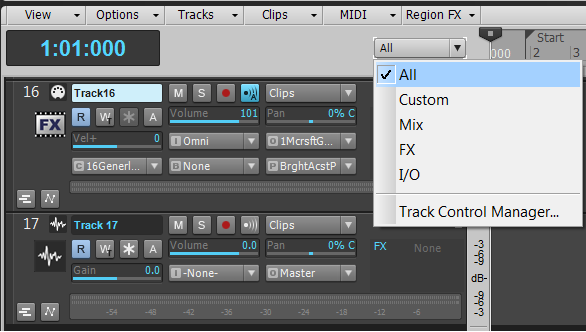
|
stevec
Max Output Level: 0 dBFS
- Total Posts : 11546
- Joined: 2003/11/04 15:05:54
- Location: Parkesburg, PA
- Status: offline
Re: Midi track not audible, yet recorded
2014/11/20 14:42:38
(permalink)
Also... for this part:
1. Where do I set the OUTPUT of that miditrack? In the PRO CHANNEL (Because I cannot see output selection in the track view).
I'm assuming you're looking at the Track Inspector on the left. If so, across the top there are tabs for displaying Track, Clip and Pro Channel data for that track, with Pro Channel being the default. That's why you can't see the track's I/O near the bottom of the Inspector unless you pick the Track tab.
Or as 57Gregy wrote, you can expand the track's vertical height and access the same controls from the track widgets.
SteveC https://soundcloud.com/steve-cocchi http://www.soundclick.com/bands/pagemusic.cfm?bandID=39163 SONAR Platinum x64, Intel Q9300 (2.5Ghz), Asus P5N-D, Win7 x64 SP1, 8GB RAM, 1TB internal + ESATA + USB Backup HDDs, ATI Radeon HD5450 1GB RAM + dual ViewSonic VA2431wm Monitors; Focusrite 18i6 (ASIO); Komplete 9, Melodyne Studio 4, Ozone 7 Advanced, Rapture Pro, GPO5, Valhalla Plate, MJUC comp, MDynamic EQ, lots of other freebie VST plugins, synths and Kontakt libraries
|