DonM
Max Output Level: -34 dBFS

- Total Posts : 4129
- Joined: 2004/04/26 12:23:12
- Location: Pittsburgh
- Status: offline

Mixdown Workflow (It works for Me!)
I was reading the current thread about mixing down and how many mixes someone does before they are complete. A client came to me this week and needed a mix-minus version of an entire CD that we finished last fall. The process was very simple using a workflow/methodology that my students have commented on being very useful when mixing down. Sonar is an excellent tool for doing and managing your mixes. In fact, there are times that I export consolidated files out of othere DAW's just to mix in Sonar. One of the problems when you perform multiple mixdowns is keeping track of them and knowing the differences. It is also difficult to perform reasonable comparisons in mixes once you have several of them per song. So here is my workflow, I hope you find it useful. #1 Bounce to Track - NOT - File Export When I am building a mix, rather than exporting the audio to an 'external' audio file, I select my tracks and timeline and Edit - Bounce to Tracks. I Name the track in the scribble strip and then I change the color of the clips background and foreground so as to differentiate it from the standard project tracks. I also put notes in the track properties dialog box that identify the bounce down's characteristics. Here is a moderate size pop/rock project with multiple mixdowns - notice the track colors easily let me see where they are. Notice the last two tracks are Green backgrounds with White foregrounds in the clip. This indicates the final mix - reason for two of these tracks in this mix is one is the mix that went to the CD master last fall and the other is the mix-minus we just did last week. Each are a final in other words. 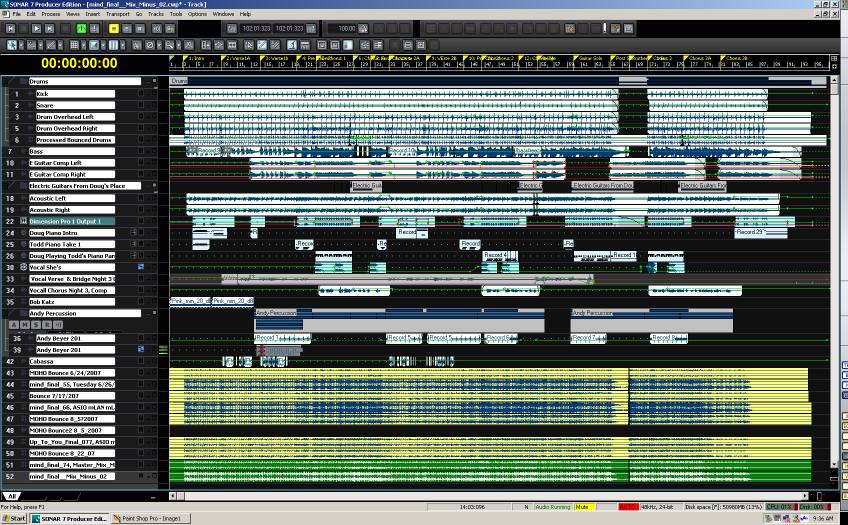 #2 Mix Management Now all of mixdowns are conveniently located in one manageable place. I can do instant comparisons, and have total parity of the comparisons rather than opening and closing files trying to remember which mix and whether it is 16 bit or 24 bit, what sample rate, etc. I hate when I do a mix and I can't remember how it is different than the mix the day before, so the track properties dialog box is critical for keeping this data - and I really don't have to worry about the mix filename since they will live in the same Sonar project as the actual tracks forever. I can archive a track to keep it out of the mix accidentally when auditioning other mixes or continuing work on the project. Here is a shot of the track manager 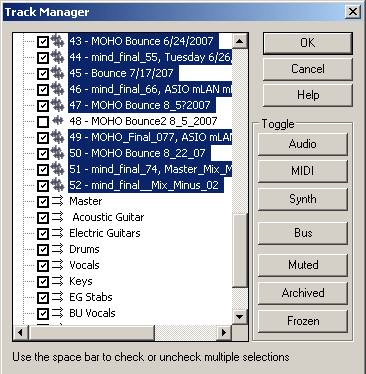 Here is a shot of the Track Properties of the final CD master mix. Note it's output is routed directly to the main HW outputs on my O1X. 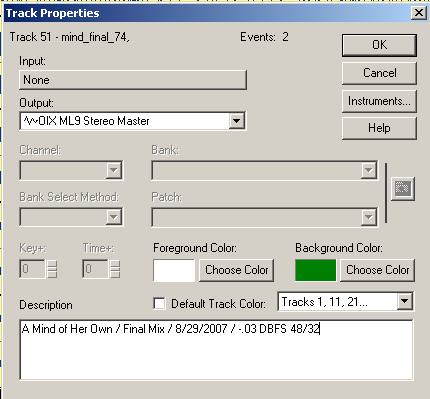 Here is a shot of the File Export dialog box - once I have completed my mix and am doing an export. Notice I am doing SRC in Sonar - 'Mastering' in Ozone where I am managing final EQ, Dynamics, Spatial Processing, and Dither. A 'trick' I used can be seen in the filename of the dialog box - notice I am only putting a "_" (underscore character) as a filename. This allows me to have the Track Name from the scribble strip become the filename - then there is no confusion as to what mix actually was the source of the external bounce. So, I have mix management and tons of documentation and comparison notes for each mix, and all of the mixes neatly stay with the original project. 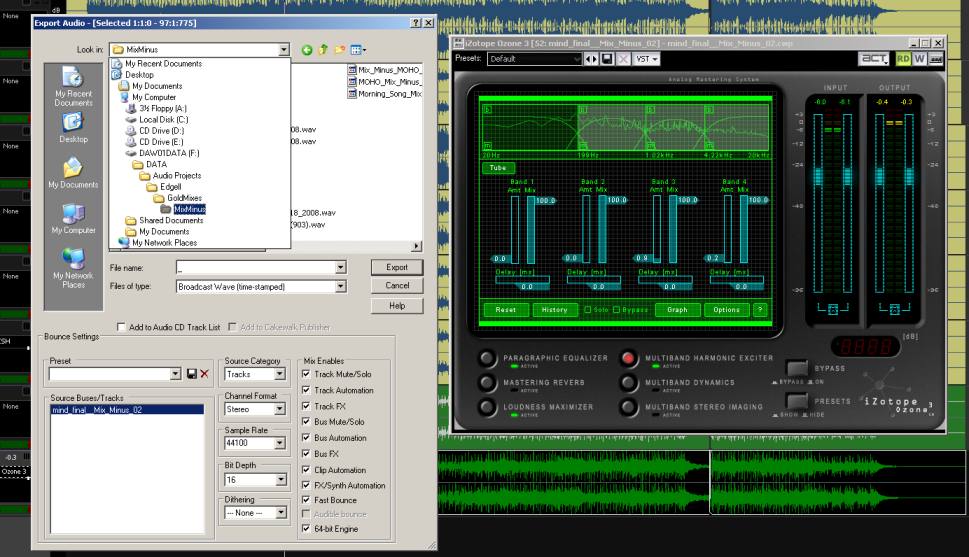 As my project gets backed up to other media for library storage, all mixes stay with each project or with the entire global project folder without any additional effort. The client was impressed how quickly we were able to get the mix-minus versions to the film production company that needed them in a week - we took a day. Gotta love Sonar. ...Hope some of this helps y'all. -D
post edited by DonM - 2008/06/23 10:15:14
|
DW_Mike
Max Output Level: -6 dBFS

- Total Posts : 6907
- Joined: 2006/11/29 18:06:40
- Location: The arm-pit of the good 'ol US...New Jersey
- Status: offline
RE: Mixdown Workflow (It works for Me!)
2008/06/23 12:02:37
(permalink)
Thanks for that Don.
It keeps things clean and simple having everything in one project folder.
Mike
Sonar X3 ~ Scarlett 18i6 ~ Home Build DAW
GA-Z77X-UD5H
Intel i7 3770k 4.2GHz
32GB RAM Crucial Ballistix Elite (4x8)
2x Samsung 250GB SSD
1TB WD Black HDD @ 7200RPM 6Gb/s 64MB
Corsair H80i Liquid cooler
Noctua Silent Fans ~ 3x120mm ~ 1x140mm
Seasonic Platinum 760w PSU
Windows 7 Pro 64Bit.
|
...wicked
Max Output Level: -1.5 dBFS

- Total Posts : 7360
- Joined: 2003/12/18 01:00:56
- Location: Seattle
- Status: offline
RE: Mixdown Workflow (It works for Me!)
2008/06/23 12:26:23
(permalink)
Hey thanks, couple of good tips here.
So, does the "_" act as a wildcard, where in the absence of anything else it defaults to the track name?
=========== The Fog People =========== Intel i7-4790 16GB RAM ASUS Z97 Roland OctaCapture Win10/64 SONAR Platinum 64-bit billions VSTs, some of which work
|
stratcat33511
Max Output Level: -39 dBFS

- Total Posts : 3636
- Joined: 2004/12/27 09:48:37
- Location: Tampa FL
- Status: offline
RE: Mixdown Workflow (It works for Me!)
2008/06/23 12:36:31
(permalink)
Great idea
Great post
Great
Thanks
|
R!Soc
Max Output Level: -77 dBFS

- Total Posts : 660
- Joined: 2006/03/08 15:32:29
- Location: Calgary, Alberta
- Status: offline
RE: Mixdown Workflow (It works for Me!)
2008/06/23 13:00:22
(permalink)
No, it doesn't. The export function appends the track name to the exported file. By giving it an underscore, it just makes it easier to read. If you leave it blank, I believe you get an error when exporting. ORIGINAL: ...wicked
Hey thanks, couple of good tips here.
So, does the "_" act as a wildcard, where in the absence of anything else it defaults to the track name?
|
...wicked
Max Output Level: -1.5 dBFS
- Total Posts : 7360
- Joined: 2003/12/18 01:00:56
- Location: Seattle
- Status: offline
RE: Mixdown Workflow (It works for Me!)
2008/06/23 15:31:52
(permalink)
ORIGINAL: R!Soc
No, it doesn't. The export function appends the track name to the exported file. By giving it an underscore, it just makes it easier to read. If you leave it blank, I believe you get an error when exporting.
Ah, got it. Thanks.
=========== The Fog People =========== Intel i7-4790 16GB RAM ASUS Z97 Roland OctaCapture Win10/64 SONAR Platinum 64-bit billions VSTs, some of which work
|
DonM
Max Output Level: -34 dBFS
- Total Posts : 4129
- Joined: 2004/04/26 12:23:12
- Location: Pittsburgh
- Status: offline
RE: Mixdown Workflow (It works for Me!)
2008/06/23 17:15:33
(permalink)
Glad that some of y'all find this workflow useful. Before I did my mix management this way, I had folders of mixes with bizarre filenames and had a tough time doing some comparisons. In fact to test the differences between two mixes using thing methodology is simple - sum the mixes to a single output and flip the phase on one of the tracks. Only the delta will be heard - instant mix differential.
-D
|
tunekicker
Max Output Level: -65 dBFS

- Total Posts : 1261
- Joined: 2005/10/28 14:39:50
- Location: Grand Junction, CO
- Status: offline
RE: Mixdown Workflow (It works for Me!)
2008/06/23 19:10:47
(permalink)
INVALUABLE input. I will be implementing this technique immediately. :-)
My only hesitation is that the SRC in Sonar has performed sub-par in some tests with other algos, particularly PT-Tweakhead, Izotope 64-bit SRC, and Voxengo's R8Brain Pro (plus a couple others I can't recall.)
I take it you have not found this a significant limitation/impact on your work?
Peace,
|
DonM
Max Output Level: -34 dBFS
- Total Posts : 4129
- Joined: 2004/04/26 12:23:12
- Location: Pittsburgh
- Status: offline
RE: Mixdown Workflow (It works for Me!)
2008/06/23 19:47:40
(permalink)
ORIGINAL: tunekicker
INVALUABLE input. I will be implementing this technique immediately. :-)
My only hesitation is that the SRC in Sonar has performed sub-par in some tests with other algos, particularly PT-Tweakhead, Izotope 64-bit SRC, and Voxengo's R8Brain Pro (plus a couple others I can't recall.)
I take it you have not found this a significant limitation/impact on your work?
Peace,
Thanks. glad you found it useful. WRT the SRC - good point - I've also used SoundForge 9's SRC - it seems to work best from 96 to 44.1 Sonar's 48 to 44.1 is acceptable - but you're right a lot of folks prefer the R8brain pro from Voxengo with good reason. -D
|
timidi
Max Output Level: -21 dBFS

- Total Posts : 5449
- Joined: 2006/04/11 12:55:15
- Location: SE Florida
- Status: offline
RE: Mixdown Workflow (It works for Me!)
2008/06/23 20:00:11
(permalink)
with this method, your tracks are set up for the last mix if I undertand you correctly. kind of hard to go back to a previous mix.
If you save a separate *.cwp file per mix, then it is always right where you left off.
And, you can just try bizarre stuff and not worry about getting back to where you were if you change your mind.
I usually make a notepad.exe file in my project folder for comments and stuff. And always keep the explorer file open.
sometimes it can get confusing though. especially if you don't keep up with the notes.
|
DonM
Max Output Level: -34 dBFS
- Total Posts : 4129
- Joined: 2004/04/26 12:23:12
- Location: Pittsburgh
- Status: offline
RE: Mixdown Workflow (It works for Me!)
2008/06/23 20:16:07
(permalink)
ORIGINAL: timidi
with this method, your tracks are set up for the last mix if I undertand you correctly. kind of hard to go back to a previous mix.
It may be hard to see, but the project is actually on it's 47th or so mix version. I repeatedly save the project file with a serialized filename and keep a log of changes and screen captures in an MS Word Doc on the secondary monitor behind the console view. -D
|
...wicked
Max Output Level: -1.5 dBFS
- Total Posts : 7360
- Joined: 2003/12/18 01:00:56
- Location: Seattle
- Status: offline
RE: Mixdown Workflow (It works for Me!)
2008/06/23 20:26:54
(permalink)
ORIGINAL: DonM
I repeatedly save the project file with a serialized filename and keep a log of changes and screen captures in an MS Word Doc on the secondary monitor behind the console view.
Hey, you didn't mention that! 
=========== The Fog People =========== Intel i7-4790 16GB RAM ASUS Z97 Roland OctaCapture Win10/64 SONAR Platinum 64-bit billions VSTs, some of which work
|
HotCoollMusicGirl
Max Output Level: -71 dBFS

- Total Posts : 991
- Joined: 2004/10/02 20:23:31
- Status: offline
RE: Mixdown Workflow (It works for Me!)
2008/06/23 21:28:49
(permalink)
That's the technique I use when making reference mixes while I'm working on a song. It also helps to put them all in a separate folder so they can be easily archived and hidden as a group. This technique makes it possible to A/B the mixes in real time since they're always in sync with each other. I've gotten some interesting results from playing two parallel mixes on top of each other. ORIGINAL: DonM
I repeatedly save the project file with a serialized filename and keep a log of changes and screen captures in an MS Word Doc on the secondary monitor behind the console view.
Sonar should have a Save-as function that will do this automatically by appending a timestamp to the main project name. If CAL is able to... 1) access the Save-as function 2) access the project name as a variable 3) access the system time as a variable 4) concatenate the two ...it would be possible to put the CAL right on the menu. Dunno if it can do those things, but if it could it would probably be a simple macro to make. This is similar to what autoversioning does, but those are not regular cwp files, and can only be created automatically each time a file is saved, rather than manually when the user wants. Would love to see CW include something like that in an upgrade, along with a number of other project and file management tools, including better clip/track color functionality whcih (as Don's post shows) is an important part of managment. It really lags in this area.
post edited by HotCoollMusicGirl - 2008/06/23 21:51:39
|
The Maillard Reaction
Max Output Level: 0 dBFS

- Total Posts : 31918
- Joined: 2004/07/09 20:02:20
- Status: offline
RE: Mixdown Workflow (It works for Me!)
2008/06/23 21:37:35
(permalink)
Hi Don,
That's great protocol.
Can you elaborate on what you mean by Mix-Minus in the context of this project. I'm more familiar with using the term with regards to live monitoring.
thanks,
mike
|
DonM
Max Output Level: -34 dBFS
- Total Posts : 4129
- Joined: 2004/04/26 12:23:12
- Location: Pittsburgh
- Status: offline
RE: Mixdown Workflow (It works for Me!)
2008/06/23 22:04:41
(permalink)
ORIGINAL: mike_mccue
Hi Don,
That's great protocol.
Can you elaborate on what you mean by Mix-Minus in the context of this project. I'm more familiar with using the term with regards to live monitoring.
thanks,
mike
Mike: The Mix-Minus was for a film production that wanted to use the tracks as instrumentals - without vocals. It was really an interesting issue to create mix-minus versions of the tracks since I worked so hard on the quality of the vocal mix. The artist was pretty adamant about not changing anything in the mix, only the removal of all vocals. However once the vocals were gone - I really wanted to touch up the Acoustic and Electric Guitars a db or two since the vocals created a bit of a dynamic hole - but alas - we didn't touch them. I would like to perform a more extensive eval of mix minus projects (hopefully this production company will come through with more projects soon) so that I could develop a better strategy for them. I'd like to test the changes in RMS and crest with and without the vocals and then see if changes to the instrumental buses makes the project better or worse for film placement. All in all a very interesting project and I have yet to listen to them in the car but will this week... because the car stereo is the FINAL word eh??!!! -D
|
DonM
Max Output Level: -34 dBFS
- Total Posts : 4129
- Joined: 2004/04/26 12:23:12
- Location: Pittsburgh
- Status: offline
RE: Mixdown Workflow (It works for Me!)
2008/06/23 22:09:07
(permalink)
ORIGINAL: HotCoollMusicGirl
That's the technique I use when making reference mixes while I'm working on a song. It also helps to put them all in a separate folder so they can be easily archived and hidden as a group.
This technique makes it possible to A/B the mixes in real time since they're always in sync with each other. I've gotten some interesting results from playing two parallel mixes on top of each other.
HCMG: I like the idea of using folders - nice touch. then you could archive them all at once. It is essential to archive these bounces once you are 'done with them' since they can double the energy in the main outputs if accidently playing while the project is. I use folders for my drums and multiple takes of AG, EG, Strings etc... I've just be stupid about my colors (all dark) and can't see the darn little plus arrow that opens and closes them too easily - ugh! -D
post edited by DonM - 2008/06/23 22:36:11
|
The Maillard Reaction
Max Output Level: 0 dBFS
- Total Posts : 31918
- Joined: 2004/07/09 20:02:20
- Status: offline
RE: Mixdown Workflow (It works for Me!)
2008/06/23 22:13:59
(permalink)
Thanks Don,
I was assuming that but thought I might also be missing out on some other definition.
best regards,
mike
|
mudgel
Max Output Level: 0 dBFS
- Total Posts : 12010
- Joined: 2004/08/13 00:56:05
- Location: Linton Victoria (Near Ballarat)
- Status: offline
RE: Mixdown Workflow (It works for Me!)
2008/06/24 01:28:16
(permalink)
What a great thread. Thanks donm.
And then i was reading along and then came another gem so thanks to hcmg as well.
sometimes something just crystalises before your eyes and you can see the benefit straight away.
I'll be adopting this as my new project and file management strategy immediatley. I like it.
Mike V. (MUDGEL) STUDIO: Win 10 Pro x64, SPlat & CbB x64, PC: ASUS Z370-A, INTEL i7 8700k, 32GIG DDR4 2400, OC 4.7Ghz. Storage: 7 TB SATA III, 750GiG SSD & Samsung 500 Gig 960 EVO NVMe M.2. Monitors: Adam A7X, JBL 10” Sub. Audio I/O & DSP Server: DIGIGRID IOS & IOX. Screen: Raven MTi + 43" HD 4K TV Monitor. Keyboard Controller: Native Instruments Komplete Kontrol S88.
|
DonM
Max Output Level: -34 dBFS
- Total Posts : 4129
- Joined: 2004/04/26 12:23:12
- Location: Pittsburgh
- Status: offline
RE: Mixdown Workflow (It works for Me!)
2008/06/24 07:31:08
(permalink)
ORIGINAL: mudgel
What a great thread. Thanks donm.
And then i was reading along and then came another gem so thanks to hcmg as well.
sometimes something just crystalises before your eyes and you can see the benefit straight away.
I'll be adopting this as my new project and file management strategy immediatley. I like it.
Mike: Thanks, I'm glad the thread was useful. I know that much of the value in software like Sonar doesn't appear in a menu or a dialog box. Personally, I love when folks give me insight to a product that is not in a menu but reveals in insight into the tool that has been designed for flexibility and creative functionality. Again, gotta love Sonar. -D
|
Chevalier DAour
Max Output Level: -87 dBFS

- Total Posts : 198
- Joined: 2003/11/08 14:21:11
- Status: offline
RE: Mixdown Workflow (It works for Me!)
2008/06/24 08:11:20
(permalink)
Merci Don, For your useful method and your free-handedness! I repeatedly save the project file with a serialized filename and keep a log of changes and screen captures in an MS Word Doc on the secondary monitor behind the console view.
For this kind of "suivi" I utilizes MS OneNote. Salut.
post edited by Chevalier DAour - 2008/06/24 08:44:19
|
SteveJL
Max Output Level: -29 dBFS

- Total Posts : 4644
- Joined: 2004/01/23 05:26:38
- Location: CANADA
- Status: offline
RE: Mixdown Workflow (It works for Me!)
2008/06/24 08:21:44
(permalink)
Interesting idea Don, thanks for sharing it.
I'm not sure I'll go with it, though. For one, I don't know if I like the idea of having all my "mix-eggs" in one basket. Plus, when I mix down, I like to have a wav file burned to CD to listen to on other systems. I always first export to a 24-bit Master folder, adding Master_24 to the filename. Then when I bring it into a Mastering project, I add Master_16 to that exported filename, placing it into a 16-bit Master folder. If I make multiple versions, I just add _A or _B , etc to the filenames.
If I want to compare, I just import the wav's into whatever appropriate master project and mute/compare.
This has worked well for me and everything stays seperate and organized.
Your methodology does make sense though and I like to be open to new ideas, so will see if there are aspects of it that I can incorporate.
|
DonM
Max Output Level: -34 dBFS
- Total Posts : 4129
- Joined: 2004/04/26 12:23:12
- Location: Pittsburgh
- Status: offline
RE: Mixdown Workflow (It works for Me!)
2008/06/24 08:45:25
(permalink)
ORIGINAL: SteveJL
Interesting idea Don, thanks for sharing it.
I'm not sure I'll go with it, though. For one, I don't know if I like the idea of having all my "mix-eggs" in one basket. Plus, when I mix down, I like to have a wav file burned to CD to listen to on other systems. I always first export to a 24-bit Master folder, adding Master_24 to the filename. Then when I bring it into a Mastering project, I add Master_16 to that exported filename, placing it into a 16-bit Master folder. If I make multiple versions, I just add _A or _B , etc to the filenames.
If I want to compare, I just import the wav's into whatever appropriate master project and mute/compare.
This has worked well for me and everything stays seperate and organized.
Your methodology does make sense though and I like to be open to new ideas, so will see if there are aspects of it that I can incorporate.
Steve: I was hoping some one would comment with regard to what you've called" "mix-eggs" in one basket. Plus, when I mix down, I like to have a wav file burned to CD Keep in mind the tracks that are my bounce downs are still in reality disk files. Just standard run of the mill broadcast wave files with ye good 'ole .wav extension. Just right click on the clip and check the file properties for the exact file name. So the route you seek to load them into an authoring tool ( I use Sony's CD Architect) can point directly to the exact file that is also being pointed to by a track in Sonar. The nice thing about my suggestion is that every version of the mix can now be easily cataloged and notated - disk files do not have the metadata capacity that a Sonar track pointing to a disk file has. Serializing the mixes with "A's" and "B's" and numbers is something that I already do. But by the trick I suggest with an underline character you are using the Track Name as the Filename - added with the track properties metadata and you'll NEVER lose a mixdown. One of the things I harp on with my students is Asset Management. Tracks, Presets, Naming Schema, Files, Folders, and so on.... Time is Money and profits are thinner than ever - my ability to turn something around very quickly keeps me competitive. So to your point, as I create these intermediary mixes, and a client needs a demo CD I can easily point CD Architect or now Sonar 7 to burn the CD. Thanks. -D
|
mudgel
Max Output Level: 0 dBFS
- Total Posts : 12010
- Joined: 2004/08/13 00:56:05
- Location: Linton Victoria (Near Ballarat)
- Status: offline
RE: Mixdown Workflow (It works for Me!)
2008/06/24 09:04:14
(permalink)
That's the great thing about this forum. Someone will share a point of view, a technique, an idea, a contact even and it will trigger further events as folks process what they've come across. For me this strategy you employ is going to solve a quandry i've been in because I couldn't quite get a handle on how I might go about streamlining some of my management of assets as you call it.
i've been bumbling around trying a few different strategies without really getting a handle on it. Wasting a lot of time experiemnting without getting to a satisfactory conclusion. With this example of how you manage your files and versioning etc It's like I've gotten a real insight. A finished prodcut if you will.
An epiphany, not in the religious sense just an Of course. Why didn't I think of that? Well I know why. I don't do enough of this sort of thing, I'm not in a position to teach others nor am I challenged by assignments other than of my own making.
BUT; I'm privileged to be learning great techniques from great teachers and I'm not even enrolled in a class. In this case the technique has to do with asset management but at other times its been about producing, recording, mixing, arranging you name it. What a blast.
Thanks again donm.
Mike V. (MUDGEL) STUDIO: Win 10 Pro x64, SPlat & CbB x64, PC: ASUS Z370-A, INTEL i7 8700k, 32GIG DDR4 2400, OC 4.7Ghz. Storage: 7 TB SATA III, 750GiG SSD & Samsung 500 Gig 960 EVO NVMe M.2. Monitors: Adam A7X, JBL 10” Sub. Audio I/O & DSP Server: DIGIGRID IOS & IOX. Screen: Raven MTi + 43" HD 4K TV Monitor. Keyboard Controller: Native Instruments Komplete Kontrol S88.
|
SteveJL
Max Output Level: -29 dBFS
- Total Posts : 4644
- Joined: 2004/01/23 05:26:38
- Location: CANADA
- Status: offline
RE: Mixdown Workflow (It works for Me!)
2008/06/24 09:04:49
(permalink)
The other thing that concerns me is project load-time (probably because I'm still using a P4/3.0 ghz). When I keep my projects seperate, I can load a Master cwp a lot quicker. Not trying to punch holes, just weighing the pros and cons. I'll have to do some experimenting to see if these concerns are warranted. That's the beauty of idea-sharing: first there's what you think, then there's what you know after you try it out 
|
DonM
Max Output Level: -34 dBFS
- Total Posts : 4129
- Joined: 2004/04/26 12:23:12
- Location: Pittsburgh
- Status: offline
RE: Mixdown Workflow (It works for Me!)
2008/06/24 09:14:25
(permalink)
ORIGINAL: SteveJL
The other thing that concerns me is project load-time (probably because I'm still using a P4/3.0 ghz). When I keep my projects seperate, I can load a Master cwp a lot quicker. Not trying to punch holes, just weighing the pros and cons. I'll have to do some experimenting to see if these concerns are warranted. That's the beauty of idea-sharing: first there's what you think, then there's what you know after you try it out
Steve: You keep making me think!!!! With regard to load time - Soft Synths and Plugs take the majority of my load time, not the tracks. I have some projects that exceed 100 tracks and they load fairly quickly - but the plugs and synths seem to take the time. Also remind me, more to your point - Doesn't Sonar 7 permit you to prevent the waveform preview at a very granular level? If so load time regarding track wave preview would be a minimum. Just thinking out loud here... -D
|
HotCoollMusicGirl
Max Output Level: -71 dBFS
- Total Posts : 991
- Joined: 2004/10/02 20:23:31
- Status: offline
RE: Mixdown Workflow (It works for Me!)
2008/06/24 15:10:21
(permalink)
ORIGINAL: DonM
Keep in mind the tracks that are my bounce downs are still in reality disk files. Just standard run of the mill broadcast wave files with ye good 'ole .wav extension. Just right click on the clip and check the file properties for the exact file name.
Yes. But. The properties dialog that comes up with that right cilck needs to be brought out of the dark ages. First, it's too small to actually see the file name without adjusting the columns EVERY time you open it, especially as file names (which are long and hard to read to begin with) start sprouting prefixes and suffixes. It should show other properties, such as length, recording/process/mix date, number of instances/clips in project... you know... *properties*. It should be possible to right click the name and copy it into the clipboard. It should be possible to rename the file (and update project references to it) from that dialog. It should have a "Go to file" button that would open Explorer to the folder and have that file highlighted. It should it should it should..... One of the things I harp on with my students is Asset Management. Tracks, Presets, Naming Schema, Files, Folders, and so on.... Asset managment. It's such a lovely phrase. One shouldn't have to jump through hoops to achieve it. Isn't that what computers are for?
post edited by HotCoollMusicGirl - 2008/06/24 15:42:28
|
DonM
Max Output Level: -34 dBFS
- Total Posts : 4129
- Joined: 2004/04/26 12:23:12
- Location: Pittsburgh
- Status: offline
RE: Mixdown Workflow (It works for Me!)
2008/06/24 15:39:33
(permalink)
ORIGINAL: HotCoollMusicGirl
ORIGINAL: DonM
Keep in mind the tracks that are my bounce downs are still in reality disk files. Just standard run of the mill broadcast wave files with ye good 'ole .wav extension. Just right click on the clip and check the file properties for the exact file name.
Yes. But. The properties dialog that comes up with that right cilck needs to be brought out of the dark ages. First, it's too small to actually see the file name without adjusting the columns EVERY time you open it, especially as file names (which are long and hard to read to begin with) start sprouting prefixes and suffixes. It should show other properties, such as length, recording/process/mix date, number of instances/clips in project... you know... *properties*. It should be possible to right click the name and copy it into the clipboard. It should be possible to rename the file (and update project references to it) from that dialog. It should have a "Go to file" button that would open Explorer to the folder and have that file highlighted. It should it should it should.....
One of the things I harp on with my students is Asset Management. Tracks, Presets, Naming Schema, Files, Folders, and so on....
Asset managment. It's such a lovely phrase. One shouldn't have to jump through hoops to achieve it. Isn't that what computers are for?
I hope the cakefolk developer's are listening. Personally I really want a beefed up Track Manager. Imagine opening up the track manager and seeing a list of columns like Excel or iTunes - you could make routing changes, sort the list, add comments copy the contents of the entire list to the clipboard and open in a tool like excel so that you could keep a track sheet listing - or even cut and past track setting between projects - now here I go back on that one.... -D
|
HotCoollMusicGirl
Max Output Level: -71 dBFS
- Total Posts : 991
- Joined: 2004/10/02 20:23:31
- Status: offline
RE: Mixdown Workflow (It works for Me!)
2008/06/24 15:46:40
(permalink)
ORIGINAL: DonM
Imagine.....
You might saaaaay.... I'm a dreamer.... but I'm not the only one... I hope some daaaaay...... 
|
John
Forum Host

- Total Posts : 30467
- Joined: 2003/11/06 11:53:17
- Status: offline
RE: Mixdown Workflow (It works for Me!)
2008/06/24 15:59:33
(permalink)
That's the great thing about this forum. Someone will share a point of view, a technique, an idea, a contact even and it will trigger further events as folks process what they've come across. The minds on this forum are 20 to 40% better. I don't know if its the software or the nature of the subject is what attracts all these bright people here. All I know is its a great place to hang out. Lurk if you like or state a view or ask a question. All contribute to the enormous data base that is this forum. The Track Manger improvements that Don proposed is not only ideal for Sonar its genesis comes from an interplay with the other bright people offering thoughts. This place is far and above the sum of its parts. I am often delighted by the quality of the postings that this place seems to generate on a regular basis.
|
rm5700@optonline.net
Max Output Level: -71 dBFS
- Total Posts : 969
- Joined: 2004/10/09 06:32:50
- Location: CT
- Status: offline
RE: Mixdown Workflow (It works for Me!)
2008/11/20 20:26:27
(permalink)
I didn't even the first part of this thread till later (5 months after you posted it hehe)........but Wow! Really cool! Thanks for sharing this Don, some great ideas in there 
post edited by rm5700@optonline.net - 2008/11/20 20:29:03
Sonar X3 Producer, Toxic Biohazard IV, Rayblaster, Minimonsta, OP-X Pro II, kHS ONE, Melodyne Editor, Saurus, ElectraX, LuSH-101, Gladiator 2, Rapture, Dimension Pro, Wusikstation 7, Nemesis, impOSCar2, Sampletank2xl, SonikSynth2, Battery 3, M-Audio Oxygene 25 and Audiophile 2496 http://soundcloud.com/examigan
|