Gerry1943
Max Output Level: -89 dBFS

- Total Posts : 67
- Joined: 2011/08/14 12:46:18
- Location: Hanover, PA
- Status: offline

Mixing/Mastering
Having completed my first project, I am now at the final stage ie, mixing/ mastering/ editing.
I have used the Console view to do some panning of the different tracks to either the right or left channel.
I am now trying to adjust to volume of certain parts of a track. When using the Console view to adjust the volume it seems to affect the whole track not just a portion of the track.
For example, the end of the project presently ends suddenly and I would like to be able to progressively lower the volume on that portion of the track only so that the music ends in a smoother fashion.
I would also like to adjust the volume of certain instruments in different parts of tracks as it seems that depending on which instruments is playing the volume needs adjusting.
In other words, I would like to be able to do what they do in recording studios, in all humility as I am far from being an expert but I am enjoying myself, and replay and readjust the tracks until I am satisfied with the result.
Is there something in Sonar X1 that would let me do this?
Thank you in advance for your input.
Gerry
|
Linear Phase
Max Output Level: -53 dBFS

- Total Posts : 2201
- Joined: 2012/04/15 02:21:15
- Location: Ft. Lauderdale, FL USA
- Status: offline
Re:Mixing/Mastering
2012/08/01 12:59:53
(permalink)
too many lasers...  Sonar = audio editing ninja of a music software!
|
Guitarhacker
Max Output Level: 0 dBFS

- Total Posts : 24398
- Joined: 2007/12/07 12:51:18
- Location: NC
- Status: offline
Re:Mixing/Mastering
2012/08/01 13:07:58
(permalink)
yeah... yes would seem too simply and incomplete, and I don't have time for the 10k word answer that would get you closer. But I do have pictures and they say those things are worth a thousand words so... here's 2k words (sort of) and commentary. Books on the topic are an excellent idea and a good reference point for later. To adjust volume in a track and on the entire project for faded endings, (I hate faded endings and so do most people in the music business) I would suggest the judicious use of volume envelopes. Insert them in a track and use them to automate the levels as needed. volume envelopes in the tracks to pull the levels down at the end of the song. You can also insert the volume envelope into the master buss and do the fade from there. I just happened to have the envelopes in the tracks and used them to end the last note together. 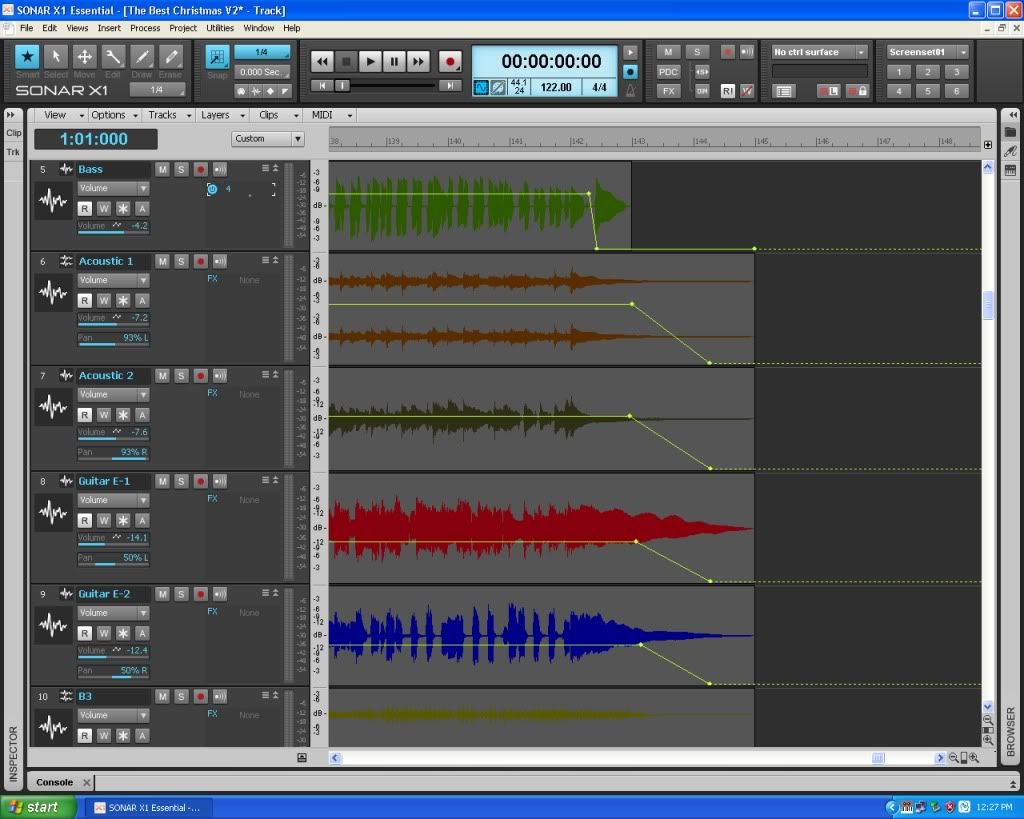 Levels in the mix on piano fills 
My website & music: www.herbhartley.com MC4/5/6/X1e.c, on a Custom DAW Focusrite Firewire Saffire Interface BMI/NSAI "Just as the blade chooses the warrior, so too, the song chooses the writer "
|
Bristol_Jonesey
Max Output Level: 0 dBFS
- Total Posts : 16775
- Joined: 2007/10/08 15:41:17
- Location: Bristol, UK
- Status: offline
Re:Mixing/Mastering
2012/08/01 14:33:27
(permalink)
Just to elaborate on Herbs excellent post, every track has an Edit Filter (circled in Red below) Click this and select Automation > Volume A volume envelope will be created for the track 
CbB, Platinum, 64 bit throughoutCustom built i7 3930, 32Gb RAM, 2 x 1Tb Internal HDD, 1 x 1TB system SSD (Win 7), 1 x 500Gb system SSD (Win 10), 2 x 1Tb External HDD's, Dual boot Win 7 & Win 10 64 Bit, Saffire Pro 26, ISA One, Adam P11A,
|
Guitarhacker
Max Output Level: 0 dBFS
- Total Posts : 24398
- Joined: 2007/12/07 12:51:18
- Location: NC
- Status: offline
Re:Mixing/Mastering
2012/08/01 15:20:10
(permalink)
A side note to my post above.....
I never use the automation write function. That is where you insert the envelope and then move the faders with your mouse and X1 remembers what you did.
I prefer to add the nodes manually and make my edits very precise. Right click the envelope to add a new node.
My website & music: www.herbhartley.com MC4/5/6/X1e.c, on a Custom DAW Focusrite Firewire Saffire Interface BMI/NSAI "Just as the blade chooses the warrior, so too, the song chooses the writer "
|
konradh
Max Output Level: -42 dBFS

- Total Posts : 3325
- Joined: 2006/01/16 16:07:06
- Status: offline
Re:Mixing/Mastering
2012/08/01 16:30:46
(permalink)
Essentially, click the W in the track to turn WRITE automation on and be sure the R for READ is on. R should be on by default but you will have to turn W on.
With Write on, just move the fader up and down where you want the volume to change and Sonar will remember this and do it for you. (That is what the R does: reads the changes you made wile W was on).
If you don't like the changes, just play back the track and move the fader anywhere you want something to be different--you don't have to change the whole song: you can just change any part you don't like.
When you are done, you can click W to turn Write off if you want to so you don't accidentally make a change, but it is OK to leave it on.
If you temporarily want to hear a part without the automation changes, you can click the W and R to OFF. If R is off, the fader will stay in one place instead of moving as you programmed it. Sometimes I turn Write and Read off to see what the track would sound like at a different level without messing up the automation.
You can also highlight the whole track and go to EDIT | CUT and choose automation to get rid of the fader changes if you really mess up.
By the way, this automation function works with panning (left and write) as well.
WARNING: Be careful what you change when automation is on. Once I was fooling around with the EQ while the track was running and automation was on and I programmed in some pretty crazy EQ changes.
You don't have to do this in Console view. You can do it in Track view as well. People use Console to see all the tracks at once and their various pan and level settings, but the function works in track view as well. Good luck!
|
Guitarhacker
Max Output Level: 0 dBFS
- Total Posts : 24398
- Joined: 2007/12/07 12:51:18
- Location: NC
- Status: offline
Re:Mixing/Mastering
2012/08/01 19:28:20
(permalink)
konradh
WARNING: Be careful what you change when automation is on. Once I was fooling around with the EQ while the track was running and automation was on and I programmed in some pretty crazy EQ changes.
yeah ....that plus it's really hard to get some of the envelope edits very precise with a mouse in real time.....and by adding the nodes manually the look of the track and envelope is so much cleaner looking.
My website & music: www.herbhartley.com MC4/5/6/X1e.c, on a Custom DAW Focusrite Firewire Saffire Interface BMI/NSAI "Just as the blade chooses the warrior, so too, the song chooses the writer "
|
pdlstl
Max Output Level: -71 dBFS

- Total Posts : 991
- Joined: 2003/11/06 16:07:23
- Location: Mineral Wells, TX
- Status: offline
Re:Mixing/Mastering
2012/08/01 19:37:48
(permalink)
Guitarhacker
A side note to my post above.....
I never use the automation write function. That is where you insert the envelope and then move the faders with your mouse and X1 remembers what you did.
I prefer to add the nodes manually and make my edits very precise. Right click the envelope to add a new node.
This is how I handle it as well. Far more accurate. And I have 24 faders sitting in front of me so moving them would be so much faster than a mouse. But I like the surgical edits I can makes with envelopes and nodes. 2¢...
|
Gerry1943
Max Output Level: -89 dBFS
- Total Posts : 67
- Joined: 2011/08/14 12:46:18
- Location: Hanover, PA
- Status: offline
Re:Mixing/Mastering
2012/08/03 12:34:56
(permalink)
|
Kalle Rantaaho
Max Output Level: -5 dBFS

- Total Posts : 7005
- Joined: 2006/01/09 13:07:59
- Location: Finland
- Status: offline
Re:Mixing/Mastering
2012/08/03 12:48:22
(permalink)
There used to be a 1500 page pdf manual with earlier SONARs. I'm sure one exists for X1 as well, maybe a download if you don't have the installation DVDs?
SONAR PE 8.5.3, Asus P5B, 2,4 Ghz Dual Core, 4 Gb RAM, GF 7300, EMU 1820, Bluetube Pre - Kontakt4, Ozone, Addictive Drums, PSP Mixpack2, Melda Creative Pack, Melodyne Plugin etc. The benefit of being a middle aged amateur is the low number of years of frustration ahead of you.
|
konradh
Max Output Level: -42 dBFS
- Total Posts : 3325
- Joined: 2006/01/16 16:07:06
- Status: offline
Re:Mixing/Mastering
2012/08/03 13:39:42
(permalink)
Regarding automation v adding nodes manually, totally agree with g-hack's comments, but I am more more comfortable mixing with physical faders on the console. The OCD side of me, though, wants to put those nodes at exact values and get those panning %s right... One downside to mixing with the V-Studio 700 console is that the knobs used for panning move too much. A "normal" mixing desk had pan pots that went from about 7:00 to 5:00. On the V-Studio, you have to spin the knob around a couple of times to get the full range. I understand why, since they want to give you a full 100%L to 100%R without skipping any numbers, but it does not feel right and I can never get to the right value quickly enough when sweeping. Luckily, you can flip the console and use the faders for panning to create your automation and then flip back to normal mode. Still odd, though.
|