aglewis723
Max Output Level: -86 dBFS

- Total Posts : 216
- Joined: 2013/01/14 14:28:02
- Location: New Jersey
- Status: offline
Most Compatible Keyboard Controllers?
Hello everyone!
I am setting up a new DAW studio.... i remember in Sonar X1 I had so much trouble getting my M-Audio Oxygen to keep its CC/ACT controls in sync. I was wondering if there are any controllers that work more compatible with Sonar X2.
I looked at the Roland ones sold by Cakewalk but the Mod Wheel acts like a pitch wheel! It goes back to zero when you let go! That's a big NO for me because certain patches totally change sound when you have the mod wheel adjusted. Sometimes, i want to set it and go!
Any others?
Thank you in advanced!
Adam
|
Wouter Schijns
Max Output Level: -85 dBFS

- Total Posts : 259
- Joined: 2013/01/30 10:29:18
- Status: offline

Re: Most Compatible Keyboard Controllers?
2013/07/13 07:42:34
(permalink)
Guess it's hard to find a more compatible controller than M-audio, should work as well as Roland gear.
M-Audio is even in the presets in Preferences menu....should work fine & probably a setting somewhere giving you probs.
Would try to get the M-audio working, must be someone can help you....
good luck
Medion pc,Line6 GX,Sennheiser280,Roland A500S, SonarX3
|
2:43AM
Max Output Level: -68 dBFS

- Total Posts : 1147
- Joined: 2013/06/24 07:59:49
- Location: PHX
- Status: offline
Re: Most Compatible Keyboard Controllers?
2013/07/13 08:34:34
(permalink)
aglewis723
I looked at the Roland ones sold by Cakewalk but the Mod Wheel acts like a pitch wheel! It goes back to zero when you let go! That's a big NO for me because certain patches totally change sound when you have the mod wheel adjusted. Sometimes, i want to set it and go!
I have the A500pro, but considered the MPK49 or the 49SL MkII, which is just bad ***. The A500pro, of course, was the most affordable, but still retained many useable features, including it being easy to program. So therefore, the simple workaround for not having the modwheel return to zero is to program a slider to send CC01.
|
aglewis723
Max Output Level: -86 dBFS
- Total Posts : 216
- Joined: 2013/01/14 14:28:02
- Location: New Jersey
- Status: offline
Re: Most Compatible Keyboard Controllers?
2013/07/13 11:24:02
(permalink)
2:43AM
aglewis723
I looked at the Roland ones sold by Cakewalk but the Mod Wheel acts like a pitch wheel! It goes back to zero when you let go! That's a big NO for me because certain patches totally change sound when you have the mod wheel adjusted. Sometimes, i want to set it and go!
I have the A500pro, but considered the MPK49 or the 49SL MkII, which is just bad ***. The A500pro, of course, was the most affordable, but still retained many useable features, including it being easy to program. So therefore, the simple workaround for not having the modwheel return to zero is to program a slider to send CC01.
Thanks for that! The A500, is it pretty much plug and play? Did you have to map anything and does it retain its control?
|
2:43AM
Max Output Level: -68 dBFS
- Total Posts : 1147
- Joined: 2013/06/24 07:59:49
- Location: PHX
- Status: offline
Re: Most Compatible Keyboard Controllers?
2013/07/13 11:42:18
(permalink)
aglewis723
Thanks for that! The A500, is it pretty much plug and play? Did you have to map anything and does it retain its control?
No problem! Yes, the Cakewalk A-Pro's will retain their programming if control maps 1-16 are used. I forgot exactly, but control map 0 cannot be programmed, or it can be programmed but will not retain its settings. The A-Pro editor is intuitive and makes it very easy. Screenshot below... 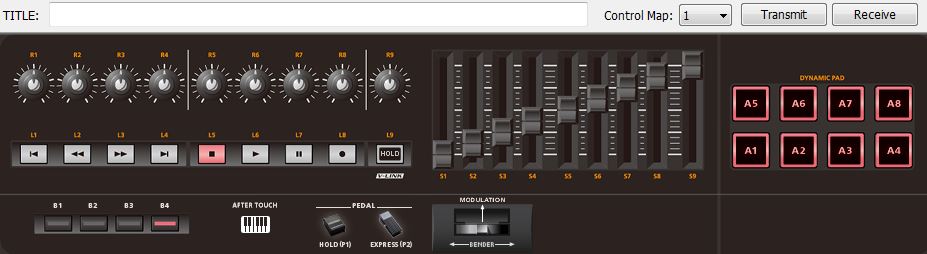
|
MachineClaw
Max Output Level: -68 dBFS
- Total Posts : 1116
- Joined: 2012/10/08 00:15:28
- Status: offline
Re: Most Compatible Keyboard Controllers?
2013/07/13 11:55:37
(permalink)
I have an Oxygen49 and an Akai MPK88 and both of them work in Sonar but with ACT are passible in control setups. sometimes a slider, pad, knob will forget it's assigned function. I've just given up on using all the advanced features of these controllers in Sonar. they work and I can input just don't always get to use my bells and whistles within Sonar.
Now with Ableton 9 and Reason 7 no problems at all. everything is slick, easy setup and everything just works.
I don't know if it's me (most likely), ACT or Sonar template I haven't dived in to check things out, still trying to learn stuff in Sonar.
|
icontakt
Max Output Level: -32.5 dBFS

- Total Posts : 4266
- Joined: 2012/03/04 08:18:02
- Location: Tokyo
- Status: offline
Re: Most Compatible Keyboard Controllers?
2013/07/13 12:36:21
(permalink)
☄ Helpfulby aglewis723 2013/07/13 14:01:26
2:43AM
aglewis723
Thanks for that! The A500, is it pretty much plug and play? Did you have to map anything and does it retain its control?
No problem! Yes, the Cakewalk A-Pro's will retain their programming if control maps 1-16 are used. I forgot exactly, but control map 0 cannot be programmed, or it can be programmed but will not retain its settings. The A-Pro editor is intuitive and makes it very easy. Screenshot below...
Hang on a second. I was just about to go to bed and then saw your post on my smartphone, and couldn't help booting up my PC to reply. There are two software programs available when using A-800/500/300PRO with Sonar. The A-Pro Editor is an editor to edit control maps 1-19 in the A-Pro hardware, and the other one is Sonar Control Surface Plugin, which uses Cakewalk's controller technology ACT to control various parameters in Sonar. No matter which map (1-19) you choose in the A-Pro hardware, if you set up the Control Surface Plugin in Sonar (which is recommended by Roland), Sonar will transmit a map called "SONAR ACT Map 2" to control map #19 in the A-Pro hardware every time it's launched. So, if you're using this Sonar Control Surface Plugin, you can forget about the A-Pro Editor. When do you use the A-Pro Editor then? Basically, you use it when using A-800/500/300Pro with other DAWs. Also, if you don't like what ACT does, you can disable (remove) Sonar Control Surface Plugin from Sonar's Preferences, and you can instead use one of maps you like (or use the "SONAR ACT Map2" in map#19) and use the Remote Control feature (MIDI learn) in Sonar. To see why I think Sonar Control Surface Plugin needs to improve, check this post: http://forum.cakewalk.com/FR-Cakewalk-you-really-must-improve-APro-Control-Surface-Plugin-for-Sonar-m2790490.aspx Well, I'm going to bed now :)
Tak T. Primary Laptop: Core i7-4710MQ CPU, 16GB RAM, 7200RPM HDD, Windows 7 Home Premium OS (Japanese) x64 SP1Secondary Laptop: Core2 Duo CPU, 8GB RAM, 7200RPM HDD, Windows 7 Professional OS (Japanese) x64 SP1Audio Interface: iD14 (ASIO)Keyboard Controller/MIDI Interface: A-800PRODAW: SONAR Platinum x64 (latest update installed)
|
2:43AM
Max Output Level: -68 dBFS
- Total Posts : 1147
- Joined: 2013/06/24 07:59:49
- Location: PHX
- Status: offline
Re: Most Compatible Keyboard Controllers?
2013/07/13 12:58:40
(permalink)
Well, I never got into the whole ACT thing because a) I personally don't really see a point to it for my needs, b) it is complex to set up (I think I had it working back in X1 to a degree but lost it after my first reinstall of Sonar), and c) I use more hardware synths in my projects.
Therefore, I have programmed my A500pro with the editor to set up CC outputs that are common to several of my synths. For example, the knobs and sliders control filter cutoff frequencies, filter resonances, ADSR decay parameters, LFO speeds, etc. I have the pads programmed to hit notes 36 through 43 for use with drum machine software VSTs. All of this is programmed on Control Map 1.
I've thought about programming subsequent control maps for utilizing each one for a particular hardware synth, but never got around to it yet. Again, not terribly useful for my situation because knob tracking (recording the CC output) is much easier on the front end by just using the synth itself.
|
icontakt
Max Output Level: -32.5 dBFS
- Total Posts : 4266
- Joined: 2012/03/04 08:18:02
- Location: Tokyo
- Status: offline
Re: Most Compatible Keyboard Controllers?
2013/07/13 20:56:47
(permalink)
@2:43AM: ACT is confusing at first but it’s not that complex to understand, but I see why you choose Remote Control over ACT. I think it really depends on what you want to use these knobs/sliders/buttons/pads for. @aglewis723: aglewis723
The A500, is it pretty much plug and play? Did you have to map anything and does it retain its control?
What do you want to use the knobs/sliders/buttons/pads for? If you want to use the L1-L8 buttons as a transport module or if you want to assign various commands in Sonar (which you can assign keyboard shortcuts to) to the L1-L8 buttons, A1-A8 pads, etc., and if you don’t mind about ACT not being able to control volume faders and pan knobs of non-contiguous tracks/buses in Sonar, I’d say the A-Pro Control Surface Plugin is the one for you (and there’s not much to set up). In my case, I want to use sliders S1-S8 to control non-contiguous tracks/buses so I combine ACT and Remote Control (combining the two isn't recommended by Roland, but it works fine if you employ a special technique), which means buttons L1-L8 and pads A1-A8 do their jobs according to ACT, while the sliders and knobs act according to the Remote Control feature. I think you want to use one of the sliders as a modulation wheel, so maybe you'll end up combining ACT and Remote Control, too. Btw, if you intend to use the pads A1-A8 for drumming, you might want to check this thread first (maybe you already have): http://forum.cakewalk.com/The-dynamic-pads-on-the-A800-Pro-are-pretty-lame-m2831929.aspx To be honest I'm not sure if A-Pro is the best controller for Sonar, but I like the key action and the size/weight of the product very much (note that the keys are a little shorter than regular keys of hardware synths). Hope that helps.
Tak T. Primary Laptop: Core i7-4710MQ CPU, 16GB RAM, 7200RPM HDD, Windows 7 Home Premium OS (Japanese) x64 SP1Secondary Laptop: Core2 Duo CPU, 8GB RAM, 7200RPM HDD, Windows 7 Professional OS (Japanese) x64 SP1Audio Interface: iD14 (ASIO)Keyboard Controller/MIDI Interface: A-800PRODAW: SONAR Platinum x64 (latest update installed)
|