John
Forum Host

- Total Posts : 30467
- Joined: 2003/11/06 11:53:17
- Status: offline

Re:For those wanted the core schedule for quads.
2009/09/23 00:16:11
(permalink)
C:\Docments and Settings\User Name\APplication Data\Cakewalk\Sonar 8.5 Producer I don't have that folder. I am on Vista. But check this out. 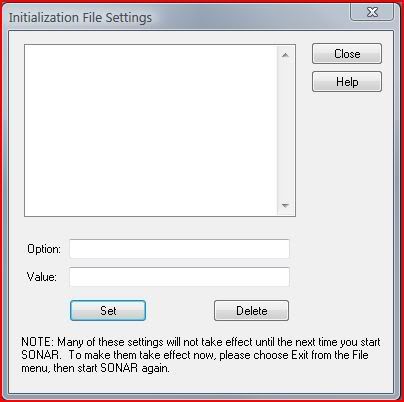 What this says to me is CW and MS has done so much to screw up the paths to where these files reside nobody knows where they are. 
|
Hansenhaus
Max Output Level: -56.5 dBFS

- Total Posts : 1866
- Joined: 2004/06/29 16:18:03
- Location: Delray Beach, FL.
- Status: offline
Re:For those wanted the core schedule for quads.
2009/09/23 00:23:33
(permalink)
Wow that is wierd. Well Since I'm still on XP I will digress from this part of the discussion. 
|
Jose7822
Max Output Level: 0 dBFS

- Total Posts : 10031
- Joined: 2005/11/07 18:59:54
- Location: United States
- Status: offline
Re:For those wanted the core schedule for quads.
2009/09/23 00:30:44
(permalink)
I don't think I've ever seen that window before.
All I know is that you need to have hidden files/folder enabled in order to get to the path I gave you in my previous post.
OR Navigate to:
C:\Program Files\Cakewalk\SONAR 8.5 Producer <== for the 64 bit version of Sonar.
C:\Program Files (x86)\Cakewalk\SONAR 8.5 Producer <== for the 32 bit version of Sonar.
Inside this folder, there is a shortcut folder (named "Cakewalk User Data") that will take you to the actual "Sonar 8.5 Producer" folder where the AUD.INI file resides.
But, again, I find this all unnecesary when you have the option to just open the AUD.INI file from within Sonar.
HTH
Intel Q9400 2.66 GHz 8 GB of RAM @ 800 Mhz ATI Radeon HD 3650 Windows 7 Professional (SP1) x64 Cubase 6.03 x64 Sonar PE 8.5.3 x64 RME FireFace 400 Frontier Design Alpha Track Studio Logic VMK-188 Plus http://www.youtube.com/user/SonarHD
|
Jose7822
Max Output Level: 0 dBFS
- Total Posts : 10031
- Joined: 2005/11/07 18:59:54
- Location: United States
- Status: offline
Re:For those wanted the core schedule for quads.
2009/09/23 00:32:55
(permalink)
I just wanted to clarify that this path:
C:\Program Files\Cakewalk\SONAR 8.5 Producer
Also applies to 32 bit OS. The ones given above are for 64 bit OS.
Intel Q9400 2.66 GHz 8 GB of RAM @ 800 Mhz ATI Radeon HD 3650 Windows 7 Professional (SP1) x64 Cubase 6.03 x64 Sonar PE 8.5.3 x64 RME FireFace 400 Frontier Design Alpha Track Studio Logic VMK-188 Plus http://www.youtube.com/user/SonarHD
|
John
Forum Host
- Total Posts : 30467
- Joined: 2003/11/06 11:53:17
- Status: offline
Re:For those wanted the core schedule for quads.
2009/09/23 00:37:46
(permalink)
Wow that is wierd. Well Since I'm still on XP I will digress from this part of the discussion. See what I mean? LOL
|
Jose7822
Max Output Level: 0 dBFS
- Total Posts : 10031
- Joined: 2005/11/07 18:59:54
- Location: United States
- Status: offline
Re:For those wanted the core schedule for quads.
2009/09/23 00:48:10
(permalink)
John,
It's really not that hard. There's only one AUD.INI file, unless you have several version of Sonar installed (in which case each AUD.INI file is stored in their corresponding Sonar Producer folder). In my case, I have a 'Sonar 8 Producer Edition' and a 'Sonar 8.5 Producer' folder each with their own AUD.INI file inside. There's 3 ways (I know of) you can get to the same file (which I've explained already), the easiest on being from within Sonar itself. It's really not as complicated as you make it seem :-).
Take care!
Intel Q9400 2.66 GHz 8 GB of RAM @ 800 Mhz ATI Radeon HD 3650 Windows 7 Professional (SP1) x64 Cubase 6.03 x64 Sonar PE 8.5.3 x64 RME FireFace 400 Frontier Design Alpha Track Studio Logic VMK-188 Plus http://www.youtube.com/user/SonarHD
|
John
Forum Host
- Total Posts : 30467
- Joined: 2003/11/06 11:53:17
- Status: offline
Re:For those wanted the core schedule for quads.
2009/09/23 00:49:48
(permalink)
I don't think I've ever seen that window before. All I know is that you need to have hidden files/folder enabled in order to get to the path I gave you in my previous post. OR Navigate to: C:\Program Files\Cakewalk\SONAR 8.5 Producer <== for the 64 bit version of Sonar. C:\Program Files (x86)\Cakewalk\SONAR 8.5 Producer <== for the 32 bit version of Sonar. Inside this folder, there is a shortcut folder (named "Cakewalk User Data") that will take you to the actual "Sonar 8.5 Producer" folder where the AUD.INI file resides. But, again, I find this all unnecesary when you have the option to just open the AUD.INI file from within Sonar. HTH No that is not the problem. You have to know that is the very first thing I do when I deal with a new OS is make sure I know where everything is and how to get to it. One basic thing is unhide everything and show extensions. The problem is simple Sonar's install places these files in places that change with each version and with the OS used. Also instead of deleting irrelevant files it leaves them on the system to confuse the user base such as myself. I can't call it a bug but it is a PITA big time. That dialog is in Options toward the bottom. It has always been empty. I thought when it first appeared all my troubles would be over. It turns out even CW has no idea where those files are. Its been in Sonar for awhile now. I laugh only because its so funny in a bizarre way. Jose don't get the wrong impression here I do know all this stuff. I have been dealing with this ever since Pro Audio. The one thing I did not know was about the access in the audio options for the aud.ini file. I didn't know it would actually work. I have been doing this sort of thing with Sonar for years. Rewriting the master ini file and so on. You name I have edited at some point. To be a Sonar user one needs to be a hacker of sorts. LOL There's only one AUD.INI file
No, there is only one right Aud.ini file. I have dozens of them all over the place.
post edited by John - 2009/09/23 00:59:39
|
Jose7822
Max Output Level: 0 dBFS
- Total Posts : 10031
- Joined: 2005/11/07 18:59:54
- Location: United States
- Status: offline
Re:For those wanted the core schedule for quads.
2009/09/23 01:07:18
(permalink)
The only time I remember them changing the placement of these files was with Sonar 6 and the advent of Vista. But, ever since then, I haven't seen any of them move to another place. Correct me if I'm wrong, but those places I mentioned are one and the same and where the AUD.INI file has resided ever since Sonar 6. Again, the only time you'll see diferent versions of the AUD.INI file is when you have more than one version of Sonar installed on your machine. One AUD.INI file for each version of Sonar, which makes sense to me since that enables you to keep the previous version intact when a new one is installed. However, I don't know what the deal is with the empty Initialization File thingy. That is weird!
post edited by Jose7822 - 2009/09/23 01:08:20
Intel Q9400 2.66 GHz 8 GB of RAM @ 800 Mhz ATI Radeon HD 3650 Windows 7 Professional (SP1) x64 Cubase 6.03 x64 Sonar PE 8.5.3 x64 RME FireFace 400 Frontier Design Alpha Track Studio Logic VMK-188 Plus http://www.youtube.com/user/SonarHD
|
John
Forum Host
- Total Posts : 30467
- Joined: 2003/11/06 11:53:17
- Status: offline
Re:For those wanted the core schedule for quads.
2009/09/23 01:23:37
(permalink)
Well in my system I have them under Programdata, and user for each and everyone of the versions that were ever installed on this system. True they are in there proper folder yet I have at least two places where these files are located some are even more scattered. Still, it begs the question why? Why can't they be in the folder where the program is? They are just INI files for Pete's sake. I don't buy the CW explanation that its a Vista requirement. Other programs have these type file in their own folder and run just fine.
|
Jose7822
Max Output Level: 0 dBFS
- Total Posts : 10031
- Joined: 2005/11/07 18:59:54
- Location: United States
- Status: offline
Re:For those wanted the core schedule for quads.
2009/09/23 01:33:50
(permalink)
Not on my system, so they must've changed this at some point prior to/or when Sonar 8 came out. The AUD.INI files are ONLY found at their respective Sonar Producer version folder (again Sonar 8 and Sonar 8.5 in my case). On the other hand, the Cakewalk.INI file is indeed found in the Program Data folder, as well as inside the Sonar Producer folder. Only they know the reasons for this though.
Take care!
Intel Q9400 2.66 GHz 8 GB of RAM @ 800 Mhz ATI Radeon HD 3650 Windows 7 Professional (SP1) x64 Cubase 6.03 x64 Sonar PE 8.5.3 x64 RME FireFace 400 Frontier Design Alpha Track Studio Logic VMK-188 Plus http://www.youtube.com/user/SonarHD
|
John
Forum Host
- Total Posts : 30467
- Joined: 2003/11/06 11:53:17
- Status: offline
Re:For those wanted the core schedule for quads.
2009/09/23 01:39:04
(permalink)
Jose have you ever looked at the MS Office file directory structure? At least Sonar's is not anywhere as convoluted as that. But its getting there. I believe that that is CW's standard. LOL
|
Jose7822
Max Output Level: 0 dBFS
- Total Posts : 10031
- Joined: 2005/11/07 18:59:54
- Location: United States
- Status: offline
Re:For those wanted the core schedule for quads.
2009/09/23 01:43:07
(permalink)
No I haven't, but that's messed up John :-P
Intel Q9400 2.66 GHz 8 GB of RAM @ 800 Mhz ATI Radeon HD 3650 Windows 7 Professional (SP1) x64 Cubase 6.03 x64 Sonar PE 8.5.3 x64 RME FireFace 400 Frontier Design Alpha Track Studio Logic VMK-188 Plus http://www.youtube.com/user/SonarHD
|
bil_g
Max Output Level: -89 dBFS

- Total Posts : 75
- Joined: 2008/10/25 19:32:18
- Status: offline
Re:For those wanted the core schedule for quads.
2009/09/23 01:48:45
(permalink)
John, Eric, and Jose,
That Options/Initialization File edits Cakewalk.ini(same folder as Aud.ini). I added WarnSilentBuses=0 to mine so it would stop with that annoying window when you load projects with any bus outs set to "none". Cakewalk.ini is probably not reloaded when you hit the new reload config button in Options/Audio. I think that's why it says to restart.
You know, I don't think I've ever noticed that PanicStrength variable in Help under Cakewalk.ini. Interesting...
|
Jose7822
Max Output Level: 0 dBFS
- Total Posts : 10031
- Joined: 2005/11/07 18:59:54
- Location: United States
- Status: offline
Re:For those wanted the core schedule for quads.
2009/09/23 01:55:35
(permalink)
That's what I was wondering, if only changes made to the Cakewalk.ini file show up in the Initialization window.
Is that how it works?
Intel Q9400 2.66 GHz 8 GB of RAM @ 800 Mhz ATI Radeon HD 3650 Windows 7 Professional (SP1) x64 Cubase 6.03 x64 Sonar PE 8.5.3 x64 RME FireFace 400 Frontier Design Alpha Track Studio Logic VMK-188 Plus http://www.youtube.com/user/SonarHD
|
bil_g
Max Output Level: -89 dBFS
- Total Posts : 75
- Joined: 2008/10/25 19:32:18
- Status: offline
Re:For those wanted the core schedule for quads.
2009/09/23 02:00:19
(permalink)
Looks like it. just tested w/ the panic variable.
|
Jose7822
Max Output Level: 0 dBFS
- Total Posts : 10031
- Joined: 2005/11/07 18:59:54
- Location: United States
- Status: offline
Re:For those wanted the core schedule for quads.
2009/09/23 02:08:34
(permalink)
Ah, thanks!
That makes it better to edit it since you only see what's been modified.
Makes sense :-)
Intel Q9400 2.66 GHz 8 GB of RAM @ 800 Mhz ATI Radeon HD 3650 Windows 7 Professional (SP1) x64 Cubase 6.03 x64 Sonar PE 8.5.3 x64 RME FireFace 400 Frontier Design Alpha Track Studio Logic VMK-188 Plus http://www.youtube.com/user/SonarHD
|
razor
Max Output Level: -59.5 dBFS

- Total Posts : 1557
- Joined: 2004/05/10 16:53:27
- Location: Irvine, CA
- Status: offline
Re:For those wanted the core schedule for quads.
2009/09/23 13:59:11
(permalink)
John
cyphersuit
I have a minor problem now. after having changed the ini file whenever i close sonar (as in exit the program), i get the error message "sonar does not work anymore".
(sorry for bad english)
How did you do the change?
I did mine with notepad. I inserted this:
ThreadSchedulingModel=
With a value of 2 just after the = sign. No space.
It was inserted in the [Waves] section of the audio.ini.
With my system being Vista I found it here:
C:/users/me/appdata/roaming/cakewalk/sonar 8.5 producer
Whoops--my previous post did stick. Pay no attention to this...
post edited by razor - 2009/09/23 14:02:35
Stephen Davis Cakewalk by Bandlab Windows 7 Pro 64-Bit ADK DAW - (out of business 2018) Intel i7 4930K CPU Core i7 SB-E MOBO 16 GB DDR3 RAM 7 TB Storage Layla 3G SoundCard (11.5 ms Roundtrip Latency) UAD-2 DSP WaveLab 8 Pro 64-bit Sound Forge 10 Pro
|
razor
Max Output Level: -59.5 dBFS
- Total Posts : 1557
- Joined: 2004/05/10 16:53:27
- Location: Irvine, CA
- Status: offline
Re:For those wanted the core schedule for quads.
2009/09/23 14:06:58
(permalink)
John
Be sure you are editing the right audio.ini file. This is a real PITA to make sure you have the right one. Why you may ask. Its because for CW to stay compliant with the changing Windows standards CW has to put this file in different places. XP has it in one place Vista has it in another place. This is also true of all the ini files Sonar uses. You think you're editing a current file only to find that you are editing a clone that has no effect what so ever.
I liked it much better when all these files were in the Sonar directory.
Jose has the best solution but it may not work in some cases. It all depends on the location of said file.
Well, it was in the parent folder of Sonar Producer 8 in XP. Do you or anyone know the proper file path for XP? I can double check. Thanks,
Stephen Davis Cakewalk by Bandlab Windows 7 Pro 64-Bit ADK DAW - (out of business 2018) Intel i7 4930K CPU Core i7 SB-E MOBO 16 GB DDR3 RAM 7 TB Storage Layla 3G SoundCard (11.5 ms Roundtrip Latency) UAD-2 DSP WaveLab 8 Pro 64-bit Sound Forge 10 Pro
|
Jose7822
Max Output Level: 0 dBFS
- Total Posts : 10031
- Joined: 2005/11/07 18:59:54
- Location: United States
- Status: offline
Re:For those wanted the core schedule for quads.
2009/09/23 14:11:38
(permalink)
Well, there could be something else causing this core spiking. 3rd party plugins are the usual suspects (especially heavy hitter ones).
Also, the reason Cakewalk made this a variable is because not everyone has a Quad Core CPU and, as the note John posted said, this setting is not recommended for single nor dual core CPUs. After making this change, I noticed a more evenly spread among cores (more noticable in some projects than others). But not all projects are created equal, so I would try opening others to see if the problem exists in those too. If so, then something is cause that reaction and you're gonna need to find out what that is.
Intel Q9400 2.66 GHz 8 GB of RAM @ 800 Mhz ATI Radeon HD 3650 Windows 7 Professional (SP1) x64 Cubase 6.03 x64 Sonar PE 8.5.3 x64 RME FireFace 400 Frontier Design Alpha Track Studio Logic VMK-188 Plus http://www.youtube.com/user/SonarHD
|
bil_g
Max Output Level: -89 dBFS
- Total Posts : 75
- Joined: 2008/10/25 19:32:18
- Status: offline
Re:For those wanted the core schedule for quads.
2009/09/23 14:31:40
(permalink)
razor
Well, it was in the parent folder of Sonar Producer 8 in XP. Do you or anyone know the proper file path for XP? I can double check.
Check Eric's post at #58. What you are seeing in the parent folder is a shortcut to the correct location.
|
razor
Max Output Level: -59.5 dBFS
- Total Posts : 1557
- Joined: 2004/05/10 16:53:27
- Location: Irvine, CA
- Status: offline
Re:For those wanted the core schedule for quads.
2009/09/23 15:19:29
(permalink)
I'll check again that I edited the correct file.
Thanks,
Stephen Davis Cakewalk by Bandlab Windows 7 Pro 64-Bit ADK DAW - (out of business 2018) Intel i7 4930K CPU Core i7 SB-E MOBO 16 GB DDR3 RAM 7 TB Storage Layla 3G SoundCard (11.5 ms Roundtrip Latency) UAD-2 DSP WaveLab 8 Pro 64-bit Sound Forge 10 Pro
|
razor
Max Output Level: -59.5 dBFS
- Total Posts : 1557
- Joined: 2004/05/10 16:53:27
- Location: Irvine, CA
- Status: offline
Re:For those wanted the core schedule for quads.
2009/09/24 18:19:56
(permalink)
razor
I'll check again that I edited the correct file.
Thanks,
Ah, no joy. NI (Negative Impact). It's gotta be a plug in. I'll check Guitar Rig 3 (lite) that came with Sonar and see if it's the culprit. I don't suppose anyone knows how to tweak plug-ins so they use all cores evenly?
Stephen Davis Cakewalk by Bandlab Windows 7 Pro 64-Bit ADK DAW - (out of business 2018) Intel i7 4930K CPU Core i7 SB-E MOBO 16 GB DDR3 RAM 7 TB Storage Layla 3G SoundCard (11.5 ms Roundtrip Latency) UAD-2 DSP WaveLab 8 Pro 64-bit Sound Forge 10 Pro
|
John
Forum Host
- Total Posts : 30467
- Joined: 2003/11/06 11:53:17
- Status: offline
Re:For those wanted the core schedule for quads.
2009/09/24 18:40:00
(permalink)
Check Eric's post at #58. What you are seeing in the parent folder is a shortcut to the correct location. Now we have shortcuts to deal with too? LOL
|
Jose7822
Max Output Level: 0 dBFS
- Total Posts : 10031
- Joined: 2005/11/07 18:59:54
- Location: United States
- Status: offline
Re:For those wanted the core schedule for quads.
2009/09/24 18:42:31
(permalink)
razor
I don't suppose anyone knows how to tweak plug-ins so they use all cores evenly?
The only way to do this is by having the same amount of plugins evenly distributed throughout the project. For example, having the same FX and the same number of instances of this FX on all tracks and/or busses. This is because each Track/Bus is given a thread. At least that's what Noel said when we asked him back then (if I understood him correctly). HTH
post edited by Jose7822 - 2009/09/24 18:56:24
Intel Q9400 2.66 GHz 8 GB of RAM @ 800 Mhz ATI Radeon HD 3650 Windows 7 Professional (SP1) x64 Cubase 6.03 x64 Sonar PE 8.5.3 x64 RME FireFace 400 Frontier Design Alpha Track Studio Logic VMK-188 Plus http://www.youtube.com/user/SonarHD
|
guitarmikeh
Max Output Level: -72 dBFS

- Total Posts : 942
- Joined: 2005/03/11 23:16:02
- Location: ?
- Status: offline
Re:Multi-Core Balancing AUD.INI Variable from Noel's post.
2009/09/25 02:10:30
(permalink)
Well I'll be a monkey's uncle! this works! It has made my system more stable, more responsive with lower latency.
thanks for this, John, Jose and Noel. it's brought my system to another level.
haven't posted in a long time. I thought I'd post the above showing my gratitude. and to bump it. cause it's a good tweak.
thanks again guys,
mikeh
I harbor no ill will towards any man.
|