2:43AM
Max Output Level: -68 dBFS

- Total Posts : 1147
- Joined: 2013/06/24 07:59:49
- Location: PHX
- Status: offline

My Questions About X3 vs. X2 Features, Fixes, Annoyances, Wishes, Etc...
I have some questions regarding Sonar X3 vs. X2. I have compiled some questions and annoyances from X2, and I would like your input from the X3 users out there. Overall, without a demo for X3, there is no way to know of the bug fixes or improvements in the latest version (X3c). So the only way to find out is to ask! Some questions may need a little X3-experimentation to confirm. Thanks in advance! Here are my questions (and to ease is responses/replies, they are numbered): #1. Are Sends "check-marked" in the drop-down list to show that it's active? Also, are the abbreviations shown on the top-side of the drop-down menu (before it's clicked; see picture below) any clearer, i.e. a little less cryptic? Overall, my biggest beef with sends in X2 is that despite a gray, shaded area on the left side of the drop-down menu, a check-mark or highlight is not utilized to show the active Send-Destination for any given Send number. See picture below where a nice check mark or dot should be located to designate the "active" send in the drop-down menu. It's like Cakewalk wanted to do this, but forgot, and it was never implemented. After all, the shaded area is obviously available for a check mark! So has this feature been added or improved in X3? 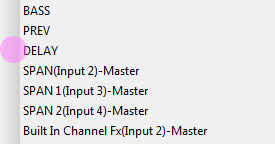 ...and by cryptic, I mean this: 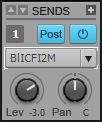 At first glance, I think it's "Bus Input Compressor FX...two...'M'...uh? Oh wait, I'll just pop open the drop-down to see which one is selected! Oh wait. Can't do that!  [Problem report and feature request submitted on 12/9/13 - CWBRN-22318]. #2. [Problem report and feature request submitted on 12/9/13 - CWBRN-22318]. #2. If Sonar is running on a dual-monitor setup, where the Track View and Multi-Dock/Console View are displayed separately, and Sonar is minimized, then upon reclick to foreground (i.e. re-maximize), the second monitor's display (in this example, the Multi-Dock) reappears not in fullscreen; it merely reopens in a small window, specifically a window 280x1279 pixels. So did Cakewalk fix this issue? NOTE: this may be a Windows vs. floating-window issue, inherent to a program running in the Windows environment, and therefore no fix or workaround is possible. [Problem report submitted on 6/18/13; submitted to development -- CWBRN-17792]. #3. For some reason, Sonar seems to forget VST and VSTi layouts in the Browser upon opening projects or starting new templates. Sometimes I need to select "Default All Plug-ins," then reselect my own Layout from time to time. It seems rather inconsistent and intermittent, but I don't think it's just me. So is this still an issue? #4. Perhaps I am missing something easy, but I always thought if I right-clicked an audio clip, I could select an effect to apply to it. For example, if I wanted to normalize a clip, I could right-click on it and select "Normalize" from a "Process" menu. However, the only way to do it, as far as I know, is to go to the top of the screen's Process Menu and select Apply Effect. I think it's been this way since the beginning of Sonar, but that doesn't mean it couldn't be improved. So has this optimized trick/feature been added? #5. Sometimes it would be nice to have a peak-hold needle on the ProChannel bus/channel compressors (similar to Cytomic's the Glue), or a numeric peak-hold indicator. This is asking a lot, but has this feature been added? After all, this would be more useful than the ability or Easter egg to turn on the PC4K comps' VU-meter backlight! Has anything been improved upon for any of the ProChannel modules besides the EQ? #6. Oh, BTW, can the EQ be removed from the ProChannel strip? In X2, it could never be removed. #7. Also, can values for knob parameters be manually entered in any ProChannel module other than the EQ? #8. There still seem to be some issues with envelopes and the "crashing" of envelopes (i.e. not working/non-responsive, either in automation lane or within a clip) once deleted and then recreated. For example, if a volume envelope is delete but created again, the track then does not read the envelope, therefore not causing any parameters to automatically change as it's supposed to. Is this issue fixed, or is stable, in X3? #9. Also, there is a delay when reading an automation envelope if a metronome count-in is utilized. Is this issue fixed in X3? [Problem report submitted on 8/13/13; submitted to development -- CWBRN-18893]. #10. There is a problem/bug with the Browser "forgetting" or "ignoring" the preview bus-routing if changed from the default, or if the original Preview stereo bus is deleted but added again later, after which the Browser audio-preview-bus is set back to a newly created Preview bus, or other bus for that matter. At this point, Sonar X2 completely ignores any bus and continues to preview/play audio clips at full volume which is very annoying. So...has this been fixed or improved? [Problem report submitted for good measure on 12/9/13; submitted to development on 1/2/14 -- CWBRN-22300]. EDIT (1/2/14): Item #10 has been "submitted to development" as of Jan. 2, 2014.
post edited by 2:43AM - 2014/01/02 20:51:52
|
2:43AM
Max Output Level: -68 dBFS
- Total Posts : 1147
- Joined: 2013/06/24 07:59:49
- Location: PHX
- Status: offline
Re: My Questions About X3 vs. X2 Features, Fixes, Annoyances, Wishes, Etc...
2013/12/09 07:13:28
(permalink)
...and BTW, I'm not trying to be a **** with this thread, I honestly would like to know if things have improved or if the listed features have been added.
Item #1 in my list is a huge one for me. However, I don't want to take the time to assemble a complete Feature Request to Cakewalk if it's already been implemented in X3x.
|
icontakt
Max Output Level: -32.5 dBFS

- Total Posts : 4266
- Joined: 2012/03/04 08:18:02
- Location: Tokyo
- Status: offline
Re: My Questions About X3 vs. X2 Features, Fixes, Annoyances, Wishes, Etc...
2013/12/09 08:47:57
(permalink)
#1 - Looks like it's still the same. X3c  #3 - I seem to have the same issue in X3.
Tak T. Primary Laptop: Core i7-4710MQ CPU, 16GB RAM, 7200RPM HDD, Windows 7 Home Premium OS (Japanese) x64 SP1Secondary Laptop: Core2 Duo CPU, 8GB RAM, 7200RPM HDD, Windows 7 Professional OS (Japanese) x64 SP1Audio Interface: iD14 (ASIO)Keyboard Controller/MIDI Interface: A-800PRODAW: SONAR Platinum x64 (latest update installed)
|
2:43AM
Max Output Level: -68 dBFS
- Total Posts : 1147
- Joined: 2013/06/24 07:59:49
- Location: PHX
- Status: offline
Re: My Questions About X3 vs. X2 Features, Fixes, Annoyances, Wishes, Etc...
2013/12/09 20:06:43
(permalink)
It is very disturbing that it's not in X3c; very upsetting. This is such a simple implementation that could aid project setup, troubleshooting and tweaking, and it makes as much sense as color customization (that works) for tracks and buses. I have submitted a problem report and a feature request (original post updated). I feel it's a "problem" because the drop-down menu's left hand, gray strip is clearly there and meant for implementation, yet it is non-functional in all versions of Sonar X_.
post edited by 2:43AM - 2013/12/09 20:21:04
|
Splat 
Max Output Level: 0 dBFS

- Total Posts : 8672
- Joined: 2010/12/29 15:28:29
- Location: Mars.
- Status: offline
Re: My Questions About X3 vs. X2 Features, Fixes, Annoyances, Wishes, Etc...
2013/12/09 20:29:34
(permalink)
I would wait until X3 demo comes in order to review it (ETA unknown, I suspect Cake wants to get their patches out of the way first such as X3D).
Sell by date at 9000 posts. Do not feed. @48/24 & 128 buffers latency is 367 with offset of 38. Sonar Platinum(64 bit),Win 8.1(64 bit),Saffire Pro 40(Firewire),Mix Control = 3.4,Firewire=VIA,Dell Studio XPS 8100(Intel Core i7 CPU 2.93 Ghz/16 Gb),4 x Seagate ST31500341AS (mirrored),GeForce GTX 460,Yamaha DGX-505 keyboard,Roland A-300PRO,Roland SPD-30 V2,FD-8,Triggera Krigg,Shure SM7B,Yamaha HS5.Maschine Studio+Komplete 9 Ultimate+Kontrol Z1.Addictive Keys,Izotope Nectar elements,Overloud Bundle,Geist.Acronis True Image 2014.
|
Kev999
Max Output Level: -36 dBFS

- Total Posts : 3922
- Joined: 2007/05/01 14:22:54
- Location: Victoria, Australia
- Status: offline
Re: My Questions About X3 vs. X2 Features, Fixes, Annoyances, Wishes, Etc...
2013/12/09 23:52:14
(permalink)
2:43AM
#2. If Sonar is running on a dual-monitor setup, where the Track View and Multi-Dock/Console View are displayed separately, and Sonar is minimized, then upon reclick to foreground (i.e. re-maximize), the second monitor's display (in this example, the Multi-Dock) reappears not in fullscreen; it merely reopens in a small window, specifically a window 280x1279 pixels. So did Cakewalk fix this issue? NOTE: this may be a Windows vs. floating-window issue, inherent to a program running in the Windows environment, and therefore no fix or workaround is possible.
I have seen lots of weird behaviour with the Console View resizing itself, usually just heightwise. It only occurs when the CV window is on a different screen from the main Sonar window. None of the other windows ever exhibit the same problem. It's not a new bug; it was there in Sonar 7 too.
SonarPlatinum∞(22.11.0.111)|Mixbus32C(4.3.19)|DigitalPerformer(9.5.1)|Reaper(5.77)FractalDesign:DefineR5|i7-6850k@4.1GHz|16GB@2666MHz-DDR4|MSI:GamingProCarbonX99a|Matrox:M9148(x2)|UAD2solo(6.5.2)|W7Ult-x64-SP1
Audient:iD22+ASP800|KRK:VXT6|+various-outboard-gear|+guitars&basses, etc.
Having fun at work lately
|
Splat
Max Output Level: 0 dBFS
- Total Posts : 8672
- Joined: 2010/12/29 15:28:29
- Location: Mars.
- Status: offline
Re: My Questions About X3 vs. X2 Features, Fixes, Annoyances, Wishes, Etc...
2013/12/10 09:08:59
(permalink)
Kev999
2:43AM
#2. If Sonar is running on a dual-monitor setup, where the Track View and Multi-Dock/Console View are displayed separately, and Sonar is minimized, then upon reclick to foreground (i.e. re-maximize), the second monitor's display (in this example, the Multi-Dock) reappears not in fullscreen; it merely reopens in a small window, specifically a window 280x1279 pixels. So did Cakewalk fix this issue? NOTE: this may be a Windows vs. floating-window issue, inherent to a program running in the Windows environment, and therefore no fix or workaround is possible.
I have seen lots of weird behaviour with the Console View resizing itself, usually just heightwise. It only occurs when the CV window is on a different screen from the main Sonar window. None of the other windows ever exhibit the same problem. It's not a new bug; it was there in Sonar 7 too.
Has this issue been logged?
Sell by date at 9000 posts. Do not feed. @48/24 & 128 buffers latency is 367 with offset of 38. Sonar Platinum(64 bit),Win 8.1(64 bit),Saffire Pro 40(Firewire),Mix Control = 3.4,Firewire=VIA,Dell Studio XPS 8100(Intel Core i7 CPU 2.93 Ghz/16 Gb),4 x Seagate ST31500341AS (mirrored),GeForce GTX 460,Yamaha DGX-505 keyboard,Roland A-300PRO,Roland SPD-30 V2,FD-8,Triggera Krigg,Shure SM7B,Yamaha HS5.Maschine Studio+Komplete 9 Ultimate+Kontrol Z1.Addictive Keys,Izotope Nectar elements,Overloud Bundle,Geist.Acronis True Image 2014.
|
2:43AM
Max Output Level: -68 dBFS
- Total Posts : 1147
- Joined: 2013/06/24 07:59:49
- Location: PHX
- Status: offline
Re: My Questions About X3 vs. X2 Features, Fixes, Annoyances, Wishes, Etc...
2013/12/10 10:05:57
(permalink)
CakeAlexS
Has this issue been logged? I don't know about others, but I submitted it awhile back. See original post. I got the Cakewalk response that the problem "has been submitted to development."
|
Bristol_Jonesey
Max Output Level: 0 dBFS
- Total Posts : 16775
- Joined: 2007/10/08 15:41:17
- Location: Bristol, UK
- Status: offline
Re: My Questions About X3 vs. X2 Features, Fixes, Annoyances, Wishes, Etc...
2013/12/10 14:27:08
(permalink)
1 - I totally agree with you
4 - Right click an audio clip, there are options for Insert Effect, Process Effect, Open Clip Fx bin in the 4th section
6 - No
7 - no. You can of course utilise other Vst's data entry functions if you insert them into the Pro Channel as an Fx chain. Not quite the same I know.
8 - Never seen this in any version of Sonar. Envelopes have always worked fine for me.
9 - No delay here, seems to work fine.
CbB, Platinum, 64 bit throughoutCustom built i7 3930, 32Gb RAM, 2 x 1Tb Internal HDD, 1 x 1TB system SSD (Win 7), 1 x 500Gb system SSD (Win 10), 2 x 1Tb External HDD's, Dual boot Win 7 & Win 10 64 Bit, Saffire Pro 26, ISA One, Adam P11A,
|
2:43AM
Max Output Level: -68 dBFS
- Total Posts : 1147
- Joined: 2013/06/24 07:59:49
- Location: PHX
- Status: offline
Re: My Questions About X3 vs. X2 Features, Fixes, Annoyances, Wishes, Etc...
2013/12/24 14:08:56
(permalink)
Bristol_Jonesey
8 - Never seen this in any version of Sonar. Envelopes have always worked fine for me.
I am currently working on a project and the volume envelope basically died on the vine. It became unresponsive and did not send any volume increases/decreases to the track's respective fader; only moving the nodes manually with the mouse caused a change on the fader. Automation READ was on. I don't know what causes it exactly, and it usually occurs after working a project for a long time. Whatever it is, it happens. In X3, it would be nice to know that envelopes can be beaten to near-death but still remain intact and 100% functional.
|
...wicked
Max Output Level: -1.5 dBFS

- Total Posts : 7360
- Joined: 2003/12/18 01:00:56
- Location: Seattle
- Status: offline
Re: My Questions About X3 vs. X2 Features, Fixes, Annoyances, Wishes, Etc...
2013/12/24 18:12:45
(permalink)
I love this thread. Really? "Very disturbing" that an indicator tick isn't present? Is it really breaking your tranquility and causing anxiety? The way I'm looking at it, it adds one-click to your workflow.
=========== The Fog People =========== Intel i7-4790 16GB RAM ASUS Z97 Roland OctaCapture Win10/64 SONAR Platinum 64-bit billions VSTs, some of which work
|
2:43AM
Max Output Level: -68 dBFS
- Total Posts : 1147
- Joined: 2013/06/24 07:59:49
- Location: PHX
- Status: offline
Re: My Questions About X3 vs. X2 Features, Fixes, Annoyances, Wishes, Etc...
2013/12/24 21:53:05
(permalink)
...wicked
I love this thread. Really? "Very disturbing" that an indicator tick isn't present? Is it really breaking your tranquility and causing anxiety? The way I'm looking at it, it adds one-click to your workflow.
We're all entitled to our opinions and wishes. It may add one click more, but the checkmarks are utilized in other areas without problems. It's the principle of the matter. And like others, we all wish longtime bugs are finally squashed on current releases and patches.
|
...wicked
Max Output Level: -1.5 dBFS
- Total Posts : 7360
- Joined: 2003/12/18 01:00:56
- Location: Seattle
- Status: offline
Re: My Questions About X3 vs. X2 Features, Fixes, Annoyances, Wishes, Etc...
2013/12/24 23:52:59
(permalink)
But your hyperbole is laughably out of proportion. Srsly, "very disturbing"? Are you really "very disturbed"? Like the same level of anxiety when you find out a serial killer is loose in your neighborhood? Your points are fine, your rhetoric is the kind that makes people not take any of this crap srsly.
=========== The Fog People =========== Intel i7-4790 16GB RAM ASUS Z97 Roland OctaCapture Win10/64 SONAR Platinum 64-bit billions VSTs, some of which work
|
rontarrant
Max Output Level: -78 dBFS

- Total Posts : 643
- Joined: 2010/06/21 06:26:09
- Location: Ottawa, Ontario
- Status: offline
Re: My Questions About X3 vs. X2 Features, Fixes, Annoyances, Wishes, Etc...
2013/12/25 07:03:10
(permalink)
2:43AM
#2. If Sonar is running on a dual-monitor setup, where the Track View and Multi-Dock/Console View are displayed separately, and Sonar is minimized, then upon reclick to foreground (i.e. re-maximize), the second monitor's display (in this example, the Multi-Dock) reappears not in fullscreen; it merely reopens in a small window, specifically a window 280x1279 pixels. So did Cakewalk fix this issue? NOTE: this may be a Windows vs. floating-window issue, inherent to a program running in the Windows environment, and therefore no fix or workaround is possible.
[Problem report submitted on 6/18/13; submitted to development -- CWBRN-17792].
I can't say if this is a Windows issue or peculiar to Sonar (although experiences in other software seem to say it's Windows) however... There is a workaround. Don't maximize the window on screen #2, use the resize gadget to make it full screen. Minimize/maximize will now open both windows to their original sizes. This should work in X2 as well, BTW.
-Ron T. ---------------------------------------------------------- MSI GE72 2QF-247US, 12 gb, Focusrite 6i6, AT-2020 ---------------------------------------------------------- Windows 10 x64, Sonar Platinum
|
rontarrant
Max Output Level: -78 dBFS
- Total Posts : 643
- Joined: 2010/06/21 06:26:09
- Location: Ottawa, Ontario
- Status: offline
Re: My Questions About X3 vs. X2 Features, Fixes, Annoyances, Wishes, Etc...
2013/12/25 07:21:22
(permalink)
2:43AM#3. For some reason, Sonar seems to forget VST and VSTi layouts in the Browser upon opening projects or starting new templates. Sometimes I need to select "Default All Plug-ins," then reselect my own Layout from time to time. It seems rather inconsistent and intermittent, but I don't think it's just me. So is this still an issue? I'm assuming you're talking about the FX bin for this on... This hasn't happened to me in X3. And with the VST/plugin manager, you can get very fine control apparently. I haven't tried it yet, so can't say if it works as advertised. 2:43AM#4. Perhaps I am missing something easy, but I always thought if I right-clicked an audio clip, I could select an effect to apply to it. For example, if I wanted to normalize a clip, I could right-click on it and select "Normalize" from a "Process" menu. However, the only way to do it, as far as I know, is to go to the top of the screen's Process Menu and select Apply Effect. I think it's been this way since the beginning of Sonar, but that doesn't mean it couldn't be improved. So has this optimized trick/feature been added?? In X3, the clip-based context menu does have a Process Effect submenu, but the items in that submenu are the same as the FX bin, not the main window's Process menu. 2:43AM#6. Oh, BTW, can the EQ be removed from the ProChannel strip? In X2, it could never be removed.? I don't see any way to do this, but you can disable and collapse it. 2:43AM#7. Also, can values for knob parameters be manually entered in any ProChannel module other than the EQ?? No. Hope this helps at least a little.
-Ron T. ---------------------------------------------------------- MSI GE72 2QF-247US, 12 gb, Focusrite 6i6, AT-2020 ---------------------------------------------------------- Windows 10 x64, Sonar Platinum
|
Blades
Max Output Level: -43 dBFS

- Total Posts : 3246
- Joined: 2003/11/06 08:22:52
- Location: Georgia
- Status: offline
Re: My Questions About X3 vs. X2 Features, Fixes, Annoyances, Wishes, Etc...
2013/12/25 22:14:53
(permalink)
I don't know that I agree that just because there happens to be a vertical bar down the left side of the window that it was intentionally put there to hold some sort of selection indicator.
That said, it WOULD be a great place to put a check mark, little dot, or whatever to indicate that an option was selected. If not that, maybe a bold face of the selected item or maybe even a little popup with a "less cryptic" version in a little popup window.
I haven't looked at any of these issues, just wanted to drop my opinion on this, same way I wish someone would have added input to my issues with midi remote control not quite working! Not bitter or anything :)
|
2:43AM
Max Output Level: -68 dBFS
- Total Posts : 1147
- Joined: 2013/06/24 07:59:49
- Location: PHX
- Status: offline
Re: My Questions About X3 vs. X2 Features, Fixes, Annoyances, Wishes, Etc...
2013/12/26 06:09:31
(permalink)
Blades
I don't know that I agree that just because there happens to be a vertical bar down the left side of the window that it was intentionally put there to hold some sort of selection indicator.
Yes, it's a guess on my part, but if you compare the Sends drop-down menu to all other menus utilizing the check mark (e.g. MIDI ch. #, MIDI patch, MIDI I/O, audio I/O, etc.), they are all the same menu type and style. Therefore, one could only surmise that the Sends menu would (or should have) followed suit. Blades
Not bitter or anything :)
You mean you're not "very disturbed?" "Srsly?"
|
Loptec
Max Output Level: -72 dBFS

- Total Posts : 948
- Joined: 2011/02/07 13:29:01
- Location: Sweden
- Status: offline
Re: My Questions About X3 vs. X2 Features, Fixes, Annoyances, Wishes, Etc...
2013/12/26 08:19:44
(permalink)
2:43AM
Bristol_Jonesey
8 - Never seen this in any version of Sonar. Envelopes have always worked fine for me.
I am currently working on a project and the volume envelope basically died on the vine. It became unresponsive and did not send any volume increases/decreases to the track's respective fader; only moving the nodes manually with the mouse caused a change on the fader. Automation READ was on. I don't know what causes it exactly, and it usually occurs after working a project for a long time. Whatever it is, it happens. In X3, it would be nice to know that envelopes can be beaten to near-death but still remain intact and 100% functional.
You didn't activate Envelope Offset mode by accident and this is the reason why the faders doesn't react to envelopes? You activate/deactivate offset mode by pressing "o". It's a great feature if you for example have created an advanced automation and later want to increase or decrease the overall volume of a track without having to redo the automation. It woks for pan as well.
SAMUEL LIDSTRÖM
 DAW: Sonar Platinum (64bit) with Melodyne Studio - Controllers: Roland VS-700C, Cakewalk A-500 Pro, Yamaha P90Desktop Audio Interface: RME HDSPe RayDAT - Laptop Audio Interface: RME Babyface Pro DAW: Sonar Platinum (64bit) with Melodyne Studio - Controllers: Roland VS-700C, Cakewalk A-500 Pro, Yamaha P90Desktop Audio Interface: RME HDSPe RayDAT - Laptop Audio Interface: RME Babyface Pro
|
Noel Borthwick [Cakewalk]
Cakewalk Staff

- Total Posts : 6475
- Joined: 2003/11/03 17:22:50
- Location: Boston, MA, USA
- Status: offline
Re: My Questions About X3 vs. X2 Features, Fixes, Annoyances, Wishes, Etc...
2013/12/26 08:43:56
(permalink)
Regarding check's for used sends, they are not used because multiple tracks or buses can use the same send. Normally checks are used in menus when the item is a "radio choice" which doesnt really apply in this case.
Re #3 I know there were several fixes made in X3 and the updates for plugin layouts so pretty sure it should be addressed.
#5 - manual text entry applies to only built in modules like the compressor eq and tube saturation where the UI is drawn by SONAR.
|
icontakt
Max Output Level: -32.5 dBFS
- Total Posts : 4266
- Joined: 2012/03/04 08:18:02
- Location: Tokyo
- Status: offline
Re: My Questions About X3 vs. X2 Features, Fixes, Annoyances, Wishes, Etc...
2013/12/26 09:34:03
(permalink)
Noel Borthwick [Cakewalk]
Regarding check's for used sends, they are not used because multiple tracks or buses can use the same send. Normally checks are used in menus when the item is a "radio choice" which doesnt really apply in this case.
Hmm......this isn't very user-friendly, is it?
Tak T. Primary Laptop: Core i7-4710MQ CPU, 16GB RAM, 7200RPM HDD, Windows 7 Home Premium OS (Japanese) x64 SP1Secondary Laptop: Core2 Duo CPU, 8GB RAM, 7200RPM HDD, Windows 7 Professional OS (Japanese) x64 SP1Audio Interface: iD14 (ASIO)Keyboard Controller/MIDI Interface: A-800PRODAW: SONAR Platinum x64 (latest update installed)
|
Brando
Max Output Level: -47.5 dBFS

- Total Posts : 2776
- Joined: 2003/11/06 11:47:20
- Location: Canada
- Status: offline
Re: My Questions About X3 vs. X2 Features, Fixes, Annoyances, Wishes, Etc...
2013/12/26 09:55:21
(permalink)
Jlien X
Noel Borthwick [Cakewalk]
Regarding check's for used sends, they are not used because multiple tracks or buses can use the same send. Normally checks are used in menus when the item is a "radio choice" which doesnt really apply in this case.
Hmm......this isn't very user-friendly, is it?
It seems to me to be practical to avoid confusion - how can a radio choice be of value when a send can be used by multiple tracks and buses?
Brando
Cakewalk, Studio One Pro, Reaper Presonus Audiobox 1818VSL ASUS Prime Z370-A LGA1151, 32GB DDR4, Intel 8700K i7, 500 GB SSD, 3 x 1TB HDD, Windows 10 Pro 64
|
icontakt
Max Output Level: -32.5 dBFS
- Total Posts : 4266
- Joined: 2012/03/04 08:18:02
- Location: Tokyo
- Status: offline
Re: My Questions About X3 vs. X2 Features, Fixes, Annoyances, Wishes, Etc...
2013/12/26 10:49:42
(permalink)
Brando
Jlien X
Noel Borthwick [Cakewalk]
Regarding check's for used sends, they are not used because multiple tracks or buses can use the same send. Normally checks are used in menus when the item is a "radio choice" which doesnt really apply in this case.
Hmm......this isn't very user-friendly, is it?
It seems to me to be practical to avoid confusion - how can a radio choice be of value when a send can be used by multiple tracks and buses?
I don't know. A similar thing is just possible in the other daw I use. The name of the send used is automatically highlighted in the list. 
Tak T. Primary Laptop: Core i7-4710MQ CPU, 16GB RAM, 7200RPM HDD, Windows 7 Home Premium OS (Japanese) x64 SP1Secondary Laptop: Core2 Duo CPU, 8GB RAM, 7200RPM HDD, Windows 7 Professional OS (Japanese) x64 SP1Audio Interface: iD14 (ASIO)Keyboard Controller/MIDI Interface: A-800PRODAW: SONAR Platinum x64 (latest update installed)
|
stevec
Max Output Level: 0 dBFS
- Total Posts : 11546
- Joined: 2003/11/04 15:05:54
- Location: Parkesburg, PA
- Status: offline
Re: My Questions About X3 vs. X2 Features, Fixes, Annoyances, Wishes, Etc...
2013/12/26 11:17:34
(permalink)
That looks similar to how the Edit Filter displays already assigned automation.
SteveC https://soundcloud.com/steve-cocchi http://www.soundclick.com/bands/pagemusic.cfm?bandID=39163 SONAR Platinum x64, Intel Q9300 (2.5Ghz), Asus P5N-D, Win7 x64 SP1, 8GB RAM, 1TB internal + ESATA + USB Backup HDDs, ATI Radeon HD5450 1GB RAM + dual ViewSonic VA2431wm Monitors; Focusrite 18i6 (ASIO); Komplete 9, Melodyne Studio 4, Ozone 7 Advanced, Rapture Pro, GPO5, Valhalla Plate, MJUC comp, MDynamic EQ, lots of other freebie VST plugins, synths and Kontakt libraries
|
2:43AM
Max Output Level: -68 dBFS
- Total Posts : 1147
- Joined: 2013/06/24 07:59:49
- Location: PHX
- Status: offline
Re: My Questions About X3 vs. X2 Features, Fixes, Annoyances, Wishes, Etc...
2013/12/27 07:36:20
(permalink)
Noel Borthwick [Cakewalk]
Regarding check's for used sends, they are not used because multiple tracks or buses can use the same send.
Yes, but only one Send can be selected in the drop-down menu for that particular track or bus and the particular Send number. Examples: Track 1, Send #1-Delay bus @ 0dB <--check mark to show active in list. Track 1, Send #2-Reverb bus @ -3dB <--check mark to show active in this list which is separate from the other. So in other words, the check mark I am referring to would be within the Send "selection" menu. Only one Send is possible per Send number.
|