My Screensets (Long post warning!!)

Author
FastBikerBoy
Forum Host
  • Total Posts : 11326
  • Joined: 2008/01/25 16:15:36
  • Location: Watton, Norfolk, UK
  • Status: offline
2011/01/12 15:06:45 (permalink)

My Screensets (Long post warning!!)

I've been a huge advocate (Fanboi?? ) of Screensets (from now on SS) since they appeared in X1 and some users have asked me to post some of mine up so here they are in all their glory. They are very much a work in progress, I'm still tweaking them but fairly happy with where I am with them now.

I really feel the power of SS is misunderstood by some and I hope that these examples will give an idea of how powerful they are for organising 'workflow'. If at the end of this you still think they are just layouts, then I'm never going to convince you otherwise. I could never do this with layouts though, perhaps I was missing something? I also think once users start to realise the power there'll be less calls to 'go global'.

A better way of saving and loading them individually definitely but I'm more convinced than ever that global would be a disaster. Imagine hiding all your audio tracks in every project just because you choose to do that in one or changing the snap to or zoom resolutions. If you want them in every project set them up how you want them and then save that as a template. If you want them in old projects open that template and import them. You've only got to do it once per project.
 
First thing I'll say is that if your screensets are slow to change, disable your floppy disk controller in your BIOS - yes it really makes a difference. Even on my underpowered system (by CWs minimum specs) mine change pretty much instantly.

NOTES

I have my CV set to sync with my TV BTW.

The names in brackets are the names I have given them

The dark areas in the images are a result of me having two different sized monitors, not how they actually appear.

I hope the images are big enough.........

As I keep reciting the only thing so far that I have found limiting, aside from a couple of wishes I'll mention later, is my imagination. Anyway here they are with a brief explanation of my thinking behind each one. Enjoy...


SS 1 - (Standard)
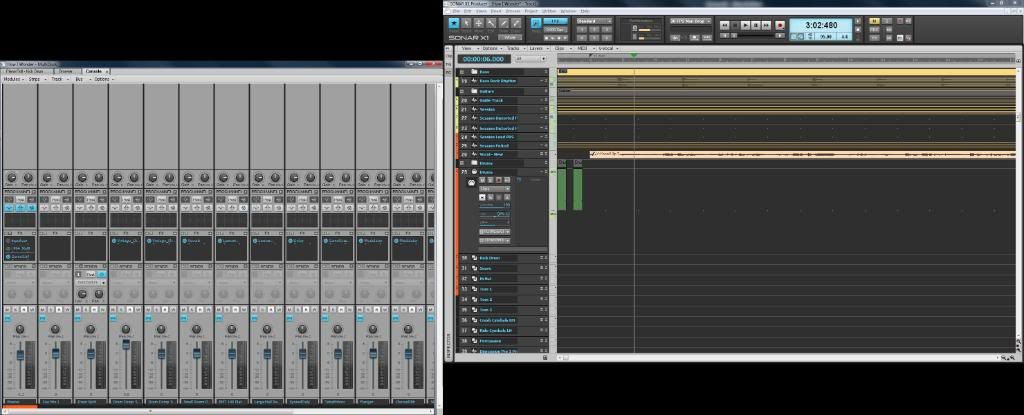


A boring one to start with - before all the exciting stuff starts. A general view I leave unlocked, so if I'm making changes here for whatever reason and then move to another screenset, when I return here it's as I left it and not back to its default state.

This is a TV in the right monitor, The left monitor has a maximised multidock (as do all my SS, unless otherwise stated)  with the CV, Browser, and PRV in the left monitor. The last view opened, in this case the CV is the one that will default to the front when switching back to the SS no matter which TAB was in view when the screenset is locked. I have no idea whether that's by design or a bug, but it is consistent so I can live with that. remember switching tabs is simply a ctrl-shift-left/right arrow key press. Widgets set to all.

One thing I wish they would add to SS is an indicator that shows whether the current SS is locked or not. I have a key assigned to lock/unlock but it's not easy to tell what the current state is.


SS 2 - (Audio Record)
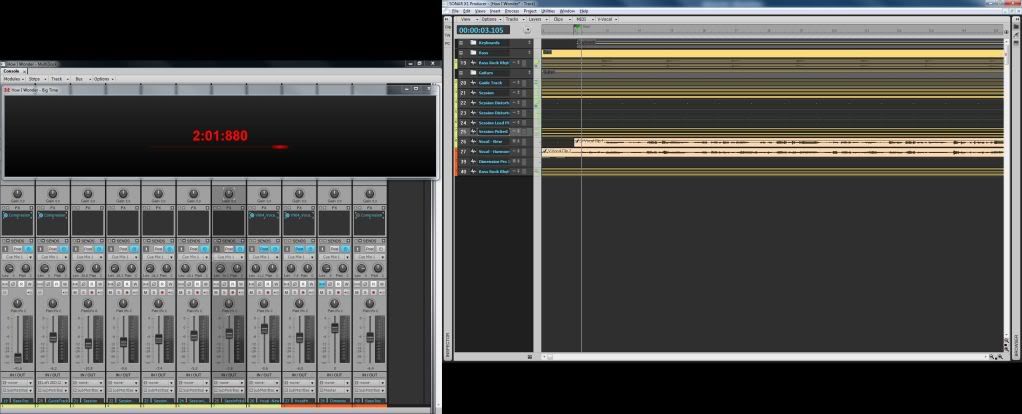


Now things start to get a little more interesting and once the floating window bug is sorted, it'll be even better.

As the name suggests I use this for audio recording. The right hand view again is TV but now with only the audio tracks showing, that's all I want to see here. (Hide others using the track manager).
The left hand view has a console view with tracks only and a floating big time window on top of that. For some reason my screen capture doesn' get it but it's the big time view stretched across the blank area of the console strips at the top of the console view. EDIT: Now fixed.) (To float a window and stop it auto-docking hold down the ctrl key as you move it)

I can see my meters and the big time as I'm recording. Remember I'm currently a one-man band bedroom, hobbyist, amateur or whatever you want to call me. I'm hoping to do more once/if ever I get the premises.
Only trouble is with this at the moment is the big time will be hidden when switching back to it. I'm hoping that this is a bug and be fixed in a future update. Press Alt-Shift-3 to bring it back to the front.

In this SS I have snap to set to measure but turned off. Widgets set to I/O. Edit filters all on clips.


SS 3 (MIDI record)
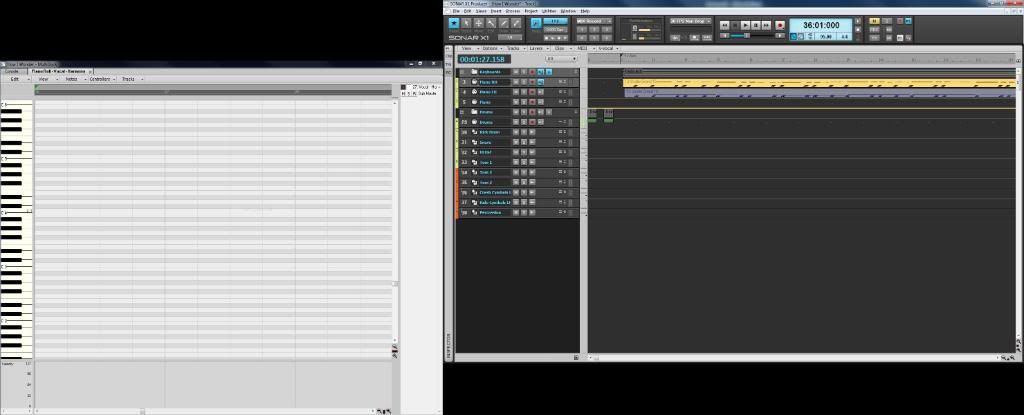


I use this for MIDI recording.

Similar to my Audio record SS except in this one only MIDI tracks are visible, the left hand monitor is PRV fairly well zoomed out but the CV is also docked in there so I can quickly access that if needed.
In this SS I have snap to set to measure but turned on. Widgets set to I/O. Edit filters set to clips.


SS 4 - (PRV 1)
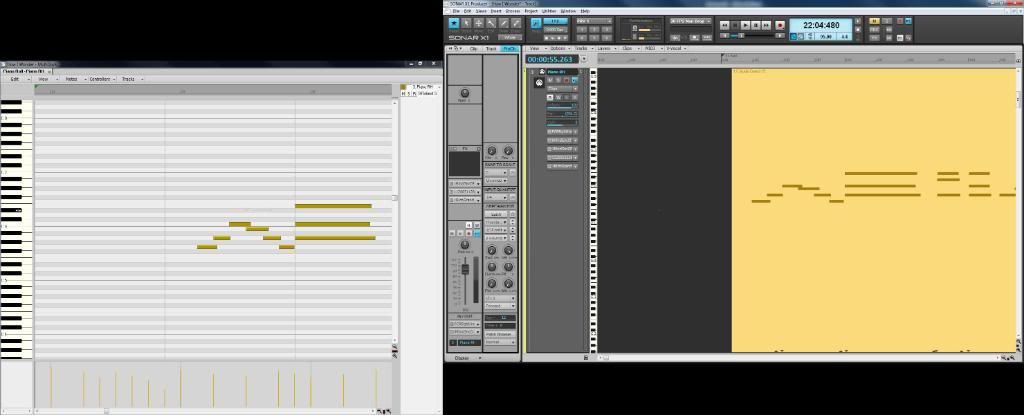


I use this for MIDI editing mainly in the PRV. Again only tracks visible are the MIDI tracks. I also have the inspector open on this view by default. Remember in all the SS that's only a keypress away anyway. Both views are fairly well zoomed in and I have the snap to at 1/16 and switched on.

To call up a track to edit in the PRV and the next view just double click the track. Double clicking a different track replaces the one in the PRV  with it. This SS also highlights another bug.  When switching back to this type of view with a MIDI track ready loaded the MIDI data in the PRV appears to have disappeared. Doubling clicking the track brings it back.

All track edit filters set to notes. Widgets on Mix


SS 5 - PRV 2
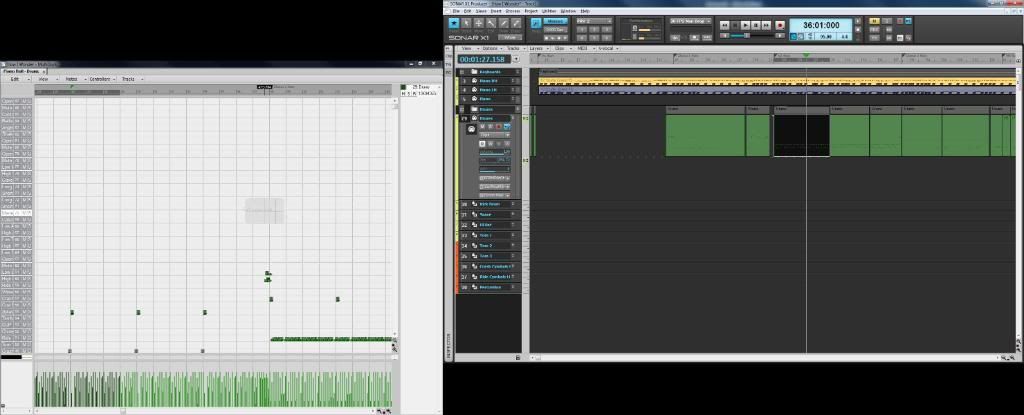


A copy of PRV 1 but both zooms are backed off and the snap to is now at measure. The inspector is off by default. I use this view for moving MIDI clips around and more clip based rather than note editing.

All track edit filters set to clips. Widgets on Mix


SS 6 - CV Tracks
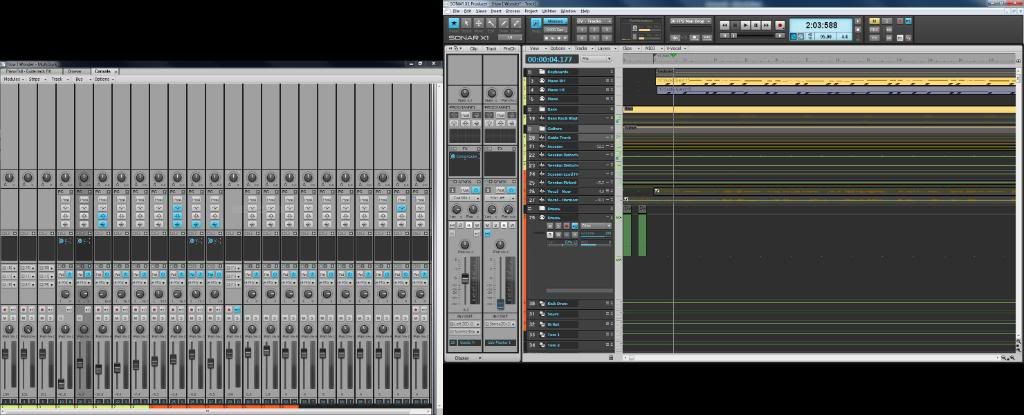


I have all tracks visible in this view. TV again in the right with a medium width track header , inspector visible, moderate zoom level, snap to at a measure. Left hand monitor has the CV with narrow tracks view  (let's not start on that one ) but at least I can see real detail in the inspector.

Widgets on Mix. All edit filters on audio tracks set initially to volume automation (cos that's what I start working on first when I'm mixing)
 

SS 7 - Buss View
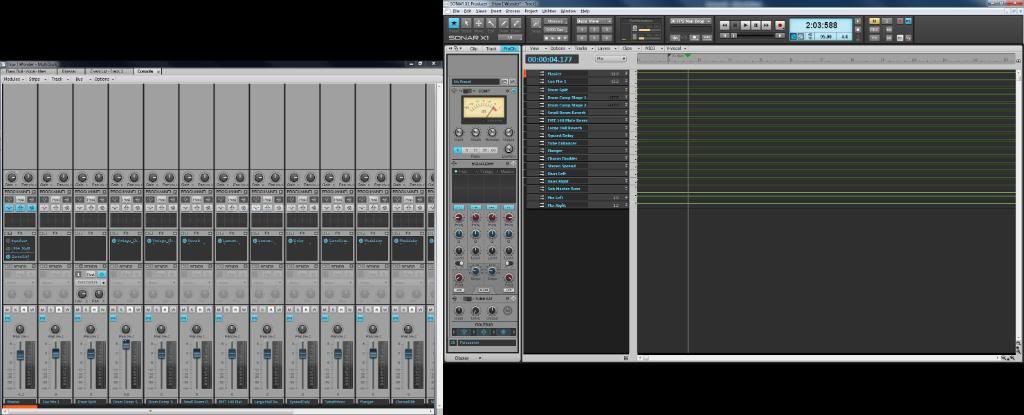


Similar layout to SS 6 but his time only busses visible. I have the strips in wide view in the CV, Inspector visible showing the prochannel. Widgets on mix and edit filter set to volume automation.
 

SS 8 - Synth Rack
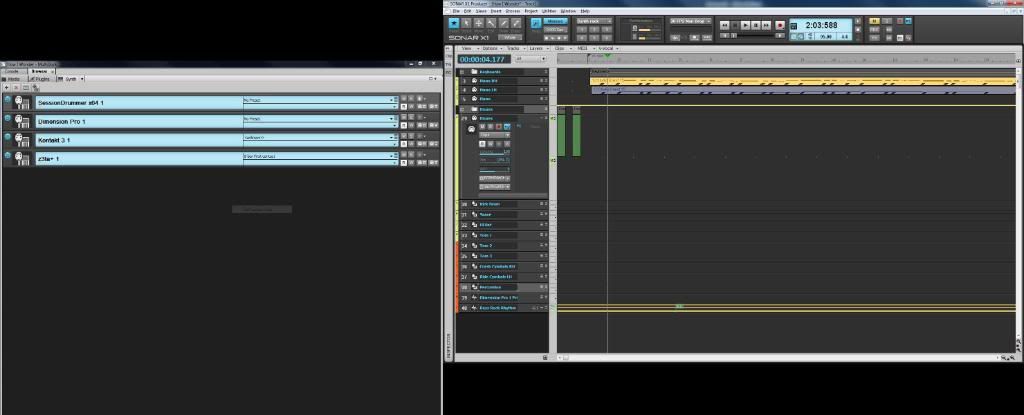


I don't use this SS much being more an audio and MIDI hardware kind of guy, but it's here if I do need it. Standard TV on the right, MIDI channels only. Browser with the synth tab at the front in the left. I also have the console docked there as well.
 
Widgets on all. Snap to at measure. Edit filters on Clips.
 

SS 9 - Step Sequencer
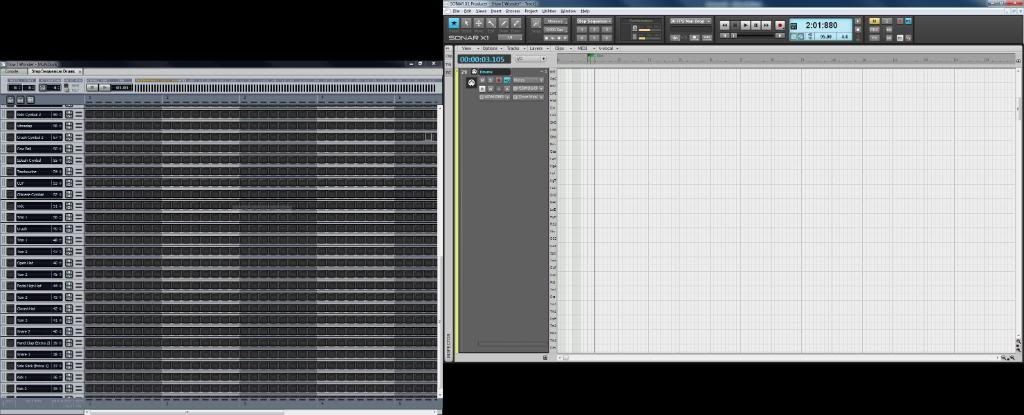


I use this one for entering my drum patterns (obviously). Only track visible is my Drum track in the TV. Step sequencer in the left plus the console also docked there if I need it. Widgets on I/O Snap to off. Edit filter to notes.

 
SS 10 - Comping
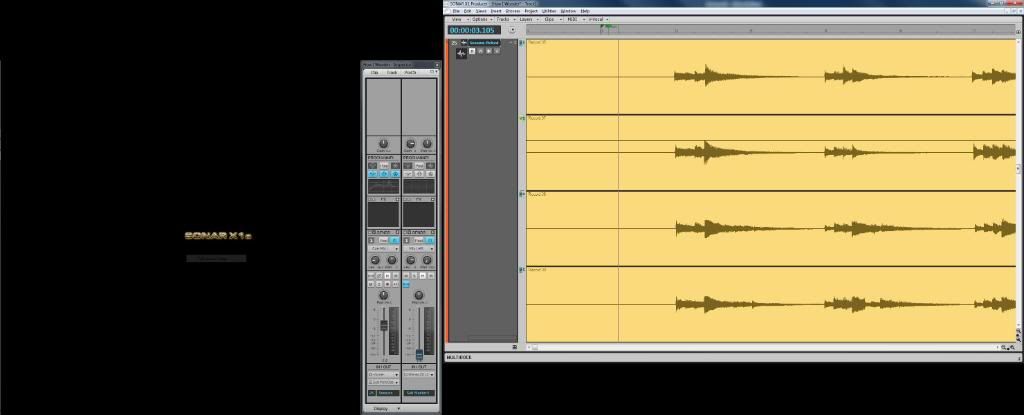


The only SS I don't use the multidock in. I have the track header just wide enough to read the track name. Inspector floating on the left hand monitor. Edit filter on clips. Widgets on one of my custom settings called comping which is basically every thing off except track state. I also close the Main Control Bar when I switch to this view. It would be nice to have SS remember which other windows such as Inspector, control bar etc are open and incorporate that as well. Feature request going in I think.

Now think about how quick having all those views preset ready to go instantly at the press of a button. If layouts could do that I really missed the boat with them.
 
Anyway, if you've got this far without falling asleep I hope these may have given you a few ideas. If you have any suggestions/questions/comments, please fire away. I'm no expert but if I can help with anything I will.
 
Screensets - I love 'em - How about another 10 Cake?


EDIT: Fixed image problem with SS2
post edited by FastBikerBoy - 2011/01/12 16:38:20
#1

26 Replies Related Threads

    The Maillard Reaction
    Max Output Level: 0 dBFS
    • Total Posts : 31918
    • Joined: 2004/07/09 20:02:20
    • Status: offline
    Re:My Screensets (Long post warning!!) 2011/01/12 15:16:51 (permalink)
    I think this a fantastic post. I recognize the hard work you put in preparing the screen shots and the explanations.

    I honestly don't see a thing there that will enhance the way I enjoy working.

    SS5 PRV2 almost looks applicable but my 2nd monitor is disconnected at the moment because I prefer to enjoy hearing the sound coming from my speakers than to block it with a wall of monitors.

    I sure wish I could double click a MIDI clip and have the PRV open in the state I last left it in... I guess that will never happen.

    I'm glad you like Screen Sets it certainly seems like are making good use of them to suit your preferences.

    Thanks again.

    best regards,
    mike


    #2
    PeterMc
    Max Output Level: -80 dBFS
    • Total Posts : 504
    • Joined: 2003/11/12 23:46:34
    • Location: Tasmania
    • Status: offline
    Re:My Screensets (Long post warning!!) 2011/01/12 15:35:24 (permalink)
    Mike - There's been discussion about how to open any MIDI clip in the PRV by double-clicking. I thought this worked well. If the PRV is in the multi-dock, and the multi-dock is maximised using shift-D, then minimised using D, double-clicking a clip in the TV puts you straight back into the maximised PRV in the multi-dock with the last settings. Then D gets you back to the TV. What elements of the state are you not seeing preserved?

    Cheers, Peter.


    i5 6500, H170M, Intel HD 530, 16GB, Focusrite Scarlett 8i6, Win 10 Pro (1803) (64 bit), Cakewalk by Bandlab

    #3
    Brando
    Max Output Level: -47.5 dBFS
    • Total Posts : 2776
    • Joined: 2003/11/06 11:47:20
    • Location: Canada
    • Status: offline
    Re:My Screensets (Long post warning!!) 2011/01/12 15:50:24 (permalink)
    These are fantastic. I use a similar sort of layout but I have set up my multidock a bit differently. I also have the TV on my right display, along with the multidock with step sequencer, staff view, lyrics view, matrix and piano roll views all docked at the bottom (I don't use them all. LOL). I have an undocked console view on the left display which butts up to a browser view, also undocked, which is at the right edge of the left display. These are two widescreen 22" screens at 1920 x 1080 resolution.
    I generally keep the inspector docked at the left of the Track view (on the right display) where it is easy to toggle with a simple "I" key press. I keep a small gap under the CV and Browser windows in the left display for softsynths and effects which pop down there whenever I minimize a GUI display. This is my "Main Layout" Screenset, and I kind of work from there as you do, with different screensets showing audio, or MIDI tracks, or Busses in the CV, or whatever.
    But it sure helps to see what you are doing and I will definitely give some of your ideas some more thought to see how I can integrate 'em.
     
    thanks very much for taking the time to post these.

    Brando
    Cakewalk, Studio One Pro, Reaper
    Presonus Audiobox 1818VSL
    ASUS Prime Z370-A LGA1151, 32GB DDR4, Intel 8700K i7, 500 GB SSD, 3 x 1TB HDD, Windows 10 Pro 64
    #4
    The Maillard Reaction
    Max Output Level: 0 dBFS
    • Total Posts : 31918
    • Joined: 2004/07/09 20:02:20
    • Status: offline
    Re:My Screensets (Long post warning!!) 2011/01/12 16:31:05 (permalink)
    PeterMc


    Mike - There's been discussion about how to open any MIDI clip in the PRV by double-clicking. I thought this worked well. If the PRV is in the multi-dock, and the multi-dock is maximised using shift-D, then minimised using D, double-clicking a clip in the TV puts you straight back into the maximised PRV in the multi-dock with the last settings. Then D gets you back to the TV. What elements of the state are you not seeing preserved?

    Cheers, Peter.


    That's a great idea if you use the multidock.

    I want a lot more display space than multi docking seems to afford.

    Larry (humblenoise) showed me a great way to do this... but the result is to small a display for my personal preference.

    I think I am just going to hammer through opening and dragging out the margins just like I have been doing for 13 years. It may take 2 seconds slower each time but the comfort or visual ergonomics of working with a screen that suits me will afford me a relaxed sense of focus so I will work fast and make up any time I lose because I am not taking advantage of screen sets or multi dock.

    Thanks for the reminder.

    very best regards,
    mike


    #5
    RLD
    Max Output Level: -55.5 dBFS
    • Total Posts : 1990
    • Joined: 2003/11/06 10:11:26
    • Status: offline
    Re:My Screensets (Long post warning!!) 2011/01/12 16:41:52 (permalink)
    mike_mccue

    I sure wish I could double click a MIDI clip and have the PRV open in the state I last left it in... I guess that will never happen.

    mike

    Not sure what you are doing.

    PRV works exactly that way for me.  Docked or undocked, any size I want, double click on the midi track and it will appear where ever I left it last.
    At least that how it works for me.

    SS, however won't hold a docked VSTi or other gui's. Hope that will be fixed.
    post edited by RLD - 2011/01/12 16:43:18
    #6
    The Maillard Reaction
    Max Output Level: 0 dBFS
    • Total Posts : 31918
    • Joined: 2004/07/09 20:02:20
    • Status: offline
    Re:My Screensets (Long post warning!!) 2011/01/12 16:46:20 (permalink)
    Hi RLD,

    Try it with a drum map full of nice easy to read descriptive names and a few controller lanes at the bottom.

    I think that works well with multi dock or screen sets... but it doesn't just as a window.

    It has been a long standing feature request of mine that SONAR simply remember the state I left it in.

    But it always collapses back to what I suspect, after reading of your perspective, you consider normal.

    Thanks very much.

    all the best,
    mike


    #7
    RLD
    Max Output Level: -55.5 dBFS
    • Total Posts : 1990
    • Joined: 2003/11/06 10:11:26
    • Status: offline
    Re:My Screensets (Long post warning!!) 2011/01/12 16:54:10 (permalink)
    Could be. I'm not sure what "normal" means, all I know is it re opens to the way I left it last.
    Good luck.
    #8
    FastBikerBoy
    Forum Host
    • Total Posts : 11326
    • Joined: 2008/01/25 16:15:36
    • Location: Watton, Norfolk, UK
    • Status: offline
    Re:My Screensets (Long post warning!!) 2011/01/12 17:21:13 (permalink)
    mike_mccue

    I want a lot more display space than multi docking seems to afford.


    Mike the multidock maximised (Shift D) is a full screen view. Open and close it by pressing D. You can't need more than a full screen surely?

    I also know what you mean about the PRV view panes not staying how you left them, especially the drum note name pane but it's been like that forever not X1 specific.
    #9
    Keebo
    Max Output Level: -79 dBFS
    • Total Posts : 576
    • Joined: 2003/11/06 18:06:26
    • Location: Southeast
    • Status: offline
    Re:My Screensets (Long post warning!!) 2011/01/12 18:08:50 (permalink)
    Nice thread, FBB.  I appreciate you taking the time to organize all of that information along with the screen shots.

    I really enjoy seeing, hearing, and reading how other people are using this software.  It helps me see that there are other ways of doing things that I may not have tried.

    I am still using only a single 19" 1280x1024 monitor but look forward to picking up another one with higher resolution and display area in the near future.  Looking forward to a dual monitor setup to experience screen sets to the fullest.

    Thanks again.

    Sonar X2 Producer 64 bit
    Sonar X1 Producer Expanded 64 bit
    Sonar 8.5.3 Producer 32/64 bit
    Windows 7 64 bit
    #10
    HumbleNoise
    Max Output Level: -46 dBFS
    • Total Posts : 2946
    • Joined: 2004/01/04 12:53:50
    • Status: offline
    Re:My Screensets (Long post warning!!) 2011/01/12 19:05:41 (permalink)
    Thanks for the time it took to organize and post those shots FBB. You know I'm a fan as well but like I reported in one of the last SS threads mine have been changing around on me so I've unlocked them so I can get them back working a little easier when they change themselves.

    I only have one monitor but I think that's where Screen Sets REALLY shine. Not that I would trade two in for a single monitor but the SS really help get around a single monitor.

    Humbly Yours

    Larry

    Sonar X2 x64
    MAudio 2496
    Yamaha MG 12/4
    Roland XV-88
    Intel MB with Q6600 and 4 GB Ram
    NVidia 9800 GTX
    Windows 7 x64 Home Premium
    #11
    sven450
    Max Output Level: -72 dBFS
    • Total Posts : 945
    • Joined: 2004/03/16 08:11:49
    • Status: offline
    Re:My Screensets (Long post warning!!) 2011/01/12 19:24:11 (permalink)
    Being the lazy bastard that I am, this is a fantastic post.  I can use YOUR imagination instead of taxing my own!  I already have four or five SS I use regularly, but you have opened my eyes for a few more possibilities.  Thanks for putting this together.

    Sonar Platinum/Bandlab Sonar
    Roland Octa-Capture            
    Win 10 
    i7 6700  16 Gig Ram
    Some songs
    Covers:  https://soundcloud.com/cygnuss/sets/covers
    Originals:
     https://soundcloud.com/cygnuss/sets/originals
    #12
    FastBikerBoy
    Forum Host
    • Total Posts : 11326
    • Joined: 2008/01/25 16:15:36
    • Location: Watton, Norfolk, UK
    • Status: offline
    Re:My Screensets (Long post warning!!) 2011/01/13 02:43:38 (permalink)
    sven450


    Being the lazy bastard that I am, this is a fantastic post.  I can use YOUR imagination instead of taxing my own!  I already have four or five SS I use regularly, but you have opened my eyes for a few more possibilities.  Thanks for putting this together.


    Thank you. There's some real neat tricks with SS. Remembering the tracks displayed with the track manager is one of my favourites. Almost makes the track manager a preference module now rather than something to adjust as you go.
    #13
    FastBikerBoy
    Forum Host
    • Total Posts : 11326
    • Joined: 2008/01/25 16:15:36
    • Location: Watton, Norfolk, UK
    • Status: offline
    Re:My Screensets (Long post warning!!) 2011/01/13 02:46:26 (permalink)
    HumbleNoise


    Thanks for the time it took to organize and post those shots FBB. You know I'm a fan as well but like I reported in one of the last SS threads mine have been changing around on me so I've unlocked them so I can get them back working a little easier when they change themselves.

    I only have one monitor but I think that's where Screen Sets REALLY shine. Not that I would trade two in for a single monitor but the SS really help get around a single monitor.


    You could be right about the single screen bit. I don't really use Sonar on my laptop much but messing around with it I've found SS a big plus on it. It's like having multiple monitors but you can only see one at a time.
    #14
    Crg
    Max Output Level: 0 dBFS
    • Total Posts : 7719
    • Joined: 2007/11/15 07:59:17
    • Status: offline
    Re:My Screensets (Long post warning!!) 2011/01/13 09:08:27 (permalink)
    Nice.

    Craig DuBuc
    #15
    chuckebaby
    Max Output Level: 0 dBFS
    • Total Posts : 13146
    • Joined: 2011/01/04 14:55:28
    • Status: offline
    Re:My Screensets (Long post warning!!) 2011/01/20 23:05:44 (permalink)
    im blown away at the effort you put in to this post..it really helped me alot and gave me some great ideas.thank you very,very much.
    #16
    trimph1
    Max Output Level: -12 dBFS
    • Total Posts : 6348
    • Joined: 2010/09/07 19:20:06
    • Location: London ON
    • Status: offline
    Re:My Screensets (Long post warning!!) 2011/01/20 23:41:52 (permalink)
    This thread is going into my favorites file!! Thanks for the screenshots!!
    #17
    adrian4u
    Max Output Level: -79 dBFS
    • Total Posts : 568
    • Joined: 2010/12/07 19:07:11
    • Location: Poland
    • Status: offline
    Re:My Screensets (Long post warning!!) 2011/01/21 07:22:06 (permalink)
    One question from me, guys - will X1 REMEMBER SS settings for all the new projects, or - should I make a template file to open it every time?

    Phenom II x6 1100T (OC to 6x 4,1gHz), 8gB DDR3/1600gHz RAM, Win7/64; SONAR Producer X1c; Korgs: Z1, M50, Triton Rack, TRinity Rack; NI Maschine; Behringer BCF-R2000; MOTU 828mk3 FW; Edirol Edirol UA-1000; guitars: Cort Z-Custom, LAG JET100 totally customed, Cort SFX-DAO; some other music toys, one very musical cat 
    ***************************************
    Be patient for newbie ;)
    #18
    trimph1
    Max Output Level: -12 dBFS
    • Total Posts : 6348
    • Joined: 2010/09/07 19:20:06
    • Location: London ON
    • Status: offline
    Re:My Screensets (Long post warning!!) 2011/01/21 07:24:38 (permalink)
    I'd make a template anyways...just in case....
    #19
    adrian4u
    Max Output Level: -79 dBFS
    • Total Posts : 568
    • Joined: 2010/12/07 19:07:11
    • Location: Poland
    • Status: offline
    Re:My Screensets (Long post warning!!) 2011/01/21 07:42:51 (permalink)
    thxx - I should make some templates too.

    btw. another dilly question ablut snapping:

    I started to move one of my project from Ableton to X1...
    In a fact - I build it from "pure waves" recorded earlier, added some MIDI tracks..
    And here we go:
    Even when SNAP is ON, midi clips/loops i try to make longer (multiply) on track doesn't snap to nothing. Smooth dragging... eee - sorry for my poor English...
    The same with notes in Piano roll - I can catch the end and make it longer, shorter, but with no snapping at all - no "snap to grid etc"...
    Have  I to "click" to a specific button/option or something?

    Phenom II x6 1100T (OC to 6x 4,1gHz), 8gB DDR3/1600gHz RAM, Win7/64; SONAR Producer X1c; Korgs: Z1, M50, Triton Rack, TRinity Rack; NI Maschine; Behringer BCF-R2000; MOTU 828mk3 FW; Edirol Edirol UA-1000; guitars: Cort Z-Custom, LAG JET100 totally customed, Cort SFX-DAO; some other music toys, one very musical cat 
    ***************************************
    Be patient for newbie ;)
    #20
    ProjectM
    Max Output Level: -36 dBFS
    • Total Posts : 3941
    • Joined: 2004/02/10 09:32:12
    • Location: Norway
    • Status: offline
    Re:My Screensets (Long post warning!!) 2011/01/21 08:09:49 (permalink)
    That's cool FastBikerBoy! I've learned to work without the Screensets. But the way you use them sure looks like a work flow improvement.

    I'm off to buy a new video card when I get some cash. For now it takes forever to switch between them so it's a useless feature for me. But I'm very motivated to get them to work.

    Great post!

    (Sonar Platinum - Win10 x64) - iMac and 13" MacBook - Logic Pro X ++ - UA Apollo Twin DUO - NI Maschine MKII - NI Komplete Kontrol S61 - Novation Nocturne - KRK Rokit 6
    Soundcloud
    Negative Vibe Records
    #21
    FastBikerBoy
    Forum Host
    • Total Posts : 11326
    • Joined: 2008/01/25 16:15:36
    • Location: Watton, Norfolk, UK
    • Status: offline
    Re:My Screensets (Long post warning!!) 2011/01/21 08:20:04 (permalink)
    ProjectM


    That's cool FastBikerBoy! I've learned to work without the Screensets. But the way you use them sure looks like a work flow improvement.

    I'm off to buy a new video card when I get some cash. For now it takes forever to switch between them so it's a useless feature for me. But I'm very motivated to get them to work.

    Great post!


    Check your floppy controller is disabled in the BIOS. Yes really - mine were slow until I done that. Now they switch instantly and my system is under the minimum recommended.

    I've tweaked several of these a bit more since I posted them although the basics are the same. I also now work with most of them unlocked. I really wish there was some sort of indicator as to whether a set is locked or not.
    #22
    FastBikerBoy
    Forum Host
    • Total Posts : 11326
    • Joined: 2008/01/25 16:15:36
    • Location: Watton, Norfolk, UK
    • Status: offline
    Re:My Screensets (Long post warning!!) 2011/01/21 08:22:36 (permalink)
    adrian4u


    One question from me, guys - will X1 REMEMBER SS settings for all the new projects, or - should I make a template file to open it every time?


    You'll need to get them set up and then save as a template. Of course if you want to have several different ways of working you can always make more than one template and then start with the appropriate one for the project.

    I've also added a couple of keybindings for widening & narrowing the console strips - that's a very handy addition.
    #23
    ProjectM
    Max Output Level: -36 dBFS
    • Total Posts : 3941
    • Joined: 2004/02/10 09:32:12
    • Location: Norway
    • Status: offline
    Re:My Screensets (Long post warning!!) 2011/01/21 08:30:23 (permalink)
    I remember you suggesting that to me in a previous thread. There are no floppy disk controllers on my system AFAIK. I've looked and looked and talked to two computer geeks about it. But my conclusion is that I have no floppy controller and therefore it's something else. A few people said they remedied the issue with a new video controller and I think that's a good idea. I have an ATI something installed (I really don't know much about this either) with enough memory to go but I think there are some issues with that type of video card. Only if the browser is in the screenset, tho. In another studio I co-owned up until recently had an Nvidia thing installed and screensets switched like it's going out of fashion on that one.

    (Sonar Platinum - Win10 x64) - iMac and 13" MacBook - Logic Pro X ++ - UA Apollo Twin DUO - NI Maschine MKII - NI Komplete Kontrol S61 - Novation Nocturne - KRK Rokit 6
    Soundcloud
    Negative Vibe Records
    #24
    adrian4u
    Max Output Level: -79 dBFS
    • Total Posts : 568
    • Joined: 2010/12/07 19:07:11
    • Location: Poland
    • Status: offline
    Re:My Screensets (Long post warning!!) 2011/01/21 09:23:28 (permalink)
    I have ATI HD 4350 and it takes a second or two to switch between screensets.
    On MB i made a setting with "fast" acc for graphics - but I can't see any change :D

    you can try to little OverClocking, but be carefull.

    Phenom II x6 1100T (OC to 6x 4,1gHz), 8gB DDR3/1600gHz RAM, Win7/64; SONAR Producer X1c; Korgs: Z1, M50, Triton Rack, TRinity Rack; NI Maschine; Behringer BCF-R2000; MOTU 828mk3 FW; Edirol Edirol UA-1000; guitars: Cort Z-Custom, LAG JET100 totally customed, Cort SFX-DAO; some other music toys, one very musical cat 
    ***************************************
    Be patient for newbie ;)
    #25
    ProjectM
    Max Output Level: -36 dBFS
    • Total Posts : 3941
    • Joined: 2004/02/10 09:32:12
    • Location: Norway
    • Status: offline
    Re:My Screensets (Long post warning!!) 2011/01/21 09:26:56 (permalink)
    Well... I would need help from a grown up to attempt something like that. My plan is to wait for X1b and see if that helps. If it doesn't, I'll open my wallet and see if that helps;)

    (Sonar Platinum - Win10 x64) - iMac and 13" MacBook - Logic Pro X ++ - UA Apollo Twin DUO - NI Maschine MKII - NI Komplete Kontrol S61 - Novation Nocturne - KRK Rokit 6
    Soundcloud
    Negative Vibe Records
    #26
    adrian4u
    Max Output Level: -79 dBFS
    • Total Posts : 568
    • Joined: 2010/12/07 19:07:11
    • Location: Poland
    • Status: offline
    Re:My Screensets (Long post warning!!) 2011/01/21 09:32:31 (permalink)
    and I will wait till May or so - to change whole computer....
    Here you can buy Xeon processor in the price of i7.... :D more-less 300 Euros :D
    Then I will try to put two graphic cards - one for 2x22" main monitors, second for 1 or 2 small monitors... we will see,'cause 12,1" LCD's costs too much - the same price as 23" fullHD LCD... weird....

    Phenom II x6 1100T (OC to 6x 4,1gHz), 8gB DDR3/1600gHz RAM, Win7/64; SONAR Producer X1c; Korgs: Z1, M50, Triton Rack, TRinity Rack; NI Maschine; Behringer BCF-R2000; MOTU 828mk3 FW; Edirol Edirol UA-1000; guitars: Cort Z-Custom, LAG JET100 totally customed, Cort SFX-DAO; some other music toys, one very musical cat 
    ***************************************
    Be patient for newbie ;)
    #27
    Jump to:
    © 2025 APG vNext Commercial Version 5.1