delamatrix
Max Output Level: -89 dBFS

- Total Posts : 56
- Joined: 2003/12/12 13:02:12
- Location: Chicago, IL
- Status: offline
NEW DAW CONTROLLER!
Hey guys! There's a new DAW controller on the market right now! It's the Tascam US-2400! It's a 24 channel mixing console controller with motorized faders. The unit hasn't start shipping yet, but some online retailers are already allowing people to order now. The going price is $1,600. Tascam has yet to release the full specs on this item, but I already like the price! I've been saving for the tascam fw-1884, but if the US-2400 proves to be what I hope it is, then good bye fw-1884! Check it out at --> http://www.tascam.com/product_info.php?pid=342&nav=computer_hardware <-- Check it out and let me know what you guys think. Thanks. Delamatrix
|
delamatrix
Max Output Level: -89 dBFS
- Total Posts : 56
- Joined: 2003/12/12 13:02:12
- Location: Chicago, IL
- Status: offline

RE: NEW DAW CONTROLLER!
2004/02/23 10:57:08
(permalink)
Here's a pic of this monster! 
|
tazman
Max Output Level: -51 dBFS

- Total Posts : 2435
- Joined: 2003/11/13 13:01:40
- Status: offline
RE: NEW DAW CONTROLLER!
2004/02/23 10:58:53
(permalink)
I would love to see some reviews of it. I have been thinkiong about the Mackie Control plus one or two extenders,. The Tascam would actually be cheaper. Wow, I would like to see some sort of review on it....
|
tazman
Max Output Level: -51 dBFS
- Total Posts : 2435
- Joined: 2003/11/13 13:01:40
- Status: offline
RE: NEW DAW CONTROLLER!
2004/02/23 11:00:31
(permalink)
Darn, I hate repeating myself... I guess I can blame it on the cold...
|
CraigG
Max Output Level: -89 dBFS
- Total Posts : 66
- Joined: 2003/12/23 08:50:24
- Location: Mechanicsburg, PA, USA
- Status: offline
RE: NEW DAW CONTROLLER!
2004/02/23 11:08:18
(permalink)
According to the specs it's only a controller - something folks might want to keep in mind. No audio inputs. Sure does look sweet, though.
Craig
|
tazman
Max Output Level: -51 dBFS
- Total Posts : 2435
- Joined: 2003/11/13 13:01:40
- Status: offline
RE: NEW DAW CONTROLLER!
2004/02/23 11:45:37
(permalink)
It would compete against the Mackie Control.
|
SteveD
Max Output Level: -47 dBFS

- Total Posts : 2831
- Joined: 2003/11/07 13:35:57
- Location: NJ
- Status: offline
RE: NEW DAW CONTROLLER!
2004/02/23 11:49:22
(permalink)
Looks interesting. Here's some more FYI stuff just to keep in mind. No per track LCD display for track names and functions. This control surface looks like it will be just transport control with faders and v-pots. The MC does much more including: save your project, open and close functional windows and views, expand and collapse views (zoom), insert audio and MIDI tracks, delete button for selected clips and features, user programmable buttons (M1-M4), switch from track faders to bus faders, loop insert and control buttons ... etc. I guess the select button would be the record/enable button on the Mackie Control. There's a separate select button on the MC that is not functional right now, but after the DLL is updated, it will shift the focus from one track to another.
< Message edited by SteveD -- 2/23/2004 11:52:09 AM >
|
tazman
Max Output Level: -51 dBFS
- Total Posts : 2435
- Joined: 2003/11/13 13:01:40
- Status: offline
RE: NEW DAW CONTROLLER!
2004/02/23 11:52:19
(permalink)
What's left to be added to the MC as far as controls?
|
SteveD
Max Output Level: -47 dBFS
- Total Posts : 2831
- Joined: 2003/11/07 13:35:57
- Location: NJ
- Status: offline
RE: NEW DAW CONTROLLER!
2004/02/23 12:07:38
(permalink)
From another thread: 1,The select Buttons need to select tracks. This is very important for me. 2, Support for the touch faders. Touching a fader should select a track. 3, Full plugin support and Eq For automation and control . Please try to make it simple and easy. 4, Latch mode for tweaking automation. 5, MC LCD meter support! 6, Need to revise what the Control Group buttons do. 7, Better scrub function 8, The MC should not display hidden tracks or make this a user switchable function. 9, Support for green per track signal activity LEDs on the MC. (MIDI and Audio) These are MC features that work in other DAW software applications but are not yet working in Sonar. But stay tuned... let's see what the DLL update brings... SOON I hope! 
|
SteveD
Max Output Level: -47 dBFS
- Total Posts : 2831
- Joined: 2003/11/07 13:35:57
- Location: NJ
- Status: offline
RE: NEW DAW CONTROLLER!
2004/02/23 13:19:41
(permalink)
Interesting sidebar: I recently went to a Pat Metheny concert (my all-time favorite artist) and I noticed that on top of his guitar effects/amp rack was something that looked like a Mackie Control. But I figured it must be something else because it's an odd place to put a recording software controller and besides, there were green LEDs flickering with every note he played on several tracks. I was up high enough to see all that and as usual, I brought my binoculars. Upon closer inspection... it was a Mackie Control... with track level LEDs just below the Record/Enable button... dancing away. I was able to catch up with Pat after the show, and I asked him about the Mackie Control. He started out by saying, "Well, if you know anything about the Mackie Control, then you know that...", and I figured... okay... I know a lot about the Mackie Control so this should be interesting. It turns out I actually knew very little about the additional things it was capable of. Pat proceeded to explain how he was using the MC to allow quick access and adjustments for all of his effect units in the rack. He mentioned Digital Performer but I didn't see a computer or laptop... but it might have been out of sight. Anyway, by using the MC to control his effects during live concerts, he doesn't have to press tiny buttons or squint to see the small LCD displays on each unit. I said, "But you never touched it". "Yeah. Once I get it right during the sound check, I don't usually need to go over there any more... but it's a real easy way to get everthing set just right before a performance", was the reply. I didn't tell him I couldn't figure out what was blinking with the signal strength on each track. I didn't even know my MC had one of those lights on each track. Once again... I am really looking forward to the DLL update. It will be interesting to see what else this thing can do!
|
schmoron13
Max Output Level: -90 dBFS

- Total Posts : 18
- Joined: 2003/11/06 15:47:51
- Location: Bay Area, CA
- Status: offline

RE: NEW DAW CONTROLLER!
2004/02/23 13:57:20
(permalink)
with all this talk about controllers, I wonder if anyone knows what happened to Radical Tech's Sac 2k2? I heard buzz about it, and then, NOTHING. Is it any good? better/worse/diff than the MC? I see that they can be had for dirt cheap on ebay (the $600 range)...any comments? 
|
ohhey
Max Output Level: 0 dBFS

- Total Posts : 11676
- Joined: 2003/11/06 16:24:07
- Location: Fort Worth Texas USA
- Status: offline
RE: NEW DAW CONTROLLER!
2004/02/23 15:01:34
(permalink)
I just can't see spending $2000 (or even $1000) on something that just gives me knobs. Are folks having that much of a problem using a mouse ? I could see a remote with transport controls just for a remote control but why all the faders ? Is it just for looks ?
|
SteveD
Max Output Level: -47 dBFS
- Total Posts : 2831
- Joined: 2003/11/07 13:35:57
- Location: NJ
- Status: offline
RE: NEW DAW CONTROLLER!
2004/02/23 15:26:01
(permalink)
ORIGINAL: ohhey
Are folks having that much of a problem using a mouse? Yep. But you're right... it doesn't look bad either! 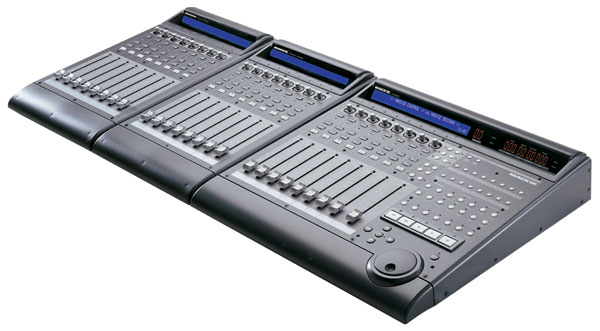
< Message edited by SteveD -- 2/23/2004 3:33:25 PM >
|
psi777
Max Output Level: -80 dBFS

- Total Posts : 527
- Joined: 2003/12/12 16:14:43
- Status: offline
RE: NEW DAW CONTROLLER!
2004/02/23 22:01:02
(permalink)
I just can't see spending $2000 (or even $1000) on something that just gives me knobs. Are folks having that much of a problem using a mouse ? I could see a remote with transport controls just for a remote control but why all the faders ? by that same argument: why even bother using a keyboard to input midi tracks? what's wrong with just entering it all in with your mouse? A) it speeds up workflow greatly. B) because it is a more tactile experience, you will actually find yourself getting better results.
|
Al Nico
Max Output Level: -86 dBFS

- Total Posts : 202
- Joined: 2003/12/06 10:03:05
- Status: offline
RE: NEW DAW CONTROLLER!
2004/02/23 23:13:46
(permalink)
NOTICE*... The US-2400 features 25 touch-sensitive moving channel faders and a touch-sensitive motorized master fader, That's right... ONE motorized master fader, all the rest are not......apperently?? Seemed noteworthy. Al
|
woody24
Max Output Level: -87 dBFS

- Total Posts : 191
- Joined: 2004/01/07 16:01:54
- Location: Out in the woods somewhere in Oregon
- Status: offline
RE: NEW DAW CONTROLLER!
2004/02/24 01:40:44
(permalink)
I just can't see spending $2000 (or even $1000) on something that just gives me knobs. Are folks having that much of a problem using a mouse ? I could see a remote with transport controls just for a remote control but why all the faders ? Is it just for looks ? You know....It's about work flow and just being lazy for me. Example: I have a musical windchime business and when working in my shop.... I found that spending 500.00 on that pro scroll saw ended up saving me time and money. Other tools I invested in did that or made things EZ as in lazy!:-) The MC does all of this for me and will pay for itself quickly. Also I realized how inportant it is to listen more than look. With a mouse I get hung up on looking at what I'm doing instead of listening as I balance the level of a guitar or kick. Now I can close my eyes and adjust to what I'm hearing and feeling. Pretty cool! Believe I'm no pro at being a sound engineer but it just made sense to me to invest for the above reasons... for me! :-) I learned about this reading a preview that Mr. Spotted Eagle wrote about using a MC with Sonar in his pro studio. It's a great read that you can check out here if you like: http://production.digitalmedianet.com/2003/03_mar/tutorials/sonar_mackiecontrol.htm Enjoy, Woody http://windchimes.net
< Message edited by woody24 -- 2/23/2004 10:45:34 PM >
|
johnkempton
Max Output Level: -90 dBFS
- Total Posts : 14
- Joined: 2004/01/26 17:59:09
- Status: offline
RE: NEW DAW CONTROLLER!
2004/02/24 02:21:35
(permalink)
ORIGINAL: ohhey
I just can't see spending $2000 (or even $1000) on something that just gives me knobs. Are folks having that much of a problem using a mouse ? I could see a remote with transport controls just for a remote control but why all the faders ? Is it just for looks ?
You've got a funny way of asking for help. John.
|
psi777
Max Output Level: -80 dBFS
- Total Posts : 527
- Joined: 2003/12/12 16:14:43
- Status: offline
RE: NEW DAW CONTROLLER!
2004/02/24 02:45:08
(permalink)
I learned about this reading a preview that Mr. Spotted Eagle wrote about using a MC with Sonar in his pro studio. It's a great read that you can check out here if you like:
http://production.digitalmedianet.com/2003/03_mar/tutorials/sonar_mackiecontrol.htm wow....so my Mackie is capable of displaying audio levels on the LCD??? Holy S*** that is so cool...except for the fact that it doesn't in Sonar, and it doesn't in Cubase, so it does me absolutely no good. ...so does anyone know what apps DO take advantage of this? Or if we're going to see any of that in this promised MC driver update? I hate to say it, but I love this thing enough that I might just follow whichever software company is giving it the best support. I'm already pretty much using Cubase for the most part these days, simply because the MC has more functionality there...I bought Sonar because I love the software and respect the company...but since right now things get done faster in my old s/w because it works better with my hardware, Sonar gathers dust until I see this new MC update.
|
John
Forum Host

- Total Posts : 30467
- Joined: 2003/11/06 11:53:17
- Status: offline
RE: NEW DAW CONTROLLER!
2004/02/24 04:05:43
(permalink)
Logic and Samplitude show the meters as well as a lot more stuff. The MC, as I have been saying for a very long time now on this and the old forum is far more then just some faders and knobs. It was designed to fully integrate into the DAW allowing nearly complete control of all aspects of the DAW and with a great deal of feedback to the user and user customization. I have tried to point this out to the users of Sonar that the MC is far better then the weak implementation we now have under Sonar. Do a search on Logic Control and Mackie Control (they are the same) in Sound On Sound and other mags and see what they say about it and what it can do. I am still waiting for the new plugin dll for the MC that CW has said is forthcoming. It really should have been done a long time ago. If not when Sonar 3 shipped. I'm already pretty much using Cubase for the most part these days, simply because the MC has more functionality there...I bought Sonar because I love the software and respect the company...but since right now things get done faster in my old s/w because it works better with my hardware, Sonar gathers dust until I see this new MC update. I hear you loud and clear. In my case I also have Cubase SX 2 but as much as I like the look of it and the MC support I still prefer Sonar 3 for the things I do. I just found out that Sound Forge can be controlled by the MC even though it doesn’t support it. Best John
< Message edited by John -- 2/24/2004 4:15:01 AM >
|
michael japan
Max Output Level: -22.5 dBFS

- Total Posts : 5252
- Joined: 2004/01/29 03:01:03
- Status: offline
RE: NEW DAW CONTROLLER!
2004/02/24 06:04:50
(permalink)
in reply to Craig, my first reaction as well. I guess people who know that's what they want they get excited about it. I'm waiting for something to route everything through-not just some controllers-maybe something likethe 01X-but still waiting. I think it's cool though that people post and let us know what they are excited about. You know, we're all different animals-there's no right or wrong when it comes to certain things in life. I use to love 2 seater sports cars and now I don't see the point. I like SUV's. But the road would be boring if we all had them. I have a golden retriever and some people like poodles-I can't imagine owning a poodle but WTH I've seen a lot of poodle owners. It is exciting that so much good stuff is coming out again-well in some ways it's exciting-in some ways it's expensive and confusing, but I know the right thing is coming along for me, and if this one's for you delamatrix then go for it. But in the opinion of someone who owns a lot of gear for live and studio, I would say wait a few months because the industry is just now getting to the point that things have gone seriously computer. Some of you may say, "man are you behind." What I mean is, everything is being made now to link up, even the latest Korg keyboards. Gotta run. Happy shopping.
< Message edited by michael japan -- 2/24/2004 6:16:34 AM >
|
PureSongz03
Max Output Level: -89 dBFS
- Total Posts : 55
- Joined: 2004/01/25 10:19:57
- Status: offline
RE: NEW DAW CONTROLLER!
2004/02/24 06:44:08
(permalink)
hmmm
yamaha o1x anyone???
|
Eric_funk
Max Output Level: -88 dBFS

- Total Posts : 134
- Joined: 2003/12/16 19:07:20
- Status: offline
RE: NEW DAW CONTROLLER!
2004/02/24 08:03:26
(permalink)
You cant beat the mackie control, after all it is a MACKIE, i hope that the new dll has the meter in the LCD option, how cool :)
Derek
|
SteveD
Max Output Level: -47 dBFS
- Total Posts : 2831
- Joined: 2003/11/07 13:35:57
- Location: NJ
- Status: offline
RE: NEW DAW CONTROLLER!
2004/02/24 08:57:08
(permalink)
ORIGINAL: Eric_funk
You cant beat the mackie control, after all it is a MACKIE, i hope that the new dll has the meter in the LCD option, how cool :)
Derek
There was a response in another thread from a CW developer indicating a concern for the amount of streaming MIDI traffic MC level meters would require. I think it was John (above) who responded with the fact that Logic and Samplitude are doing it, and they don't seem to have a problem. It seems to me that the streaming MIDI data for the MC level meters would require another Sonar update... not just a new DLL.
|
tor
Max Output Level: -73 dBFS

- Total Posts : 852
- Joined: 2003/11/06 23:32:59
- Location: Norway
- Status: offline
RE: NEW DAW CONTROLLER!
2004/02/24 10:30:32
(permalink)
In my opinion it's obvious that mixing would go faster and smoother when
you actually control volume envelopes with faders, both more volume parameters at once, and with greater accuracy.
To be as accurate with drawing envelopes with your mouse, the track view would have to be so zoomed in that you'd have to manipulate views in and out
all the time to select envelopes on other tracks.
Lots of time and lots of clicking.
In my opinion the discussion shouldn't be wether or not to have a controller of some kind, but rather if your controller also should be an audio interface and a digital mixer.
The money decides, if you have enough, and how wisely you spend them.....
I've just bought myself a Yamaha 01v96 and a Hammerfall 9652 system, and I just can't wait to start using those faders................
|
ohhey
Max Output Level: 0 dBFS
- Total Posts : 11676
- Joined: 2003/11/06 16:24:07
- Location: Fort Worth Texas USA
- Status: offline
RE: NEW DAW CONTROLLER!
2004/02/24 11:41:12
(permalink)
From what I read on this Forum and the Mackie Forum folks spend more time trying to get these things working then they save in workflow. And then they get to do it all over again the next time they upgrade or change their DAW software. I used to mix on an analog console and I can't imagine going back to that. You can't even see where you are in the track to make a change and there is no way you can more your hand fast enough to do any precise changes. Yeah you could watch the monitor and zoom around while you are trying to keep the other hand on the fader but why ? If you're at the computer just make a few nodes and move the envolope, done. I wonder how many nodes (events) are generated by the output of the controller ? Seems like you would have to thin them out at some point. As for motorized faders how much noise are those things going to make when they all start jumping around ?
|
sfripp
Max Output Level: -77 dBFS

- Total Posts : 665
- Joined: 2004/02/04 01:58:58
- Location: Blue mountains, Australia
- Status: offline
RE: NEW DAW CONTROLLER!
2004/02/24 11:57:41
(permalink)
50years later the pic finally downloads!!  I think its time for broadband!!
E6600 Core2Duo, 2gigC4 corsair, Asus P5B, LynxII, 3xWD250Gig SATAII BFD, Dimension Pro, Z3Ta
|
SteveD
Max Output Level: -47 dBFS
- Total Posts : 2831
- Joined: 2003/11/07 13:35:57
- Location: NJ
- Status: offline
RE: NEW DAW CONTROLLER!
2004/02/24 13:27:02
(permalink)
ORIGINAL: ohhey
From what I read on this Forum and the Mackie Forum folks spend more time trying to get these things working then they save in workflow. And then they get to do it all over again the next time they upgrade or change their DAW software. I used to mix on an analog console and I can't imagine going back to that. You can't even see where you are in the track to make a change and there is no way you can more your hand fast enough to do any precise changes. Yeah you could watch the monitor and zoom around while you are trying to keep the other hand on the fader but why ? If you're at the computer just make a few nodes and move the envolope, done. I wonder how many nodes (events) are generated by the output of the controller ? Seems like you would have to thin them out at some point. As for motorized faders how much noise are those things going to make when they all start jumping around ?
Envelopes drawn by a faders do indeed create lots of nodes. However, if they bother you, (don't know why the would) you can easily block the ones between the end nodes and press delete. What remains is the same as if you drew them with a mouse, except you might have done it with multiple faders at once. Can't do that with a mouse. The motorized faders are very quiet, but if they bother you, (don't know why they would), you can turn them off. Personally, I don't start mixing to the point of adding envelopes until I'm done recording... so fader movement sounds (if you can hear them... don't know why you would) never get picked up by a microphone. I certainly can't hear them over the playback audio. The only reason people complain about loosing functionality after a software upgrade of something as useful and appreciated as the Mackie Control is because once you get used to it, you never want to work without it again. You know... kind of like never wanting to go back to trying to mix with an analog mixer. Do I like the fact that my Mackie Control investment cost more than my DAW? NO! I wish it was less expensive. But when I bought mine, did I put it up for sale on ebay? Heck no... instead I bought extenders! You never hear MC owners complaining that we bought one and it's a piece of crap, and you don't see many for sale on ebay. When you buy one... you keep it until your ready for the next level... and that, in my opinion, would be a 48 track digital console. They START around $15,000.00. http://bpgprod.sel.sony.com/Professional/images/product/front_zoom/dmxr100_z.jpg You don't see the need. Okay, that's fine. I guess you're right... it's not a NEED... I could live without it for a while if my MC ever breaks or needs service. Ohey, I truely think you'd like it if you owned one with extenders. There's nothing like sliding your finger across 12-16 basic rhthym track record/enable buttons to instantly set up for the next take. Pricey? Yes. Effecient? Yes. Helpful? Yes. Impressive? Yes. Fun? OH YES!
|
John Page
Max Output Level: -77 dBFS
- Total Posts : 672
- Joined: 2003/11/10 20:40:45
- Location: New York
- Status: offline
RE: NEW DAW CONTROLLER!
2004/02/24 13:40:15
(permalink)
ORIGINAL: ohhey
From what I read on this Forum and the Mackie Forum folks spend more time trying to get these things working then they save in workflow. And then they get to do it all over again the next time they upgrade or change their DAW software. I used to mix on an analog console and I can't imagine going back to that. You can't even see where you are in the track to make a change and there is no way you can more your hand fast enough to do any precise changes. Yeah you could watch the monitor and zoom around while you are trying to keep the other hand on the fader but why ? If you're at the computer just make a few nodes and move the envolope, done. I wonder how many nodes (events) are generated by the output of the controller ? Seems like you would have to thin them out at some point. As for motorized faders how much noise are those things going to make when they all start jumping around ?
ohhey dont knock until you try it...if Cakewalk supported it properly with the release of 3.0 this would not even be an issue and nobody is complaining about "getting these things to work" with Sonar 2.2 I had my MC working in 10 min. The support is much better in 3.1.1 but could use allot more features and Cake said its comming. I suggest you try one for a week and then let me know what you think.
|
psi777
Max Output Level: -80 dBFS
- Total Posts : 527
- Joined: 2003/12/12 16:14:43
- Status: offline
RE: NEW DAW CONTROLLER!
2004/02/24 13:56:22
(permalink)
hmmm
yamaha o1x anyone??? as I understand it, the faders aren't touch sensitive on the 01x? That was the deal-breaker for me. WTF is the point of motorized faders if they aren't touch sensitive? Just to look pretty?
|
ohhey
Max Output Level: 0 dBFS
- Total Posts : 11676
- Joined: 2003/11/06 16:24:07
- Location: Fort Worth Texas USA
- Status: offline
RE: NEW DAW CONTROLLER!
2004/02/24 14:17:42
(permalink)
I'm sorry I'm not knocking it, anything that helps you make music is a good deal in my book. I'm just struggleing with the idea of actual use. I think they must solve some problem I don't have. Adjusting one channel at a time is perfect for the way I work during mixdown. Now if you didn't have an external mixer during tracking I can see how a controller would be quick and handy. I still use my Mackie 8buss for that so I guess I don't need it. In fact I still have my 3 ADAT XT20s and RME HDSP9652 so I could mix with my analog mixer during tracking just for headphone mixes and stuff. Single knob per function is nice during tracking when things are moving quickly. I think if I had to use both the controller and the computer to set all that up it would be a net loss in productivity.
< Message edited by ohhey -- 2/24/2004 2:19:56 PM >
|