shocking
Max Output Level: -90 dBFS

- Total Posts : 4
- Joined: 2011/12/22 01:13:54
- Status: offline
Need advice for K-meter, Ozone5, Tele Levels
I’m not sure if my mastered tracks are finished to the right levels for the intended purpose. They are of various styles and for music libraries. I have finalized previous tracks at higher levels, but I recently got the Ozone5 and have used that on this new bunch.
The question is: do I have them peaking correctly at approximately -14 at the highest point (according to the daw meter)? I want to keep dynamics and not push it to high.
In Ozone5 I choose the Television Level in the maximizer options, and then also K-meter. I don’t let the highest point of audio output get past 0 on the Ozone5 meter. And the daw meter reads -19 up to -14 at the highest point.
3.30GHz Intel Core i5-2500K, 8GB DDR3-1333Dual Channel 4x2GB, Primary: 500GB SATA2, Audio & Sample: 1TB SATA2, Windows7 pro 64, Sonar Producer Expanded X1d, Ozone5, Firewire Solo, 2.1 monitors
|
Kalle Rantaaho
Max Output Level: -5 dBFS

- Total Posts : 7005
- Joined: 2006/01/09 13:07:59
- Location: Finland
- Status: offline

Re: Need advice for K-meter, Ozone5, Tele Levels
2013/04/23 02:41:12
(permalink)
Welcome to the forum!
I don't know how the levels in music libraries are in general, but if that -14 dB is the peak, not RMS level, then it souds low to me. For RMS (average) level it might be ok. I assume they are of 24 bit depth? Someone wiser than me will surely give you more precise info.
SONAR PE 8.5.3, Asus P5B, 2,4 Ghz Dual Core, 4 Gb RAM, GF 7300, EMU 1820, Bluetube Pre - Kontakt4, Ozone, Addictive Drums, PSP Mixpack2, Melda Creative Pack, Melodyne Plugin etc. The benefit of being a middle aged amateur is the low number of years of frustration ahead of you.
|
cowboydan
Max Output Level: -72 dBFS

- Total Posts : 908
- Joined: 2012/01/13 06:10:21
- Location: Asperen, Netherlands
- Status: offline
Re: Need advice for K-meter, Ozone5, Tele Levels
2013/04/23 06:21:39
(permalink)
As far as I know the kmeter is the percieved volume and not the real volume. In mixbus the meters give a percieved reading from -4 to +4 before going into the clipping zone.
Danny
|
bitflipper
01100010 01101001 01110100 01100110 01101100 01101

- Total Posts : 26036
- Joined: 2006/09/17 11:23:23
- Location: Everett, WA USA
- Status: offline
Re: Need advice for K-meter, Ozone5, Tele Levels
2013/04/23 10:17:05
(permalink)
My understanding is that library submissions are supposed to be on the quiet side and lightly compressed, in order to give the end user more options. A highly squashed master might get passed over if squashed isn't what the buyer is looking for. So yeh, you're probably on the right track keeping it dynamic with lots of headroom. 14db of headroom is perhaps going a little too far in that direction, though. I'd think that limiting peaks to -6db would be more than adequate.
If you're looking for consistency, e.g. getting tracks from similar genres to match, you're going to want to look at RMS rather than peak values. Set the absolute limit in Ozone to -6db and let Ozone take care of it. All you have to do is make sure it's not pushed so hard that it sucks the dynamics out of it.
If you find that the maximizer is working too hard, lower Ozone's Input fader. I've had mixes where I let fader-creep get the best of me, resulting in a too-hot mix that required lowering the input to Ozone by 6-8db in order to give it some room to do its magic. For example, if you're trying to limit peaks to -6db, but your levels going into the master bus are averaging -3db, then Ozone's going to have to be working constantly and you're at risk of losing dynamics.
I'm an Ozone fan myself, but I actually use the free Voxengo SPAN plugin for K-metering. Put it into Mastering mode and select K-14 for the meters. What I shoot for is to have the meters hovering around the zero mark, going no more than 4-6db below it on the quietest parts and no more than 4-6db above for the loudest parts. It's bouncing around, of course, so you're watching ballpark levels.
If the meter shows that the song is consistently below the 0 line, lower the threshold on Ozone's maximizer accordingly. If the meter shows it consistently 4 or more db above the line, raise Ozone's maximizer threshold. If the piece is extremely dynamic, it may even be necessary to automate the threshold in order to level out the overall volume.
 All else is in doubt, so this is the truth I cling to. My Stuff
|
shocking
Max Output Level: -90 dBFS
- Total Posts : 4
- Joined: 2011/12/22 01:13:54
- Status: offline
Re: Need advice for K-meter, Ozone5, Tele Levels
2013/04/23 20:01:26
(permalink)
Thanks, everyone for your advice.
The track is imported at 32 bit, Ozone is at 16.
Made few adjustments:
I am using the K-14 setting. Yes, it is peak output of -0.1 and -0.0 on the Ozone meter, and peak input of -0.4 and -0.2 on Ozone meter, RMS goes up to about -9. The peak in Sonar master bus is -14.2, and RMS between -24 to -30. Ozone Threshold at -11.6 and Margin at -11.4, I have read up on K-14 and I’m still in the confused stage of understanding. The imported audio track is at a volume of -5.8 with a peak output of -14.4, not sure if anyone wants all that info, but I’m not sure if I should be going by the output of Ozone or the master bus.
I had the impression that for the intended purpose of these tracks that I should use the K-14 and not exceed 0 on the K-14 Ozone output (peak). And that k-14 is 0 in Ozone meter, and is equivalent to -14 output in the master bus. (?)
3.30GHz Intel Core i5-2500K, 8GB DDR3-1333Dual Channel 4x2GB, Primary: 500GB SATA2, Audio & Sample: 1TB SATA2, Windows7 pro 64, Sonar Producer Expanded X1d, Ozone5, Firewire Solo, 2.1 monitors
|
bitflipper
01100010 01101001 01110100 01100110 01101100 01101
- Total Posts : 26036
- Joined: 2006/09/17 11:23:23
- Location: Everett, WA USA
- Status: offline
Re: Need advice for K-meter, Ozone5, Tele Levels
2013/04/24 12:48:00
(permalink)
How can the peak on the master bus be -14.2db and the peak input to Ozone is -0.4db? They should be the same.
How can the imported audio have an RMS of -5.8db but have no peak over -14.4db?
Maybe some pictures would help.
All else is in doubt, so this is the truth I cling to. My Stuff
|
dlesaux
Max Output Level: -70 dBFS

- Total Posts : 1034
- Joined: 2009/09/13 09:25:18
- Status: offline
Re: Need advice for K-meter, Ozone5, Tele Levels
2013/04/24 20:02:48
(permalink)
Another good tool for metering during mastering is ToneBoosters' TB EBULoudness. I like using the integrated loudness feature with the graph function. This allows me to graph the level for multiple songs to see how well the levels match.
Peace! Daniel Sonar Platinum - 2017.10 and PreSonus Studio One 3.5.5
Windows 10 64 bit
Studiocat Skylake Desktop PC with Intel i7 6700k processor @ 4.20 GHz / 16G RAM
Focusrite Scarlett 2i2 Audio Interface and Cakewalk UM-2G Midi Interface Check out my website
|
Guitarhacker
Max Output Level: 0 dBFS

- Total Posts : 24398
- Joined: 2007/12/07 12:51:18
- Location: NC
- Status: offline
Re: Need advice for K-meter, Ozone5, Tele Levels
2013/04/25 08:26:31
(permalink)
I have a number of tracks in several libraries. I simply mixed the tracks so that none of them were compressed excessively .... there are no "flat tops" and no "brick" looking waves. Most have no, or very few overs. The libraries never specified a specific level requirement in their submission policy. So I mixed and polished to get a good sounding, clean track that could be used easily in the end user's project. This would be a good example of a typical song that might be submitted by me: From my Wavepad wave editor screen. Nothing's flat topped and very few places even come close to the top. The song is on my website music page for reference. It is currently submitted but not signed to any libraries. Ozone is used on this tune. (O4) 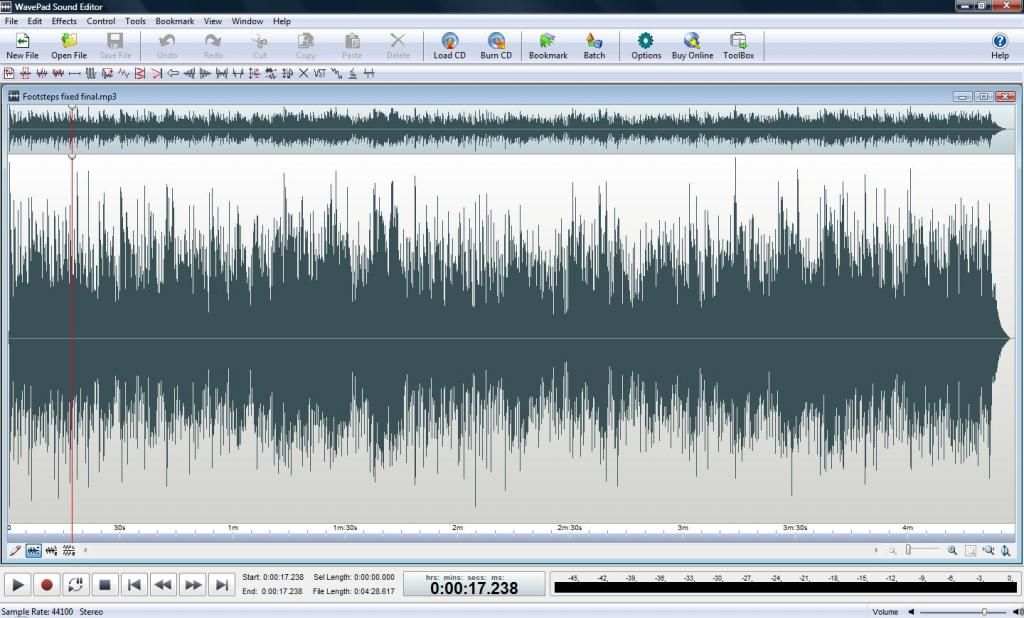
My website & music: www.herbhartley.com MC4/5/6/X1e.c, on a Custom DAW Focusrite Firewire Saffire Interface BMI/NSAI "Just as the blade chooses the warrior, so too, the song chooses the writer "
|
bitflipper
01100010 01101001 01110100 01100110 01101100 01101
- Total Posts : 26036
- Joined: 2006/09/17 11:23:23
- Location: Everett, WA USA
- Status: offline
Re: Need advice for K-meter, Ozone5, Tele Levels
2013/04/25 10:35:46
(permalink)
That's a beautiful waveform, Herb. Seriously. New users could print it out and tape it up over their monitors for reference.
Which is not to say every song in every genre should look exactly like that. But if someone wanted to use that song in a movie or TV show, they'd have no problems. If they did in fact want a brick, they could easily turn it into one because it hasn't already been pre-bricked.
All else is in doubt, so this is the truth I cling to. My Stuff
|
shocking
Max Output Level: -90 dBFS
- Total Posts : 4
- Joined: 2011/12/22 01:13:54
- Status: offline
Re: Need advice for K-meter, Ozone5, Tele Levels
2013/04/25 18:41:56
(permalink)
Bitflipper: I’m not sure and am confused now. Been checking into this and will start over.
Guitarhacker: my previous projects were like that, not overly compressed and brickwalled, but at about -6. Except for the last project, I think they may have been pushed too far; but limiting to just below 0 in projects was easier to grasp. I wanted to try the K system this time.
3.30GHz Intel Core i5-2500K, 8GB DDR3-1333Dual Channel 4x2GB, Primary: 500GB SATA2, Audio & Sample: 1TB SATA2, Windows7 pro 64, Sonar Producer Expanded X1d, Ozone5, Firewire Solo, 2.1 monitors
|
Jeff Evans
Max Output Level: -24 dBFS

- Total Posts : 5139
- Joined: 2009/04/13 18:20:16
- Location: Ballarat, Australia
- Status: offline
Re: Need advice for K-meter, Ozone5, Tele Levels
2013/04/25 18:54:17
(permalink)
To fully understand the K system you have to do a few things first: Know that there are two aspects of a signal peak and rms. (By peak I am not referring to the top part of a continuous sine wave as in electrical engineering. I am talking about how high the signal gets during the attack or leading edge transient part of the signal. eg an acoustic guitar string plucked with a pick. The sound will jump up quite high to a peak value first then after all that will settle down to an average or rms value) There are meters that show either. Peak meters (on most DAW's) and rms meters. VU meters are good for RMS. There are other good rms meters too. (note rms meters are slow in responding. 300 ms in fact to reach 0 dB so they don't show peaks or respond to them they tend to only show the rms component) A digital reference level is chosen to represent 0dB VU rms. eg K-14. When an rms signal is created down at -14dB your main rms or VU meter will show 0dB VU. There is 14 dB of headroom above that. You need to CALIBRATE your system. You need to import K system levels (sinewaves) and play them back and get the rms meters to show 0 dB at these various levels. You need to be able to quickly change your ref level calibration to suit different types of work you may be doing. Without calibrating your system first you are nowhere! You need to read two very important articles from the Bob Katz website. http://www.digido.com/articles-and-demos12/13-bob-katz/22-level-practices-part-1.html http://www.digido.com/how-to-make-better-recordings-part-2.html Once you understand and done all this you can then import and compare commercial recordings. Many commercial mastered CD's end up with a much higher average rms than K-14 or K-12. Many get up to K-7 or K-6. These are not official K ref levels as such but I have created them in order to measure how loud commercial CD's are. You then change the calibration to suit mastering levels and do your mastering to match. (If that is what you want that is)
post edited by Jeff Evans - 2013/04/25 19:29:49
Specs i5-2500K 3.5 Ghz - 8 Gb RAM - Win 7 64 bit - ATI Radeon HD6900 Series - RME PCI HDSP9632 - Steinberg Midex 8 Midi interface - Faderport 8- Studio One V4 - iMac 2.5Ghz Core i5 - Sierra 10.12.6 - Focusrite Clarett thunderbolt interface Poor minds talk about people, average minds talk about events, great minds talk about ideas -Eleanor Roosevelt
|