somsto75
Max Output Level: -86 dBFS

- Total Posts : 206
- Joined: 2006/12/16 16:10:10
- Status: offline
New Vocalstrip plugin
I don't hear anything when I put the "listen" mode on for the de esser part of the plugin. Anybody else or is this just on my end? Weird thing it worked a few days ago and i went back to a project and now it doesnt. I scan all freq's too
8.5.1 x64
|
CJaysMusic
Max Output Level: 0 dBFS

- Total Posts : 30423
- Joined: 2006/10/28 01:51:41
- Location: Miami - Fort Lauderdale - Davie
- Status: offline

Re:New Vocalstrip plugin
2009/10/19 23:30:26
(permalink)
don't hear anything when I put the "listen" mode on for the de esser part of the plugin change the threshold Cj
|
somsto75
Max Output Level: -86 dBFS
- Total Posts : 206
- Joined: 2006/12/16 16:10:10
- Status: offline
Re:New Vocalstrip plugin
2009/10/19 23:32:35
(permalink)
CJaysMusic
don't hear anything when I put the "listen" mode on for the de esser part of the plugin
change the threshold
Cj
If you mean "depth" control,I did that. I adjusted that and the focus freq and it's silent in "listen" mode.
|
somsto75
Max Output Level: -86 dBFS
- Total Posts : 206
- Joined: 2006/12/16 16:10:10
- Status: offline
Re:New Vocalstrip plugin
2009/10/19 23:36:57
(permalink)
Ok now it's weirder. Now I left it for a few sec's in the "7 oclock" position to see what happens and Im hearing high freq's there and still nothing when actually set on high freq's. It's like backwards
|
CJaysMusic
Max Output Level: 0 dBFS
- Total Posts : 30423
- Joined: 2006/10/28 01:51:41
- Location: Miami - Fort Lauderdale - Davie
- Status: offline
Re:New Vocalstrip plugin
2009/10/19 23:39:19
(permalink)
Do you have the listen button on or off and is the de-esser section enabled
|
somsto75
Max Output Level: -86 dBFS
- Total Posts : 206
- Joined: 2006/12/16 16:10:10
- Status: offline
Re:New Vocalstrip plugin
2009/10/19 23:44:01
(permalink)
Yeah, with the de esser activated, I throw the listen mode on to check for the most offending freq but the freq's are backwards from what's being read on the screen. For example I'll put it like 3khz but I'm hearing sibilant freq's there. And if I actually put it on the higher freq's that are usually the cluprits I hear nothing
|
...wicked
Max Output Level: -1.5 dBFS

- Total Posts : 7360
- Joined: 2003/12/18 01:00:56
- Location: Seattle
- Status: offline
Re:New Vocalstrip plugin
2009/10/20 03:18:18
(permalink)
Well, yeah. That means there's not a lot of content the plugin is working on.
Forgive me if I'm not reading you right, but you know that "listen" switches the output the actual signal getting attenuated right? You should hear very little in that mode (unless your content is awful).
=========== The Fog People =========== Intel i7-4790 16GB RAM ASUS Z97 Roland OctaCapture Win10/64 SONAR Platinum 64-bit billions VSTs, some of which work
|
AT
Max Output Level: 0 dBFS
- Total Posts : 10654
- Joined: 2004/01/09 10:42:46
- Location: TeXaS
- Status: offline
Re:New Vocalstrip plugin
2009/10/20 10:50:28
(permalink)
The listen switch, as wicked sez, is to her what is being taken out of your signal. What is de-essed. If you hear a lot, you are probably cutting to much into your output signal.
https://soundcloud.com/a-pleasure-dome
http://www.bnoir-film.com/ there came forth little children out of the city, and mocked him, and said unto him, Go up, thou bald head; go up, thou bald head. 24 And he turned back, and looked on them, and cursed them in the name of the Lord. And there came forth two she bears out of the wood, and tare forty and two children of them.
|
somsto75
Max Output Level: -86 dBFS
- Total Posts : 206
- Joined: 2006/12/16 16:10:10
- Status: offline
Re:New Vocalstrip plugin
2009/10/20 13:24:07
(permalink)
I dont want to be rude or anything but I have to ask did you guys read the post? From what you just said it doesn't seem like you read it.
Firstly: listen modes allow a monitoring of what is being attenuated when in "normal" mode. just like a sidechain monitor. You should hear something very easily when in listen mode and it should sound offensive and pretty high freq, especially when the focus dial is set some where in that high range.
In a nutshell, it seems like this plugin works just as any deesser would, its just backwards as far as how its reading freq's
My issue: setting the focus dial in those high areas Im hearing nothing in listen mode - which is not normal. When I set it down further like 3k i start to hear high sibilant freqs as if I was in the high area. So its backwards as it stands right now.
|
CJaysMusic
Max Output Level: 0 dBFS
- Total Posts : 30423
- Joined: 2006/10/28 01:51:41
- Location: Miami - Fort Lauderdale - Davie
- Status: offline
Re:New Vocalstrip plugin
2009/10/20 16:04:23
(permalink)
Firstly: listen modes allow a monitoring of what is being attenuated when in "normal" mode. just like a sidechain monitor. You should hear something very easily when in listen mode and it should sound offensive and pretty high freq, especially when the focus dial is set some where in that high range.
Not necessarily. De essers can be subtle and not heard. It depends on the audio file and the settings. With due respect, the dither may not have no effect on some audio files. It depends on the frequnxcy range of the audio file (vocal) and the de-esser. When a de-esser is working properly, you should not notice it. Cj
post edited by CJaysMusic - 2009/10/20 16:46:33
|
somsto75
Max Output Level: -86 dBFS
- Total Posts : 206
- Joined: 2006/12/16 16:10:10
- Status: offline
Re:New Vocalstrip plugin
2009/10/20 16:23:08
(permalink)
CJaysMusic
Firstly: listen modes allow a monitoring of what is being attenuated when in "normal" mode. just like a sidechain monitor. You should hear something very easily when in listen mode and it should sound offensive and pretty high freq, especially when the focus dial is set some where in that high range.
Not necessarily. Dithers can be subtle and not heard. It depends on the audio file and the settings. With due respect, the dither may not have no effect on some audio files. It depends on the frequnxcy range of the audio file (vocal) and the de-esser.
When a de-esser is working properly, you should not notice it.
Cj
 I think something is bein fundamentally confused here. To be honest cj, Im not sure why you bring up dither, I dont see how its related here. Anyways guys, im not talking about the de esser here in a regular working mode where, yes you are NOT suppose to here a good de esser or good de esser settings in action. Im talking about the "listen mode". In listen mode you ARE suppose to hear your freq's and badly. Its suppose to be showing you what you are removing. this is a very basic understanding of listen modes for side chains or a de esser. Ive asked a friend of my mine who is a pro audio engineer to confirm. Again having said all of that this de esser in the new vocalstrip plugin actually works but as far as gauging it knowing what freq you are on, somethin isnt right or at least on my system its not right. Where u set the focus freq and what its reading is presently backwards.
|
CJaysMusic
Max Output Level: 0 dBFS
- Total Posts : 30423
- Joined: 2006/10/28 01:51:41
- Location: Miami - Fort Lauderdale - Davie
- Status: offline
Re:New Vocalstrip plugin
2009/10/20 16:45:28
(permalink)
Oh I meant De-essers.. Not dither. ill edit my post
Cj
|
AT
Max Output Level: 0 dBFS
- Total Posts : 10654
- Joined: 2004/01/09 10:42:46
- Location: TeXaS
- Status: offline
Re:New Vocalstrip plugin
2009/10/20 17:09:08
(permalink)
Yes, I read the post. And no de-esser I've ever used the "listen" function with passed a lot of sound - unless you were abusing it. It is usually a band pass filter set around 6 kHz. Hopefully there isn't a lot of energy there and it only suppresses the ssses and such. there shouldn't be much sound there - just what is too much, making the sound hard, and no fundamentals.
On the new vocalstrip I listened to what it was suppressing and it wasn't much. Very mild, less than other de-esses. Prehaps you should just use a notch filter if you want to get rid of all that slithern (sp) speech that is bothering you.
https://soundcloud.com/a-pleasure-dome
http://www.bnoir-film.com/ there came forth little children out of the city, and mocked him, and said unto him, Go up, thou bald head; go up, thou bald head. 24 And he turned back, and looked on them, and cursed them in the name of the Lord. And there came forth two she bears out of the wood, and tare forty and two children of them.
|
somsto75
Max Output Level: -86 dBFS
- Total Posts : 206
- Joined: 2006/12/16 16:10:10
- Status: offline
Re:New Vocalstrip plugin
2009/10/20 17:22:37
(permalink)
AT
Yes, I read the post. And no de-esser I've ever used the "listen" function with passed a lot of sound - unless you were abusing it. It is usually a band pass filter set around 6 kHz. Hopefully there isn't a lot of energy there and it only suppresses the ssses and such. there shouldn't be much sound there - just what is too much, making the sound hard, and no fundamentals.
On the new vocalstrip I listened to what it was suppressing and it wasn't much. Very mild, less than other de-esses. Prehaps you should just use a notch filter if you want to get rid of all that slithern (sp) speech that is bothering you.
Well passing a lot of sound and what im referring to are very different. I never said that or any general idea like that. If the threshold is set on a de esser and you're in listen mode you should hear the siblant sound you are trying to tame and in listen mode it should sound harsh or sibliant, which is why youre using this in the first place. Listen mode shows you what youre removing and should in an obvious way but it should not frequency rich or broad but specific to a slither of freq and not constantly. Thats what im driving at. Now the issue at hand im having which is being overlooked for some reason is the settings and what is heard are backwards. Id like to confirm if anybody else is havin this issue
|
CJaysMusic
Max Output Level: 0 dBFS
- Total Posts : 30423
- Joined: 2006/10/28 01:51:41
- Location: Miami - Fort Lauderdale - Davie
- Status: offline
Re:New Vocalstrip plugin
2009/10/20 18:37:45
(permalink)
the threshold is set on a de esser and you're in listen mode you should hear the siblant sound you are trying to tame and in listen mode it should sound harsh or sibliant Not really. Threshold is only threshold. Threshold has nothing to due with the frequency. Threshold is for determining when it activated the de-esser and when it shuts off. De-essers are more complicated than that. yuo just cant raise and lower the threshold and think its going to fix or effecta vocal or audio track. Cj
|
somsto75
Max Output Level: -86 dBFS
- Total Posts : 206
- Joined: 2006/12/16 16:10:10
- Status: offline
Re:New Vocalstrip plugin
2009/10/20 19:28:06
(permalink)
CJaysMusic
the threshold is set on a de esser and you're in listen mode you should hear the siblant sound you are trying to tame and in listen mode it should sound harsh or sibliant
Not really. Threshold is only threshold. Threshold has nothing to due with the frequency. Threshold is for determining when it activated the de-esser and when it shuts off. De-essers are more complicated than that. yuo just cant raise and lower the threshold and think its going to fix or effecta vocal or audio track.
Cj
Please point out to me where I said threshold is anything but. I never said anything of the sort. However, threshold is very related to how the de esser will behave once you set the frequency you find is offensive. As you said activate the deesser and shut it off. LOL My goodness, you are tellin me things that are not related to my issue nor im not aware of. Why do you keep doing that? its really strange you keep picking things out out of context and interpreating them as me not understanding a de esser. Since you took my quote out of context :"the threshold is set on a de esser and you're in listen mode you should hear the siblant sound you are trying to tame and in listen mode it should sound harsh or sibliant" this was assuming you already found your frequency at hand. I mistakenly assumed youd understand that was implicit because again imnot tryin tofigure out HOW to use a de esser. Please MOVE on from what a de esser is. I know what it is. I need somebody to either verify or deny this issue im having. Preferably more than one person.
|
John
Forum Host

- Total Posts : 30467
- Joined: 2003/11/06 11:53:17
- Status: offline
Re:New Vocalstrip plugin
2009/10/20 19:37:38
(permalink)
I used it on a few vocal tracks and it works as it should. I did try the "listen" mode to get an idea of what was being processed and it was a very tiny bit of the audio stream that I heard infrequently. I believe that is the way it should work. I don't understand what you are trying to say about it, Somsto.
|
somsto75
Max Output Level: -86 dBFS
- Total Posts : 206
- Joined: 2006/12/16 16:10:10
- Status: offline
Re:New Vocalstrip plugin
2009/10/20 19:49:29
(permalink)
John
I used it on a few vocal tracks and it works as it should. I did try the "listen" mode to get an idea of what was being processed and it was a very tiny bit of the audio stream that I heard infrequently. I believe that is the way it should work. I don't understand what you are trying to say about it, Somsto.
John, What I am saying is my issue is a label problem. On my system x64 Vista with 8.5.1 x 64, the frequencies spectrum seems reversed from what the freq dial is set on. So if I visually set the freq dial on like 3K I hear sibilance freq like 7k - 9k range, again dont know exactly because obviously Im having this issue. When I actually, visually then set the freq dial on a freq in that upper range I dont hear anything (again confirming what im hearing by using listen mode).
|
John
Forum Host
- Total Posts : 30467
- Joined: 2003/11/06 11:53:17
- Status: offline
Re:New Vocalstrip plugin
2009/10/20 20:20:52
(permalink)
Here I am posting the pictures of the way I have it set and its output. 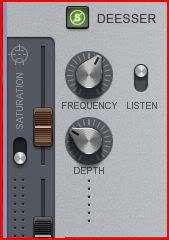 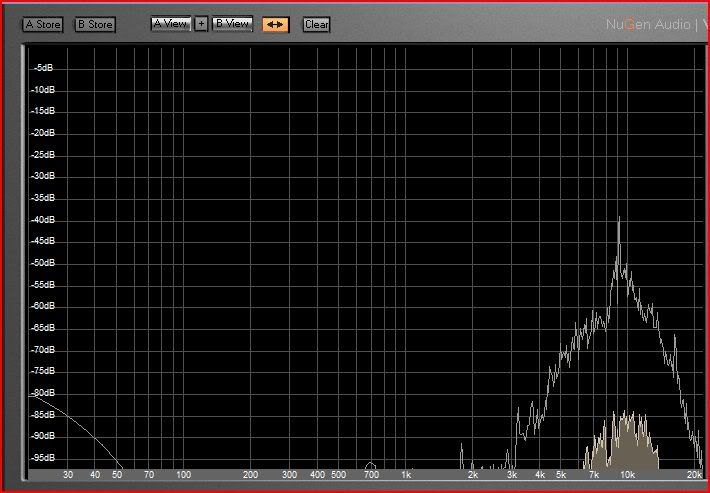 The spectrum is only a freeze of a part that has sound. Most of the output is silent. Is this different from what you see and hear?
|
timumstead
Max Output Level: -89 dBFS

- Total Posts : 67
- Joined: 2006/02/05 14:23:35
- Status: offline
Re:New Vocalstrip plugin
2009/10/20 20:25:19
(permalink)
I have noticed the same thing using the De-Esser on the new vx-64. The freq. dial has to be turned way to the left to hear the sibilance on some lead vox in listen mode in one of my projects. This isn't where I would expect the frequencies to be needing adjustment either. I would expect them to be in a much higher range.
This may just be my own idea of where I think it "should" be though, cause doing some quick searches on sibilance, you will find that it can be generally found anywhere from the 2 to 10 kHz range, so the dial on the vx-64 set pointing straight left at the wall isn't too out of the question when it reads that it is working in the 4 kHz range.
Could be just the way Cake set the dial up, since the lowest setting is 2 kHz, going up to 12 kHz.
Just my thoughts
Tim
|
somsto75
Max Output Level: -86 dBFS
- Total Posts : 206
- Joined: 2006/12/16 16:10:10
- Status: offline
Re:New Vocalstrip plugin
2009/10/20 20:25:37
(permalink)
Ahh now we are getting some where. John I can get the same exact output but here's where its weird for me: My freq dial instead will be on like 3k but it will show just as you have it there on the analyzer. VERY odd issue and it seems nobody else is experiencing this. EDIT: timumstead! Thank you for chiming in. Finally now we're getting some where. AND somebody else does have this issue, YAY! lol that sounds weird I know but you know what I mean  Anyways its a good guess but i highly doubt it. I talked with my engineer friend again and although they can be found in lower freq's like 4k its not likely. Not to mention the audio confirmation tells me its inthe higher range for sure AND the analyzer output shows 7 - 10 k
post edited by somsto75 - 2009/10/20 20:29:23
|
timumstead
Max Output Level: -89 dBFS
- Total Posts : 67
- Joined: 2006/02/05 14:23:35
- Status: offline
Re:New Vocalstrip plugin
2009/10/20 21:54:09
(permalink)
Glad to be of help, you guys analysis is way more in depth than mine on this one, just off the cuff guesses here. I would love to know what the final consensus is on this.
Tim
|
timumstead
Max Output Level: -89 dBFS
- Total Posts : 67
- Joined: 2006/02/05 14:23:35
- Status: offline
Re:New Vocalstrip plugin
2009/10/20 21:59:12
(permalink)
Just watched the track I have the vx-64 on with a spectrum analyzer running real time. Yeah, the dominant frequencies are in th 7-9 kHz range like you guys are showing, but the plug wants to be set around 4 kHz as to what it claims on the dial to handle these.
Tim
|
timumstead
Max Output Level: -89 dBFS
- Total Posts : 67
- Joined: 2006/02/05 14:23:35
- Status: offline
Re:New Vocalstrip plugin
2009/10/20 22:18:41
(permalink)
Totally subjective here, using my ears and fiddling with the dials, but vx-64 does seem to be handling the track different than the spitfish de-esser from digitalfishphones. Take that for what its worth, could mean nothing and just be me.
Tim
|
somsto75
Max Output Level: -86 dBFS
- Total Posts : 206
- Joined: 2006/12/16 16:10:10
- Status: offline
Re:New Vocalstrip plugin
2009/10/20 22:41:22
(permalink)
For the time being its so-so just guessing going by sound. But I do hope theres a fix for this sooner than later EDIT: John btw, since yours seems okay what version Sonar and Win are you using?
post edited by somsto75 - 2009/10/20 22:42:31
|
John
Forum Host
- Total Posts : 30467
- Joined: 2003/11/06 11:53:17
- Status: offline
Re:New Vocalstrip plugin
2009/10/20 23:35:26
(permalink)
Sonar 8.5.1 Vista 32 Ultimate. For the time being its so-so just guessing going by sound. But I do hope theres a fix for this sooner than later In the section where the frequency bands are shown you can click on the deesser tab to see what frequencies are being modified. Also it says what frequency is being effected. Here in this example its 4.95 kHz. 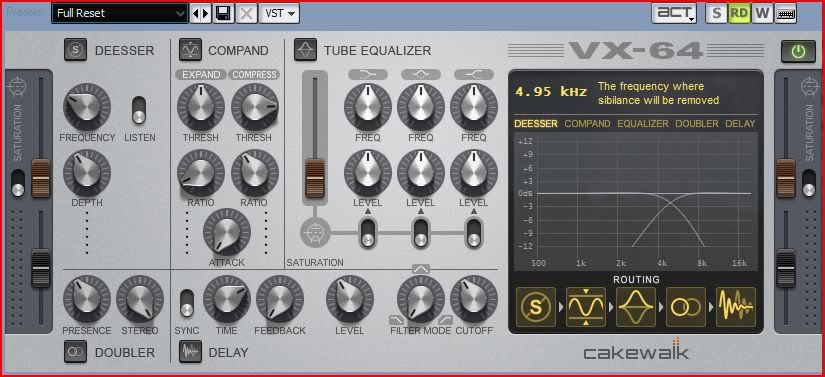
|
somsto75
Max Output Level: -86 dBFS
- Total Posts : 206
- Joined: 2006/12/16 16:10:10
- Status: offline
Re:New Vocalstrip plugin
2009/10/20 23:41:21
(permalink)
John I think you missed the point here. The issue is that since the dial and the window showing the freq are reversed with what freq is actually being affected we must go by ear for the time being until theres a fix.
And I think it seems that this is a Sonar 8.5.1 x64 Vista x64 bug
post edited by somsto75 - 2009/10/20 23:46:16
|
John
Forum Host
- Total Posts : 30467
- Joined: 2003/11/06 11:53:17
- Status: offline
Re:New Vocalstrip plugin
2009/10/21 00:06:59
(permalink)
If its a 64 bit issue I can't be of any help. However you seem to think that one should not listen to what the plugin is doing. I believe that is not the right way to use it or any other plugin. When I was finding the point where the essing was most effected I did not watch the plugin at all just the knob turning. I was carefully listening to what was happening. I couldn't care less what the visuals are saying. That to me is only an interesting side issue. It has no meaning to the end results.
Now I will admit I may not understand the issue here because it has worked for me as I would expect it to.
|
somsto75
Max Output Level: -86 dBFS
- Total Posts : 206
- Joined: 2006/12/16 16:10:10
- Status: offline
Re:New Vocalstrip plugin
2009/10/21 00:16:47
(permalink)
John,
I understand that and of course listening is the ultimate form in audio however Id rather stillnot have any factors that could throw off any perception or workflow. Its no different than buying anything really: you expect it to work as it should and be in a "normal" state. Especially when it comes to software where one wrong or off thing may possibly indicate a bad working state for the plugin regarding other parts of it. I dont know. But having a fundamental thing backwards like this is def not a good start in feeling secure about the plugin.
|
Bob Currie
Max Output Level: -90 dBFS

- Total Posts : 47
- Joined: 2006/10/31 14:17:42
- Status: offline
Re:New Vocalstrip plugin
2009/10/21 10:07:22
(permalink)
Hi somsto75, You're not crazy :-) But I think that there is a fundamental difference in the way that a number of DeEssers work. Many older-style DeEssers operate by first splitting the frequency bands, then limiting the upper band, so the burst of high frequencies doesn't blow-over the rest of the signal. The problem is, just as often, it degrades the overall crispness and clarity of the signal (as the "sizzle" reaches a certain level). Many newer generation DeEssers are somewhat smarter in that they work harder to detect or isolate a true "S"-pop and suppress it as a whole. In your case, when you turn the frequency knob too high, you're confusing the DeEsser as to where the "S" is. If some of the "S" bleeds into the lower band, it can be confused with non-"S" signal, and the DeEsser may end up suppressing nothing at all. FWIW - older-style DeEssers would always remove something in this case (i.e. the higher-frequency portion of the "S"), but again, this often came at the expense of crispness and sizzle. Question to the group: Which mode do you expect/prefer? Does older-style DeEssing have its place? Would you want both modes? ~Bob
post edited by Bob Currie [Cakewalk] - 2009/10/21 10:26:58
|