audi321
Max Output Level: -90 dBFS

- Total Posts : 3
- Joined: 2012/07/05 12:34:17
- Status: offline
Newbie needs help!
Hi all. I have very limited computer skills I'm afraid so sorry to be thick.
I have been given Sonar X1LE from Roland as a solution to a problem with my Roland Digital Piano.
Basically, my piano has the ability to convert midi files and display it as a music score on the pianos screen.
However, after lots of emails to their technical support, it turns out that the only midi channels it can use, are ch 3 (for the left hand) and ch 4 (for the right hand).
So my needs are very simple, I want to be able to load up a midi file, and change the channels to 3&4. However, I guess this software is far more complex than I will ever use it for.......could someone provide me with an idiots guide on how to do this please!
Many many thanks in advance!
|
Beepster
Max Output Level: 0 dBFS

- Total Posts : 18001
- Joined: 2012/05/11 19:11:24
- Status: offline

Re:Newbie needs help!
2012/07/05 13:08:51
(permalink)
I'm not sure but I would take a look in Edit > Preferences > MIDI Devices and see if you can set it there. Also take a look at the help topics manual that should have come with Sonar. It would be in your programs menu under the Cakewalk folder. Good luck and welcome to the forum.
|
57Gregy
Max Output Level: 0 dBFS
- Total Posts : 14404
- Joined: 2004/05/31 17:04:17
- Location: Raleigh, North Carolina
- Status: offline
Re:Newbie needs help!
2012/07/05 23:47:03
(permalink)
Welcome to the forum.
Open the MIDI file in SONAR.
Change the channel in the MIDI track to 3 or 4.
Click File>Save As and save it as a MIDI Format 0 file.
Copy that file to disk, or however else you can get it into the Roland, and it should work.
|
audi321
Max Output Level: -90 dBFS
- Total Posts : 3
- Joined: 2012/07/05 12:34:17
- Status: offline
Re:Newbie needs help!
2012/07/06 06:59:03
(permalink)
Hi Greg, thanks for that, you make it sound very simple.
Can you explain a bit more the 'Change the channel in the MIDI track to 3 or 4' part?
Again, sorry to be an idiot, but I'm going to need an idiots guide!
Thanks again.
|
57Gregy
Max Output Level: 0 dBFS
- Total Posts : 14404
- Joined: 2004/05/31 17:04:17
- Location: Raleigh, North Carolina
- Status: offline
Re:Newbie needs help!
2012/07/06 10:40:00
(permalink)
Sure. When you expand a MIDI track pane, you can see all it's properties. Just click the Ch drop-down arrow and change the channel. 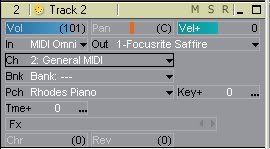
|
audi321
Max Output Level: -90 dBFS
- Total Posts : 3
- Joined: 2012/07/05 12:34:17
- Status: offline
Re:Newbie needs help!
2012/07/06 11:30:02
(permalink)
Thanks again Greg, I think I'm getting there. So I load Sonar. Press 'Create a New Project' and call it something and leave it as 'Normal' Go to 'File' and 'Open' and select the MIDI file. I am then presented with this screen 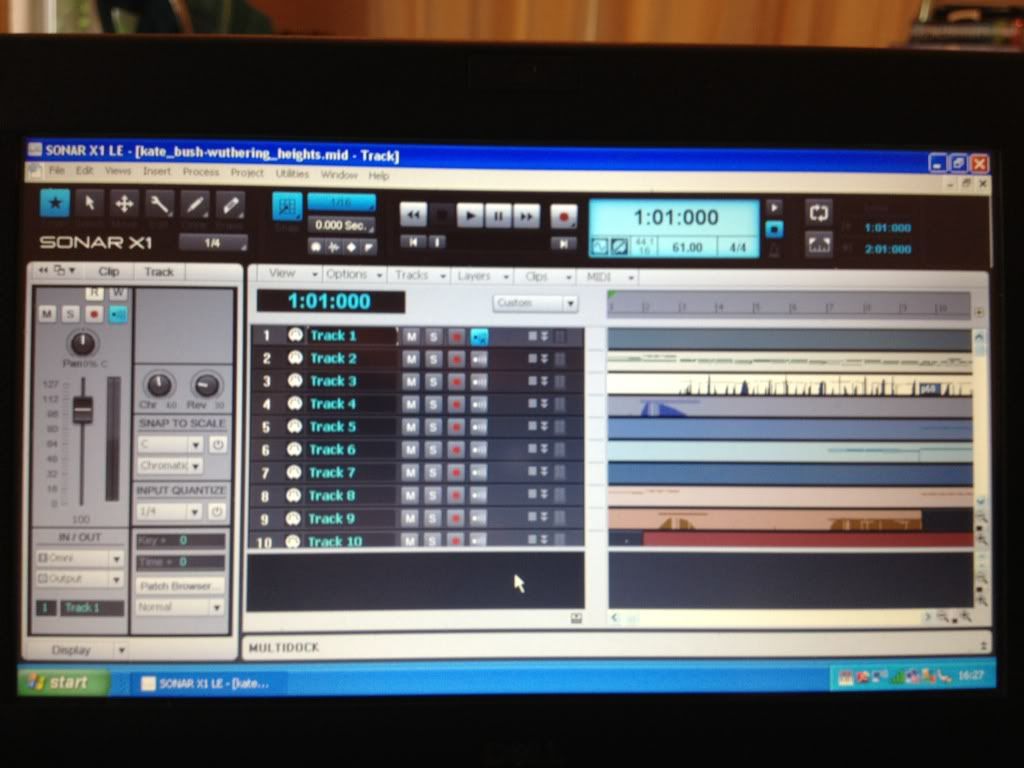 Where do I go next to get the screen you have? Thanks again!
|
RobertB
Max Output Level: 0 dBFS
- Total Posts : 11256
- Joined: 2005/11/19 23:40:50
- Location: Fort Worth, Texas
- Status: offline
Re:Newbie needs help!
2012/07/07 01:11:58
(permalink)
Audi, you won't see the particular screen that Greg has shown.
While it does the same thing, The X1 graphic interface is very different.
Do you have the Roland connected via USB or a standard MIDI (DIN) connection?
If you click Edit/Preferences/MIDI Devices, what are your options?
In particular, your Output options.
My Soundclick Page SONAR Professional, X3eStudio,W7 64bit, AMD Athlon IIx4 2.8Ghz, 4GB RAM, 64bit, AKAI EIE Pro, Nektar Impact LX61,Alesis DM6,Alesis ControlPad,Yamaha MG10/2,Alesis M1Mk2 monitors,Samson Servo300,assorted guitars,Lava Lamp Shimozu-Kushiari or Bob
|
57Gregy
Max Output Level: 0 dBFS
- Total Posts : 14404
- Joined: 2004/05/31 17:04:17
- Location: Raleigh, North Carolina
- Status: offline
Re:Newbie needs help!
2012/07/07 10:31:10
(permalink)
Right. That image is from SONAR Home Studio 6, but you can expand the MIDI track panes by dragging the bottoms of the tracks downward (I think). Then you should be able to see all the track properties and change what you want.
|