HotCoollMusicGirl
Max Output Level: -71 dBFS

- Total Posts : 991
- Joined: 2004/10/02 20:23:31
- Status: offline
No MIDI meters when Record is enabled?
I just noticed that the MIDI meters disappear when I enable Record. The space it takes up is filled in by the FX bin, or the bottom of the track control area, depending on whether you've got horizontal or vertical meters.
Seems strange, since if you have the "Allow MIDI recording without an armed track" option selected the MIDI meters work while recording, so I wonder why they hide them when you DO have an armed track?
No big deal. Just curious.
|
Susan G
Max Output Level: 0 dBFS

- Total Posts : 12016
- Joined: 2003/11/05 22:49:26
- Location: Putnam County, NY
- Status: offline

RE: No MIDI meters when Record is enabled?
2008/04/02 19:14:27
(permalink)
Hi- The MIDI meters work fine here during Recording. I use vertical meters, BTW. I don't even see an option to change that. Hmm... -Susan EDIT: Very long shot, but are you patched to 7.0.2?
post edited by Susan G - 2008/04/02 19:34:59
2.30 gigahertz Intel Core i7-3610QM; 16 GB RAMWindows 10 x64; NI Komplete Audio 6.SONAR Platinum (Lexington) x64
|
tubeydude
Max Output Level: -72 dBFS

- Total Posts : 904
- Joined: 2005/11/16 12:17:59
- Location: Santa Ynez, CA
- Status: offline
RE: No MIDI meters when Record is enabled?
2008/04/02 19:27:29
(permalink)
Another long shot...Have you tried dragging the divider on the left of the track lanes to make the channel control area wider. Some of my older projects from Sonar 5 have the Mute, solo and record hidden until I drag the border over a bit. Hope that helps...
Erik
|
brundlefly
Max Output Level: 0 dBFS
- Total Posts : 14250
- Joined: 2007/09/14 14:57:59
- Location: Manitou Spgs, Colorado
- Status: offline
RE: No MIDI meters when Record is enabled?
2008/04/02 19:37:43
(permalink)
The MIDI meters work fine here during Recording. Susan, do you have "Allow MIDI recording without an armed track" enabled as the OP suggested? I mentioned the loss of MIDI meters with track arming in another post a little bit ago. I am patched to 7.02, and lose them the moment I arm a track, whether they are vertical or horizontal and no matter how much realestate is available to display them. Also, since the menu option for displaying them specifically refers to "playback" meters, I assumed Cakewalk intended them not to display on recording (for reasons known only to them  ). Strange.
SONAR Platinum x64, 2x MOTU 2408/PCIe-424 (24-bit, 48kHz) Win10, I7-6700K @ 4.0GHz, 24GB DDR4, 2TB HDD, 32GB SSD Cache, GeForce GTX 750Ti, 2x 24" 16:10 IPS Monitors
|
Susan G
Max Output Level: 0 dBFS
- Total Posts : 12016
- Joined: 2003/11/05 22:49:26
- Location: Putnam County, NY
- Status: offline
RE: No MIDI meters when Record is enabled?
2008/04/02 19:48:29
(permalink)
Hi Dave- Susan, do you have "Allow MIDI recording without an armed track" enabled as the OP suggested? Yes, I do. This is weird. Are you looking at the "All" tab when you're recording? I can't think what the difference might be. My MIDI meters are definitely visible and responding during recording. -Susan
2.30 gigahertz Intel Core i7-3610QM; 16 GB RAMWindows 10 x64; NI Komplete Audio 6.SONAR Platinum (Lexington) x64
|
brundlefly
Max Output Level: 0 dBFS
- Total Posts : 14250
- Joined: 2007/09/14 14:57:59
- Location: Manitou Spgs, Colorado
- Status: offline
RE: No MIDI meters when Record is enabled?
2008/04/02 19:52:09
(permalink)
Yes, I'm on the All tab. Turn off Record without Arming, and I think you'll see the meters disappear when you arm the track as we do.
SONAR Platinum x64, 2x MOTU 2408/PCIe-424 (24-bit, 48kHz) Win10, I7-6700K @ 4.0GHz, 24GB DDR4, 2TB HDD, 32GB SSD Cache, GeForce GTX 750Ti, 2x 24" 16:10 IPS Monitors
|
Susan G
Max Output Level: 0 dBFS
- Total Posts : 12016
- Joined: 2003/11/05 22:49:26
- Location: Putnam County, NY
- Status: offline
RE: No MIDI meters when Record is enabled?
2008/04/02 20:03:55
(permalink)
Turn off Record without Arming, and I think you'll see the meters disappear when you arm the track as we do. No, I still see the MIDI meters. -Susan
2.30 gigahertz Intel Core i7-3610QM; 16 GB RAMWindows 10 x64; NI Komplete Audio 6.SONAR Platinum (Lexington) x64
|
brundlefly
Max Output Level: 0 dBFS
- Total Posts : 14250
- Joined: 2007/09/14 14:57:59
- Location: Manitou Spgs, Colorado
- Status: offline
RE: No MIDI meters when Record is enabled?
2008/04/02 20:15:45
(permalink)
Hmmm... I don't lose the meters if I enable recording without arming, but the meters don't register any events when recording. Tried a few other configurations like routing MIDI to soft synths instead of MIDI Out, or selecting a specific MIDI input channel, but nothing seems to make any difference. It's not a big deal to me, either, but if it can work, I'd like it to.
SONAR Platinum x64, 2x MOTU 2408/PCIe-424 (24-bit, 48kHz) Win10, I7-6700K @ 4.0GHz, 24GB DDR4, 2TB HDD, 32GB SSD Cache, GeForce GTX 750Ti, 2x 24" 16:10 IPS Monitors
|
HotCoollMusicGirl
Max Output Level: -71 dBFS
- Total Posts : 991
- Joined: 2004/10/02 20:23:31
- Status: offline
RE: No MIDI meters when Record is enabled?
2008/04/02 20:17:21
(permalink)
Hi all. My experience is like what brundlefly describes. It's not dependent on screen realestate or how wide I have the track panel, or which widgets I'm showing (I have it set to All.) The main difference is that when I change the "Allow MIDI recording without an armed track" setting doesn't make any difference: no matter how that's set, when I arm the track, the MIDI meter just pops out of view, and when I disarm the track, it pops back into view.
I've tended to record MIDI in "unarmed" mode, and only recently turned off that option (thinking it might save a few CPUs).. and also probably spent much of my recording time in PRV..., so I don't know if this only recently showed up. I only noticed it earlier when I wanted to confirm my kb was getting into the track, and couldn't find the meter.
I like having the MIDI meters, BTW. A small but very cool new feature. :)
|
Susan G
Max Output Level: 0 dBFS
- Total Posts : 12016
- Joined: 2003/11/05 22:49:26
- Location: Putnam County, NY
- Status: offline
RE: No MIDI meters when Record is enabled?
2008/04/02 21:01:17
(permalink)
I don't know what to say -- the MIDI track meters stay in view and register events during recording here whether the tracks are pre-armed or not. I guess all I can say is I'm glad it's not a big deal for either of you!
-Susan
2.30 gigahertz Intel Core i7-3610QM; 16 GB RAMWindows 10 x64; NI Komplete Audio 6.SONAR Platinum (Lexington) x64
|
brundlefly
Max Output Level: 0 dBFS
- Total Posts : 14250
- Joined: 2007/09/14 14:57:59
- Location: Manitou Spgs, Colorado
- Status: offline
RE: No MIDI meters when Record is enabled?
2008/04/02 21:14:47
(permalink)
I have another important data point:
I created a new project form scratch using the default Normal template in 7.02, and MIDI meters display and work properly with tracks armed and recording. I was unable to "break" them in this new project. I suspect this is an issue involving projects created under 6.2.1. I still have that installed on another machine, and will try creating a new project there and opening it with 7.02.
SONAR Platinum x64, 2x MOTU 2408/PCIe-424 (24-bit, 48kHz) Win10, I7-6700K @ 4.0GHz, 24GB DDR4, 2TB HDD, 32GB SSD Cache, GeForce GTX 750Ti, 2x 24" 16:10 IPS Monitors
|
Susan G
Max Output Level: 0 dBFS
- Total Posts : 12016
- Joined: 2003/11/05 22:49:26
- Location: Putnam County, NY
- Status: offline
RE: No MIDI meters when Record is enabled?
2008/04/02 21:24:24
(permalink)
Ah -- good information! I still have 6.2.1 installed, but the project I used to test this issue was started in 7.
Thanks-
-Susan
2.30 gigahertz Intel Core i7-3610QM; 16 GB RAMWindows 10 x64; NI Komplete Audio 6.SONAR Platinum (Lexington) x64
|
brundlefly
Max Output Level: 0 dBFS
- Total Posts : 14250
- Joined: 2007/09/14 14:57:59
- Location: Manitou Spgs, Colorado
- Status: offline
RE: No MIDI meters when Record is enabled?
2008/04/02 22:36:46
(permalink)
I verified MIDI meters will not work correctly in projects started in 6.2.1. There appears to be something in the new .cwt template structure that sets up MIDI metering that is missing from the old .tpl structure. Resaving the project under 7.02 does not seem to correct the problem. would be nice to know how to recover MIDI metering in okd projects. Resaving the file under 7.02 does not seem to do it. It would also be nice to know what other weirdnesses in 7..02 might be due to things missing from 6.2.1 files.
SONAR Platinum x64, 2x MOTU 2408/PCIe-424 (24-bit, 48kHz) Win10, I7-6700K @ 4.0GHz, 24GB DDR4, 2TB HDD, 32GB SSD Cache, GeForce GTX 750Ti, 2x 24" 16:10 IPS Monitors
|
HotCoollMusicGirl
Max Output Level: -71 dBFS
- Total Posts : 991
- Joined: 2004/10/02 20:23:31
- Status: offline
RE: No MIDI meters when Record is enabled?
2008/04/02 23:17:16
(permalink)
Brundlefly, how interesting. The project I'm working on now was indeed started in version 6... I can't be sure if it was the initial release of 6.0 or if I already had patches applied (I had reinstalled XP and Sonar late last year and didn't initially do the updates.) I'm having another apparently unrelated problem in that same project. (FYI, all the gory details are here: http://forum.cakewalk.com/tm.asp?m=1349420&mpage=1&key=��) I can reproduce the conditions on other tracks in that same project file. But when I recreate the same conditions in a file created from scratch in 7.0.2 (to the extent that's possible), the problem isn't there. It's so hard to know what's what, with so many variables. But I think I'm generally finding that things are less stable, and with more unexplained quirkiness, in projects that started in version 6.x.x than those that are native to 7, which unfortunately includes most of what I'm working on. I'm not even sure I have a "pure" version 7 project..... My sense is that even though I often over-taxed my computer when working under 6 (with dropouts, high CPU, etc.), it was nevertheless more stable, with fewer crashes, than my current experience with 7. Whether that's because of subtle version incompatibilities, or that 7 is just less stable on my system, or if it's just my imagination, I have no real way of knowing. Oh well. [Edit: bad link fixed.]
post edited by HotCoollMusicGirl - 2008/04/03 01:04:52
|
brundlefly
Max Output Level: 0 dBFS
- Total Posts : 14250
- Joined: 2007/09/14 14:57:59
- Location: Manitou Spgs, Colorado
- Status: offline
RE: No MIDI meters when Record is enabled?
2008/04/03 00:35:04
(permalink)
Hmmm... I get an error message on that thread you linked, but I've seen some of your other issues. They're always interesting.  My general observation is that most of the issues with v 7.xx are due to interoperability of new features with old functionality, and changes in the project file format to support them. I haven't had any major issues with 7.02, but it definitely needs a little massaging to get all these new features completely integrated and working predictably. And not having complete backward compatibility with old project files is a significant problem for oldtimers like me . I reported this problem to Cakewalk as CWBRN-876, "MIDI Meters Disappear When Arming Tracks in Pre-SONAR 7 Projects".
SONAR Platinum x64, 2x MOTU 2408/PCIe-424 (24-bit, 48kHz) Win10, I7-6700K @ 4.0GHz, 24GB DDR4, 2TB HDD, 32GB SSD Cache, GeForce GTX 750Ti, 2x 24" 16:10 IPS Monitors
|
HotCoollMusicGirl
Max Output Level: -71 dBFS
- Total Posts : 991
- Joined: 2004/10/02 20:23:31
- Status: offline
RE: No MIDI meters when Record is enabled?
2008/04/03 00:43:40
(permalink)
While trying to troubleshoot another problem, I came across this. Notice how tracks 2,4,6, and 8 are all MIDI tracks, and all are armed for recording. But track 4 doesn't have a MIDI meter. If I unarm track 4, the meter will appear. 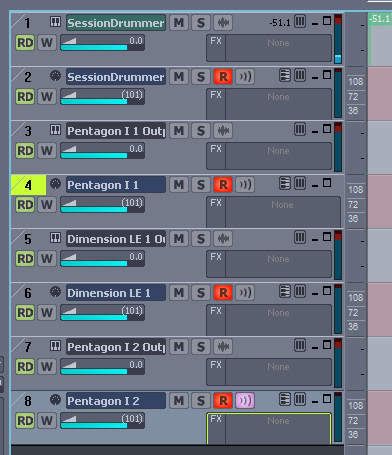 I did this in Sonar 7.0.2, and to insure that there was nothing from Sonar 6 involved, I made my Normal.cwt template inaccessible to it, since it's possible that it was either copied from my Sonar 6 installation or created from a file that was first created in Sonar 6. So the new project started without any tracks or busses, just a direct mains out to my sound card. I first inserted Session Drummer. Then I inserted the Pentagon. When I saw that it didn't have a MIDI meter, I inserted Dimension and another instance of Pentagon, both of which kept their MIDI meters after being armed. Changng the order of the tracks didn't have any effect. The screen shot was made while unarmed recording was allowed in Global Options, but changing that setting doesn't appear to have any effect on the MIDI meters on my system.
|
HotCoollMusicGirl
Max Output Level: -71 dBFS
- Total Posts : 991
- Joined: 2004/10/02 20:23:31
- Status: offline
RE: No MIDI meters when Record is enabled?
2008/04/03 01:03:35
(permalink)
Hi Brundlefly. I fixed that link, if you're interested. http://forum.cakewalk.com/tm.asp?m=1349420&mpage=1&key=í³¥í¼¬ I'm very tempted to roll back to a pre-Sonar image of a new XP installation from December, and then install version 7 on a totally Cakewalk-less system. That won't address any compatibility issues with my older cwp's... some of those go back to version 4 or earlier. But there's something about this installation that makes me think it's somehow haunted, if you know what I mean. And I can't off hand think of anything in 6 that I'd miss if I didn't reinstall it at all. Will I actually take such drastic measures? Ummm.... prolly not anytime soon! I'm able to get my work done, and as long as I can put most of these issues into the "Doesn't Really Matter" category, then I'm good. The MIDI meter thing is really pretty trivial... but still curious.... SOFTWARE!!!     
post edited by HotCoollMusicGirl - 2008/04/03 01:26:59
|
brundlefly
Max Output Level: 0 dBFS
- Total Posts : 14250
- Joined: 2007/09/14 14:57:59
- Location: Manitou Spgs, Colorado
- Status: offline
RE: No MIDI meters when Record is enabled?
2008/04/03 01:42:29
(permalink)
I first inserted Session Drummer. Then I inserted the Pentagon. When I saw that it didn't have a MIDI meter, I inserted Dimension and another instance of Pentagon, both of which kept their MIDI meters after being armed. So you let the SONAR create the MIDI tracks when inserting the synths, and Pentagon's first instance generated a disappearing MIDI track meter, but the second instance didn't? That's pretty interesting. So it may not be strictly related to old projects. Oh, well. As long as the Bakers can recreate the problem as I did, they should be able to get to the bottom of it.
post edited by brundlefly - 2008/04/03 02:06:04
SONAR Platinum x64, 2x MOTU 2408/PCIe-424 (24-bit, 48kHz) Win10, I7-6700K @ 4.0GHz, 24GB DDR4, 2TB HDD, 32GB SSD Cache, GeForce GTX 750Ti, 2x 24" 16:10 IPS Monitors
|
brundlefly
Max Output Level: 0 dBFS
- Total Posts : 14250
- Joined: 2007/09/14 14:57:59
- Location: Manitou Spgs, Colorado
- Status: offline
RE: No MIDI meters when Record is enabled?
2008/04/03 01:47:36
(permalink)
I'm very tempted to roll back to a pre-Sonar image of a new XP installation from December, and then install version 7 on a totally Cakewalk-less system. I don't know if I'd bother. I installed 7.02 on this brand spanking new machine, and I'm seeing most of the same issues except for the mute tool thing (which might also be related to working with old files). Might as well wait for 7.1.
SONAR Platinum x64, 2x MOTU 2408/PCIe-424 (24-bit, 48kHz) Win10, I7-6700K @ 4.0GHz, 24GB DDR4, 2TB HDD, 32GB SSD Cache, GeForce GTX 750Ti, 2x 24" 16:10 IPS Monitors
|
HotCoollMusicGirl
Max Output Level: -71 dBFS
- Total Posts : 991
- Joined: 2004/10/02 20:23:31
- Status: offline
RE: No MIDI meters when Record is enabled?
2008/04/03 02:05:40
(permalink)
ORIGINAL: brundlefly
So you let the SONAR create the MIDI tracks when inserting the synths, and Pentagon's first instance generated a disappearing MIDI track meter, but the second instance didn't? That's pretty interesting.
Yes. I let Sonar create it all of those with the Insert dialog. Now, each MIDI/synth pair were originally created in their own track folders... I removed them at some point. I'd be surprised if that was a factor... but who knows.... So, as best as I can tell, this was a pure 7.0.2 project. But could some of it might be of Sonar 6 vintage...? Was Pentagon included in 6 (I don't recall)? Did the Sonar 7 installtion overwrite the S6 installation of Session Drummer? I also have Project5 installed... and so there could be a lot of cross-pollination talking place in those generic "Cakewalk" folders. But you're right... it's probably not worth doing a fresh install... espeically since I really need a new comp anyway... my current one is a little over 4 years old....
|
jm24
Max Output Level: -54 dBFS

- Total Posts : 2127
- Joined: 2003/11/12 10:41:12
- Status: offline
RE: No MIDI meters when Record is enabled?
2008/08/06 12:33:41
(permalink)
This is happening to me. I am sad.
Sonar 7..02
XP pro SP2
New project, default template
Meters horizontal or vertical
Record without Record Enabled: yes or no
==============================================
Challenge your self daily: Today stop using these phrases, you will be a better person for it:
act up, add up, back up, break up, catch up, choke up, clean up, close up, cook up, cut up, doctor up, fed up, fill up, finish up, fired up, frame up, freshen up, going up, heat up, hold up, look up, measure up, open up, patch up, pick up, pony up, ramp up, roll up, round up, set up, shut up, stack up, suck up, tighten up, tune up, turn up, wait up, warm up, wind up, wipe up, work up, wrap up,...
------------------------------------------
|
xiwix
Max Output Level: -85 dBFS

- Total Posts : 284
- Joined: 2003/11/09 16:19:11
- Location: sf, ca usa
- Status: offline
RE: No MIDI meters when Record is enabled?
2008/08/06 15:16:15
(permalink)
I have the same behavior on 7.02, too.
Not a big deal for me - I love the visual feedback of midi activity getting a track set up but once I'm actually recording it and see the data laying down in the track that is enough visual feedback for me.
|