Kev999
Max Output Level: -36 dBFS

- Total Posts : 3922
- Joined: 2007/05/01 14:22:54
- Location: Victoria, Australia
- Status: offline
Non-midi tracks in PRV's Pick Tracks
When using the Pick Tracks dialog box in PRV, I find it annoying that the menu lists every track in the project. All I ever want to select is a midi track. In a large project it often takes longer than necessary to find the required midi track, especially if you are trying to make a multiple selection. Other types of track (i.e. audio & synth) need to be filtered out from the list.
I pointed this out to CW a few years ago via their Feature Request facility. Maybe I should have reported it as a bug instead.
SonarPlatinum∞(22.11.0.111)|Mixbus32C(4.3.19)|DigitalPerformer(9.5.1)|Reaper(5.77)FractalDesign:DefineR5|i7-6850k@4.1GHz|16GB@2666MHz-DDR4|MSI:GamingProCarbonX99a|Matrox:M9148(x2)|UAD2solo(6.5.2)|W7Ult-x64-SP1
Audient:iD22+ASP800|KRK:VXT6|+various-outboard-gear|+guitars&basses, etc.
Having fun at work lately
|
chuckebaby
Max Output Level: 0 dBFS

- Total Posts : 13146
- Joined: 2011/01/04 14:55:28
- Status: offline

Re:Non-midi tracks in PRV's Pick Tracks
2013/04/02 01:06:20
(permalink)
kevin, try highlighting the track in the track view,then going to global: views/piano roll view.
this will open up only the track that is selected.
that's whats been working for me.
good luck
Windows 8.1 X64 Sonar Platinum x64 Custom built: Asrock z97 1150 - Intel I7 4790k - 16GB corsair DDR3 1600 - PNY SSD 220GBFocusrite Saffire 18I8 - Mackie Control
|
Kev999
Max Output Level: -36 dBFS
- Total Posts : 3922
- Joined: 2007/05/01 14:22:54
- Location: Victoria, Australia
- Status: offline
Re:Non-midi tracks in PRV's Pick Tracks
2013/04/02 03:11:27
(permalink)
chuckebaby
kevin, try highlighting the track in the track view,then going to global: views/piano roll view.
this will open up only the track that is selected.
that's whats been working for me.
When I am already working in PRV and wish to select a different track, it is easier to use Pick Tracks. In Sonar 7 I used to select the track before launching PRV (via the PVR button on the Views toolbar which is not available in X2). But now I am using screensets, so launching PRV means clicking on a particular screenset button first.
SonarPlatinum∞(22.11.0.111)|Mixbus32C(4.3.19)|DigitalPerformer(9.5.1)|Reaper(5.77)FractalDesign:DefineR5|i7-6850k@4.1GHz|16GB@2666MHz-DDR4|MSI:GamingProCarbonX99a|Matrox:M9148(x2)|UAD2solo(6.5.2)|W7Ult-x64-SP1
Audient:iD22+ASP800|KRK:VXT6|+various-outboard-gear|+guitars&basses, etc.
Having fun at work lately
|
Bristol_Jonesey
Max Output Level: 0 dBFS
- Total Posts : 16775
- Joined: 2007/10/08 15:41:17
- Location: Bristol, UK
- Status: offline
Re:Non-midi tracks in PRV's Pick Tracks
2013/04/02 04:46:57
(permalink)
It can be a pain having to scroll through the list to find the track you want - but you can minimise this pain with a little forward thinking & planning. What I do is to have all my Midi tracks in one Midi Tracks folder so they will all appear in one contiguous block in the Pick Tracks dialog Also, every Midi track has an 'M' at then end of the track name, so I'll have Bass M, Piano M as track names. Also, if you select the Midi track you want in Track View, Alt + 3 will open the relevant PRV Another thing you can do is to open ALL of your Midi tracks in the prv on separate tabs and have them all docked in the multidock and then save this as a specific screenset, like this: 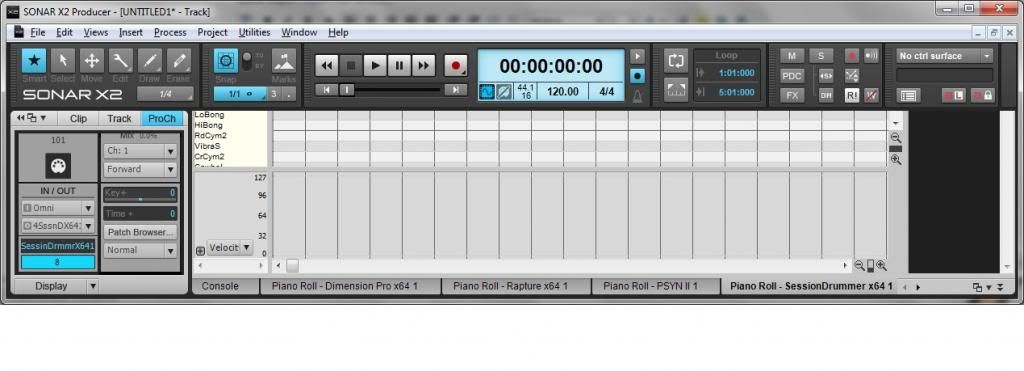
CbB, Platinum, 64 bit throughoutCustom built i7 3930, 32Gb RAM, 2 x 1Tb Internal HDD, 1 x 1TB system SSD (Win 7), 1 x 500Gb system SSD (Win 10), 2 x 1Tb External HDD's, Dual boot Win 7 & Win 10 64 Bit, Saffire Pro 26, ISA One, Adam P11A,
|
icontakt
Max Output Level: -32.5 dBFS

- Total Posts : 4266
- Joined: 2012/03/04 08:18:02
- Location: Tokyo
- Status: offline
Re:Non-midi tracks in PRV's Pick Tracks
2013/04/02 08:16:40
(permalink)
I included this in my feature requests I submitted a few months ago. And I too have been using the solutions Charlie and Jonesey mentioned (not the screenset one)). Now, it just occurred to me that the reason why Cakewalk don't try to improve the feature is maybe they read threads like this and think, "Oh, they'll tell these workarounds to new users, so let's forget." (Seriously, do you once in a while submit a feature request for this or have you completely given up and decided to use these workarounds?)
Tak T. Primary Laptop: Core i7-4710MQ CPU, 16GB RAM, 7200RPM HDD, Windows 7 Home Premium OS (Japanese) x64 SP1Secondary Laptop: Core2 Duo CPU, 8GB RAM, 7200RPM HDD, Windows 7 Professional OS (Japanese) x64 SP1Audio Interface: iD14 (ASIO)Keyboard Controller/MIDI Interface: A-800PRODAW: SONAR Platinum x64 (latest update installed)
|
Kev999
Max Output Level: -36 dBFS
- Total Posts : 3922
- Joined: 2007/05/01 14:22:54
- Location: Victoria, Australia
- Status: offline
Re:Non-midi tracks in PRV's Pick Tracks
2013/04/02 18:48:01
(permalink)
Bristol_Jonesey
Another thing you can do is to open ALL of your Midi tracks in the prv on separate tabs and have them all docked in the multidock and then save this as a specific screenset...
I don't use the Multidock. I like PRV and other views to fill a screen without sacrificing Track View. Nice idea though.
SonarPlatinum∞(22.11.0.111)|Mixbus32C(4.3.19)|DigitalPerformer(9.5.1)|Reaper(5.77)FractalDesign:DefineR5|i7-6850k@4.1GHz|16GB@2666MHz-DDR4|MSI:GamingProCarbonX99a|Matrox:M9148(x2)|UAD2solo(6.5.2)|W7Ult-x64-SP1
Audient:iD22+ASP800|KRK:VXT6|+various-outboard-gear|+guitars&basses, etc.
Having fun at work lately
|
chuckebaby
Max Output Level: 0 dBFS
- Total Posts : 13146
- Joined: 2011/01/04 14:55:28
- Status: offline
Re:Non-midi tracks in PRV's Pick Tracks
2013/04/02 20:46:42
(permalink)
Kev999
Bristol_Jonesey
Another thing you can do is to open ALL of your Midi tracks in the prv on separate tabs and have them all docked in the multidock and then save this as a specific screenset...
I don't use the Multidock. I like PRV and other views to fill a screen without sacrificing Track View.
Nice idea though.
my idea is looking better by the minute hu ? :)
Windows 8.1 X64 Sonar Platinum x64 Custom built: Asrock z97 1150 - Intel I7 4790k - 16GB corsair DDR3 1600 - PNY SSD 220GBFocusrite Saffire 18I8 - Mackie Control
|