Kev999
Max Output Level: -36 dBFS

- Total Posts : 3922
- Joined: 2007/05/01 14:22:54
- Location: Victoria, Australia
- Status: offline
PRV track pane settings lost
In PRV, when I lock or hide a track, using the buttons in the track pane, these setting are not retained. After opening a different screenset then returning to this one, the buttons are all reset to their default positions.
Is this:
a. a bug?
b. intentional?
c. just me?
SonarPlatinum∞(22.11.0.111)|Mixbus32C(4.3.19)|DigitalPerformer(9.5.1)|Reaper(5.77)FractalDesign:DefineR5|i7-6850k@4.1GHz|16GB@2666MHz-DDR4|MSI:GamingProCarbonX99a|Matrox:M9148(x2)|UAD2solo(6.5.2)|W7Ult-x64-SP1
Audient:iD22+ASP800|KRK:VXT6|+various-outboard-gear|+guitars&basses, etc.
Having fun at work lately
|
Bristol_Jonesey
Max Output Level: 0 dBFS

- Total Posts : 16775
- Joined: 2007/10/08 15:41:17
- Location: Bristol, UK
- Status: offline

Re:PRV track pane settings lost
2013/04/07 07:57:16
(permalink)
Yes, I'm seeing the same thing, I can only think this is intentional
CbB, Platinum, 64 bit throughoutCustom built i7 3930, 32Gb RAM, 2 x 1Tb Internal HDD, 1 x 1TB system SSD (Win 7), 1 x 500Gb system SSD (Win 10), 2 x 1Tb External HDD's, Dual boot Win 7 & Win 10 64 Bit, Saffire Pro 26, ISA One, Adam P11A,
|
icontakt
Max Output Level: -32.5 dBFS

- Total Posts : 4266
- Joined: 2012/03/04 08:18:02
- Location: Tokyo
- Status: offline
Re:PRV track pane settings lost
2013/04/07 08:12:40
(permalink)
d. they didn't have time to think about it
Tak T. Primary Laptop: Core i7-4710MQ CPU, 16GB RAM, 7200RPM HDD, Windows 7 Home Premium OS (Japanese) x64 SP1Secondary Laptop: Core2 Duo CPU, 8GB RAM, 7200RPM HDD, Windows 7 Professional OS (Japanese) x64 SP1Audio Interface: iD14 (ASIO)Keyboard Controller/MIDI Interface: A-800PRODAW: SONAR Platinum x64 (latest update installed)
|
g_randybrown
Max Output Level: -40 dBFS

- Total Posts : 3522
- Joined: 2003/12/24 11:30:04
- Location: Las Cruces, NM, USA
- Status: offline
Re:PRV track pane settings lost
2013/04/07 09:06:51
(permalink)
In PRV, when I lock or hide a track, using the buttons in the track pane, these setting are not retained.
When you say hide, do you mean using the track manager?
G. Randy Brown Windows 10, 64 bit, PlatinumIntel Core i7-3770S Asus P8Z77-V LK mobo 4X8GB Corsair XMS3 memory 500 GB Crucial BX100 SSD (OS)two WD Black 1 TB HDDSAPPHIRE DUAL-X 100314-4L Radeon HD 6970 2GB 256-Bit GDDR5 Presonus AudioBox 22VSLyoutube.com/crystalclearnm
|
Bristol_Jonesey
Max Output Level: 0 dBFS
- Total Posts : 16775
- Joined: 2007/10/08 15:41:17
- Location: Bristol, UK
- Status: offline
Re:PRV track pane settings lost
2013/04/07 09:16:42
(permalink)
g_randybrown
In PRV, when I lock or hide a track, using the buttons in the track pane, these setting are not retained.
When you say hide, do you mean using the track manager?
I assumed he meant the hide notes & lock midi for editing icons: 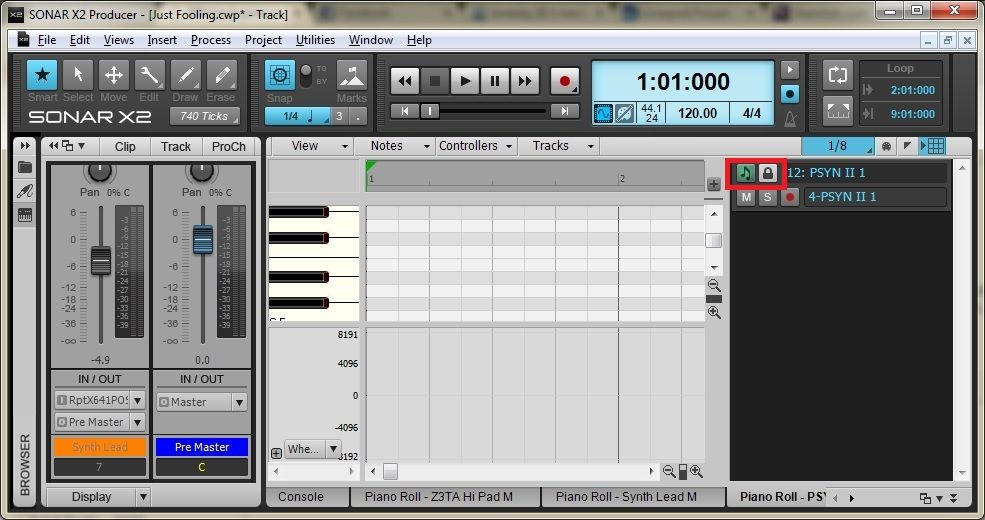
CbB, Platinum, 64 bit throughoutCustom built i7 3930, 32Gb RAM, 2 x 1Tb Internal HDD, 1 x 1TB system SSD (Win 7), 1 x 500Gb system SSD (Win 10), 2 x 1Tb External HDD's, Dual boot Win 7 & Win 10 64 Bit, Saffire Pro 26, ISA One, Adam P11A,
|
g_randybrown
Max Output Level: -40 dBFS
- Total Posts : 3522
- Joined: 2003/12/24 11:30:04
- Location: Las Cruces, NM, USA
- Status: offline
Re:PRV track pane settings lost
2013/04/07 09:27:32
(permalink)
Oh, my bad I was thinking track view...well okay then, carry on gentlemen.
G. Randy Brown Windows 10, 64 bit, PlatinumIntel Core i7-3770S Asus P8Z77-V LK mobo 4X8GB Corsair XMS3 memory 500 GB Crucial BX100 SSD (OS)two WD Black 1 TB HDDSAPPHIRE DUAL-X 100314-4L Radeon HD 6970 2GB 256-Bit GDDR5 Presonus AudioBox 22VSLyoutube.com/crystalclearnm
|
Kev999
Max Output Level: -36 dBFS
- Total Posts : 3922
- Joined: 2007/05/01 14:22:54
- Location: Victoria, Australia
- Status: offline
Re:PRV track pane settings lost
2013/04/08 06:04:15
(permalink)
Bristol_Jonesey I assumed he meant the hide notes & lock midi for editing icons...
Correct. But I should have been more precise and called it the "Track List Pane" instead of "Track Pane". Sorry.
SonarPlatinum∞(22.11.0.111)|Mixbus32C(4.3.19)|DigitalPerformer(9.5.1)|Reaper(5.77)FractalDesign:DefineR5|i7-6850k@4.1GHz|16GB@2666MHz-DDR4|MSI:GamingProCarbonX99a|Matrox:M9148(x2)|UAD2solo(6.5.2)|W7Ult-x64-SP1
Audient:iD22+ASP800|KRK:VXT6|+various-outboard-gear|+guitars&basses, etc.
Having fun at work lately
|
Kev999
Max Output Level: -36 dBFS
- Total Posts : 3922
- Joined: 2007/05/01 14:22:54
- Location: Victoria, Australia
- Status: offline
Re:PRV track pane settings lost
2013/04/08 06:06:01
(permalink)
I've just tested it in Sonar 7PE. These Track List Pane settings are not preserved after closing and re-opening the project.
So maybe it is either intentional or overlooked.
SonarPlatinum∞(22.11.0.111)|Mixbus32C(4.3.19)|DigitalPerformer(9.5.1)|Reaper(5.77)FractalDesign:DefineR5|i7-6850k@4.1GHz|16GB@2666MHz-DDR4|MSI:GamingProCarbonX99a|Matrox:M9148(x2)|UAD2solo(6.5.2)|W7Ult-x64-SP1
Audient:iD22+ASP800|KRK:VXT6|+various-outboard-gear|+guitars&basses, etc.
Having fun at work lately
|