Tripecac
Max Output Level: -58 dBFS

- Total Posts : 1702
- Joined: 2004/01/27 16:45:15
- Location: New Zealand
- Status: offline
Piano Roll - Show all (or some) note velocities if no (or some) notes selected?
In previous versions of Sonar, if I didn't have any notes selected, all of the note velocities would be visible/editable at the bottom. If I then selected one or more notes, only those notes' velocities would be visible/editable.
In Sonar Premium, it seems we have 2 options:
1) If Show Velocity on Selected Notes only is ticked, then the only way to see velocities is to select notes; if you don't have any notes selected, then NO velocities will appear.
2) If Show Velocity on Selected Notes only is NOT ticked, then all notes' velocities are always visible at the bottom, but only selected notes have editable velocities. There is no way to show only a subset of notes' velocities.
Is there any way to get the behavior back to how it used to be? So, if no notes are selected, we can see and edit ANY velocities, and if some notes are selected, we can only see and edit those notes' velocities?
tripecac.com
Sonar Platinum + Komplete 9
Win7 SP1 64bit, Intel i7 950 3.07GHz, 12 GB RAM, M-Audio Delta44 (for Sonar), ASUS Xonar DX (for everything else), Nvidia GTX970, 2xSSD, 3xSATA
|
Bristol_Jonesey
Max Output Level: 0 dBFS

- Total Posts : 16775
- Joined: 2007/10/08 15:41:17
- Location: Bristol, UK
- Status: offline

Re: Piano Roll - Show all (or some) note velocities if no (or some) notes selected?
2016/04/20 03:59:05
(permalink)
With no notes selected you can easily edit individual velocities in the Controller Pane, just click & drag, or even do a sweep across a range of velocities.
CbB, Platinum, 64 bit throughoutCustom built i7 3930, 32Gb RAM, 2 x 1Tb Internal HDD, 1 x 1TB system SSD (Win 7), 1 x 500Gb system SSD (Win 10), 2 x 1Tb External HDD's, Dual boot Win 7 & Win 10 64 Bit, Saffire Pro 26, ISA One, Adam P11A,
|
tenfoot
Max Output Level: -53.5 dBFS

- Total Posts : 2186
- Joined: 2015/01/22 18:12:07
- Location: Qld, Australia
- Status: offline
Re: Piano Roll - Show all (or some) note velocities if no (or some) notes selected?
2016/04/20 04:48:53
(permalink)
As BJ said if no notes are selected all velocities are editable. If notes are selected it is easy to see which velocity bars are theirs as they are a darker colour, and only those are editable.
Bruce. Sonar Platinum 2017-09, Studio One 3.5.3, Win 10 x64, Quad core i7, RME Fireface, Behringer X32 Producer, Behringer X32 Rack, Presonus Faderport, Lemure Software Controller (Android), Enttec DMXIS VST lighting controller, Xtempo POK.
|
Tripecac
Max Output Level: -58 dBFS
- Total Posts : 1702
- Joined: 2004/01/27 16:45:15
- Location: New Zealand
- Status: offline
Re: Piano Roll - Show all (or some) note velocities if no (or some) notes selected?
2016/04/20 12:38:41
(permalink)
Is there a way to make the color of the uneditable velocities much lighter, to make them stand out better against the darker, editable velocities?
(I am editing on the fly so need the velocity pane to be as uncluttered as possible)
tripecac.com
Sonar Platinum + Komplete 9
Win7 SP1 64bit, Intel i7 950 3.07GHz, 12 GB RAM, M-Audio Delta44 (for Sonar), ASUS Xonar DX (for everything else), Nvidia GTX970, 2xSSD, 3xSATA
|
Bristol_Jonesey
Max Output Level: 0 dBFS
- Total Posts : 16775
- Joined: 2007/10/08 15:41:17
- Location: Bristol, UK
- Status: offline
Re: Piano Roll - Show all (or some) note velocities if no (or some) notes selected?
2016/04/20 14:02:14
(permalink)
How does Sonar know which notes are editable and which ones aren't?
All notes are editable at any time surely?
CbB, Platinum, 64 bit throughoutCustom built i7 3930, 32Gb RAM, 2 x 1Tb Internal HDD, 1 x 1TB system SSD (Win 7), 1 x 500Gb system SSD (Win 10), 2 x 1Tb External HDD's, Dual boot Win 7 & Win 10 64 Bit, Saffire Pro 26, ISA One, Adam P11A,
|
tenfoot
Max Output Level: -53.5 dBFS
- Total Posts : 2186
- Joined: 2015/01/22 18:12:07
- Location: Qld, Australia
- Status: offline
Re: Piano Roll - Show all (or some) note velocities if no (or some) notes selected?
2016/04/20 17:33:06
(permalink)
Tripecac
Is there a way to make the color of the uneditable velocities much lighter, to make them stand out better against the darker, editable velocities?
(I am editing on the fly so need the velocity pane to be as uncluttered as possible)
No idea sorry - I have never needed to change the colours. If you can, it is most likely under preferences>customisation>colours https://www.cakewalk.com/Documentation?product=SONAR%20X2&language=3&help=Dialogs2.074.html Obviously the way to have it least cluttered is to select 'show velocities on selected notes only' that you mentioned in your first post. Bristol_Jonesey
How does Sonar know which notes are editable and which ones aren't?
All notes are editable at any time surely?
Op means the colour of the velocity bars of un-selected notes in PRV after a selection is made, which are not editable as they are not selected.
Bruce. Sonar Platinum 2017-09, Studio One 3.5.3, Win 10 x64, Quad core i7, RME Fireface, Behringer X32 Producer, Behringer X32 Rack, Presonus Faderport, Lemure Software Controller (Android), Enttec DMXIS VST lighting controller, Xtempo POK.
|
stevec
Max Output Level: 0 dBFS
- Total Posts : 11546
- Joined: 2003/11/04 15:05:54
- Location: Parkesburg, PA
- Status: offline
Re: Piano Roll - Show all (or some) note velocities if no (or some) notes selected?
2016/04/21 15:44:38
(permalink)
On my end the selected notes are always much darker, bordering on black, so fairly easy to pick out. But in the controller pane it doesn't matter since the un-selected notes won't be affected anyway. I think?
SteveC https://soundcloud.com/steve-cocchi http://www.soundclick.com/bands/pagemusic.cfm?bandID=39163 SONAR Platinum x64, Intel Q9300 (2.5Ghz), Asus P5N-D, Win7 x64 SP1, 8GB RAM, 1TB internal + ESATA + USB Backup HDDs, ATI Radeon HD5450 1GB RAM + dual ViewSonic VA2431wm Monitors; Focusrite 18i6 (ASIO); Komplete 9, Melodyne Studio 4, Ozone 7 Advanced, Rapture Pro, GPO5, Valhalla Plate, MJUC comp, MDynamic EQ, lots of other freebie VST plugins, synths and Kontakt libraries
|
Bristol_Jonesey
Max Output Level: 0 dBFS
- Total Posts : 16775
- Joined: 2007/10/08 15:41:17
- Location: Bristol, UK
- Status: offline
Re: Piano Roll - Show all (or some) note velocities if no (or some) notes selected?
2016/04/22 03:59:46
(permalink)
That's my understanding Steve, without any further clarification from the OP
CbB, Platinum, 64 bit throughoutCustom built i7 3930, 32Gb RAM, 2 x 1Tb Internal HDD, 1 x 1TB system SSD (Win 7), 1 x 500Gb system SSD (Win 10), 2 x 1Tb External HDD's, Dual boot Win 7 & Win 10 64 Bit, Saffire Pro 26, ISA One, Adam P11A,
|
Tripecac
Max Output Level: -58 dBFS
- Total Posts : 1702
- Joined: 2004/01/27 16:45:15
- Location: New Zealand
- Status: offline
Re: Piano Roll - Show all (or some) note velocities if no (or some) notes selected?
2016/04/22 12:12:19
(permalink)
On my monitor the colors of editable vs non-editable velocities are pretty close. Since I'm editing on the fly, I would prefer greater contrast, so that the velocities of the notes I've selected are significantly darker than the non-editable velocities.
I do not want to turn on the Show Velocity on Selected Notes only option, because if I have no notes selected, I want *all* of the notes' velocities to be visible and editable, like they were on the older versions of Sonar. I do not want to have to try to lasso all notes in a track or ctrl-A each time I want to view all the notes' velocities.
In other words, the previous versions of Sonar had a velocity display system which worked well for me. If I wanted to see all the velocities in a track, I didn't select any notes. If I only wanted to focus on a subset of notes, I'd select those notes. That made sense.
The new system isn't as convenient. Honestly, I think they forgot to put in logic to show all velocities if no notes are selected. Otherwise, why would they deliberately show NO velocities when no notes are selected? How does showing NOTHING help anyone? It would be much better to show EVERYTHING when there is not an active selection. It's not like the velocity pane clutters up anything else.
I really think they forgot to finish re-implementing the feature. As far as I am concerned, it's a bug. Because otherwise it would be a design decision, and why in the world would they deliberately show NOTHING?
tripecac.com
Sonar Platinum + Komplete 9
Win7 SP1 64bit, Intel i7 950 3.07GHz, 12 GB RAM, M-Audio Delta44 (for Sonar), ASUS Xonar DX (for everything else), Nvidia GTX970, 2xSSD, 3xSATA
|
stevec
Max Output Level: 0 dBFS
- Total Posts : 11546
- Joined: 2003/11/04 15:05:54
- Location: Parkesburg, PA
- Status: offline
Re: Piano Roll - Show all (or some) note velocities if no (or some) notes selected?
2016/04/22 12:24:25
(permalink)
Tripecac
On my monitor the colors of editable vs non-editable velocities are pretty close. Since I'm editing on the fly, I would prefer greater contrast, so that the velocities of the notes I've selected are significantly darker than the non-editable velocities.
I do not want to turn on the Show Velocity on Selected Notes only option, because if I have no notes selected, I want *all* of the notes' velocities to be visible and editable, like they were on the older versions of Sonar. I do not want to have to try to lasso all notes in a track or ctrl-A each time I want to view all the notes' velocities.
In other words, the previous versions of Sonar had a velocity display system which worked well for me. If I wanted to see all the velocities in a track, I didn't select any notes. If I only wanted to focus on a subset of notes, I'd select those notes. That made sense.
The new system isn't as convenient. Honestly, I think they forgot to put in logic to show all velocities if no notes are selected. Otherwise, why would they deliberately show NO velocities when no notes are selected? How does showing NOTHING help anyone? It would be much better to show EVERYTHING when there is not an active selection. It's not like the velocity pane clutters up anything else.
I really think they forgot to finish re-implementing the feature. As far as I am concerned, it's a bug. Because otherwise it would be a design decision, and why in the world would they deliberately show NOTHING?
I'm having a hard time visualizing what you're describing... Like you I prefer to see all velocities so I can better gauge whether the edits need to be compared to their surroundings. But the difference between selected/non-selected is always fairly visible to me, so while dragging across the Controller Pane only those darker velocity bars are affected but I can see them in relation to the non-selected notes/velocity bars. I wonder if you're using darker colored notes to begin with that may provide less contrast between selected/non-selected events? How about velocity bar width? Just thinking out loud...
SteveC https://soundcloud.com/steve-cocchi http://www.soundclick.com/bands/pagemusic.cfm?bandID=39163 SONAR Platinum x64, Intel Q9300 (2.5Ghz), Asus P5N-D, Win7 x64 SP1, 8GB RAM, 1TB internal + ESATA + USB Backup HDDs, ATI Radeon HD5450 1GB RAM + dual ViewSonic VA2431wm Monitors; Focusrite 18i6 (ASIO); Komplete 9, Melodyne Studio 4, Ozone 7 Advanced, Rapture Pro, GPO5, Valhalla Plate, MJUC comp, MDynamic EQ, lots of other freebie VST plugins, synths and Kontakt libraries
|
Tripecac
Max Output Level: -58 dBFS
- Total Posts : 1702
- Joined: 2004/01/27 16:45:15
- Location: New Zealand
- Status: offline
Re: Piano Roll - Show all (or some) note velocities if no (or some) notes selected?
2016/04/22 13:02:43
(permalink)
Here's an image of what I see when I select one row of notes: 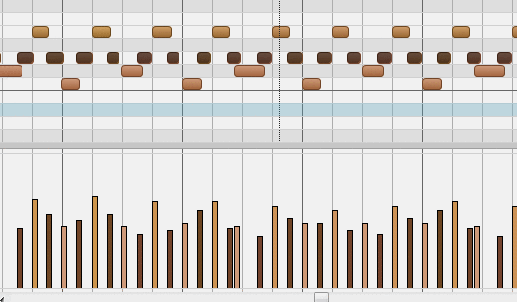 For me, this contrast is not nearly as strong as I would like. I would prefer to just barely see those notes that are not editable.
tripecac.com
Sonar Platinum + Komplete 9
Win7 SP1 64bit, Intel i7 950 3.07GHz, 12 GB RAM, M-Audio Delta44 (for Sonar), ASUS Xonar DX (for everything else), Nvidia GTX970, 2xSSD, 3xSATA
|
tenfoot
Max Output Level: -53.5 dBFS
- Total Posts : 2186
- Joined: 2015/01/22 18:12:07
- Location: Qld, Australia
- Status: offline
Re: Piano Roll - Show all (or some) note velocities if no (or some) notes selected?
2016/04/22 13:54:27
(permalink)
As much as I have tried to respond to your last few problem posts in a positive and helpful manner - you seriously think the distinction between selected and un-selected notes in your example is unclear? As a fellow antipodean, my only advice is to lodge a bug report with Specsavers  Sorry mate - I am just not feeling your pain! Others may be more sympathetic:)
Bruce. Sonar Platinum 2017-09, Studio One 3.5.3, Win 10 x64, Quad core i7, RME Fireface, Behringer X32 Producer, Behringer X32 Rack, Presonus Faderport, Lemure Software Controller (Android), Enttec DMXIS VST lighting controller, Xtempo POK.
|
Tripecac
Max Output Level: -58 dBFS
- Total Posts : 1702
- Joined: 2004/01/27 16:45:15
- Location: New Zealand
- Status: offline
Re: Piano Roll - Show all (or some) note velocities if no (or some) notes selected?
2016/04/22 14:25:38
(permalink)
To me eyes, the velocity pane is very cluttery in the image above. I would prefer to notice *only* the notes I selected, or at least to make the unselected notes extremely faint, so that the selected ones stand out a lot more.
I do my edits on the fly, so high contrast is even more important than when we're looking at a still image.
tripecac.com
Sonar Platinum + Komplete 9
Win7 SP1 64bit, Intel i7 950 3.07GHz, 12 GB RAM, M-Audio Delta44 (for Sonar), ASUS Xonar DX (for everything else), Nvidia GTX970, 2xSSD, 3xSATA
|
tenfoot
Max Output Level: -53.5 dBFS
- Total Posts : 2186
- Joined: 2015/01/22 18:12:07
- Location: Qld, Australia
- Status: offline
Re: Piano Roll - Show all (or some) note velocities if no (or some) notes selected?
2016/04/22 14:30:38
(permalink)
Why not use the show only selected velocities then?
You are either up very early or very late BTW:)
Bruce. Sonar Platinum 2017-09, Studio One 3.5.3, Win 10 x64, Quad core i7, RME Fireface, Behringer X32 Producer, Behringer X32 Rack, Presonus Faderport, Lemure Software Controller (Android), Enttec DMXIS VST lighting controller, Xtempo POK.
|
Tripecac
Max Output Level: -58 dBFS
- Total Posts : 1702
- Joined: 2004/01/27 16:45:15
- Location: New Zealand
- Status: offline
Re: Piano Roll - Show all (or some) note velocities if no (or some) notes selected?
2016/04/22 14:42:24
(permalink)
I get up early. :)
I don't like to turn on Show Velocity on Selected Notes only because when no notes are selected, there are no velocities. I then have to select all the notes in order to see their velocities, which is an extra step, and a bit of a pain when editing on the fly. Since most of the time I don't need to filter by specific notes, this would not be ideal.
In other words:
1) Most of the time I want to see all notes' velocities.
2) Sometimes I want to see only selected notes' velocities.
3) I *never* want to see no notes' velocities.
When Show Velocity on Selected Notes only is enabled, #2 works well, but #1 requires manual selection of all notes each time I want to look at velocities (which is frequently). This is not ideal.
When Show Velocity on Selected Notes only is disabled, #1 works well, but #2 does not work, since it shows both selected and unselected notes' velocities. This is not ideal, unless there is a way to dramatically increase the contrast between selected and unselected notes' velocity bars.
Does that make sense?
tripecac.com
Sonar Platinum + Komplete 9
Win7 SP1 64bit, Intel i7 950 3.07GHz, 12 GB RAM, M-Audio Delta44 (for Sonar), ASUS Xonar DX (for everything else), Nvidia GTX970, 2xSSD, 3xSATA
|
Bristol_Jonesey
Max Output Level: 0 dBFS
- Total Posts : 16775
- Joined: 2007/10/08 15:41:17
- Location: Bristol, UK
- Status: offline
Re: Piano Roll - Show all (or some) note velocities if no (or some) notes selected?
2016/04/22 14:46:05
(permalink)
Travis, you've referred a couple of times to "the way Sonar used to be", but I go back to Sonar 6 and cannot remember a version in which the contrast between selected and non-selected velocity bars being greater than that show in your screenshot.
In my eyes, the difference is obvious and striking, with no possibility of mistake or error.
CbB, Platinum, 64 bit throughoutCustom built i7 3930, 32Gb RAM, 2 x 1Tb Internal HDD, 1 x 1TB system SSD (Win 7), 1 x 500Gb system SSD (Win 10), 2 x 1Tb External HDD's, Dual boot Win 7 & Win 10 64 Bit, Saffire Pro 26, ISA One, Adam P11A,
|
Tripecac
Max Output Level: -58 dBFS
- Total Posts : 1702
- Joined: 2004/01/27 16:45:15
- Location: New Zealand
- Status: offline
Re: Piano Roll - Show all (or some) note velocities if no (or some) notes selected?
2016/04/22 15:07:13
(permalink)
In Sonar X3 (and earlier versions), when Show Velocity on Selected Notes only is selected, then when no notes are selected you see all notes' velocities (good), and when some notes are selected you only see those notes' velocities (good). This behavior, to me, is perfect, because it is both intuitive and efficient. (Selection enables a filter, and lack of selection means no filter; that's the standard behavior of search engines and other applications' filters, so Sonar was "correct" in handling it the same way.)
In Sonar Platinum, when Show Velocity on Selected Notes only is selected, then when no notes are selected, you don't see any velocities (bad), and when some notes are selected, you only see those notes' velocities (good). The lack of any velocities when no selection is made is useless and requires the user to make a selection of the entire set of notes. This is not how other applications and search engines work, and is both inconvenient and unintuitive.
To me, it looks like the Sonar Platinum programmers forgot to add back the logic which says "if no notes are selected, show all notes' velocities". It's a simple oversight/bug which could be fixed easily.
Of course, maybe there is another reason they changed the behavior for Sonar Platinum. Can you think of any reason why it's better to have the absence of note selection result in NO velocities than ALL velocities?
tripecac.com
Sonar Platinum + Komplete 9
Win7 SP1 64bit, Intel i7 950 3.07GHz, 12 GB RAM, M-Audio Delta44 (for Sonar), ASUS Xonar DX (for everything else), Nvidia GTX970, 2xSSD, 3xSATA
|
Tripecac
Max Output Level: -58 dBFS
- Total Posts : 1702
- Joined: 2004/01/27 16:45:15
- Location: New Zealand
- Status: offline
Re: Piano Roll - Show all (or some) note velocities if no (or some) notes selected?
2016/04/22 15:20:30
(permalink)
BJ, I'm not anti-Sonar. I love Sonar. I just wish it would stop changing in ways that make it harder (for me) to use. To me, the most intuitive version was 8.5.3. X1/2/3 and Platinum are prettier, and seem to bring a lot of cool plugins and other features... but the post-8.5.3 versions have created a lot of inconveniences for me.
Everyone uses Sonar in different ways. It does so much. Audio, video syncing, looping, staff view... So many options, most of which I never use. I pick some soft synths, improvise in the piano roll, and then clean up the messy notes I made, usually in real time. I try to work quickly, so editing efficiency is key. That's why I'm so sensitive to the changes in workflow which make things less efficient than they were (or could be). If you look at my recent topics, you'll see a common thread: something used to be easy, but now is harder or slower.
I don't hate Sonar. I just wish the devs would spend some time trying to add back some of the behaviors they took way.
tripecac.com
Sonar Platinum + Komplete 9
Win7 SP1 64bit, Intel i7 950 3.07GHz, 12 GB RAM, M-Audio Delta44 (for Sonar), ASUS Xonar DX (for everything else), Nvidia GTX970, 2xSSD, 3xSATA
|
tenfoot
Max Output Level: -53.5 dBFS
- Total Posts : 2186
- Joined: 2015/01/22 18:12:07
- Location: Qld, Australia
- Status: offline
Re: Piano Roll - Show all (or some) note velocities if no (or some) notes selected?
2016/04/22 15:27:51
(permalink)
I see what you mean, and am happy to accept given your concern that the behaviour may have been different previously - but if you think about it, showing the velocities of all notes when you have selected 'show velocities of selected notes only' kind of flies in the face of logic. You could say they fixed something that was broken!
Surely in the grand scheme the fact that velocity bars change colour rather than disappear when not selected is not a huge deal.
What I have found consistently is that once I adapt to new behaviours in Sonar I invariably find advantages down the track.
Sorry - that's all I've got. Unlike you I'm up late :)
Bruce. Sonar Platinum 2017-09, Studio One 3.5.3, Win 10 x64, Quad core i7, RME Fireface, Behringer X32 Producer, Behringer X32 Rack, Presonus Faderport, Lemure Software Controller (Android), Enttec DMXIS VST lighting controller, Xtempo POK.
|
Tripecac
Max Output Level: -58 dBFS
- Total Posts : 1702
- Joined: 2004/01/27 16:45:15
- Location: New Zealand
- Status: offline
Re: Piano Roll - Show all (or some) note velocities if no (or some) notes selected?
2016/04/22 15:38:57
(permalink)
showing the velocities of all notes when you have selected 'show velocities of selected notes only' kind of flies in the face of logic. You could say they fixed something that was broken! If no notes are selected, then an application can either show ALL notes or NO notes. The old Sonar showed ALL notes, which was useful. The new Sonar shows NO notes, which is useless. I don't call that a fix!
tripecac.com
Sonar Platinum + Komplete 9
Win7 SP1 64bit, Intel i7 950 3.07GHz, 12 GB RAM, M-Audio Delta44 (for Sonar), ASUS Xonar DX (for everything else), Nvidia GTX970, 2xSSD, 3xSATA
|
tenfoot
Max Output Level: -53.5 dBFS
- Total Posts : 2186
- Joined: 2015/01/22 18:12:07
- Location: Qld, Australia
- Status: offline
Re: Piano Roll - Show all (or some) note velocities if no (or some) notes selected?
2016/04/22 15:54:31
(permalink)
Yeah - my fix comment was tongue in cheek. As I said, I just don't see the change as that big a deal - to be honest I didn't even notice it, and I use Sonar at least 8 hours a day. I do on the other hand fully understand that you do see it as a big deal. Not much else I can offer sorry. You could submit a feature request.
Bruce. Sonar Platinum 2017-09, Studio One 3.5.3, Win 10 x64, Quad core i7, RME Fireface, Behringer X32 Producer, Behringer X32 Rack, Presonus Faderport, Lemure Software Controller (Android), Enttec DMXIS VST lighting controller, Xtempo POK.
|
Tripecac
Max Output Level: -58 dBFS
- Total Posts : 1702
- Joined: 2004/01/27 16:45:15
- Location: New Zealand
- Status: offline
Re: Piano Roll - Show all (or some) note velocities if no (or some) notes selected?
2016/04/22 16:13:53
(permalink)
I have filed a problem report, and submitted an email directly to Cakewalk support.
Again, if NO notes are selected, then wouldn't it be better to show ALL velocities rather than NO velocities? If not, can you please explain?
tripecac.com
Sonar Platinum + Komplete 9
Win7 SP1 64bit, Intel i7 950 3.07GHz, 12 GB RAM, M-Audio Delta44 (for Sonar), ASUS Xonar DX (for everything else), Nvidia GTX970, 2xSSD, 3xSATA
|
tenfoot
Max Output Level: -53.5 dBFS
- Total Posts : 2186
- Joined: 2015/01/22 18:12:07
- Location: Qld, Australia
- Status: offline
Re: Piano Roll - Show all (or some) note velocities if no (or some) notes selected?
2016/04/22 16:17:41
(permalink)
I hear you - there really is no alternate explanation other than if you choose to show velocities on selected notes only that is EXACTLY what it does! No selected notes = no velocities.
Bruce. Sonar Platinum 2017-09, Studio One 3.5.3, Win 10 x64, Quad core i7, RME Fireface, Behringer X32 Producer, Behringer X32 Rack, Presonus Faderport, Lemure Software Controller (Android), Enttec DMXIS VST lighting controller, Xtempo POK.
|
scook
Forum Host

- Total Posts : 24146
- Joined: 2005/07/27 13:43:57
- Location: TX
- Status: offline
Re: Piano Roll - Show all (or some) note velocities if no (or some) notes selected?
2016/04/22 16:26:22
(permalink)
Tripecac
I have filed a problem report, and submitted an email directly to Cakewalk support.
In this case a problem report may not be the appropriate action. The program appears to work as documented, however; there is a desire for an alternate behavior. This would be a feature request.
|
Tripecac
Max Output Level: -58 dBFS
- Total Posts : 1702
- Joined: 2004/01/27 16:45:15
- Location: New Zealand
- Status: offline
Re: Piano Roll - Show all (or some) note velocities if no (or some) notes selected?
2016/04/22 16:28:04
(permalink)
I understand that a literal interpretation of the label " Show Velocity on Selected Notes only" option would mean that we should not show any velocities when no notes are selected. However, " Show Velocity on Selected Notes only" is only a label, and can be regarded as shorthand for the actual behavior. Check out the Sonar X2 documentation: https://www.cakewalk.com/Documentation?product=SONAR%20X2&language=3&help=EditingMIDI.17.htmlIt says this: SONAR has an option to show velocities for selected Note events. This option makes it easier to see and edit velocities when many Note events are present. It also makes it easier to change the velocity for individual Note events that are stacked (such as chords).
If there is no selection, velocities are shown for all Note events. As you can see, as of X2, the feature was deliberately designed to show all notes when there is no selection. This behavior is broken in Sonar Platinum.
tripecac.com
Sonar Platinum + Komplete 9
Win7 SP1 64bit, Intel i7 950 3.07GHz, 12 GB RAM, M-Audio Delta44 (for Sonar), ASUS Xonar DX (for everything else), Nvidia GTX970, 2xSSD, 3xSATA
|
Tripecac
Max Output Level: -58 dBFS
- Total Posts : 1702
- Joined: 2004/01/27 16:45:15
- Location: New Zealand
- Status: offline
Re: Piano Roll - Show all (or some) note velocities if no (or some) notes selected?
2016/04/22 16:33:36
(permalink)
Here is the current online documentation for the feature: https://www.cakewalk.com/Documentation?product=SONAR&language=3&help=EditingMIDI.17.html Show velocity on selected notes (optional)
SONAR has an option to show velocities for selected Note events. This option makes it easier to see and edit velocities when many Note events are present. It also makes it easier to change the velocity for individual Note events that are stacked (such as chords).
If there is no selection, velocities are shown for all Note events.
To only show velocity for selected note events
Click the Piano Roll view Notes menu and choose Show Velocity on Selected Notes Only.
The state of the Show Velocity on Selected Notes option is saved with the project, and the setting is separate for the Piano Roll view and Inline Piano Roll. So yes, this clearly appears to be a bug.
tripecac.com
Sonar Platinum + Komplete 9
Win7 SP1 64bit, Intel i7 950 3.07GHz, 12 GB RAM, M-Audio Delta44 (for Sonar), ASUS Xonar DX (for everything else), Nvidia GTX970, 2xSSD, 3xSATA
|
scook
Forum Host
- Total Posts : 24146
- Joined: 2005/07/27 13:43:57
- Location: TX
- Status: offline
Re: Piano Roll - Show all (or some) note velocities if no (or some) notes selected?
2016/04/22 16:42:06
(permalink)
OK. So either, the documentation needs to be updated or the program needs to be brought into alignment with the documentation. If you have filed a report with Cakewalk, until they take action you will need to toggle the setting to suit your situation.
|
Tripecac
Max Output Level: -58 dBFS
- Total Posts : 1702
- Joined: 2004/01/27 16:45:15
- Location: New Zealand
- Status: offline
Re: Piano Roll - Show all (or some) note velocities if no (or some) notes selected?
2016/06/04 13:00:43
(permalink)
This bug is still present in Sonar 2016.05.
I have not heard back from any Cakewalk staff about it.
tripecac.com
Sonar Platinum + Komplete 9
Win7 SP1 64bit, Intel i7 950 3.07GHz, 12 GB RAM, M-Audio Delta44 (for Sonar), ASUS Xonar DX (for everything else), Nvidia GTX970, 2xSSD, 3xSATA
|
Tripecac
Max Output Level: -58 dBFS
- Total Posts : 1702
- Joined: 2004/01/27 16:45:15
- Location: New Zealand
- Status: offline
Re: Piano Roll - Show all (or some) note velocities if no (or some) notes selected?
2016/06/06 21:51:31
(permalink)
tripecac.com
Sonar Platinum + Komplete 9
Win7 SP1 64bit, Intel i7 950 3.07GHz, 12 GB RAM, M-Audio Delta44 (for Sonar), ASUS Xonar DX (for everything else), Nvidia GTX970, 2xSSD, 3xSATA
|
tenfoot
Max Output Level: -53.5 dBFS
- Total Posts : 2186
- Joined: 2015/01/22 18:12:07
- Location: Qld, Australia
- Status: offline
Re: Piano Roll - Show all (or some) note velocities if no (or some) notes selected?
2016/06/06 22:09:50
(permalink)
Haha - Plagued is a strong word! As Scook pointed out this could well be intended behaviour as it is no less functional despite being different from how it worked previously. They may just update the documentation.
Bruce. Sonar Platinum 2017-09, Studio One 3.5.3, Win 10 x64, Quad core i7, RME Fireface, Behringer X32 Producer, Behringer X32 Rack, Presonus Faderport, Lemure Software Controller (Android), Enttec DMXIS VST lighting controller, Xtempo POK.
|