jmasno5
Max Output Level: -81 dBFS

- Total Posts : 453
- Joined: 2009/01/08 23:47:51
- Location: West Chester, PA - USA
- Status: offline
Piano Roll, Step Sequencer
I need to be talked back in from the ledge. I use Superior Drummer midi files. I don't really know where to begin except that X2 seems to be very flaky when clicking on the new drop down (on the midi file) here you can select Piano Roll, Step Sequencer and a couple of other things. The midi file is selected but sometimes the notes will not move in the PR or the sequencer is blank. The whole thing is very touchy maybe because I'm not using Session Drummer 3. Misery loves company. Anyone else out there having their creativeness being sucked out of them by X2's PR and Sequencer? Other than this (so far) I am pretty happy with X2. Come on. Talk me back in!
|
stratman70
Max Output Level: -45 dBFS

- Total Posts : 3044
- Joined: 2006/09/12 20:34:12
- Location: Earth
- Status: offline

Re:Piano Roll, Step Sequencer
2012/10/15 19:16:47
(permalink)
I use Steven Slate Platinum 4.0. and have zero issues with the PRV. I don't use the step sequesncer though.
|
FastBikerBoy
Forum Host

- Total Posts : 11326
- Joined: 2008/01/25 16:15:36
- Location: Watton, Norfolk, UK
- Status: offline
Re:Piano Roll, Step Sequencer
2012/10/16 03:49:58
(permalink)
☄ Helpful
This came up in another thread somewhere. A couple of things have changed very slightly. First the indicator for whether a clip is a MIDI clip or step sequencer clip has changed so it's not quite as immediately obvious what type the clip is. A MIDI clip has slightly less dashes in the top right corner, as indicated by the highlight and arrow in the screenshot. The one beneath it is a Step Sequencer clip. 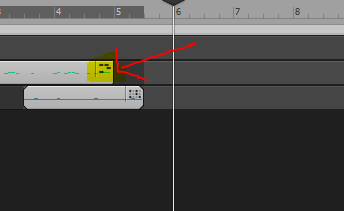 Secondly clip type automatically changes depending on the default editor setting. As before if you view a step sequencer clip in the PRV it is impossible to select and edit the data there. You either need to bounce the clip (as before) or change the default editor which effectively bounces the clip for you. That new behaviour is compounded by the new clip type graphics. I find now I know about it it's just as easy as before but was very confusing until then. HTH
|
robert_e_bone
Moderator

- Total Posts : 8968
- Joined: 2007/12/26 22:09:28
- Location: Palatine, IL
- Status: offline
Re:Piano Roll, Step Sequencer
2012/10/16 06:56:36
(permalink)
I have problems all the time where I have entered midi data through the Step Sequencer, and yet when I go back later and want to edit that same midi clip, it pulls up blank, even though it plays the data properly when transport play is done.
Some really weird behavior. I end up having to re-enter the midi notes for most clips if I have to go back and change something. But then sometimes, I don't have to do that because the clip will pull up properly when I double-click on it.
Quite bizarre - I will bug that up, and suggest you do so for these other bits of flaky.
Bob Bone
Wisdom is a giant accumulation of "DOH!" Sonar: Platinum (x64), X3 (x64) Audio Interfaces: AudioBox 1818VSL, Steinberg UR-22 Computers: 1) i7-2600 k, 32 GB RAM, Windows 8.1 Pro x64 & 2) AMD A-10 7850 32 GB RAM Windows 10 Pro x64 Soft Synths: NI Komplete 8 Ultimate, Arturia V Collection, many others MIDI Controllers: M-Audio Axiom Pro 61, Keystation 88es Settings: 24-Bit, Sample Rate 48k, ASIO Buffer Size 128, Total Round Trip Latency 9.7 ms
|
FastBikerBoy
Forum Host
- Total Posts : 11326
- Joined: 2008/01/25 16:15:36
- Location: Watton, Norfolk, UK
- Status: offline
Re:Piano Roll, Step Sequencer
2012/10/16 08:58:04
(permalink)
Bob I suspect you might be seeing a bug that's been around for a while with the step sequencer and drum maps.
Double clicking on the clip a second time should show the data. I haven't noticed it recently so it may be fixed but then again I haven't worked a real long session with drum maps and the SS for a while which is when I usually notice it.
|
swamptooth
Max Output Level: -53 dBFS

- Total Posts : 2229
- Joined: 2012/04/16 15:44:21
- Status: offline
Re:Piano Roll, Step Sequencer
2012/10/16 09:40:25
(permalink)
That one is usually just a result of stray midi controllers as far as i can tell. @karl - the graphical clip representation you were talking about - rounded edges - those aren't ss specific they signify whether or not the clip is in loop mode. they're always rounded for ss because loop mode is a primary functionality of ss.
@jmas - if you're going to open clicks in ss and it doesn't work (it won't sometimes) then undo the ss assignment and right click on the clip then select "convert midi clips to step sequencer". ss holds a lot of metadata on the clips that prv doesn't include like swing and individual note mutes, etc. convert first then use always a good rule of thumb. to return to midi out of ss, click the ss clip, right click and choose bounce to clips.
have fun
Arvid H. PetersonSonar X3E Prod / X2A / X1PE | Cubase 9.5.1 | Reason 9.5 | Sibelius7 | Pure DataNative-Instruments Komplete 10 Ultimate and a smattering of other pluginsHome-brewed VSTs Toshiba Satellite S855-S5378 (16GB RAM, modified with 2x 750GB HDDs, Windows 8.1 x64) Samson Graphite 49, M-Audio Oxygen 49, Korg nanoPAD2, Webcam motion tracking programs M-Audio Fast Track UltraMember, ASCAP
|
robert_e_bone
Moderator
- Total Posts : 8968
- Joined: 2007/12/26 22:09:28
- Location: Palatine, IL
- Status: offline
Re:Piano Roll, Step Sequencer
2012/10/16 10:25:23
(permalink)
yikes - haven't bounced that much since I was a toddler!
I may get adventurous enough to give that a try.
Bob Bone
Wisdom is a giant accumulation of "DOH!" Sonar: Platinum (x64), X3 (x64) Audio Interfaces: AudioBox 1818VSL, Steinberg UR-22 Computers: 1) i7-2600 k, 32 GB RAM, Windows 8.1 Pro x64 & 2) AMD A-10 7850 32 GB RAM Windows 10 Pro x64 Soft Synths: NI Komplete 8 Ultimate, Arturia V Collection, many others MIDI Controllers: M-Audio Axiom Pro 61, Keystation 88es Settings: 24-Bit, Sample Rate 48k, ASIO Buffer Size 128, Total Round Trip Latency 9.7 ms
|
FastBikerBoy
Forum Host
- Total Posts : 11326
- Joined: 2008/01/25 16:15:36
- Location: Watton, Norfolk, UK
- Status: offline
Re:Piano Roll, Step Sequencer
2012/10/16 13:20:40
(permalink)
@karl - the graphical clip representation you were talking about - rounded edges - those aren't ss specific they signify whether or not the clip is in loop mode. they're always rounded for ss because loop mode is a primary functionality of ss.
I wasn't trying to highlight the rounded corners but rather the small graphic in the top right hand corner. It is slightly different for MIDI & SS clips if you look carefully. The point I was trying to make is that it is no longer necessary to either bounce a SS clip to MIDI or convert MIDI to SS by choosing it directly. That function is now done automatically by changing the default clip editor. That certainly caught me out in the previous thread on this problem and something I hadn't noticed or seen documented, although I don't read the manual from cover to cover. 
|
jmasno5
Max Output Level: -81 dBFS
- Total Posts : 453
- Joined: 2009/01/08 23:47:51
- Location: West Chester, PA - USA
- Status: offline
Re:Piano Roll, Step Sequencer
2012/11/01 22:02:29
(permalink)
Thanks for that bit of info. It all helps.
|