DigiBiu
Max Output Level: -69 dBFS

- Total Posts : 1053
- Joined: 2003/11/27 01:47:37
- Location: Maurice, Louisiana
- Status: offline
Please Help!! I broke audiosnap and don't know how to repair it.
I am using audiosnap in Sonar X1 to convert kick and snare tracks to midi so i can replace them with samples. Well, I enabled audio snap, got the snare transients converted to midi just fine. Now when I try it with the kick, it finds no transients. All I see is a transient on each beat of the measure, whether I have a kick beat there or not. Also, if I select copy as midi, its like it copies a metronome track, puts a midi note on every beat in the song. Any idea what I did?
http://digitalbayoustudios.com/https://soundcloud.com/digibiuDavid Stuckey Sonar X3 Producer ,Windows 7 64bit ,6G Ram, Quad Core 2.6,3 1 UAD 2 card, 4 UAD-1 Cards, 2 Dell 24" LCD, ADAM ANF10, Avantones, Crown Power Amp, Great River ME-1, UA Solo/610, Distressor,Presonus ADL600,, RNC, RNLA, 2 PBC-6a, JoeMeek MC2, ART Pro Channel, Yamaha MO8,Korg Triton,M-Audio Keystation Pro 88, Custom Shop Fender Twin, 76 Randall Tube Amp, Custom Blue Runner Tube Amp, Lynx Aurora 8 FW Apogee AD8000 SE MixedLogic M24 Control Surface Yamaha Pro Mix 01
|
tunekicker
Max Output Level: -65 dBFS

- Total Posts : 1261
- Joined: 2005/10/28 14:39:50
- Location: Grand Junction, CO
- Status: offline

Re:Please Help!! I broke audiosnap and don't know how to repair it.
2012/09/15 01:03:50
(permalink)
I feel silly suggesting this to a fellow Silver member, but there is a setting for sensitivity or threshold in AudioSnap. Is that all the way up or down? Try turning moving it significantly in the other direction. I've always found the logic of AudioSnap convoluted a bit since it can be used for so many different timing/tempo/beat functions. It's a great set of features if the song was recorded to a click in the first place. If not, there is a chicken/egg problem I run into where the threshold/sensitivity wants to think on a grid, but the song isn't on one unless I've first defined some measures/beats so Sonar's measures and beats match the actual performance. What I would love would be two modes of sensitivity/threshold: 1. Manual Threshold- what would be EPIC would be to have a view similar to iZotope RX where I could see the intensity of every frequency over time, like below, and mark the kind of information I want to trigger a transient, along with a threshold. Every time that pattern of sound was repeated for a particular frequency range (above a threshold I set), a transient would be generated automatically. In essence, I tell it where the kick is and it sets a transient marker every time that same pattern of sound happens. In this way I could take a drum overhead track and export MIDI for individual instruments easily by running the process multiple times while focused on sounds that are of a certain velocity at a certain frequency for a particular range of time. This would be truly brilliant.  2. Musical Time (basically combining the above with the way it works in Sonar now- a threshold based on musical time but the ability to view and move markers in this hybrid view.) It is important to note that a user tweakable hybrid view would be better than a pure spectrogram (like in RX, it could be crossfaded by the user for pure waveform, pure spectrogram, or a mix of the two.) While the spectrogram gives a lot more information about the content of the sound, the waveform is better at pinpointing transients to the user. Thus, a hybrid view would be the best of both worlds. Peace, Tunes
|
digi2ns
Max Output Level: -48.5 dBFS

- Total Posts : 2694
- Joined: 2010/11/24 14:27:12
- Location: MICHIGAN
- Status: offline
Re:Please Help!! I broke audiosnap and don't know how to repair it.
2012/09/15 06:06:44
(permalink)
Make sure you have that Clip selected (the Kick Drum clip), Hit "A", and try adjusting the Threshold.
What happens?
MIKE --Dell Studio XPS I7/870 2.93 Ghz, 8GB Mem, 2-2TB Barracuda HDs, 500 GB Ext.HDD, Win7/64 --X1 64 Pro Expanded, Dual 21" Monitors --PCR500 --MAUDIO FastTrack Ultra --Mackie 1604 VLZ PRO --Line6 X3 Live --Gibson, Fender, Takamine, Schecter, Washburn http://pogopoppa.wix.com/5thgear# http://soundcloud.com/digi2ns
|
DigiBiu
Max Output Level: -69 dBFS
- Total Posts : 1053
- Joined: 2003/11/27 01:47:37
- Location: Maurice, Louisiana
- Status: offline
Re:Please Help!! I broke audiosnap and don't know how to repair it.
2012/09/15 09:29:30
(permalink)
Ha, thanks for the suggestions, but of course I tried moving the sensitivity. You cant adjust sensitivity on something that has not been selected. Thats the problem, none of the transients are being selected when you enable audiosnap on this track. When I hit "A" when selecting that clip, nothing happens. Also, when I go to View and select "audiosnap pallette", it opens but there is no transient button at the top of the audiosnnap pallete, like there normally is. Obviously I hit something somewhere, just don't know how to make it normal again.
http://digitalbayoustudios.com/https://soundcloud.com/digibiuDavid Stuckey Sonar X3 Producer ,Windows 7 64bit ,6G Ram, Quad Core 2.6,3 1 UAD 2 card, 4 UAD-1 Cards, 2 Dell 24" LCD, ADAM ANF10, Avantones, Crown Power Amp, Great River ME-1, UA Solo/610, Distressor,Presonus ADL600,, RNC, RNLA, 2 PBC-6a, JoeMeek MC2, ART Pro Channel, Yamaha MO8,Korg Triton,M-Audio Keystation Pro 88, Custom Shop Fender Twin, 76 Randall Tube Amp, Custom Blue Runner Tube Amp, Lynx Aurora 8 FW Apogee AD8000 SE MixedLogic M24 Control Surface Yamaha Pro Mix 01
|
FastBikerBoy
Forum Host

- Total Posts : 11326
- Joined: 2008/01/25 16:15:36
- Location: Watton, Norfolk, UK
- Status: offline
Re:Please Help!! I broke audiosnap and don't know how to repair it.
2012/09/15 09:34:47
(permalink)
Have you set the edit filter correctly? Middle mouse button or press T and set it from there.
If you have try right clicking and use the Select-->all filter and re-enable the transients.
Sounds to me like you either don't have the edit filter set or have disabled them all.
|
DigiBiu
Max Output Level: -69 dBFS
- Total Posts : 1053
- Joined: 2003/11/27 01:47:37
- Location: Maurice, Louisiana
- Status: offline
Re:Please Help!! I broke audiosnap and don't know how to repair it.
2012/09/15 11:40:53
(permalink)
Nope, thats not it either. Even if I copy the clip, and bring it into a different project, I still cannot get it to see the transients. But all other clips I try this on will work, in the other project.
http://digitalbayoustudios.com/https://soundcloud.com/digibiuDavid Stuckey Sonar X3 Producer ,Windows 7 64bit ,6G Ram, Quad Core 2.6,3 1 UAD 2 card, 4 UAD-1 Cards, 2 Dell 24" LCD, ADAM ANF10, Avantones, Crown Power Amp, Great River ME-1, UA Solo/610, Distressor,Presonus ADL600,, RNC, RNLA, 2 PBC-6a, JoeMeek MC2, ART Pro Channel, Yamaha MO8,Korg Triton,M-Audio Keystation Pro 88, Custom Shop Fender Twin, 76 Randall Tube Amp, Custom Blue Runner Tube Amp, Lynx Aurora 8 FW Apogee AD8000 SE MixedLogic M24 Control Surface Yamaha Pro Mix 01
|
FastBikerBoy
Forum Host
- Total Posts : 11326
- Joined: 2008/01/25 16:15:36
- Location: Watton, Norfolk, UK
- Status: offline
Re:Please Help!! I broke audiosnap and don't know how to repair it.
2012/09/15 11:58:51
(permalink)
Fast running out of ideas but is it a groove clip or v-vocal clip? They are all mutually exclusive.
|
DigiBiu
Max Output Level: -69 dBFS
- Total Posts : 1053
- Joined: 2003/11/27 01:47:37
- Location: Maurice, Louisiana
- Status: offline
Re:Please Help!! I broke audiosnap and don't know how to repair it.
2012/09/15 12:02:33
(permalink)
Could I have accidentaly mad it a groove clip? It's just a kick drum from the kit I recorded last week.
http://digitalbayoustudios.com/https://soundcloud.com/digibiuDavid Stuckey Sonar X3 Producer ,Windows 7 64bit ,6G Ram, Quad Core 2.6,3 1 UAD 2 card, 4 UAD-1 Cards, 2 Dell 24" LCD, ADAM ANF10, Avantones, Crown Power Amp, Great River ME-1, UA Solo/610, Distressor,Presonus ADL600,, RNC, RNLA, 2 PBC-6a, JoeMeek MC2, ART Pro Channel, Yamaha MO8,Korg Triton,M-Audio Keystation Pro 88, Custom Shop Fender Twin, 76 Randall Tube Amp, Custom Blue Runner Tube Amp, Lynx Aurora 8 FW Apogee AD8000 SE MixedLogic M24 Control Surface Yamaha Pro Mix 01
|
FastBikerBoy
Forum Host
- Total Posts : 11326
- Joined: 2008/01/25 16:15:36
- Location: Watton, Norfolk, UK
- Status: offline
Re:Please Help!! I broke audiosnap and don't know how to repair it.
2012/09/15 12:05:57
(permalink)
Shortcut is ctrl+L so maybe. A groove clip has rounded corners. You can also tell by dragging it out. If it rolls out as repeats its a groove clip.
|
DigiBiu
Max Output Level: -69 dBFS
- Total Posts : 1053
- Joined: 2003/11/27 01:47:37
- Location: Maurice, Louisiana
- Status: offline
Re:Please Help!! I broke audiosnap and don't know how to repair it.
2012/09/15 12:13:55
(permalink)
I remember reading that you can't use audiosnap on groove clips, so hopefully thats what happened. I guess I could bounce it to clip and try then.
http://digitalbayoustudios.com/https://soundcloud.com/digibiuDavid Stuckey Sonar X3 Producer ,Windows 7 64bit ,6G Ram, Quad Core 2.6,3 1 UAD 2 card, 4 UAD-1 Cards, 2 Dell 24" LCD, ADAM ANF10, Avantones, Crown Power Amp, Great River ME-1, UA Solo/610, Distressor,Presonus ADL600,, RNC, RNLA, 2 PBC-6a, JoeMeek MC2, ART Pro Channel, Yamaha MO8,Korg Triton,M-Audio Keystation Pro 88, Custom Shop Fender Twin, 76 Randall Tube Amp, Custom Blue Runner Tube Amp, Lynx Aurora 8 FW Apogee AD8000 SE MixedLogic M24 Control Surface Yamaha Pro Mix 01
|
FastBikerBoy
Forum Host
- Total Posts : 11326
- Joined: 2008/01/25 16:15:36
- Location: Watton, Norfolk, UK
- Status: offline
Re:Please Help!! I broke audiosnap and don't know how to repair it.
2012/09/15 12:19:08
(permalink)
You can always press ctrl + L again which will convert it back but if it's a rexx file that won't work and you will need to bounce it.
That will produce the systems though, Audiosnap palette open, edit filter on audio transients but it appears it isn't working. Hopefully that'll be it 'cos I'm out of ideas if it isn't.
|
Blogman
Max Output Level: -81 dBFS

- Total Posts : 481
- Joined: 2011/02/08 02:32:48
- Status: offline
Re:Please Help!! I broke audiosnap and don't know how to repair it.
2012/09/15 13:13:40
(permalink)
You didn't do anything, this is a bug in Sonar. I've emailed in pic of exactly what you're describing. (transients that shouldn't be there on every single beat, and won't go away even if you try to select and disable. try bouncing to clip and re-checking until you see it work right. (It's random, I notice it more on frozen tracks or bounced to clip tracks, but have seen it freshly recorded tracks as well... Cakewalk customer support told me to do my timing adjustments in 8.5.3 as it still works correctly there.
|
Blogman
Max Output Level: -81 dBFS
- Total Posts : 481
- Joined: 2011/02/08 02:32:48
- Status: offline
Re:Please Help!! I broke audiosnap and don't know how to repair it.
2012/09/15 13:26:48
(permalink)
|
DigiBiu
Max Output Level: -69 dBFS
- Total Posts : 1053
- Joined: 2003/11/27 01:47:37
- Location: Maurice, Louisiana
- Status: offline
Re:Please Help!! I broke audiosnap and don't know how to repair it.
2012/09/15 16:36:59
(permalink)
Thanks Blog,
Glad to see I didn't do anything wrong. I could not for the life of me figure out what I had done to cause this. Wow, they actually told you to do your edits in 8.5?
http://digitalbayoustudios.com/https://soundcloud.com/digibiuDavid Stuckey Sonar X3 Producer ,Windows 7 64bit ,6G Ram, Quad Core 2.6,3 1 UAD 2 card, 4 UAD-1 Cards, 2 Dell 24" LCD, ADAM ANF10, Avantones, Crown Power Amp, Great River ME-1, UA Solo/610, Distressor,Presonus ADL600,, RNC, RNLA, 2 PBC-6a, JoeMeek MC2, ART Pro Channel, Yamaha MO8,Korg Triton,M-Audio Keystation Pro 88, Custom Shop Fender Twin, 76 Randall Tube Amp, Custom Blue Runner Tube Amp, Lynx Aurora 8 FW Apogee AD8000 SE MixedLogic M24 Control Surface Yamaha Pro Mix 01
|
DigiBiu
Max Output Level: -69 dBFS
- Total Posts : 1053
- Joined: 2003/11/27 01:47:37
- Location: Maurice, Louisiana
- Status: offline
Re:Please Help!! I broke audiosnap and don't know how to repair it.
2012/09/17 23:07:16
(permalink)
Ok nothing is working correctly. Now it is doing it in every track in every project I open. There has to be a setting Im missing or something. If I knew how to insert a picture file into this post, I would, to show what I am seeing. Audiosnap now sees the transients, but it is inserting an event on every beat of the track, even if I open audiosnap on a track with nothing there, when I copy it as midi, it puts an event,or drum hit if you will, on every beat of the track.
http://digitalbayoustudios.com/https://soundcloud.com/digibiuDavid Stuckey Sonar X3 Producer ,Windows 7 64bit ,6G Ram, Quad Core 2.6,3 1 UAD 2 card, 4 UAD-1 Cards, 2 Dell 24" LCD, ADAM ANF10, Avantones, Crown Power Amp, Great River ME-1, UA Solo/610, Distressor,Presonus ADL600,, RNC, RNLA, 2 PBC-6a, JoeMeek MC2, ART Pro Channel, Yamaha MO8,Korg Triton,M-Audio Keystation Pro 88, Custom Shop Fender Twin, 76 Randall Tube Amp, Custom Blue Runner Tube Amp, Lynx Aurora 8 FW Apogee AD8000 SE MixedLogic M24 Control Surface Yamaha Pro Mix 01
|
FastBikerBoy
Forum Host
- Total Posts : 11326
- Joined: 2008/01/25 16:15:36
- Location: Watton, Norfolk, UK
- Status: offline
Re:Please Help!! I broke audiosnap and don't know how to repair it.
2012/09/18 00:43:56
(permalink)
Just so I can get a handle on what you are seeing.....
1. You've set the edit filter to "Audio Transients"
2. You can see transients as hollow diamonds with tails? Everywhere, even on silence?
Here's a few ideas.
Do you have the pool active? Right click context menu with either the M:B:T or Clip options checked? Showing the pool? (Same menu)
Have you at any stage merged and locked markers?
What happens if you use the filter control? Turn down the threshold or adjust the resolution? Does that change anything?
If it is really screwy in every project on every track it may be something more than just audiosnap like an install issue.
The only time I've ever had issues with audio snap is working on tracks that haven't been tidied up and bounced down prior to turning audio snap on. As soon as you get any errant noises such as studio outtake at the front of clips audiosnap then becomes problematic because of the false transients that are there.
They can be the cause of the dreaded "Beats out of range" message. Trim the clips and bounce them or apply trimming before you do anything else and see if that helps.
|
digi2ns
Max Output Level: -48.5 dBFS
- Total Posts : 2694
- Joined: 2010/11/24 14:27:12
- Location: MICHIGAN
- Status: offline
Re:Please Help!! I broke audiosnap and don't know how to repair it.
2012/09/18 00:55:37
(permalink)
DigiBiu
Ok nothing is working correctly. Now it is doing it in every track in every project I open. There has to be a setting Im missing or something. If I knew how to insert a picture file into this post, I would, to show what I am seeing. Audiosnap now sees the transients, but it is inserting an event on every beat of the track, even if I open audiosnap on a track with nothing there, when I copy it as midi, it puts an event,or drum hit if you will, on every beat of the track.
Create a acct with something like Photobucket (Free), then you can do a -- Control-Print Screen and paste it onto Paint or ??? --Save as a JPEG -Upload to Photobucket It will give you a link to share. --When you post a message here, Select the icon in the tool bar that looks like a mountain with the sun over it to the right. It will have a space to insert the link you copied from photobucket
MIKE --Dell Studio XPS I7/870 2.93 Ghz, 8GB Mem, 2-2TB Barracuda HDs, 500 GB Ext.HDD, Win7/64 --X1 64 Pro Expanded, Dual 21" Monitors --PCR500 --MAUDIO FastTrack Ultra --Mackie 1604 VLZ PRO --Line6 X3 Live --Gibson, Fender, Takamine, Schecter, Washburn http://pogopoppa.wix.com/5thgear# http://soundcloud.com/digi2ns
|
DigiBiu
Max Output Level: -69 dBFS
- Total Posts : 1053
- Joined: 2003/11/27 01:47:37
- Location: Maurice, Louisiana
- Status: offline
Re:Please Help!! I broke audiosnap and don't know how to repair it.
2012/09/18 11:12:24
(permalink)
This is what I get. Now I do have the actual transients from my kick track, but it also puts those other transients in there, almost like a metronome. And when I copy as midi, thos transients are copied also. Last night i was able to salvage the track by going in and manualy deletint all of those phantom transients. 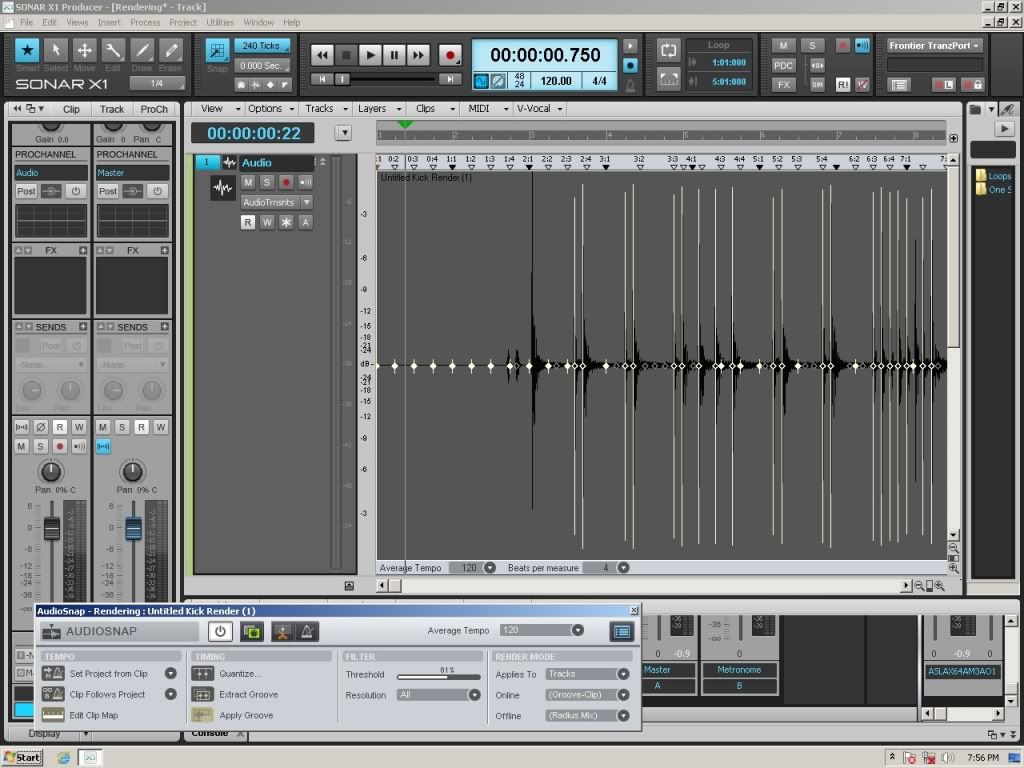
http://digitalbayoustudios.com/https://soundcloud.com/digibiuDavid Stuckey Sonar X3 Producer ,Windows 7 64bit ,6G Ram, Quad Core 2.6,3 1 UAD 2 card, 4 UAD-1 Cards, 2 Dell 24" LCD, ADAM ANF10, Avantones, Crown Power Amp, Great River ME-1, UA Solo/610, Distressor,Presonus ADL600,, RNC, RNLA, 2 PBC-6a, JoeMeek MC2, ART Pro Channel, Yamaha MO8,Korg Triton,M-Audio Keystation Pro 88, Custom Shop Fender Twin, 76 Randall Tube Amp, Custom Blue Runner Tube Amp, Lynx Aurora 8 FW Apogee AD8000 SE MixedLogic M24 Control Surface Yamaha Pro Mix 01
|
fooman
Max Output Level: -63 dBFS

- Total Posts : 1382
- Joined: 2006/06/26 14:47:44
- Location: Ontario, Canada
- Status: offline
Re:Please Help!! I broke audiosnap and don't know how to repair it.
2012/09/18 12:09:25
(permalink)
I get this constantly!
I had asked about this months ago. For now I just go and select all the transients and right-click "Delete".
Best part is that it doesn't delete all of these "manual" transients at once when selecting them all. I often have to select a bunch, delete... select others, delete... etc etc till they are all gone.
Seems Sonar generates a bunch of these manual markers at seemingly random times. I have a pretty standard workflow when setting up for mixing, and if I'm replacing a drum I'll do things the same almost every time. Why these markers only show up 1/2 the time is beyond me and I'm super happy someone else has taken a screenshot of this (I'm lazy :( )
Anyways, as you delete them, your real transient markers start to show up.
|
digi2ns
Max Output Level: -48.5 dBFS
- Total Posts : 2694
- Joined: 2010/11/24 14:27:12
- Location: MICHIGAN
- Status: offline
Re:Please Help!! I broke audiosnap and don't know how to repair it.
2012/09/18 12:43:47
(permalink)
I get this to but can adjust them off with the Threshold being raised. Your threshold doesnt turn them on and off as you slide it?
If it does adjust them off, delete the old midi track and remake with new markers. Sorry if Im confusing
MIKE --Dell Studio XPS I7/870 2.93 Ghz, 8GB Mem, 2-2TB Barracuda HDs, 500 GB Ext.HDD, Win7/64 --X1 64 Pro Expanded, Dual 21" Monitors --PCR500 --MAUDIO FastTrack Ultra --Mackie 1604 VLZ PRO --Line6 X3 Live --Gibson, Fender, Takamine, Schecter, Washburn http://pogopoppa.wix.com/5thgear# http://soundcloud.com/digi2ns
|
DigiBiu
Max Output Level: -69 dBFS
- Total Posts : 1053
- Joined: 2003/11/27 01:47:37
- Location: Maurice, Louisiana
- Status: offline
Re:Please Help!! I broke audiosnap and don't know how to repair it.
2012/09/18 12:44:33
(permalink)
Yeah, that was wierd too. Some of the transients would not be highlighted until I deleted these "phantom" transients before and after the beat, then they would appear instantly. I have no clue what is going on here, and what to do about it.
http://digitalbayoustudios.com/https://soundcloud.com/digibiuDavid Stuckey Sonar X3 Producer ,Windows 7 64bit ,6G Ram, Quad Core 2.6,3 1 UAD 2 card, 4 UAD-1 Cards, 2 Dell 24" LCD, ADAM ANF10, Avantones, Crown Power Amp, Great River ME-1, UA Solo/610, Distressor,Presonus ADL600,, RNC, RNLA, 2 PBC-6a, JoeMeek MC2, ART Pro Channel, Yamaha MO8,Korg Triton,M-Audio Keystation Pro 88, Custom Shop Fender Twin, 76 Randall Tube Amp, Custom Blue Runner Tube Amp, Lynx Aurora 8 FW Apogee AD8000 SE MixedLogic M24 Control Surface Yamaha Pro Mix 01
|
digi2ns
Max Output Level: -48.5 dBFS
- Total Posts : 2694
- Joined: 2010/11/24 14:27:12
- Location: MICHIGAN
- Status: offline
Re:Please Help!! I broke audiosnap and don't know how to repair it.
2012/09/18 12:50:46
(permalink)
Also, when I select my clip that Im adjusting, when I take the mouse and left click somewhere in the gray area off of a marker, the entire clip outlines in "white" showing the clip is selected.
I have seen and watch for the outline because you can have the track selected as seen in your pic but the clip wont be selected.
MIKE --Dell Studio XPS I7/870 2.93 Ghz, 8GB Mem, 2-2TB Barracuda HDs, 500 GB Ext.HDD, Win7/64 --X1 64 Pro Expanded, Dual 21" Monitors --PCR500 --MAUDIO FastTrack Ultra --Mackie 1604 VLZ PRO --Line6 X3 Live --Gibson, Fender, Takamine, Schecter, Washburn http://pogopoppa.wix.com/5thgear# http://soundcloud.com/digi2ns
|
digi2ns
Max Output Level: -48.5 dBFS
- Total Posts : 2694
- Joined: 2010/11/24 14:27:12
- Location: MICHIGAN
- Status: offline
Re:Please Help!! I broke audiosnap and don't know how to repair it.
2012/09/18 12:52:47
(permalink)
Nice job on the screen shot to!!!
Can you zoom out both horizontally and vertically to where the entire track and its sides are visible?
MIKE --Dell Studio XPS I7/870 2.93 Ghz, 8GB Mem, 2-2TB Barracuda HDs, 500 GB Ext.HDD, Win7/64 --X1 64 Pro Expanded, Dual 21" Monitors --PCR500 --MAUDIO FastTrack Ultra --Mackie 1604 VLZ PRO --Line6 X3 Live --Gibson, Fender, Takamine, Schecter, Washburn http://pogopoppa.wix.com/5thgear# http://soundcloud.com/digi2ns
|
fooman
Max Output Level: -63 dBFS
- Total Posts : 1382
- Joined: 2006/06/26 14:47:44
- Location: Ontario, Canada
- Status: offline
Re:Please Help!! I broke audiosnap and don't know how to repair it.
2012/09/18 13:24:01
(permalink)
I have tried adjusting the threshold, and the section that you select 1/8th, 1/16th, etc, without any luck.
I am just hoping X2 somehow doesn't have this issue. I've learned to live with it and work around it, but I can see I'm not the only one.
|
FastBikerBoy
Forum Host
- Total Posts : 11326
- Joined: 2008/01/25 16:15:36
- Location: Watton, Norfolk, UK
- Status: offline
Re:Please Help!! I broke audiosnap and don't know how to repair it.
2012/09/18 13:55:55
(permalink)
For some reason I can't see the screenshot. 
|
Blogman
Max Output Level: -81 dBFS
- Total Posts : 481
- Joined: 2011/02/08 02:32:48
- Status: offline
Re:Please Help!! I broke audiosnap and don't know how to repair it.
2012/09/18 17:04:17
(permalink)
|
FastBikerBoy
Forum Host
- Total Posts : 11326
- Joined: 2008/01/25 16:15:36
- Location: Watton, Norfolk, UK
- Status: offline
Re:Please Help!! I broke audiosnap and don't know how to repair it.
2012/09/19 02:00:11
(permalink)
That does look like a bug of some sort.
@digibiu - do they react as if they are manually created? i.e. Right clicking and selecting "Select Markers--->User" selects them and just those?
|
DigiBiu
Max Output Level: -69 dBFS
- Total Posts : 1053
- Joined: 2003/11/27 01:47:37
- Location: Maurice, Louisiana
- Status: offline
Re:Please Help!! I broke audiosnap and don't know how to repair it.
2012/09/19 09:15:37
(permalink)
Im not certain, but if I remember correctly, they act just as if they were rendered from the track, not manualy created. I can check that for sure when I get in the studio tonight.
http://digitalbayoustudios.com/https://soundcloud.com/digibiuDavid Stuckey Sonar X3 Producer ,Windows 7 64bit ,6G Ram, Quad Core 2.6,3 1 UAD 2 card, 4 UAD-1 Cards, 2 Dell 24" LCD, ADAM ANF10, Avantones, Crown Power Amp, Great River ME-1, UA Solo/610, Distressor,Presonus ADL600,, RNC, RNLA, 2 PBC-6a, JoeMeek MC2, ART Pro Channel, Yamaha MO8,Korg Triton,M-Audio Keystation Pro 88, Custom Shop Fender Twin, 76 Randall Tube Amp, Custom Blue Runner Tube Amp, Lynx Aurora 8 FW Apogee AD8000 SE MixedLogic M24 Control Surface Yamaha Pro Mix 01
|
fooman
Max Output Level: -63 dBFS
- Total Posts : 1382
- Joined: 2006/06/26 14:47:44
- Location: Ontario, Canada
- Status: offline
Re:Please Help!! I broke audiosnap and don't know how to repair it.
2012/09/19 14:02:13
(permalink)
No they are manually created because they can be deleted. As I understand, the track's "actual" trsnsients (created by Audiosnap) cannot be deleted, just disabled.
But these manually-created notes appear simply when enabling the audio-transient filter within a track. No manual-intervention otherwise. At least in my projects I've had to work around it. It's truly an annoyance, not a show-stopper. 5 minutes of work around (or less depending on the amount generated), and you're golden.
|
FastBikerBoy
Forum Host
- Total Posts : 11326
- Joined: 2008/01/25 16:15:36
- Location: Watton, Norfolk, UK
- Status: offline
Re:Please Help!! I broke audiosnap and don't know how to repair it.
2012/09/19 14:30:33
(permalink)
fooman
No they are manually created because they can be deleted. As I understand, the track's "actual" trsnsients (created by Audiosnap) cannot be deleted, just disabled.
Yes that's correct. But these manually-created notes appear simply when enabling the audio-transient filter within a track. No manual-intervention otherwise. At least in my projects I've had to work around it. It's truly an annoyance, not a show-stopper. 5 minutes of work around (or less depending on the amount generated), and you're golden.
What sort of material is it? I've never seen it but I have a very set routine and most of my use is on live drums, mainly extracting timing from improvised recordings plus tidying up here and there and the odd bit of drum replacement. I discovered that to get the best out of audiosnap material such as that is best trimmed, bounced and then the clip map checked. Any none relevant noise at the front of the clip such as studio chit chat, generally confuses audiosnap. I haven't used it extensively on much else other than moving the odd bits of bass, guitar etc around
|