Posting pics/images into forum
Hi all, I had a PM from an user regarding my last post - how to insert images into a thread. I know there's been heaps of helpful posts on this, but seeing as I was asked personally, I'll just do another one for info.
1. Register a free account with an image-hosting site -
www.photobucket.com is what lots of people use.
2. Take a screenshot of anything that is currently on your desktop, if that is what your query is about - use ALT+PRINT SCREEN (this takes a snapshot of your PC screen, and copies it to your clipboard)
3. Open the 'Paint' program - usually START\ACCESSORIES\PAINT (or some other editing software, but Paint is very easy to use)
4. When 'Paint' is open, open a new page by using FILE\NEW. Then use EDIT\PASTE to paste your screenshot into the new page. You'll see the screenshot of your PC that you just copied. If you want to narrow the selection down further, use the SELECT tool to highlight the section, then 'EDIT\CUT'. Then go 'FILE\NEW' again, then 'EDIT\PASTE'. The smaller selection will be pasted onto a new page.
5. Use FILE\SAVE AS to save the image to your PC.
6. Upload your pics to your Photobucket site. Each pic is given a direct URL or internet address.
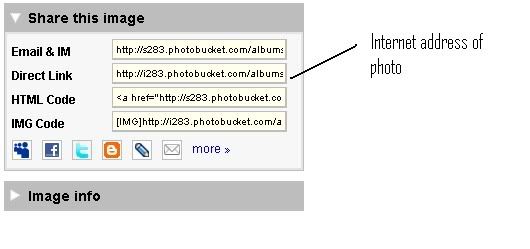
7. Start your thread in the forum, and wherever you want the image to be, use the 'Insert Image' button.
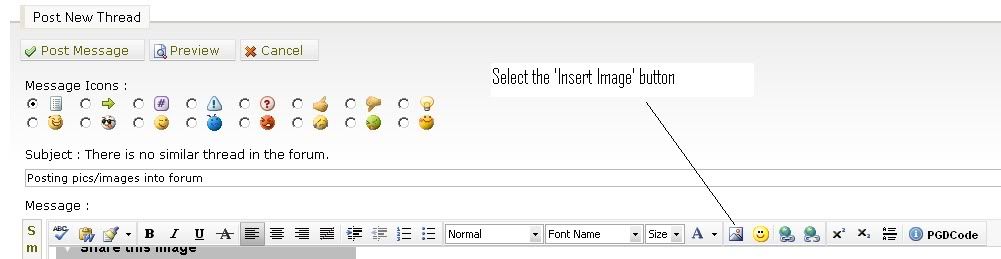
This pops up:
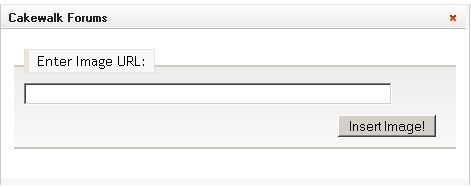
Copy and paste the URL of the pic you want to appear, into the box. Click 'Insert Image' and hey presto, your pic appears in your post.
Hope this is of some use to someone.