olemon
Max Output Level: -75 dBFS

- Total Posts : 768
- Joined: 2011/10/27 05:35:19
- Status: offline
Pro Channel - Inspector
Inspector cuts off the top of the Pro Channel module, unless I hide the Control bar. The mouse wheel/middle button doesn't scroll the Inspector. Am I doing something wrong? Also, wanted to try Photobucket.... 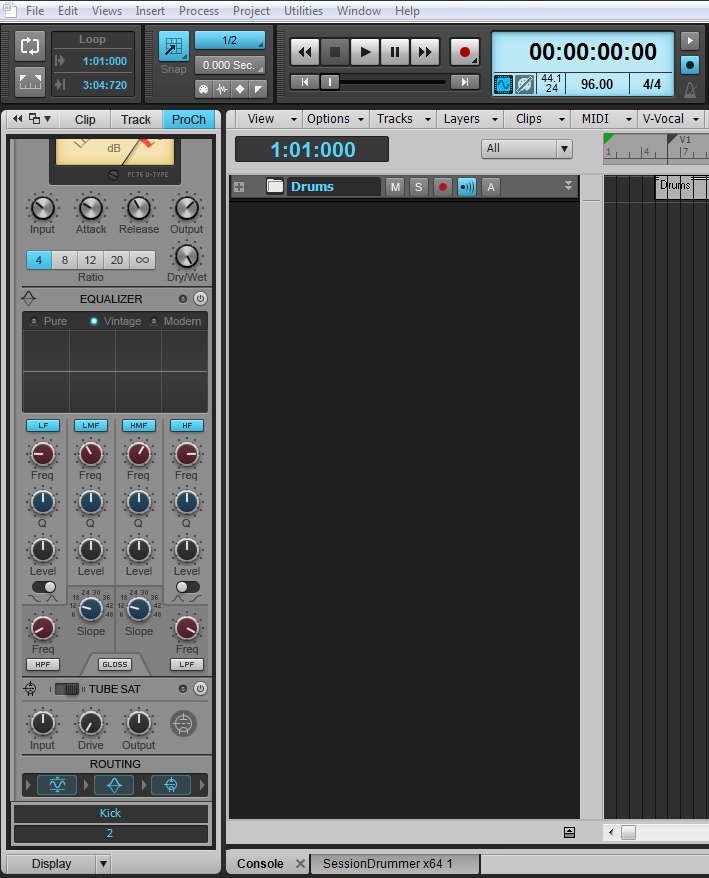 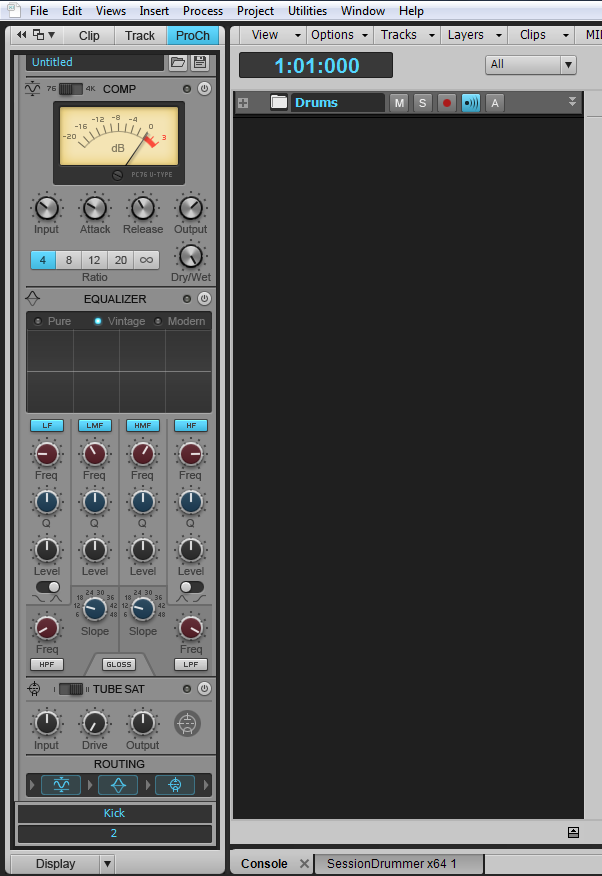
https://www.reverbnation.com/scottholson Platinum, Studio One 3 Pro, Win 10 (x64), AMD FX-8350, ASUS M5A97 R2.0, 16GB, RME UCX, Digimax DP88, Faderport 8, Revive Audio Mod Studio Channel, Vintage Audio M72, Summit Audio TLA-50, KRK Rokit 5 G2 Monitors, Guitars "If you wait till the last minute, it only takes a minute."
|
scook
Forum Host

- Total Posts : 24146
- Joined: 2005/07/27 13:43:57
- Location: TX
- Status: offline

Re:Pro Channel - Inspector
2012/10/26 22:39:49
(permalink)
Did you click in the ProChannel to give it focus before trying the mousewheel?
|
garrigus
Max Output Level: 0 dBFS

- Total Posts : 8599
- Joined: 2003/11/05 17:23:21
- Location: www.garrigus.com
- Status: offline
Re:Pro Channel - Inspector
2012/10/26 22:56:18
(permalink)
|
olemon
Max Output Level: -75 dBFS
- Total Posts : 768
- Joined: 2011/10/27 05:35:19
- Status: offline
Re:Pro Channel - Inspector
2012/10/27 07:17:57
(permalink)
That's what I was told in another thread, about clicking in the PC and using the mouse, didn't work when I tried that, but I will try again since 'operator error' is always a possibility.
Btw S.G., I'm sure glad I bought your X1 book, as many folks here recommended, and digifreq is equally helpful.
https://www.reverbnation.com/scottholson Platinum, Studio One 3 Pro, Win 10 (x64), AMD FX-8350, ASUS M5A97 R2.0, 16GB, RME UCX, Digimax DP88, Faderport 8, Revive Audio Mod Studio Channel, Vintage Audio M72, Summit Audio TLA-50, KRK Rokit 5 G2 Monitors, Guitars "If you wait till the last minute, it only takes a minute."
|
garrigus
Max Output Level: 0 dBFS
- Total Posts : 8599
- Joined: 2003/11/05 17:23:21
- Location: www.garrigus.com
- Status: offline
Re:Pro Channel - Inspector
2012/10/27 11:58:26
(permalink)
|
jb101
Max Output Level: -46 dBFS

- Total Posts : 2946
- Joined: 2011/12/04 05:26:10
- Status: offline
Re:Pro Channel - Inspector
2012/10/27 16:52:03
(permalink)
Just a thought - are you trying this in X1d? Your screenshot doesn't look like X1 D Expanded and IIRC the scrollable PC was only available in X1d Expanded. And now in X2.
|
olemon
Max Output Level: -75 dBFS
- Total Posts : 768
- Joined: 2011/10/27 05:35:19
- Status: offline
Re:Pro Channel - Inspector
2012/10/27 17:10:14
(permalink)
That explains it, I have X1d - not Expanded - and it doesn't matter where I click in PC - it doesn't scroll. No biggie. I'll install X2 eventually. Thank you.
https://www.reverbnation.com/scottholson Platinum, Studio One 3 Pro, Win 10 (x64), AMD FX-8350, ASUS M5A97 R2.0, 16GB, RME UCX, Digimax DP88, Faderport 8, Revive Audio Mod Studio Channel, Vintage Audio M72, Summit Audio TLA-50, KRK Rokit 5 G2 Monitors, Guitars "If you wait till the last minute, it only takes a minute."
|
garrigus
Max Output Level: 0 dBFS
- Total Posts : 8599
- Joined: 2003/11/05 17:23:21
- Location: www.garrigus.com
- Status: offline
Re:Pro Channel - Inspector
2012/10/27 17:19:50
(permalink)
|
scook
Forum Host
- Total Posts : 24146
- Joined: 2005/07/27 13:43:57
- Location: TX
- Status: offline
Re:Pro Channel - Inspector
2012/10/27 17:29:17
(permalink)
Yea, I read the .sig and assumed X2
|
jb101
Max Output Level: -46 dBFS
- Total Posts : 2946
- Joined: 2011/12/04 05:26:10
- Status: offline
Re:Pro Channel - Inspector
2012/10/27 18:31:43
(permalink)
I looked at the pic and saw the EQ and Module order thing, so I knew it wasn't X1 Expanded or X2..
Do install X2, I'm really liking it here..
|