Beepster
Max Output Level: 0 dBFS

- Total Posts : 18001
- Joined: 2012/05/11 19:11:24
- Status: offline
Raising the volume of a clip segment?
This is a very newbie question but I've poked around a bit and can't find the function I'm looking for. I'm playing around with my little tester experiment and I have one section of one track that I just want to bring up a bit. I'm rockin' the fade ins/outs/curves/etc but within Nuendo I was used to having an extra little knobby that would appear in the middle of whatever clip I was working on. By dragging it up or down I could raise/lower the level of that specific segment. I'm not seeing that in X1. This was something I did ALL the time to even out drum parts, vocals, guitar solos, whatever. I certainly don't want to rely on a plugin to do this type of thing for me. I know the answer is likely buried somewhere in the manual but I have the system fired up and I'm just trying to push this track along. Any help would be great. Thanks.
|
Beepster
Max Output Level: 0 dBFS
- Total Posts : 18001
- Joined: 2012/05/11 19:11:24
- Status: offline

Re:Raising the volume of a clip segment?
2012/06/08 22:18:23
(permalink)
|
guitartrek
Max Output Level: -47 dBFS

- Total Posts : 2842
- Joined: 2006/02/26 12:37:57
- Status: offline
Re:Raising the volume of a clip segment?
2012/06/08 22:19:13
(permalink)
Go to the pulldown menu on the edit filter of the track and set to Clip Automation->Gain and you'll get an envelope on every clip that you can pull up or down or insert nodes.
|
Lanceindastudio
Max Output Level: -29 dBFS

- Total Posts : 4604
- Joined: 2004/01/22 02:28:30
- Status: offline
Re:Raising the volume of a clip segment?
2012/06/08 22:20:53
(permalink)
easy way to get the menu is to have a mous with clickable wheel. also, other way is to do process audio, gain. i have mine key bound to alt g.
lance
Asus P8Z77-V LE PLUS Motherboard i7 3770k CPU 32 gigs RAM Presonus AudioBox iTwo Windows 10 64 bit, SONAR PLATINUM 64 bit Lots of plugins and softsynths and one shot samples, loops Gauge ECM-87, MCA SP-1, Alesis AM51 Presonus Eureka Mackie HR824's and matching subwoofer
|
guitartrek
Max Output Level: -47 dBFS
- Total Posts : 2842
- Joined: 2006/02/26 12:37:57
- Status: offline
Re:Raising the volume of a clip segment?
2012/06/08 22:22:34
(permalink)
Or you can insert a track envelope in the same way. If you do that there's a cool way to highlight a section on the time ruler and then set the mouse above the envelope so the pointer looks like a + with arrows on it. Click once, and it will insert 4 nodes automatically so you can drag the middle of the envelope up or down just for that section. I use that all the time. You can use that method on a clip envelope too.
|
Beepster
Max Output Level: 0 dBFS
- Total Posts : 18001
- Joined: 2012/05/11 19:11:24
- Status: offline
Re:Raising the volume of a clip segment?
2012/06/08 22:22:54
(permalink)
@guitartrek... Thank you, sir. Seems a little wacky to me but it looks like it works. Cheers!
|
guitartrek
Max Output Level: -47 dBFS
- Total Posts : 2842
- Joined: 2006/02/26 12:37:57
- Status: offline
Re:Raising the volume of a clip segment?
2012/06/08 22:24:27
(permalink)
If you do the track envelope there are shortcut keys and ways you can quickly make the envelopes active without having to deal with the pulldowns.
|
Beepster
Max Output Level: 0 dBFS
- Total Posts : 18001
- Joined: 2012/05/11 19:11:24
- Status: offline
Re:Raising the volume of a clip segment?
2012/06/08 22:28:21
(permalink)
Okay... you guys are confusing me a little (and I like it). What is happening now seems to work but I'm certainly open to options. Essentially I clicked the track drop down and did the "Clip Automation" > "Gain" thing and it highlighted all the clips in the track. From there it lets me adjust the individual volume of each clip. That totally works for me. I just figured there was a way to click a clip segment and get at it's volume automation that way or preferably have it just pop up with the Smart tool like the Fade automation stuff. That would be cool. If not I can live with this until I read the manual further. Cheers.
|
HeatherHaze
Max Output Level: -84 dBFS

- Total Posts : 334
- Joined: 2005/07/05 09:35:40
- Location: Washington DC
- Status: offline
Re:Raising the volume of a clip segment?
2012/06/08 22:54:41
(permalink)
This is a very newbie question but I've poked around a bit and can't find the function I'm looking for. I'm playing around with my little tester experiment and I have one section of one track that I just want to bring up a bit. I'm rockin' the fade ins/outs/curves/etc but within Nuendo I was used to having an extra little knobby that would appear in the middle of whatever clip I was working on. By dragging it up or down I could raise/lower the level of that specific segment. I'm not seeing that in X1. This was something I did ALL the time to even out drum parts, vocals, guitar solos, whatever. I certainly don't want to rely on a plugin to do this type of thing for me. I know the answer is likely buried somewhere in the manual but I have the system fired up and I'm just trying to push this track along. Any help would be great. Thanks. Is this what you had in mind? 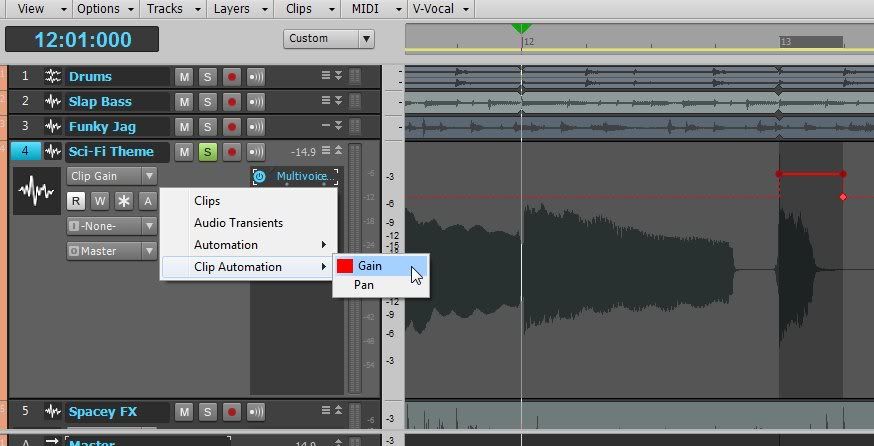 Once you select Clip Automation -> Gain, then you can double-click points in the clip to add nodes. Right-click on a node to edit or delete the node, right-click on the line for envelope options.
)-|-( HeatherHaze http://heatherhaze.com/ "This will be our reply to violence: to make music more intensely, more beautifully, more devotedly than ever before." ~ Leonard Bernstein Cakewalk by Bandlab Studio One 3.5, Cubase 9.5 Intel Core i7 8700, 32Gb RAM Focusrite Scarlett 18i20 V-Studio VS-700 Slate Raven MTi2 Windows 10 Professional 64-bit ...and a whole bunch of other stuff.
|
Beepster
Max Output Level: 0 dBFS
- Total Posts : 18001
- Joined: 2012/05/11 19:11:24
- Status: offline
Re:Raising the volume of a clip segment?
2012/06/08 22:55:58
(permalink)
Yeah... right on. I can see the pan and other automation stuff in there too and figured out how deselect the track again after I'm done. Cool beans. I have definitely learned some useful things here today. Thanks.
|
HeatherHaze
Max Output Level: -84 dBFS
- Total Posts : 334
- Joined: 2005/07/05 09:35:40
- Location: Washington DC
- Status: offline
Re:Raising the volume of a clip segment?
2012/06/08 22:57:04
(permalink)
Whoops, I see I'm a little late. 
)-|-( HeatherHaze http://heatherhaze.com/ "This will be our reply to violence: to make music more intensely, more beautifully, more devotedly than ever before." ~ Leonard Bernstein Cakewalk by Bandlab Studio One 3.5, Cubase 9.5 Intel Core i7 8700, 32Gb RAM Focusrite Scarlett 18i20 V-Studio VS-700 Slate Raven MTi2 Windows 10 Professional 64-bit ...and a whole bunch of other stuff.
|
Beepster
Max Output Level: 0 dBFS
- Total Posts : 18001
- Joined: 2012/05/11 19:11:24
- Status: offline
Re:Raising the volume of a clip segment?
2012/06/08 23:02:10
(permalink)
@Heather... not initially. As I said I'm used to the Volume/Gain "node" (I'm assuming that's what we call those little knobbies) already being there in Nuendo. It does seem strange how intricate the stretching, fade, etc... options are with just hovering over the track in X1 but they left out the volume thingy. Heh. Just a matter of learning how things work though I guess. I'm sure there is a reason for it. I was actually having a massive conundrum about Pan stuff I wanted to do and even cloned some tracks to screw around with it that way but I'm assuming with the Pan option right there I'll be able to achieve my goals that way. For now I'm just happy I have one of my main surgery tools (volume) back at my disposal. That was freaking me out. :-/
|
Beepster
Max Output Level: 0 dBFS
- Total Posts : 18001
- Joined: 2012/05/11 19:11:24
- Status: offline
Re:Raising the volume of a clip segment?
2012/06/08 23:03:20
(permalink)
You're never late. Your thoughts and insights are always appreciated. Cheers.
|
Beepster
Max Output Level: 0 dBFS
- Total Posts : 18001
- Joined: 2012/05/11 19:11:24
- Status: offline
Re:Raising the volume of a clip segment?
2012/06/08 23:19:46
(permalink)
I'm starting to get really sick of this song but I've learned so much working on it... and I haven't even started any EQing or anything yet. Maybe I should just plug my axe in and blitzkreig it with some patented Beepster mayhem... but that would kind of defeat the purpose.
|
David
Max Output Level: -86 dBFS

- Total Posts : 231
- Joined: 2003/11/06 11:00:48
- Status: offline
Re:Raising the volume of a clip segment?
2012/06/08 23:22:33
(permalink)
use clip automation, select area to be worked on by clicking and dragging in the bottom part of the
clip below the clip envelope .Then click and hold in that area above the envelope, raise or lower.
|
Beepster
Max Output Level: 0 dBFS
- Total Posts : 18001
- Joined: 2012/05/11 19:11:24
- Status: offline
Re:Raising the volume of a clip segment?
2012/06/08 23:30:07
(permalink)
@David... Wha? I'll have to try to do that tomorrow. I'm shut down for the night. Sounds weird. I do really miss my little level knobby though. It was so easy to tweak things.
|
lawajava
Max Output Level: -55 dBFS

- Total Posts : 2040
- Joined: 2012/05/31 23:23:55
- Location: Seattle
- Status: offline
Re:Raising the volume of a clip segment?
2012/06/20 02:21:12
(permalink)
Beepster - HeatherHaze is right on with this one. I use Clip Automation all the time. It's really easy to drop into a clip and pull down a small section of volume on a portion of it as needed. If you have the clip selected, if you press the Alt key you can drop inflection points (like a start and end point) wherever you click your mouse. Then you can just drag the clip automation line to the level of your choosing.
Two internal 2TB SSDs laptop stuffed with Larry's deals and awesome tools. Studio One is the cat's meow as a DAW now that I've migrated off of Sonar. Using BandLab Cakewalk just to grab old files when migrating songs.
|
Guitarhacker
Max Output Level: 0 dBFS
- Total Posts : 24398
- Joined: 2007/12/07 12:51:18
- Location: NC
- Status: offline
Re:Raising the volume of a clip segment?
2012/06/20 08:51:55
(permalink)
Thanks for this picture. There are 2 main ways I raise the levels 1. highlight the clip in it's entirety. click on it till it changes color like at measure 13.... then select PROCESS > APPLY EFFECT > GAIN then click the drop down box and select the level of + or - gain and click OK. this changes the whole clip by that amount. repeat as necessary. I normally select +1db or +3db to start. 2. Use this if you do not necessarily need the entire clip to be selected.......click on the track number to select the track....then, drag the mouse across the timeline while holding the left mouse button.....release the mouse where you want the selection to end...... it will darken the line just like you see at the time line starting at M13. You can zoom in as needed to make this surgical in nature. you can re-click and drag as needed to get the selected area EXACTLY where you need it. Then use the same procedure to raise or lower the levels. I use #2 all the time to remove the plosive sound of "P" that might sneak past the wind screen and also lowering the occasional sibilant "S" in a track....... I have also used it to raise the first syllable of a word that was weaker than the rest of the word, without needing to do a punch in record it again event. Note: even though this is an APPLY EFFECT and is potentially destructive in nature.... you have the UNDO in edit to back up while you are in the session. Note 2: In the example above.... I would have started my gain selection a bit before M13... somewhere closer to the end of M12:4:700 so that I picked up the very beginning of the note. Not doing so would possibly make the note have a glitch in it...or have it sound abrupt. Only playback would tell you that for sure..... just a last thought on this.
My website & music: www.herbhartley.com MC4/5/6/X1e.c, on a Custom DAW Focusrite Firewire Saffire Interface BMI/NSAI "Just as the blade chooses the warrior, so too, the song chooses the writer "
|
David
Max Output Level: -86 dBFS
- Total Posts : 231
- Joined: 2003/11/06 11:00:48
- Status: offline
Re:Raising the volume of a clip segment?
2012/06/20 09:21:39
(permalink)
See my post above, much faster!
|