Recording multiple takes

Author
martinv
Max Output Level: -88 dBFS
  • Total Posts : 138
  • Joined: 2012/07/28 02:25:07
  • Status: offline
2012/09/06 22:54:51 (permalink)

Recording multiple takes

I would like to record multiple takes using this method:
 
1. hit record
2. rewind
3. hit record,  have the new track be a new layer, but NOT hear the previous take and NOT overwrite the previous take.
 
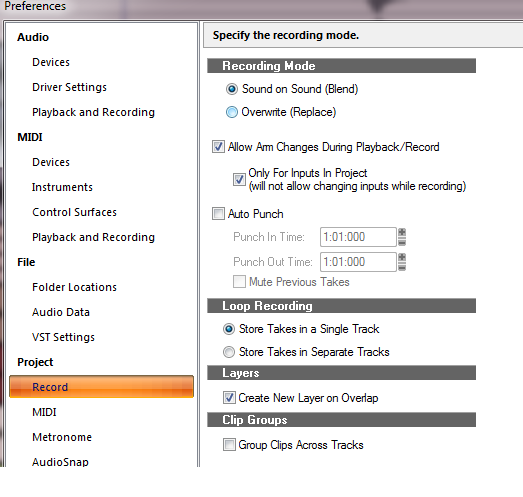
In the Record Options menu there is a choice of "Sound on Sound"  This appears to play all recorded layers at the same time.  Don't want this.
The other setting "Overwrite", overwrites the previous layer (I realize I can bring it back but don't want this hassle).
 
It looks like I can mute each layer after I record and this may be the best option?  On my previous machine,  I would just select a new layer('take') for each take, then this was the only layer that would play/record.
 
Hitting mute wouldn't be a big deal, but I'm recording myself in different locations in the room on different instruments and have a hard time seeing the mute/solo buttons next to the layers.  I don't really want to buy a big screen TV either. 


#1

2 Replies Related Threads

    perfectprint
    Max Output Level: -73 dBFS
    • Total Posts : 862
    • Joined: 2010/01/02 02:21:12
    • Status: offline
    Re:Recording multiple takes 2012/09/07 00:43:28 (permalink)
    leave as is. set up loops points, giving yourself a four bar (or more) lead in and then just record take after take as it loops over and over. you will get the result you want.

    Sonar Platinum                      

    #2
    Bristol_Jonesey
    Max Output Level: 0 dBFS
    • Total Posts : 16775
    • Joined: 2007/10/08 15:41:17
    • Location: Bristol, UK
    • Status: offline
    Re:Recording multiple takes 2012/09/07 04:20:43 (permalink)
    ^^^^ This

    And you (the OP) can ignore steps 2 & 3. Just hit record once and start playing/looping

    Previous takes will be muted by default. To view your takes once you've finished, enable Track Layers

    CbB, Platinum, 64 bit throughout
    Custom built i7 3930, 32Gb RAM, 2 x 1Tb Internal HDD, 1 x 1TB system SSD (Win 7), 1 x 500Gb system SSD (Win 10), 2 x 1Tb External HDD's, Dual boot Win 7 & Win 10 64 Bit, Saffire Pro 26, ISA One, Adam P11A,
    #3
    Jump to:
    © 2025 APG vNext Commercial Version 5.1