spindlebox
Max Output Level: -49 dBFS

- Total Posts : 2645
- Joined: 2007/05/30 07:56:11
- Location: Kansas City, MO
- Status: offline
Room Analysis Mic question
I just got a copy of REW Software (Room EQ Wizard) from Home Theater dot com and I'm going to run a test, however, I don't have an OMNI condenser mic.
Can I still do this? I have a couple cartoid condenser and a cache of '57's.
What'cha think?
|
drewfx1
Max Output Level: -9.5 dBFS

- Total Posts : 6585
- Joined: 2008/08/04 16:19:11
- Status: offline

Re:Room Analysis Mic question
2010/03/29 10:59:11
(permalink)
If the mic's frequency response is not (close to) flat, you will analyze the mic's response as well as the room's.
The cardiod pickup pattern will color/reduce the effects of reflections from the sides/back. How much of a problem this is depends on the mic's off-axis response, where the reflections are coming from, and the ratio of direct to reflected sound. Small diaphram condensers generally have much better off-axis response than LDC 's.
If your listening position is much closer to the monitors than to the off-axis reflections, this is not as big of a deal. If you're far from the monitors in an untreated, highly reverberant room, you really need an omni measurement mic.
Of the mics you have, pick the flattest one, with the best off-axis response, and the widest pickup pattern. At the listening position, point it so the loudest signal/reflections are on-axis.
|
spindlebox
Max Output Level: -49 dBFS
- Total Posts : 2645
- Joined: 2007/05/30 07:56:11
- Location: Kansas City, MO
- Status: offline
Re:Room Analysis Mic question
2010/03/29 11:23:49
(permalink)
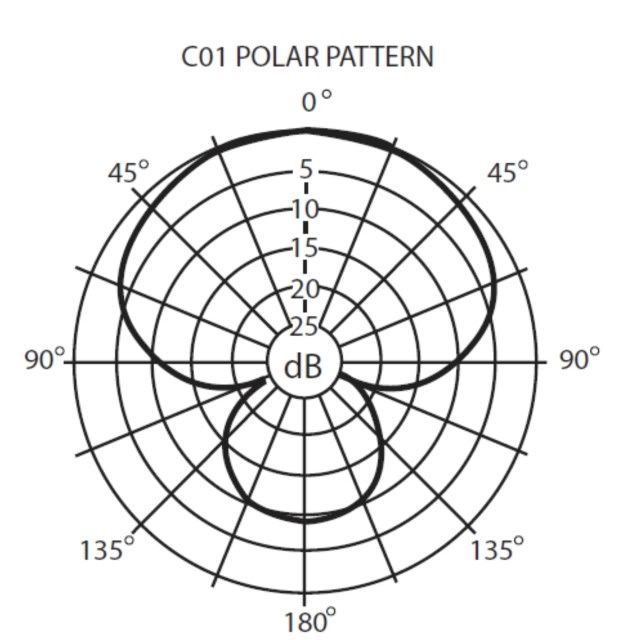 Gotcha. I tried using my condenser mic, a SAMSON C01 and I'm not sure what I got. I started another thread with my results. The above is the pattern of the mic. Unfortunately, this is what I have at the moment. Thank you for your response!!
|
spindlebox
Max Output Level: -49 dBFS
- Total Posts : 2645
- Joined: 2007/05/30 07:56:11
- Location: Kansas City, MO
- Status: offline
Re:Room Analysis Mic question
2010/03/29 11:28:41
(permalink)
BTW, I should state that my listening position IS close to the monitors, and I placed the mic just behind and above my head.
|
spindlebox
Max Output Level: -49 dBFS
- Total Posts : 2645
- Joined: 2007/05/30 07:56:11
- Location: Kansas City, MO
- Status: offline
Re:Room Analysis Mic question
2010/03/29 11:30:04
(permalink)
|
wogg
Max Output Level: -57 dBFS

- Total Posts : 1819
- Joined: 2003/11/14 16:07:44
- Location: Columbus, OH
- Status: offline
Re:Room Analysis Mic question
2010/03/29 12:58:45
(permalink)
This is the mic to get for that sort of thing: http://www.parts-express....cfm?Partnumber=248-625 Tiny dips and peaks aside you have a significant rise from 100Hz to 50Hz (looks like 10dB+). That could be the mic, your room, or the monitors. Do you have a sub or any EQ going on in your monitor chain?
|
bitflipper
01100010 01101001 01110100 01100110 01101100 01101

- Total Posts : 26036
- Joined: 2006/09/17 11:23:23
- Location: Everett, WA USA
- Status: offline
Re:Room Analysis Mic question
2010/03/29 14:44:05
(permalink)
The main reason an omni mic is recommended is that they are flatter than cardioid patterns.
While it's true that having a flat mic is preferred, it's not really that big a deal because the frequency response of the mic is the least of the factors when taking room measurements. As long as your mic has a reasonable response in the low end (don't forget to turn off the HPF!) you'll be OK.
Consider that a good condenser will be flat within 3 to 6db down to 40Hz, which is as low as you care about. If it's 3db down at 40Hz, that's nothing compared to the 20, 30 or even 40db peaks and nulls your room can create. An extremely well-treated room will only be flat within about 6db.
Similarly, except at the extreme low end, the flatness of your speakers have comparatively little impact on the measurement.
 All else is in doubt, so this is the truth I cling to. My Stuff
|
tarsier
Max Output Level: -45 dBFS

- Total Posts : 3029
- Joined: 2003/11/07 11:51:35
- Location: 6 feet under
- Status: offline
Re:Room Analysis Mic question
2010/03/29 14:56:24
(permalink)
|
spindlebox
Max Output Level: -49 dBFS
- Total Posts : 2645
- Joined: 2007/05/30 07:56:11
- Location: Kansas City, MO
- Status: offline
Re:Room Analysis Mic question
2010/03/29 18:34:45
(permalink)
$85 for a microphone that I'd use for room analysis! Maybe if I could use it for other things as well!! LOL. Besides it's a Behringer ECM8000 , and people have said that they're noisy for recording purposes. Makes me wonder how a "noisy mic" can calibrate anything properly? BUT, who am I to say. The $85 one is the one sold by Home Theater Shack; it's been tweaked. Everywhere else it's under $50. A little more reasonable I AM going to be purchasing the JBL LSR4326P's as my main reference monitors, and they come with DSP Room Mode calibration and mic. Perhaps I will be able to use that for this when the time comes. 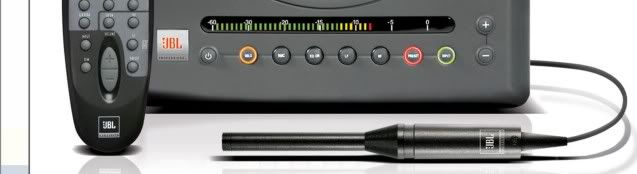 WOGG, I did have my SUB lightly turned up when I ran this test. I will run it again without. I figured I'd give myself a "worst case scenario"; but it was perhaps a NOOB mistake! DOH!
|
Keebo
Max Output Level: -79 dBFS

- Total Posts : 576
- Joined: 2003/11/06 18:06:26
- Location: Southeast
- Status: offline
Re:Room Analysis Mic question
2010/03/29 23:22:32
(permalink)
This is an interesting subject for me. I bought a Behringer Ultra Curve Pro EQ and ECM8000 mic way back in the day. I always use the EQ (and yes, a BBE 362) behind my POD XT while playing but not for recording as I would rather adjust the frequencies within Sonar.
I guess I am a complete moron because the little info in the EQ pdf doesn't explain very well (to me) how to use the EQ and mic to perform a room analysis and use that data for future use. The mic has since been in the closet for years without use and without dust since it came with a nice case :-) .
I have downloaded the Room EQ Wizard but have yet to install it. I'm not too crazy about installing software that I am not too sure if it is worthwhile. Does it have comprehensive info on how to go about EQ'ing a room and then using that data to tune your environment? Are there any links that one may provide to help me understand this process a little better?
Sonar X2 Producer 64 bit Sonar X1 Producer Expanded 64 bit Sonar 8.5.3 Producer 32/64 bit Windows 7 64 bit
|
Beagle
Max Output Level: 0 dBFS

- Total Posts : 50621
- Joined: 2006/03/29 11:03:12
- Location: Fort Worth, TX
- Status: offline
Re:Room Analysis Mic question
2010/03/30 10:02:31
(permalink)
Keebo
This is an interesting subject for me. I bought a Behringer Ultra Curve Pro EQ and ECM8000 mic way back in the day. I always use the EQ (and yes, a BBE 362) behind my POD XT while playing but not for recording as I would rather adjust the frequencies within Sonar.
I guess I am a complete moron because the little info in the EQ pdf doesn't explain very well (to me) how to use the EQ and mic to perform a room analysis and use that data for future use. The mic has since been in the closet for years without use and without dust since it came with a nice case :-) .
I have downloaded the Room EQ Wizard but have yet to install it. I'm not too crazy about installing software that I am not too sure if it is worthwhile. Does it have comprehensive info on how to go about EQ'ing a room and then using that data to tune your environment? Are there any links that one may provide to help me understand this process a little better?
Personally I think using EQ to flatten the room is an incorrect way to try to correct peaks in the room. use the analysis tool to figure out where your problems are but then use bass and broadband traps and (if necessary for your purpose) diffusion and/or high frequency absorbers (auralex or just foam pads or egg crates) to reduce the high frequency reflections. the bass and broadband traps are what are most needed for mixing, however, to reduce the problems with lowering your bass and low-mids too much in your mix.
|
tarsier
Max Output Level: -45 dBFS
- Total Posts : 3029
- Joined: 2003/11/07 11:51:35
- Location: 6 feet under
- Status: offline
Re:Room Analysis Mic question
2010/03/30 10:28:18
(permalink)
$85 for a microphone that I'd use for room analysis! Maybe if I could use it for other things as well!! LOL. Besides it's a Behringer ECM8000 , and people have said that they're noisy for recording purposes. Makes me wonder how a "noisy mic" can calibrate anything properly? BUT, who am I to say. The $85 one is the one sold by Home Theater Shack; it's been tweaked. Everywhere else it's under $50. A little more reasonable I AM going to be purchasing the JBL LSR4326P's as my main reference monitors, and they come with DSP Room Mode calibration and mic. Perhaps I will be able to use that for this when the time comes. Sure, the ECM8000 is noisier than your typical "studio" mic, but it's not THAT noisy. And the point of getting a calibrated mic is so that you actually KNOW how it is affecting the sound that you're measuring. If your mic isn't calibrated, then it's adding its own distortions to your analysis. So your analysis is not showing the actual response of the room, it's showing the response of the room + the response of the mic. How much have you spent on your gear? How much have you spent on treatment? $85 is pretty cheap for a calibration mic, and there really isn't any point to doing a measurement without some form of calibrated mic. Regarding the JBLs: Their mic is calibrated for their system. As I recall, you have to enter the serial of the mic into the software that comes with the JBLs so that the proper correction can be applied. (someone correct me if I'm wrong.) If you use the JBL mic with REW, you'll get skewed results. Just like using a non-calibrated mic with REW.
|
tarsier
Max Output Level: -45 dBFS
- Total Posts : 3029
- Joined: 2003/11/07 11:51:35
- Location: 6 feet under
- Status: offline
Re:Room Analysis Mic question
2010/03/30 10:31:55
(permalink)
Personally I think using EQ to flatten the room is an incorrect way to try to correct peaks in the room. +1 to this. Room treatment should be the first thing to try. But if someone wants to do room analysis and eq correction then at least they should attempt to do it right.
|
tarsier
Max Output Level: -45 dBFS
- Total Posts : 3029
- Joined: 2003/11/07 11:51:35
- Location: 6 feet under
- Status: offline
Re:Room Analysis Mic question
2010/03/30 10:33:49
(permalink)
I have downloaded the Room EQ Wizard but have yet to install it. I'm not too crazy about installing software that I am not too sure if it is worthwhile. Does it have comprehensive info on how to go about EQ'ing a room and then using that data to tune your environment? Are there any links that one may provide to help me understand this process a little better? All that info is at the same place where you downloaded REW. But to get you started: http://www.hometheatershack.com/roomeq/wizardhelp/help_en-GB/html/index.html
|
Keebo
Max Output Level: -79 dBFS
- Total Posts : 576
- Joined: 2003/11/06 18:06:26
- Location: Southeast
- Status: offline
Re:Room Analysis Mic question
2010/03/30 11:39:30
(permalink)
Sonar X2 Producer 64 bit Sonar X1 Producer Expanded 64 bit Sonar 8.5.3 Producer 32/64 bit Windows 7 64 bit
|
spindlebox
Max Output Level: -49 dBFS
- Total Posts : 2645
- Joined: 2007/05/30 07:56:11
- Location: Kansas City, MO
- Status: offline
Re:Room Analysis Mic question
2010/03/30 16:38:52
(permalink)
Good points everywhere. I'll muttle through with what I have for now; I have a pretty good idea where I'm going with treatment. Definitely traps and panels and pads. It will be interesting to see how much my tests change over time.
Thanks everyone!
|
bitflipper
01100010 01101001 01110100 01100110 01101100 01101
- Total Posts : 26036
- Joined: 2006/09/17 11:23:23
- Location: Everett, WA USA
- Status: offline
Re:Room Analysis Mic question
2010/03/31 01:47:30
(permalink)
Scott, if you're on a tight budget - and who isn't? - skip the calibrated mic for now. The magnitudes of correction you'll need are far greater than any blips in your microphone's frequency response curve.
OTOH, buying a nice condenser that can do omni mode would be a good investment, and not just for room testing. I've been recording my vocals with my mic in omni for the past few months and finding it much easier to get a good tone out of it as a result. It flattens out the response and the proximity effect almost disappears, allowing me to sing much closer to the mic when necessary.
All else is in doubt, so this is the truth I cling to. My Stuff
|