bapu
Max Output Level: 0 dBFS

- Total Posts : 86000
- Joined: 2006/11/25 21:23:28
- Location: Thousand Oaks, CA
- Status: offline

[SOLVED - Post #19] Networking Weirdness - see pic in OP
So my home network has been the same for over a year now. One laptop W7 Home Premium, one desktop W7 Professional. Both are X64. Both have fixed IP addresses (as does my NAS). Lately (maybe three weeks or so) the laptop does not recognize computer devices on the network properly. The network tree in Windows Explorer will not expand. Howeber if I click on the network node in WE both the laptop and the DAW are media "files". In WE if I click on the DAW (from the laptop) WMP says it's an invalid file. The icon for the DAW and the LAPTOP (from WE on the laptop) have that WMP image on the device. If that's not clear I'll post a pic of it when I get home. The DAW however is fine. I can access the laptop from the network tree. I used to transfer files, while on the laptop, to the DAW all the time.... until recently. I thought that I once used the refresh command in WE and the computers became accessible network devices again but I have not been able to reproduce that behavior. Reboot does not make it go away. Any ideas what is causing this? <edit> here is a screen shot of the "properties" of my network devices from the laptop. 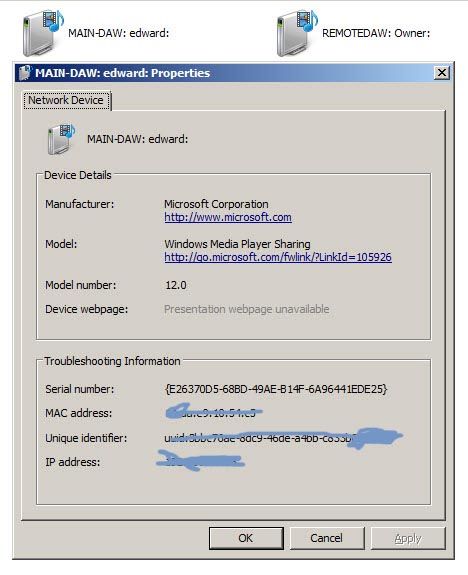
post edited by bapu - 2013/10/23 18:21:13
|
paulo
Max Output Level: -13 dBFS

- Total Posts : 6218
- Joined: 2007/01/30 05:06:57
- Status: offline

Re: Networking Weirdness
2013/10/22 16:59:20
(permalink)
Mebbe something has become shamelessly un-plugged ?
|
SteveStrummerUK
Max Output Level: 0 dBFS

- Total Posts : 31112
- Joined: 2006/10/28 10:53:48
- Location: Worcester, England.
- Status: offline
Re: Networking Weirdness
2013/10/22 17:02:35
(permalink)
☄ Helpfulby bapu 2013/10/22 17:03:46
Coincidentally, I invented a new computer game today.
The main character has to make as many people as he can feel uncomfortable by standing very close to them...
I'm calling it Personal Space Invaders.
|
bapu
Max Output Level: 0 dBFS
- Total Posts : 86000
- Joined: 2006/11/25 21:23:28
- Location: Thousand Oaks, CA
- Status: offline
Re: Networking Weirdness
2013/10/22 17:05:10
(permalink)
paulo
Mebbe something has become shamelessly un-plugged ?
Right now I blame my primate Daryk for not having anything new to plug right now. I mean he has tracks and all. WTF? 
|
paulo
Max Output Level: -13 dBFS
- Total Posts : 6218
- Joined: 2007/01/30 05:06:57
- Status: offline
Re: Networking Weirdness
2013/10/22 17:12:54
(permalink)
SteveStrummerUK
Coincidentally, I invented a new computer game today.
The main character has to make as many people as he can feel uncomfortable by standing very close to them...
I'm calling it Personal Space Invaders.
I have long been concerned by the amount of time that children waste on computer games. When my twins were born, I called them Player 1 and Player 2. That should save them some set-up time on new games.
|
craigb
Max Output Level: 0 dBFS
- Total Posts : 41704
- Joined: 2009/01/28 23:13:04
- Location: The Pacific Northwestshire
- Status: offline
Re: Networking Weirdness
2013/10/22 17:19:31
(permalink)
Meebee you've accidentally turned Netnotworking on?
Time for all of you to head over to Beyond My DAW!
|
drewfx1
Max Output Level: -9.5 dBFS

- Total Posts : 6585
- Joined: 2008/08/04 16:19:11
- Status: offline
Re: Networking Weirdness
2013/10/22 19:04:03
(permalink)
Given fixed IP addresses, I just map drives the old command prompt way:
net use t: \\192.168.1.x\share name
or optionally
net use t: \\192.168.1.x\share_name password /user:username
and
net use t: /delete
 In order, then, to discover the limit of deepest tones, it is necessary not only to produce very violent agitations in the air but to give these the form of simple pendular vibrations. - Hermann von Helmholtz, predicting the role of the electric bassist in 1877.
|
bapu
Max Output Level: 0 dBFS
- Total Posts : 86000
- Joined: 2006/11/25 21:23:28
- Location: Thousand Oaks, CA
- Status: offline
Re: Networking Weirdness
2013/10/22 21:02:33
(permalink)
Work arounds. meh. If I have to yeah, but I'd really like to know what the root cause of this is.
As I've said for over (actually) two years now this hos not been a problem but cropped up recently. I feel like I'm a pretty orgranized guy and don't just install mish-mash of junk on my computers but maybe a M$ update happened? That's about the only thing I can think of. On the lappy I use M$ auto update but not ion the DAW.
|
bapu
Max Output Level: 0 dBFS
- Total Posts : 86000
- Joined: 2006/11/25 21:23:28
- Location: Thousand Oaks, CA
- Status: offline
Re: Networking Weirdness
2013/10/23 00:43:41
(permalink)
|
craigb
Max Output Level: 0 dBFS
- Total Posts : 41704
- Joined: 2009/01/28 23:13:04
- Location: The Pacific Northwestshire
- Status: offline
Re: Networking Weirdness
2013/10/23 02:17:13
(permalink)
It's obvious that the problem is someone is scrawling all over the Troubleshooting Information!  (Sorry, wish I could help Ed - no ideas, have you searched Google?) (Sorry, wish I could help Ed - no ideas, have you searched Google?)
Time for all of you to head over to Beyond My DAW!
|
Shambler
Max Output Level: -75 dBFS

- Total Posts : 783
- Joined: 2010/07/06 05:20:19
- Status: offline
Re: Networking Weirdness
2013/10/23 05:08:53
(permalink)
SteveStrummerUK
Coincidentally, I invented a new computer game today.
The main character has to make as many people as he can feel uncomfortable by standing very close to them...
I'm calling it Personal Space Invaders.

SONAR Platypus on Win10 64bit. Studio One Pro / Cubase Pro 9.5...just in case. 8GB i7-2600 3.4GHz Gigabyte Z68XP-UD3P Geforce GTX970 Focusrite Scarlett 18i20 2nd Gen Prophet 12/Rev 2/Virus Snow Zebra2/DIVA/NI Komplete 10
|
bapu
Max Output Level: 0 dBFS
- Total Posts : 86000
- Joined: 2006/11/25 21:23:28
- Location: Thousand Oaks, CA
- Status: offline
Re: Networking Weirdness
2013/10/23 11:30:43
(permalink)
craigb
(no ideas, have you searched Google?)
endlessly. to no avail.
|
drewfx1
Max Output Level: -9.5 dBFS
- Total Posts : 6585
- Joined: 2008/08/04 16:19:11
- Status: offline
Re: Networking Weirdness
2013/10/23 12:44:47
(permalink)
I did a quick search last night, but didn't find an easy answer. Maybe a Master Browser kind of thing, but I gave up (sorry).
Since it's showing as a media file, perhaps you have a DLNA media streaming device in your Domain/Workgroup causing the problem - maybe a NAS drive, media player, networked TV or set top box or something?
The fact that you can't find any information about how it works or what might be wrong is why I don't use it in the first place and I do it the command line way (using a .bat file).
But you can just open the Run dialog and type \\192.168.1.x\Share_name and it will open Explorer and then you can pin it to the Taskbar instead.
Usually when Microsoft and all the other tech companies try to make things "easy" and deliberately hide the details of what's actually going on, it just makes it a nightmare to troubleshoot if something doesn't work.
In order, then, to discover the limit of deepest tones, it is necessary not only to produce very violent agitations in the air but to give these the form of simple pendular vibrations. - Hermann von Helmholtz, predicting the role of the electric bassist in 1877.
|
Ham N Egz
Max Output Level: 0 dBFS
- Total Posts : 15161
- Joined: 2005/01/21 14:27:49
- Location: Arpadhon
- Status: offline
Re: Networking Weirdness
2013/10/23 13:53:16
(permalink)
All your DAW belong to us 
Green Acres is the place to be I dont twitter, facebook, snapchat, instagram,linkedin,tumble,pinterest,flick, blah blah,lets have an old fashioned conversation!
|
bapu
Max Output Level: 0 dBFS
- Total Posts : 86000
- Joined: 2006/11/25 21:23:28
- Location: Thousand Oaks, CA
- Status: offline
Re: Networking Weirdness
2013/10/23 14:12:42
(permalink)
drewfx1
Since it's showing as a media file, perhaps you have a DLNA media streaming device in your Domain/Workgroup causing the problem - maybe a NAS drive, media player, networked TV or set top box or something?
I do have a NAS but (TMK) no media player. And I definately DO NOT have a networked TV or set top box on my network. The Lovely Lady has an XP box on a fixed IP address but I do not try to include her in my "W7" devices. I have a networked laser printer (Brother) but that has been on the network ever since I went W7. It feels like the problem is contained within laptop since the DAW does not act that way. Again, the only difference between the laptop and the DAW is W7 Home vs. Pro.
|
Wookiee
Rrrrugh arah-ah-woof?

- Total Posts : 13306
- Joined: 2007/01/16 06:19:43
- Location: Akahaocwora - Village Yoh Kay
- Status: offline
Re: Networking Weirdness
2013/10/23 14:24:12
(permalink)
You could try flushing your DNS cache which may well be screwed.
C:\ipconfig /flushdns
You will have to run CMD as admin
Life is not about waiting for the storm to pass, it's about learning to dance in the rain.
Karma has a way of finding its own way home.
Primary, i7 8700K 16Gigs Ram, 3x500gb SSD's 2TB Backup HHD Saffire Pro 40. Win 10 64Bit Secondary i7 4790K, 32GB Ram, 500Gb SSD OS/Prog's, 1TB Audio, 1TB Samples HHD AudioBox USB, Win 10 64Bit CbB, Adam's A7x's - Event 20/20's, Arturia V6, Korg Digital Legacy, Softube Modular, Arturia Keylab-88, USB-MidiSport 8x8
|
bapu
Max Output Level: 0 dBFS
- Total Posts : 86000
- Joined: 2006/11/25 21:23:28
- Location: Thousand Oaks, CA
- Status: offline
Re: Networking Weirdness
2013/10/23 14:31:03
(permalink)
Wookiee
You could try flushing your DNS cache which may well be screwed.
C:\ipconfig /flushdns
You will have to run CMD as admin
No change. BTW, wouldn't a reboot flush the DNS cache? I ask because reboot does not change anything.
|
UbiquitousBubba
Max Output Level: 0 dBFS
- Total Posts : 8912
- Joined: 2008/07/09 16:55:12
- Location: Everywhere Else
- Status: offline
Re: Networking Weirdness
2013/10/23 14:46:27
(permalink)
☼ Best Answerby bapu 2013/10/23 14:53:03
I saw something like this a few months ago. Unfortunately, there are multiple possible causes for this sort of thing.
Do you have Home Sharing enabled and configured on all of these machines? I'm not saying this is the culprit, but I have seen home networking weirdness after pcs/laptops received MS patches that "enhanced" Home Sharing.
Do you have IPv6 enabled on your router and on each pc/laptop? There are some articles circulating about network discovery problems that disappeared once IPv6 was disabled. The problem was not actually due to IPv6, but had more to do with a router that was improperly handling IPv6. There are other articles claiming that MS broke IPv6 with some patches. Other articles claim the moon landings were real, so consider the source.
How old/new is your router? While it is unlikely that the problem is caused by your router, I have seen network discovery problems in homes where the number of networked devices increased and the router couldn't keep up. I had a router that worked fine for several years until the number of networked devices outnumbered the human population. I bought a new router and the problems vanished.
Hope that helps.
|
bapu
Max Output Level: 0 dBFS
- Total Posts : 86000
- Joined: 2006/11/25 21:23:28
- Location: Thousand Oaks, CA
- Status: offline
Re: Networking Weirdness
2013/10/23 14:52:44
(permalink)
UbiquitousBubba
Do you have Home Sharing enabled and configured on all of these machines? I'm not saying this is the culprit, but I have seen home networking weirdness after pcs/laptops received MS patches that "enhanced" Home Sharing.
DING DING DING We have a winner!!!!! Removed from Homegroup worked.
|
Ham N Egz
Max Output Level: 0 dBFS
- Total Posts : 15161
- Joined: 2005/01/21 14:27:49
- Location: Arpadhon
- Status: offline
Re: Networking Weirdness
2013/10/23 15:50:44
(permalink)
☄ Helpfulby bapu 2013/10/23 15:53:48
microsoft update patches always break something here at skool...
Green Acres is the place to be I dont twitter, facebook, snapchat, instagram,linkedin,tumble,pinterest,flick, blah blah,lets have an old fashioned conversation!
|
craigb
Max Output Level: 0 dBFS
- Total Posts : 41704
- Joined: 2009/01/28 23:13:04
- Location: The Pacific Northwestshire
- Status: offline
Re: Networking Weirdness
2013/10/23 17:53:10
(permalink)
☄ Helpfulby bapu 2013/10/23 18:09:05
Not fair! UB went ahead in time, read what was ultimately the problem then came back to offer it!!! I need to get a time machine too... 
Time for all of you to head over to Beyond My DAW!
|
SteveStrummerUK
Max Output Level: 0 dBFS
- Total Posts : 31112
- Joined: 2006/10/28 10:53:48
- Location: Worcester, England.
- Status: offline
Re: Networking Weirdness
2013/10/23 18:18:07
(permalink)
☄ Helpfulby bapu 2013/10/23 18:20:02
craigb
Not fair! UB went ahead in time, read what was ultimately the problem then came back to offer it!!!
I need to get a time machine too...
I watched an extremely tedious and boring documentary on how to build a time machine last night.... That was an hour of my life I'll probably get back.
|
Wookiee
Rrrrugh arah-ah-woof?
- Total Posts : 13306
- Joined: 2007/01/16 06:19:43
- Location: Akahaocwora - Village Yoh Kay
- Status: offline
Re: Networking Weirdness
2013/10/24 05:03:34
(permalink)
bapu
Wookiee
You could try flushing your DNS cache which may well be screwed.
C:\ipconfig /flushdns
You will have to run CMD as admin
No change. BTW, wouldn't a reboot flush the DNS cache? I ask because reboot does not change anything.
You would think so but no! glad you got it fixed.
Life is not about waiting for the storm to pass, it's about learning to dance in the rain.
Karma has a way of finding its own way home.
Primary, i7 8700K 16Gigs Ram, 3x500gb SSD's 2TB Backup HHD Saffire Pro 40. Win 10 64Bit Secondary i7 4790K, 32GB Ram, 500Gb SSD OS/Prog's, 1TB Audio, 1TB Samples HHD AudioBox USB, Win 10 64Bit CbB, Adam's A7x's - Event 20/20's, Arturia V6, Korg Digital Legacy, Softube Modular, Arturia Keylab-88, USB-MidiSport 8x8
|