Matt
Max Output Level: -84 dBFS

- Total Posts : 346
- Joined: 2003/11/06 22:23:40
- Location: La Canada Flintridge, CA
- Status: offline

[SOLVED... sort of] complex triple-monitor, multi-dock, floating window question
This is how I have my desktop set up since as long as I can remember: http://www.koskenmaki.com/desktop.png (I shrank it so the file wasn't so big... if the quality sucks I can repost a bigger version.) This is two 30" monitors side-by-side at 2560x1600 resolution. It's got everything I need/use all the time, I like to have it all out in front of me at once (no hidden windows) and because my template has 250 tracks I like to have the track view as large as possible. The only thing I ever change is occasionally I'll cut the media browser in half and add a video window when I work with video. All the windows on the right are floating outside of the Sonar window... it's the only way I could figure out to not have overlap with the track window. The track window is the biggest issue for me.... no way to float it? This multidock is new to me, I can't see to figure out how to use it efficiently. Here's the question... in addition to these monitors I have a 3rd monitor off to the left... too far to do me any practical good like displaying softsynths but I want to be able to shoot the track view on to it. I use this monitor for mixing and for recording (you can see it from the recording booth... I have a faderport in the booth to record Sonar so all I really need is to be able to see the track view... it is also nice to see the tracks while mixing.) Right now it is set up as monitor #3 and extends my desktop onto it. So the monitors are out of order, from left-to-right they go 3, 1, 2. Ideally I would just duplicate #1 onto #3. I don't need it to display anything different than #1. The problem is it's a 24" monitor and won't run at the same resolution as the 30" monitors. I've tried active DVI-D splitters, but they will only split at the lowest resolution. I've tried display port splitters, vga splitters, and duplicating the displays via the win7 screen resolution dialog box. Everytime I run into the same problem, either I have to change the 30" resolutions down to match the 24" (I don't want to) or I have to buy a new 30" monitor to replace the 24" (expensive). I'm not sure there's any hardware-based solution for me. So enter screensets... right now I have the 24" monitor just displaying the video window, I think in the multi-dock. Is there any possible way to create a screenset with the track view on the 24" monitor?
post edited by Matt - 2014/02/07 16:38:25
|
Matt
Max Output Level: -84 dBFS
- Total Posts : 346
- Joined: 2003/11/06 22:23:40
- Location: La Canada Flintridge, CA
- Status: offline
Re: complex triple-monitor, multi-dock, floating window question
2014/02/04 12:21:09
(permalink)
Here is a picture of the setup if it's not clear. The monitor on the left is on a swivel arm and can be positioned anywhere including rotating it over so that you can see it from the recording booth (window on right). 
|
markyzno
Max Output Level: -66 dBFS

- Total Posts : 1216
- Joined: 2011/02/08 06:40:20
- Location: UK
- Status: offline
Re: complex triple-monitor, multi-dock, floating window question
2014/02/04 12:39:28
(permalink)
Have you tried a USB monitor, I'm sure they clone your main desktop, assuming that your main monitor is the Track View Monitor?
I was looking at this myself recently to clone my main video monitor to my Studio client screen monitor so I can work to picture with the monitor in front of me and my client sees the video cloned on a very awkward for me to work on Monitor (a bit like yourself) but good for the client as its by a sofa... (if that makes sense at all)
Sonar Platinum 64 bit > Pro tools 10.3.2 >Intel i7 3770K > 16Gb Ram > Gigabyte Z77-D3H Motherboard> NVIDIA GeForce GTX 660 2 GB > ATi RADEON HD5700 > 240GB OCZ Agility 3 SSD> Win 10 home 64 bit> Delta 1010 > MOTU Audio Express > MA-15D's > NI Ultimate 9 > NI Kontrol S61 1.1 > NI MAschine Studio 2.3 / KORG MS-20 Mini - Arturia MicroBrute > KORG SQ1 - KORG Kaoss Pad KP3 > iPad and IO Dock 2 running various bits > Bunch of guitars >Sound Design on IMDB --
|
Matt
Max Output Level: -84 dBFS
- Total Posts : 346
- Joined: 2003/11/06 22:23:40
- Location: La Canada Flintridge, CA
- Status: offline
Re: complex triple-monitor, multi-dock, floating window question
2014/02/04 12:52:07
(permalink)
Wow I'd never even heard of usb monitors. I will look into this thanks. On initial glance, it looks like I could run into the same issue with 2560x1600 availalble only on expensive 30" usb monitors but I will keep researching if it will allow different resolution duplicate displays.
|
markyzno
Max Output Level: -66 dBFS
- Total Posts : 1216
- Joined: 2011/02/08 06:40:20
- Location: UK
- Status: offline
Re: complex triple-monitor, multi-dock, floating window question
2014/02/04 12:57:37
(permalink)
I *think* but dont quote me on this, that you can mirror at different resolutions.....
Sonar Platinum 64 bit > Pro tools 10.3.2 >Intel i7 3770K > 16Gb Ram > Gigabyte Z77-D3H Motherboard> NVIDIA GeForce GTX 660 2 GB > ATi RADEON HD5700 > 240GB OCZ Agility 3 SSD> Win 10 home 64 bit> Delta 1010 > MOTU Audio Express > MA-15D's > NI Ultimate 9 > NI Kontrol S61 1.1 > NI MAschine Studio 2.3 / KORG MS-20 Mini - Arturia MicroBrute > KORG SQ1 - KORG Kaoss Pad KP3 > iPad and IO Dock 2 running various bits > Bunch of guitars >Sound Design on IMDB --
|
markyzno
Max Output Level: -66 dBFS
- Total Posts : 1216
- Joined: 2011/02/08 06:40:20
- Location: UK
- Status: offline
Re: complex triple-monitor, multi-dock, floating window question
2014/02/04 13:04:35
(permalink)
Sonar Platinum 64 bit > Pro tools 10.3.2 >Intel i7 3770K > 16Gb Ram > Gigabyte Z77-D3H Motherboard> NVIDIA GeForce GTX 660 2 GB > ATi RADEON HD5700 > 240GB OCZ Agility 3 SSD> Win 10 home 64 bit> Delta 1010 > MOTU Audio Express > MA-15D's > NI Ultimate 9 > NI Kontrol S61 1.1 > NI MAschine Studio 2.3 / KORG MS-20 Mini - Arturia MicroBrute > KORG SQ1 - KORG Kaoss Pad KP3 > iPad and IO Dock 2 running various bits > Bunch of guitars >Sound Design on IMDB --
|
LunaTech
Max Output Level: -85 dBFS

- Total Posts : 273
- Joined: 2012/02/04 09:58:46
- Location: Atlanta, GA
- Status: offline
Re: complex triple-monitor, multi-dock, floating window question
2014/02/04 15:24:46
(permalink)
Hi,
Or you could add another video card. This should accomodate what you are doing. The only queston would be would the cards co exist independently. Meaning that would windows try to make them all span or all clone as opposed to spanning on one and the other is independent or spanning on one card and cloning one monitor on the other.
"Life could capture me with songs of innocence... And enrapture me with pleasures galore... Suddenly it could all quickly fade away... But I'm not surprised any more...." Sonar Platinum Pro- Win 10 64- I7 6800k - Asus - 32gb DDR4-SB ZX sound card (cd output to mixer)- Toshiba 960gb SSD (OS - Audio APPs)- 4TB Seagate (Storage/ App Content)- M-Audio Keystation 88 Pro - Akai MPD 232 - Zed R16 - PT 12 - A&H QU 24- Axiom 61 - XD 80usb "When He is all you have, He is everything you need"
|
tomixornot
Max Output Level: -58.5 dBFS

- Total Posts : 1674
- Joined: 2011/03/05 11:31:26
- Status: offline
Re: complex triple-monitor, multi-dock, floating window question
2014/02/04 16:09:22
(permalink)
LunaTech
Hi,
Or you could add another video card. This should accomodate what you are doing. The only queston would be would the cards co exist independently. Meaning that would windows try to make them all span or all clone as opposed to spanning on one and the other is independent or spanning on one card and cloning one monitor on the other.
I'm using 2 fan less low performance cards. Windows (7) will managed them as follows (under the Multiple display selection). - Display 1 and 2 connected to card A, the options are to Extend (span) or Duplicate. - Display 3 connected to card B, the options are Extend or Disconnect. 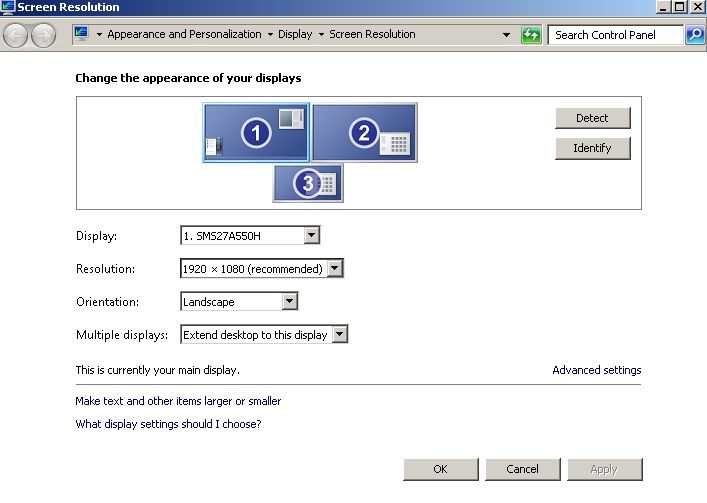
Albert i7 2600K @ 3.40GHz / MB Intel DP67BG / 16GB Ram- ADATA 250GB SSD (Boot)- Samsung Spinpoint F1 1TB HDD (Samples)Audio interface : Motu 828 MK ii i7 6700K @ 4.00GHz / MB Asrock Z170 / 16GB Ram- Samsung EVO 850 120GB / 500 GB SSD
Audio interface : Roland Quad Capture Win 10 Pro / Sonar Platinum
|
Matt
Max Output Level: -84 dBFS
- Total Posts : 346
- Joined: 2003/11/06 22:23:40
- Location: La Canada Flintridge, CA
- Status: offline
Re: complex triple-monitor, multi-dock, floating window question
2014/02/04 16:20:22
(permalink)
I'm not sure I follow. I don't think I need to add another video card, my current card has 4 (!) outputs.... 2 DVI-D, 1 Display Port, 1 HDMI. I have 3 hooked up and have tried different combinations of all of them. So with my 3rd monitor (24") I have the option of duplicating 1 & 2, duplicating 1 & 3, duplicating 2 & 3, or extending the desktop on to it. But the only option that allows different resolutions is extending the desktop on to it, otherwise I am running one of my 30" monitors at the highest resolution of the 24" monitor, which I don't want to do.
Would having another card allow a duplicate display with a different resolution? That's my problem.
The alternative is to just switch to that monitor when I need to using sonar screensets but being unable to float the track view is causing me issues.
|
tomixornot
Max Output Level: -58.5 dBFS
- Total Posts : 1674
- Joined: 2011/03/05 11:31:26
- Status: offline
Re: complex triple-monitor, multi-dock, floating window question
2014/02/04 16:28:46
(permalink)
> Would having another card allow a duplicate display with a different resolution? That's my problem.
In my case, a separate card's monitor can't be duplicated to the other card's monitors. But I'm using 2 different cards / drivers (NVIDIA and Radeon). Not sure if same brand of cards / drivers can be made to do so ?
Albert i7 2600K @ 3.40GHz / MB Intel DP67BG / 16GB Ram- ADATA 250GB SSD (Boot)- Samsung Spinpoint F1 1TB HDD (Samples)Audio interface : Motu 828 MK ii i7 6700K @ 4.00GHz / MB Asrock Z170 / 16GB Ram- Samsung EVO 850 120GB / 500 GB SSD
Audio interface : Roland Quad Capture Win 10 Pro / Sonar Platinum
|
Matt
Max Output Level: -84 dBFS
- Total Posts : 346
- Joined: 2003/11/06 22:23:40
- Location: La Canada Flintridge, CA
- Status: offline
Re: complex triple-monitor, multi-dock, floating window question
2014/02/04 18:35:32
(permalink)
I am all good with researching the usb monitor thing and trying that... but because I have everything wired already can anyone think of a sonarX3-solution that would cost me $0??
|
joeb1cannoli
Max Output Level: -87 dBFS

- Total Posts : 199
- Joined: 2012/09/22 20:07:26
- Status: offline
Re: complex triple-monitor, multi-dock, floating window question
2014/02/04 20:28:44
(permalink)
I'm running Windows 8.1 so I'm not sure if this function works with Windows 7.
If you press the Windows key + shift, you can use the arrow keys to move what's on the main display to any other display.
http://soundcloud.com/joe-b-10 Windows 10 Pro x64, 6 core, Core i7 , 16GB ram Sonar Platinum , Komplete 8, Ozone 8 Presonus Studio 192 and DP88 ,uad-2 solo
|
Matt
Max Output Level: -84 dBFS
- Total Posts : 346
- Joined: 2003/11/06 22:23:40
- Location: La Canada Flintridge, CA
- Status: offline
Re: complex triple-monitor, multi-dock, floating window question
2014/02/04 20:53:18
(permalink)
Wow! That's really cool. I can definitely use that in a pinch. It's sort of a drag with the two monitors being different resolutions... it resizes the window funky when I throw it back and forth. But still... good in a pinch.
|
gustabo
Max Output Level: -49.5 dBFS

- Total Posts : 2591
- Joined: 2009/01/05 17:32:38
- Status: offline
Re: complex triple-monitor, multi-dock, floating window question
2014/02/04 23:02:41
(permalink)
I use a Kensington usb monitor dongle to clone the contents of my two main monitors (track view) to a smaller, lower resolution monitor sitting by my drumset and use an iPad for transport controls.
Works great and I can enable/disable the monitor with a hotkey.
Cakewalk by Bandlab - Win10 Pro x64 - StudioCat Platinum Studio DAW - 32 GB Ram - MOTU UltraLite-mk3
M-Audio Keystation 88ES - Akai MPD26 (hot-rodded) - Alesis DM10 - a few guitars, a few amps
Novation Launch Control - Korg nanoKONTROL2 - PreSonus FaderPort - DAW Remote HD on iPad
Adam A7X - Behritone C50A
PreSonus Monitor Station v2 (controlling the mons)
https://www.facebook.com/groups/sonarusergroup/
|
Matt
Max Output Level: -84 dBFS
- Total Posts : 346
- Joined: 2003/11/06 22:23:40
- Location: La Canada Flintridge, CA
- Status: offline
Re: complex triple-monitor, multi-dock, floating window question
2014/02/04 23:21:41
(permalink)
|
Matt
Max Output Level: -84 dBFS
- Total Posts : 346
- Joined: 2003/11/06 22:23:40
- Location: La Canada Flintridge, CA
- Status: offline
Re: complex triple-monitor, multi-dock, floating window question
2014/02/04 23:25:21
(permalink)
|
Matt
Max Output Level: -84 dBFS
- Total Posts : 346
- Joined: 2003/11/06 22:23:40
- Location: La Canada Flintridge, CA
- Status: offline
Re: complex triple-monitor, multi-dock, floating window question
2014/02/04 23:39:31
(permalink)
For $40 I will happily give this a try. I can always return or sell it. I am a little skeptical about either of these products though.... these look like they are made for someone who only has 1 or 2 monitor outputs and wants to add on and extra monitor. In my case, I really don't need an extra output since I already have 4. I could have 4 monitors, no problem. My problem is that I am unable to duplicate a display of 2560x1600 onto a display of 1900x1200. IF this box requires being set up in the "screen resolution" area of Win7, I really can't see it making a difference for this.
Gustabo can you elaborate on how you set up your smaller monitor?
|
tomixornot
Max Output Level: -58.5 dBFS
- Total Posts : 1674
- Joined: 2011/03/05 11:31:26
- Status: offline
Re: complex triple-monitor, multi-dock, floating window question
2014/02/05 00:10:54
(permalink)
> My problem is that I am unable to duplicate a display of 2560x1600 onto a display of 1900x1200
I think a direct duplicate is not possible, or you may end up displaying a portion of Sonar only.
For example, one of my monitor (the 21.5" Dell) is specifically set to display 1280x720, even though the native resolution is 1920x1080. I scaled the resolution down so the smaller vst can be displayed larger when dragged into this monitor. When I drag Sonar main windows at 1920x1080 into the Dell, it's oversized (unless I double click on the Windows top pane to resize it - but then, the tracks will be reorganized).
If the usb/clone monitor software is able to do that, you can test the quality by doing a print screen, then crop the image of one of the 2560x1600 monitor (MS paint will do this).
Then do an image resize/resample down to 1900x1200 pixel (I use IrFanView) and see the quality of the image - pull this image to your third (smaller) monitor.
Albert i7 2600K @ 3.40GHz / MB Intel DP67BG / 16GB Ram- ADATA 250GB SSD (Boot)- Samsung Spinpoint F1 1TB HDD (Samples)Audio interface : Motu 828 MK ii i7 6700K @ 4.00GHz / MB Asrock Z170 / 16GB Ram- Samsung EVO 850 120GB / 500 GB SSD
Audio interface : Roland Quad Capture Win 10 Pro / Sonar Platinum
|
gustabo
Max Output Level: -49.5 dBFS
- Total Posts : 2591
- Joined: 2009/01/05 17:32:38
- Status: offline
Re: complex triple-monitor, multi-dock, floating window question
2014/02/05 08:24:02
(permalink)
Cakewalk by Bandlab - Win10 Pro x64 - StudioCat Platinum Studio DAW - 32 GB Ram - MOTU UltraLite-mk3
M-Audio Keystation 88ES - Akai MPD26 (hot-rodded) - Alesis DM10 - a few guitars, a few amps
Novation Launch Control - Korg nanoKONTROL2 - PreSonus FaderPort - DAW Remote HD on iPad
Adam A7X - Behritone C50A
PreSonus Monitor Station v2 (controlling the mons)
https://www.facebook.com/groups/sonarusergroup/
|
Matt
Max Output Level: -84 dBFS
- Total Posts : 346
- Joined: 2003/11/06 22:23:40
- Location: La Canada Flintridge, CA
- Status: offline
Re: complex triple-monitor, multi-dock, floating window question
2014/02/07 16:42:10
(permalink)
I fixed this by doing the one thing I knew 100% would work.... not the most cost-efficient solution. I bought a new $1,300 30" monitor to replace the 24" monitor. It helps that I can use the 24" monitor in another studio but still... chalk it up to money spent impressing clients who like lights and buttons and big displays. It looks great anyway. And duplicates my main display perfectly.
|
Matt
Max Output Level: -84 dBFS
- Total Posts : 346
- Joined: 2003/11/06 22:23:40
- Location: La Canada Flintridge, CA
- Status: offline
Re: complex triple-monitor, multi-dock, floating window question
2014/02/07 16:53:52
(permalink)
Now I have monitor envy towards my own monitor. It's amazing how much thinner, lighter, sharper the exact same monitor is... 3-4 years after buying my current two.
|