williamcopper
Max Output Level: -68 dBFS

- Total Posts : 1120
- Joined: 2014/11/03 09:22:03
- Location: Virginia, USA
- Status: offline
Selecting one tool from the tools module by a Piano Roll View ONLY shortcut key?
In X3, I haven't found a way to select a new tool from the tools module by means of a shortcut key that acts only within piano roll view. Am I missing something? I want to quickly add new notes with the draw tool (the dumb 'smart' tool requires click drag release, while the draw tool just click). Then occasionally a note needs to be adjusted, but the draw tool no longer seems able to do that, so I have to select the Move tool (the 'edit' tool doesn't allow change of pitch by dragging ... sheesh). Any way: is it possible to change tool with one key stroke and no mouse movement?
|
John
Forum Host

- Total Posts : 30467
- Joined: 2003/11/06 11:53:17
- Status: offline

Re: Selecting one tool from the tools module by a Piano Roll View ONLY shortcut key?
2015/01/08 04:00:58
(permalink)
☄ Helpfulby williamcopper 2015/01/08 10:56:31
To temporarily invoke a toolWhile using a specific tool, you can temporarily invoke another tool by holding down the new tool’s keyboard shortcut. Release the shortcut to switch back to the previously selected tool. For example, if you are using the Move tool and need to select some notes, press and hold down the F6 key (shortcut for the Select tool), make a selection, then release the F6 key to return to the Move tool. For a list of tool shortcuts, see “Using keyboard shortcuts to select tools” on page 448 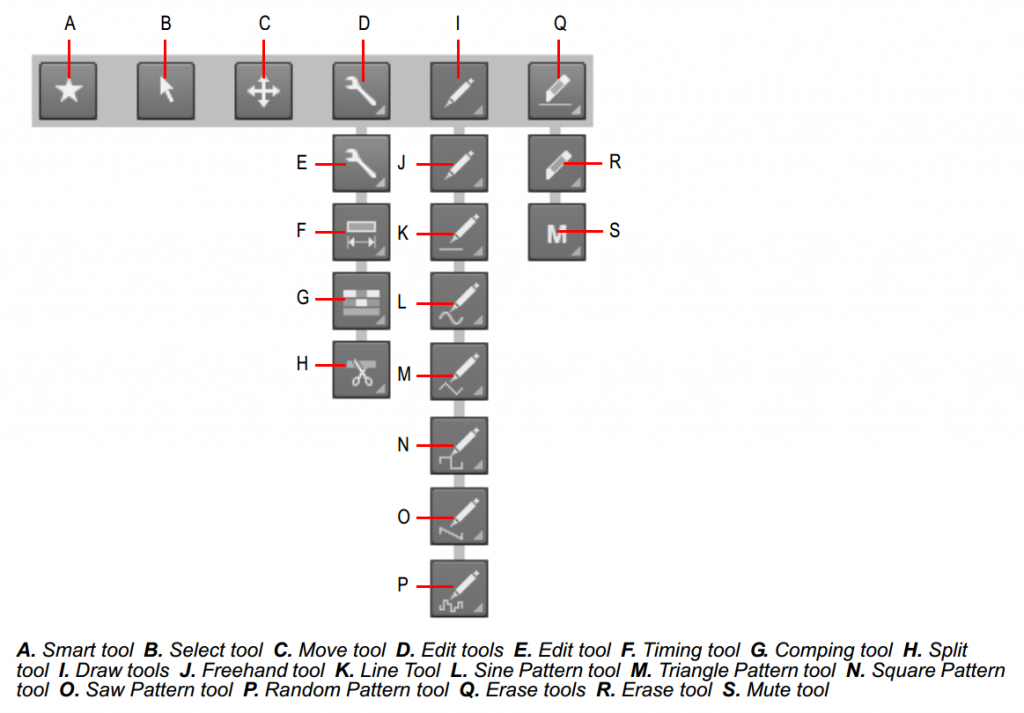
|
Bristol_Jonesey
Max Output Level: 0 dBFS

- Total Posts : 16775
- Joined: 2007/10/08 15:41:17
- Location: Bristol, UK
- Status: offline
Re: Selecting one tool from the tools module by a Piano Roll View ONLY shortcut key?
2015/01/08 04:38:30
(permalink)
If you're using the Smart Tool (recommended) then entering notes is as simple as using Alt + Click.
You can then use the same tool to move, edit, delete any notes already entered
CbB, Platinum, 64 bit throughoutCustom built i7 3930, 32Gb RAM, 2 x 1Tb Internal HDD, 1 x 1TB system SSD (Win 7), 1 x 500Gb system SSD (Win 10), 2 x 1Tb External HDD's, Dual boot Win 7 & Win 10 64 Bit, Saffire Pro 26, ISA One, Adam P11A,
|
FastBikerBoy
Forum Host
- Total Posts : 11326
- Joined: 2008/01/25 16:15:36
- Location: Watton, Norfolk, UK
- Status: offline
Re: Selecting one tool from the tools module by a Piano Roll View ONLY shortcut key?
2015/01/08 06:00:23
(permalink)
Or alternatively double click with the smart tool..........
Once you've learnt to use the smart tool properly changing tools will be a thing of the past. Only time I ever need to change tools now is for drawing envelope patterns.
|
Bristol_Jonesey
Max Output Level: 0 dBFS
- Total Posts : 16775
- Joined: 2007/10/08 15:41:17
- Location: Bristol, UK
- Status: offline
Re: Selecting one tool from the tools module by a Piano Roll View ONLY shortcut key?
2015/01/08 06:36:03
(permalink)
Spot on Karl 
CbB, Platinum, 64 bit throughoutCustom built i7 3930, 32Gb RAM, 2 x 1Tb Internal HDD, 1 x 1TB system SSD (Win 7), 1 x 500Gb system SSD (Win 10), 2 x 1Tb External HDD's, Dual boot Win 7 & Win 10 64 Bit, Saffire Pro 26, ISA One, Adam P11A,
|
williamcopper
Max Output Level: -68 dBFS
- Total Posts : 1120
- Joined: 2014/11/03 09:22:03
- Location: Virginia, USA
- Status: offline
Re: Selecting one tool from the tools module by a Piano Roll View ONLY shortcut key?
2015/01/08 10:58:25
(permalink)
Thanks for the helpful answers! Although none of them addressed my question, they gave reasonable workarounds.
|
williamcopper
Max Output Level: -68 dBFS
- Total Posts : 1120
- Joined: 2014/11/03 09:22:03
- Location: Virginia, USA
- Status: offline
Re: Selecting one tool from the tools module by a Piano Roll View ONLY shortcut key?
2015/01/08 11:00:59
(permalink)
see “Using keyboard shortcuts to select tools” on page 448 of what? Nothing I have in the way of help has page numbers....
|
John
Forum Host
- Total Posts : 30467
- Joined: 2003/11/06 11:53:17
- Status: offline
Re: Selecting one tool from the tools module by a Piano Roll View ONLY shortcut key?
2015/01/08 11:05:12
(permalink)
☄ Helpfulby williamcopper 2015/01/08 11:30:38
|
Bristol_Jonesey
Max Output Level: 0 dBFS
- Total Posts : 16775
- Joined: 2007/10/08 15:41:17
- Location: Bristol, UK
- Status: offline
Re: Selecting one tool from the tools module by a Piano Roll View ONLY shortcut key?
2015/01/08 11:10:42
(permalink)
williamcopper
Thanks for the helpful answers! Although none of them addressed my question, they gave reasonable workarounds.
With respect, I suggest they do! I want to quickly add new notes with the draw tool (the dumb 'smart' tool requires click drag release, while the draw tool just click). Using the Smart Tool, either Alt + Click or double click the 'edit' tool doesn't allow change of pitch by dragging ... sheesh The Smart Tool allows you to drag a note up/down/sideways is it possible to change tool with one key stroke and no mouse movement Nope, but the Smart Tool does all this and more e.g. velocity, length of note, start time/position
CbB, Platinum, 64 bit throughoutCustom built i7 3930, 32Gb RAM, 2 x 1Tb Internal HDD, 1 x 1TB system SSD (Win 7), 1 x 500Gb system SSD (Win 10), 2 x 1Tb External HDD's, Dual boot Win 7 & Win 10 64 Bit, Saffire Pro 26, ISA One, Adam P11A,
|
williamcopper
Max Output Level: -68 dBFS
- Total Posts : 1120
- Joined: 2014/11/03 09:22:03
- Location: Virginia, USA
- Status: offline
Re: Selecting one tool from the tools module by a Piano Roll View ONLY shortcut key?
2015/01/08 13:29:54
(permalink)
I'm not going to shout this around, because I have about 15 happy years with Cakewalk. But I just gave up and ordered cubase. A 5 minute trial persuaded me it will be easier to use as a primarily midi-oriented customer.
|
Bristol_Jonesey
Max Output Level: 0 dBFS
- Total Posts : 16775
- Joined: 2007/10/08 15:41:17
- Location: Bristol, UK
- Status: offline
Re: Selecting one tool from the tools module by a Piano Roll View ONLY shortcut key?
2015/01/09 05:18:40
(permalink)
CbB, Platinum, 64 bit throughoutCustom built i7 3930, 32Gb RAM, 2 x 1Tb Internal HDD, 1 x 1TB system SSD (Win 7), 1 x 500Gb system SSD (Win 10), 2 x 1Tb External HDD's, Dual boot Win 7 & Win 10 64 Bit, Saffire Pro 26, ISA One, Adam P11A,
|
Anderton
Max Output Level: 0 dBFS
- Total Posts : 14070
- Joined: 2003/11/06 14:02:03
- Status: offline
Re: Selecting one tool from the tools module by a Piano Roll View ONLY shortcut key?
2015/01/09 12:02:10
(permalink)
williamcopper
Am I missing something? I want to quickly add new notes with the draw tool (the dumb 'smart' tool requires click drag release, while the draw tool just click).
Yes, you're missing something; As Bristol Jonesey and Karl pointed out, you don't need to change tools. With the Smart Tool, you can draw a note of the selected note duration (or the duration of last touched/selected note) by either double-clicking, or holding down the Alt key while clicking. Once drawn, you can then move, adjust velocity, change start time, or change duration with the Smart Tool.
Thanks for the helpful answers! Although none of them addressed my question, they gave reasonable workarounds.
I don't see how using the functionality built into a single tool is a "workaround" compared to your wanting to switch tools, unless you consider holding down Alt while clicking too onerous. But that way you only have to press a key once. With switching tools, you'd have to press once to call up the other tool that you don't need, then press again to return to the tool you didn't need to leave.
|