bayoubill
Max Output Level: 0 dBFS

- Total Posts : 10899
- Joined: 2009/04/27 06:11:12
- Location: Shreveport Louisiana
- Status: offline
Sending Guitar Parts/Chords
Does anyone know where I can get a file for sending chord forms to another guitarist? Right now all I have is a page of necks where I write in the fingerings but I have to scan it. Thanks for any help
|
gswitz
Max Output Level: -18.5 dBFS

- Total Posts : 5694
- Joined: 2007/06/16 07:17:14
- Location: Richmond Virginia USA
- Status: offline

Re: Sending Guitar Parts/Chords
2013/10/09 15:45:08
(permalink)
☄ Helpfulby bayoubill 2013/10/09 22:01:13
Create grids using a spreadsheet?
StudioCat > I use Windows 10 and Sonar Platinum. I have a touch screen. I make some videos. This one shows how to do a physical loopback on the RME UCX to get many more equalizer nodes.
|
57Gregy
Max Output Level: 0 dBFS
- Total Posts : 14404
- Joined: 2004/05/31 17:04:17
- Location: Raleigh, North Carolina
- Status: offline
Re: Sending Guitar Parts/Chords
2013/10/10 00:29:59
(permalink)
☼ Best Answerby bayoubill 2013/10/10 00:39:27
Bill, all the Cakewalk software I have has thousands of guitar chord diagrams in them. Did this in just a few minutes. You can also open a New Grid and write your own chord diagrams.
Attached Image(s)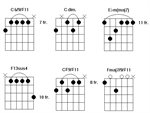
|
Leadfoot
Max Output Level: -47 dBFS

- Total Posts : 2817
- Joined: 2011/04/26 11:08:38
- Location: Indiana
- Status: offline
Re: Sending Guitar Parts/Chords
2013/10/10 00:32:52
(permalink)
That's cool! I never knew you could do that.
|
bayoubill
Max Output Level: 0 dBFS
- Total Posts : 10899
- Joined: 2009/04/27 06:11:12
- Location: Shreveport Louisiana
- Status: offline
Re: Sending Guitar Parts/Chords
2013/10/10 00:41:12
(permalink)
Wow! I forgot all about that!  I have chronic amnesia and well you know.... THANKS GREG!
|
dxp
Max Output Level: -85 dBFS

- Total Posts : 252
- Joined: 2007/06/04 12:56:34
- Location: Indiana
- Status: offline
Re: Sending Guitar Parts/Chords
2013/10/10 08:31:53
(permalink)
and HOW do we do this?
I'm not sure what 'Open a new Grid' means.
This is cool, for sure.
|
57Gregy
Max Output Level: 0 dBFS
- Total Posts : 14404
- Joined: 2004/05/31 17:04:17
- Location: Raleigh, North Carolina
- Status: offline
Re: Sending Guitar Parts/Chords
2013/10/10 10:19:34
(permalink)
☄ Helpfulby Mesh 2013/10/10 11:23:55
dxp
and HOW do we do this?
I'm not sure what 'Open a new Grid' means.
This is cool, for sure.
Open a MIDI track's Staff view. Click the C (chord) tool above the staff. Click above the staves and the C letter will appear. Right-click that to bring up the Chord Properties dialog. You should be presented with a list of all the chords in the library and their diagrams. On the right, you click New Grid and then you can click in the fingering you want.
Attached Image(s)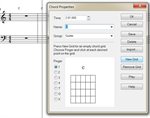
|
Bristol_Jonesey
Max Output Level: 0 dBFS
- Total Posts : 16775
- Joined: 2007/10/08 15:41:17
- Location: Bristol, UK
- Status: offline
Re: Sending Guitar Parts/Chords
2013/10/10 11:17:49
(permalink)
Who said Staff View sucks????????
CbB, Platinum, 64 bit throughoutCustom built i7 3930, 32Gb RAM, 2 x 1Tb Internal HDD, 1 x 1TB system SSD (Win 7), 1 x 500Gb system SSD (Win 10), 2 x 1Tb External HDD's, Dual boot Win 7 & Win 10 64 Bit, Saffire Pro 26, ISA One, Adam P11A,
|
dxp
Max Output Level: -85 dBFS
- Total Posts : 252
- Joined: 2007/06/04 12:56:34
- Location: Indiana
- Status: offline
Re: Sending Guitar Parts/Chords
2013/10/10 11:22:24
(permalink)
57Gregy
dxp
and HOW do we do this?
I'm not sure what 'Open a new Grid' means.
This is cool, for sure.
Open a MIDI track's Staff view.
Click the C (chord) tool above the staff.
Click above the staves and the C letter will appear. Right-click that to bring up the Chord Properties dialog.
You should be presented with a list of all the chords in the library and their diagrams.
On the right, you click New Grid and then you can click in the fingering you want.
Thank you Sir.
|