kickthefog
Max Output Level: -90 dBFS

- Total Posts : 16
- Joined: 2004/01/28 23:30:58
- Status: offline

Session Drummer 3 - High Hat position is backwards
Hi Everyone,
I'm hoping someone can help steer me on this one. I am trying to record live midi drums into Sonar X1 producer expanded into session drummer 3. I am using an Alesis Dm10 and my trigger setup doesn't make a difference becuase even playing the built in loops into session drummer has the same effect as if i use live triggers instead. I have all the triggers setup and triggering fine and I can record a midi track successfully into sonar/session drummer 3 with only one big issue...
The open and closed position of the high hat is backwards. Meaning when it is open it sounds closed and when it is closed, it sounds open. The pedal is calibrated fine becuase if I listen the AUDIO out of the DM10 is is correct. only the midi notes being sent are backwards. I can hear this when i play back the midi through session drummer 3. The big problem is that the high hat midi notes in the DM10 are fixed and cannot be changed. which brings me to my question:
Is there a way to assign (or reverse) the midi note assignments in sonar/session drummer for the high hat? If I can reverse the open/close position, I'm home free to record drums midi since this reversed high hat issue is my only problem. all else works great.
For the last 20+ years, I've been recording audio only and this is my first attempt at recording drums midi for the sake of using better samples, and of course editing! :)
Thanks for any assistance you may be able to provide! It is appreciated!
:)
Pat
|
jb101
Max Output Level: -46 dBFS

- Total Posts : 2946
- Joined: 2011/12/04 05:26:10
- Status: offline

Re:Session Drummer 3 - High Hat position is backwards
2012/02/29 17:40:40
(permalink)
You need to create a drum map. You can then assign your open hat to closed and vice versa.
|
kickthefog
Max Output Level: -90 dBFS
- Total Posts : 16
- Joined: 2004/01/28 23:30:58
- Status: offline
Re:Session Drummer 3 - High Hat position is backwards
2012/02/29 18:25:32
(permalink)
Thanks for the reply jb, I was under the impression that the drum map was to assign midi notes that went external to outboard signal processing devices only. OK, i think i know how to create a drum map. I'll experiment.
Is there an easy way to "grab" what midi notes are being sent from an external device to Sonar? Meaning, if I record a few bars of drum track and then look at the recording, what is the easiest way to see what midi notes were sent? Would that be in piano roll view or is there a better way?
Thank you!
Pat
|
jb101
Max Output Level: -46 dBFS
- Total Posts : 2946
- Joined: 2011/12/04 05:26:10
- Status: offline
Re:Session Drummer 3 - High Hat position is backwards
2012/02/29 18:51:39
(permalink)
I had to build/design/write/?? a drum map to use my Yamaha DTX with EZDrummer. The notes were all over the place: bass and snare reversed, cymbals wrong, etc. Yamaha used some really weird convensions.
IIRC I used the piano roll to see what notes were being sent from the DTX, although checking the manual would have been quicker.
I would seriously think about checking out EZdrummer or Superior Drummer, they sound and play FANTASTIC(LY).
Good luck, hope you do it quicker and with less hair pulling than I did. PM me if you get stuck.
Regards,
Jonathan.
|
Fog
Max Output Level: 0 dBFS

- Total Posts : 12302
- Joined: 2008/02/27 21:53:35
- Location: UK
- Status: offline
Re:Session Drummer 3 - High Hat position is backwards
2012/02/29 23:35:38
(permalink)
I'd answer but your username offends me hehe (not really :) ) it sounds like a few possibles 1)the order of the data being sent , some midi devices perhaps like it the other way round. 2)your base octave is wrong.. in prefs you have the option to + or - it.. so if you +1 it c3 becomes c4 etc.. if your triggering loops , it suggests your 1 octave to low.. you can easily check that in the PRV which will show you the not info.. 3)play the drums and see whats it giving in PRV and remap using a drum map, so your in / out notes get fixed to what they actually should be. hopefully that helps... and no kicking ta very much if it don't 
|
RobertB
Max Output Level: 0 dBFS
- Total Posts : 11256
- Joined: 2005/11/19 23:40:50
- Location: Fort Worth, Texas
- Status: offline
Re:Session Drummer 3 - High Hat position is backwards
2012/03/01 07:27:27
(permalink)
My DM6 has a setting to transmit GM. This triggers EZ Drummer and Session Drummer 2 correctly.
I would guess the DM10 has the same option available. Check your manual.
Also, older versions of Sonar had a drum map preset for Session Drummer 2.
You probably have one for SD3.
If that doesn't take care of the problem, at least the errant notes should be very easy to find and fix.
My Soundclick Page SONAR Professional, X3eStudio,W7 64bit, AMD Athlon IIx4 2.8Ghz, 4GB RAM, 64bit, AKAI EIE Pro, Nektar Impact LX61,Alesis DM6,Alesis ControlPad,Yamaha MG10/2,Alesis M1Mk2 monitors,Samson Servo300,assorted guitars,Lava Lamp Shimozu-Kushiari or Bob
|
THambrecht
Max Output Level: -73 dBFS

- Total Posts : 867
- Joined: 2010/12/10 06:42:03
- Location: Germany
- Status: offline
Re:Session Drummer 3 - High Hat position is backwards
2012/03/01 08:44:29
(permalink)
You can also go to the folders of the SD3-content:
For exampel:
C:\Program Files (x86)\Cakewalk\Vstplugins\Session Drummer 3\Contents\Kits\8 - Rides:
Then edit the *.sfz-Files with notepad:
...
<region> sample=14__THIN.wav --->> SAMPLE
key=51 ---->> KEY
ampeg_decay=1.062
...
And save it.
So you can change all notes and wavefiles.
There is no other way to do this in SD3.
We digitize tapes, vinyl, dat, md ... in broadcast and studio quality for publishers, public institutions and individuals.4 x Intel Quad-CPU, 4GHz Sonar Platinum (Windows 10 - 64Bit) and 14 computers for recording tapes, vinyl ...
4 x RME Fireface 800, 2 x Roland Octa Capture and 4 x Roland Quad Capture, Focusrite .... Studer A80, RP99, EMT948 ...
(Germany) http://www.hambrecht.de
|
kickthefog
Max Output Level: -90 dBFS
- Total Posts : 16
- Joined: 2004/01/28 23:30:58
- Status: offline
Re:Session Drummer 3 - High Hat position is backwards
2012/03/03 10:34:15
(permalink)
Thank you very much everyone for the replies. Your guidance is most appreciated.
So I took your suggestions, and I played around with the drum mapping abit and for whatever reason, I must be doing something wrong, becuase whatever input/output notes I change for whatever part of the kit seems to have no effect. If I delete the drum map entirely, I get no sound at all, so I know it is doing something. Right now I just loaded a DM5 map as a starting point since there are no DM10 configs preset in there that I can find, as Robert suggested. But after its loaded, I can go wild changing output notes and nothing seems to make an y difference at all. All the assignments still play the same sounds regardless of what i change. So somehow my changes are not being applied. Is there a special way to "assign" the map to the midi track output or to tell session drummer to "look" and the map as an input... similiar to bus routing or something?
Boy... talk about buhind the curve. Been doing audio only for way too long!
thanks again guys!
Pat
p.s. Hey Fog.... at least you got my name right.... usually people say "Hi Kick The FROG". :) nice to meet a fellow "Fog". :)
|
kickthefog
Max Output Level: -90 dBFS
- Total Posts : 16
- Joined: 2004/01/28 23:30:58
- Status: offline
Re:Session Drummer 3 - High Hat position is backwards
2012/03/03 11:08:38
(permalink)
Whoops disregard folks.. I think I fuigured it out. I found the right click on track - assign output to map, much like assigning a track to a bus so i think that has me all set.
Well... now I have to play with the mappings but I'm in the right direction at least.
Thanks again everyone!!
Your help is sincerely appreciated
Pat
|
RobertB
Max Output Level: 0 dBFS
- Total Posts : 11256
- Joined: 2005/11/19 23:40:50
- Location: Fort Worth, Texas
- Status: offline
Re:Session Drummer 3 - High Hat position is backwards
2012/03/03 12:05:47
(permalink)
The General MIDI setting would be in the DM10 brain, not Sonar. You want to use a map for where the MIDI is going, not where it is coming from. Here's what I have done in the view below: Insert Session Drummer. Select MIDI Source Track, Synth Audio Output(s), and Synth Properties Page. In the MIDI track, Select New Drum Map, and scroll down to Session Drummer 2. Select. Select DM-6, Ch 10 for input. MIDI path at this point is: DM-6>MIDI Track(In)>Session Drummer 2 Map(Out)>Session Drummer 2. In the view, I am redirecting the map to read note 42 (normally Hi-Hat Closed) to trigger note 46(Hi-Hat Open). Note: If the DM-10 is transmitting GM, you shouldn't have to do this. 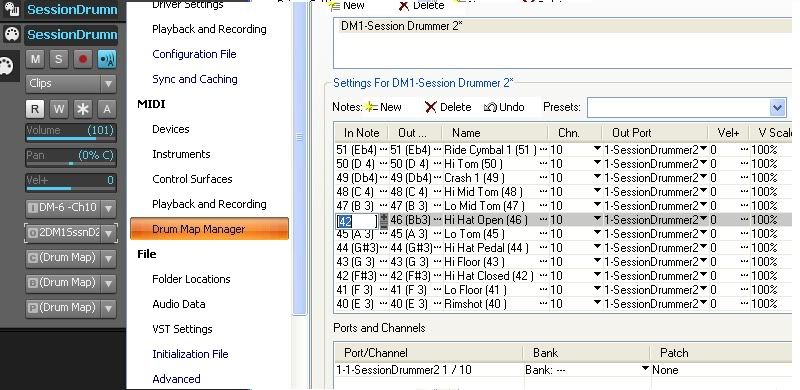 Hope that helps. Edit: It looks like you made some headway while I was putting this together. Keep going, you'll get it!
My Soundclick Page SONAR Professional, X3eStudio,W7 64bit, AMD Athlon IIx4 2.8Ghz, 4GB RAM, 64bit, AKAI EIE Pro, Nektar Impact LX61,Alesis DM6,Alesis ControlPad,Yamaha MG10/2,Alesis M1Mk2 monitors,Samson Servo300,assorted guitars,Lava Lamp Shimozu-Kushiari or Bob
|
kickthefog
Max Output Level: -90 dBFS
- Total Posts : 16
- Joined: 2004/01/28 23:30:58
- Status: offline
Re:Session Drummer 3 - High Hat position is backwards
2012/03/07 19:12:25
(permalink)
Thanks everyone! and thanks for the screenshot Robert. So i have one interesting issue left to solve. With your folks help, I am well versed in switching notes 42 and 46 so that my hat open and closed are reversed. Now... I have a different issue:
The midi notes being received on Hi Hat closed AND open are both 46. For example.... we hit record.... we hit the high hat open, then close the foot pedal and hit the high hat again in the closed position. The midi results of this test are a high hat open note... the pedal closed note and another high hat open note (46), even though the pedal is closed.
The pedal is calibrated fine since the audio out of the DM10 sounds perfect.. closed, open, etc. Also.. if i run the built in tracks in the dm 10 for a demo so to speak.. i can clearly hear and see the high hat being played closed and open just fine in session drummer, so I know the DM10 is capable of sending the right notes, but for some reason it is not when we depress the pedal for the closed hat position. As I said, the pedal is calibrated fine and it is even reading the pedal press fine by presenting that midi note correclty as well. But I am getting note 46 (open) regardless of pedal position. Any ideas?
On JB's recommendation, I am planning to buy EZ or Superior Drummer but I don't want to spend that money until i'm convinced the DM10 and pedal setup is working well first. And since I assume it doesn't matter what you are using for a midi drum processor, I am guessing I will have the same problem in Superior drummer since the midi notes are received before it even gets to the processing part... correct?
Thanks again for your help everyone, any input is welcome and sincerely appreciated.
Pat
|
jb101
Max Output Level: -46 dBFS
- Total Posts : 2946
- Joined: 2011/12/04 05:26:10
- Status: offline
Re:Session Drummer 3 - High Hat position is backwards
2012/03/07 20:02:24
(permalink)
Pat.
Hallo, again.
That's odd, but you probably know that already. I have know experience of the DM10, but I'll have a dig around tomorrow, if I get the chance.
I remember reading something about setting up Hi Hat pedals and MIDI, but can't recall it of the top of my head. Again I'll have a rumage around.
I really hope you sort this soon, as I know how frustrating it can be. If I find anything, I'll post back. Please post if you resolve it so I can stop ponderig.
Best wishes,
Jonathan
|
Silicon Audio
Max Output Level: -84 dBFS

- Total Posts : 346
- Joined: 2012/03/06 04:33:19
- Location: Northland, New Zealand
- Status: offline
Re:Session Drummer 3 - High Hat position is backwards
2012/03/07 22:16:05
(permalink)
Another possible way around this...
Not sure if the DM10 is the same, but the DM5 has a feature where it will auto detect whether the hi-hat pedal is normally open or normally closed. If you hold down the hi-hat pedal while switching the DM5 on, it will invert the pedal. This will make the onboard sound back to front, but if you are using it as a controller only, it will fix your problem without having to set up a drum map.
|
MrFed
Max Output Level: -90 dBFS
- Total Posts : 9
- Joined: 2013/11/08 19:42:21
- Status: offline
Re: Session Drummer 3 - High Hat position is backwards
2013/12/03 17:07:12
(permalink)
Hi there, been reading your post as I have been having the same issue with midi hi-hats using my Roland TD-12 as a trigger sound module.
I found that the CC note in the midi control window on my TD-12 (you should have a setting on ur module) was defaulted at 127. If you turn it down to say 50 this should get rid of the conflicts u r having.
Cakewalk Sonar V-Studio 100 midi interface-Cakewalk Sonar X2 Producer-Novation Impulse 25 Midi Controller-Roland TD-12k Drum Module-System ASUS RAMPAGE-OS Microsoft Windows 8 x64-based PC-Processor Intel(R) Core(TM) i7-3820 CPU@3.60GHz, 3601 Mhz, 4 Core(s), 8 Logical Processor(RAM) 32.0 GB Graphics Chipset AMD Radeon HD 5450
|
MrFed
Max Output Level: -90 dBFS
- Total Posts : 9
- Joined: 2013/11/08 19:42:21
- Status: offline
Re: Session Drummer 3 - High Hat position is backwards
2013/12/03 17:07:12
(permalink)
Hi there, been reading your post as I have been having the same issue with midi hi-hats using my Roland TD-12 as a trigger sound module.
I found that the CC note in the midi control window on my TD-12 (you should have a setting on ur module) was defaulted at 127. If you turn it down to say 50 this should get rid of the conflicts u r having.
Cakewalk Sonar V-Studio 100 midi interface-Cakewalk Sonar X2 Producer-Novation Impulse 25 Midi Controller-Roland TD-12k Drum Module-System ASUS RAMPAGE-OS Microsoft Windows 8 x64-based PC-Processor Intel(R) Core(TM) i7-3820 CPU@3.60GHz, 3601 Mhz, 4 Core(s), 8 Logical Processor(RAM) 32.0 GB Graphics Chipset AMD Radeon HD 5450
|
MrFed
Max Output Level: -90 dBFS
- Total Posts : 9
- Joined: 2013/11/08 19:42:21
- Status: offline
Re: Session Drummer 3 - High Hat position is backwards
2013/12/03 17:33:24
(permalink)
Hi there, been reading your post as I have been having the same issue with midi hi-hats using my Roland TD-12 as a trigger sound module.
I found that the CC note in the midi control window on my TD-12 (you should have a setting on ur module) was defaulted at 127. If you turn it down to say 50 this should get rid of the conflicts u r having.
Cakewalk Sonar V-Studio 100 midi interface-Cakewalk Sonar X2 Producer-Novation Impulse 25 Midi Controller-Roland TD-12k Drum Module-System ASUS RAMPAGE-OS Microsoft Windows 8 x64-based PC-Processor Intel(R) Core(TM) i7-3820 CPU@3.60GHz, 3601 Mhz, 4 Core(s), 8 Logical Processor(RAM) 32.0 GB Graphics Chipset AMD Radeon HD 5450
|