ston
Max Output Level: -71 dBFS

- Total Posts : 965
- Joined: 2008/03/04 12:28:40
- Status: offline
[Solved] Silent Busses Detected...eh?
I've been getting this error very recently: 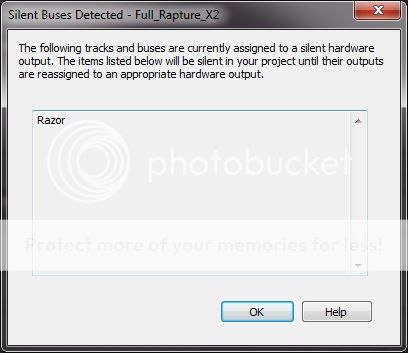 The bus Razor is on (output to) certainly isn't silent, it's the master bus! This has started happening when I open the project, since putting an instance of Camel Space in the FX bin of the channel that Razor is on. I've only just got this effects plugin, so was wondering if anybody else has seen this behaviour? Razor is running in Reaktor player, but hasn't caused any problems before now. Cheers :-)
|
Jim Roseberry
Max Output Level: 0 dBFS

- Total Posts : 9871
- Joined: 2004/03/23 11:34:51
- Location: Ohio
- Status: offline

Re: Silent Busses Detected...eh?
2013/09/09 09:39:51
(permalink)
Have you changed your audio interface?
If so, the old project/s reference the previous audio interface.
Once you reassign the outputs and save the project, all will be fine.
|
sharke
Max Output Level: 0 dBFS
- Total Posts : 13933
- Joined: 2012/08/03 00:13:00
- Location: NYC
- Status: offline
Re: Silent Busses Detected...eh?
2013/09/09 09:55:25
(permalink)
I have projects which show me this message every time and I've never been able to make head nor tail of it. I have never changed my audio interface and the tracks and buses listed are most certainly not assigned to silent hardware outputs - they're all audible and working properly. I gave up trying to work out what it meant and have simply put it down to a bug. In a couple of cases the messages randomly stopped appearing.
JamesWindows 10, Sonar SPlat (64-bit), Intel i7-4930K, 32GB RAM, RME Babyface, AKAI MPK Mini, Roland A-800 Pro, Focusrite VRM Box, Komplete 10 Ultimate, 2012 American Telecaster!
|
ltb
Max Output Level: -48 dBFS

- Total Posts : 2707
- Joined: 2005/06/19 13:34:08
- Status: offline
Re: Silent Busses Detected...eh?
2013/09/09 10:03:57
(permalink)
☄ Helpfulby chefmike8888 2013/09/10 10:11:45
sharke
I have projects which show me this message every time and I've never been able to make head nor tail of it. I have never changed my audio interface and the tracks and buses listed are most certainly not assigned to silent hardware outputs - they're all audible and working properly. I gave up trying to work out what it meant and have simply put it down to a bug. In a couple of cases the messages randomly stopped appearing.
You can always turn the warning off by going into into Preferences | Initialization file, look for WarnSilentBuses then set it to 0.
|
scook
Forum Host

- Total Posts : 24146
- Joined: 2005/07/27 13:43:57
- Location: TX
- Status: offline
Re: Silent Busses Detected...eh?
2013/09/09 10:06:04
(permalink)
I was under the impression that once the error is detected, a flag is set in the project and it does not ever get reset. If the warning message is a problem, it can be suppressed by setting WarnSilentBuses to 0 in Preferences > File > Initialization File. To get to the "Initialization File" setting make sure the Advanced radio button is selected at the bottom of the Preferences dialog.
|
ston
Max Output Level: -71 dBFS
- Total Posts : 965
- Joined: 2008/03/04 12:28:40
- Status: offline
Re: Silent Busses Detected...eh?
2013/09/09 10:06:34
(permalink)
Jim Roseberry
Have you changed your audio interface?
Not for the last 15 years and I intend to keep it for that long again! :-D @ Carl, thx for the tip, I'll probably just do that. It's not that big a deal, just a bit weird.
|
jackson white
Max Output Level: -85 dBFS

- Total Posts : 283
- Joined: 2008/02/19 21:35:13
- Location: BOS
- Status: offline
Re: Silent Busses Detected...eh?
2013/09/09 19:58:28
(permalink)
☄ Helpfulby dubdisciple 2015/01/31 15:16:46
Have you checked your sends? Every time I've seen this I've had a send with a deleted FX or something like that.
I selected -Delete Send- instead of --None-- and got rid of the message.
The Console View might help pick out the culprit as well.
-------------------- Some pieces of wood with wires and bits of metal stuck in them, silicon and plastic
|
ston
Max Output Level: -71 dBFS
- Total Posts : 965
- Joined: 2008/03/04 12:28:40
- Status: offline
Re: Silent Busses Detected...eh?
2013/09/10 03:35:25
(permalink)
Actually, that could be it, thanks. I couldn't see how to delete the send so set it to 'none'. 'Delete Send' is in the drop-down list of send targets is it?
|
cajuns2020
Max Output Level: -90 dBFS

- Total Posts : 15
- Joined: 2008/08/18 13:24:14
- Status: offline
Re: Silent Busses Detected...eh?
2013/09/10 05:44:28
(permalink)
I think this problem appears after I have moved my interface to a different USB port. I do believe I am suppose to use the same USB port each time, right? Maybe the solution.
X3d, Gigabyte GA-970A MOB- AMD Athlon II 3.2GHz Triple Core, Windows 7 HP , CORSAIR 8Gb SDRAM DDR3, 2- WD 1TB 7200 RPM HD, EVGA GeForce 210 Video Card, Edirol UA-25 Interface, Microphones: AKG Perception 220, Shure SM58, Guitars: Ovation, Fender, Epiphone, 1 Fiddle, Piano: Roland HP1000 35 Years Electronics Experience
|
DW_Mike
Max Output Level: -6 dBFS

- Total Posts : 6907
- Joined: 2006/11/29 18:06:40
- Location: The arm-pit of the good 'ol US...New Jersey
- Status: offline
Re: Silent Busses Detected...eh?
2013/09/10 10:14:18
(permalink)
carl
sharke
I have projects which show me this message every time and I've never been able to make head nor tail of it. I have never changed my audio interface and the tracks and buses listed are most certainly not assigned to silent hardware outputs - they're all audible and working properly. I gave up trying to work out what it meant and have simply put it down to a bug. In a couple of cases the messages randomly stopped appearing.
You can always turn the warning off by going into into Preferences | Initialization file, look for WarnSilentBuses then set it to 0.
That's what I did. Used to get this warning in X1. Setting must have copied from previous install. Now with the new PC and fresh install I get it on occasion in X2. Was looking for that tip. Thanks Carl. Mike
Sonar X3 ~ Scarlett 18i6 ~ Home Build DAW
GA-Z77X-UD5H
Intel i7 3770k 4.2GHz
32GB RAM Crucial Ballistix Elite (4x8)
2x Samsung 250GB SSD
1TB WD Black HDD @ 7200RPM 6Gb/s 64MB
Corsair H80i Liquid cooler
Noctua Silent Fans ~ 3x120mm ~ 1x140mm
Seasonic Platinum 760w PSU
Windows 7 Pro 64Bit.
|
jackson white
Max Output Level: -85 dBFS
- Total Posts : 283
- Joined: 2008/02/19 21:35:13
- Location: BOS
- Status: offline
Re: Silent Busses Detected...eh?
2013/09/10 12:04:36
(permalink)
ston
Actually, that could be it, thanks. I couldn't see how to delete the send so set it to 'none'. 'Delete Send' is in the drop-down list of send targets is it?
"Delete Send" is at the bottom of the drop down list. Has fixed the problem every time for me.
-------------------- Some pieces of wood with wires and bits of metal stuck in them, silicon and plastic
|
rodreb
Max Output Level: -72 dBFS

- Total Posts : 915
- Joined: 2003/11/06 14:59:42
- Location: Ohio
- Status: offline
Re: Silent Busses Detected...eh?
2013/09/11 22:01:51
(permalink)
I have this happening all the time. Strange thing is, the bus it references doesn't even exist in the project.
|
ston
Max Output Level: -71 dBFS
- Total Posts : 965
- Joined: 2008/03/04 12:28:40
- Status: offline
Re: Silent Busses Detected...eh?
2013/09/12 05:00:41
(permalink)
jackson white
"Delete Send" is at the bottom of the drop down list. Has fixed the problem every time for me.
Yup, that solved it - ta!
|
MGMitchell
Max Output Level: -88 dBFS

- Total Posts : 125
- Joined: 2014/09/26 11:23:12
- Location: Comox
- Status: offline
Re: Silent Busses Detected...eh?
2014/12/13 18:48:35
(permalink)
Drat I have the same thing in my new X3e but when i open edit preferences/init. file, it's nothing but empty boxes and with no drop down list in sight.
Sonar platinum., BR800 interface, Win 7, Yamaki acoustic, 92 Korean Strat, 60's Jazzmaster, 60's Deluxe Reverb, KRK Rokit 6's, Shure SM7B, Shure SM57, Apex 460, Rode nt1-a
|
FastBikerBoy
Forum Host
- Total Posts : 11326
- Joined: 2008/01/25 16:15:36
- Location: Watton, Norfolk, UK
- Status: offline
Re: Silent Busses Detected...eh?
2014/12/14 03:13:51
(permalink)
There is no drop down, you have to enter it manually. - Go to Prefs--->File--->Initialization File
- In the "Option" entry box type WarnSilentBusses
- In the "Value" entry box type 0
- Click on "Set"
In the area to the top you should now see WarnSilentBusses=0. That's a zero by the way not an O. Close and restart Sonar and you shouldn't get the warning again. HTH
|
Aged Funk
Max Output Level: -90 dBFS
- Total Posts : 7
- Joined: 2015/01/09 13:18:25
- Status: offline
Re: Silent Busses Detected...eh?
2015/01/31 15:00:55
(permalink)
My buses went silent right in the middle of editing (inputting notes).
post edited by Aged Funk - 2015/01/31 15:08:40
|
Noel Borthwick [Cakewalk]
Cakewalk Staff

- Total Posts : 6475
- Joined: 2003/11/03 17:22:50
- Location: Boston, MA, USA
- Status: offline
Re: Silent Busses Detected...eh?
2015/01/31 16:10:01
(permalink)
scook
I was under the impression that once the error is detected, a flag is set in the project and it does not ever get reset. If the warning message is a problem, it can be suppressed by setting WarnSilentBuses to 0 in Preferences > File > Initialization File. To get to the "Initialization File" setting make sure the Advanced radio button is selected at the bottom of the Preferences dialog.
No there is no flag for this. Damn scook you actually got something wrong :) Its dynamically detected by looking for any outputs or sends that go nowhere. i.e "--None--". When that happens its normally not intended and you could have some tracks in your project not sounding. That is the sole reason for this warning. in 90% of the scenarios its something like this which is why we have retained the warning message. I asked in the forums some time ago and people voted to leave the warning in since it serves a useful purpose sometimes :)
|
Karyn
Ma-Ma
- Total Posts : 9200
- Joined: 2009/01/30 08:03:10
- Location: Lincoln, England.
- Status: offline
Re: Silent Busses Detected...eh?
2015/01/31 16:35:15
(permalink)
Noel Borthwick [Cakewalk]
No there is no flag for this. Damn scook you actually got something wrong :)
Entry in diary complete 
Mekashi Futo. Get 10% off all Waves plugins.Current DAW. i7-950, Gigabyte EX58-UD5, 12Gb RAM, 1Tb SSD, 2x2Tb HDD, nVidia GTX 260, Antec 1000W psu, Win7 64bit, Studio 192, Digimax FS, KRK RP8G2, Sonar Platinum
|
ampfixer
Max Output Level: -20 dBFS

- Total Posts : 5508
- Joined: 2010/12/12 20:11:50
- Location: Ontario
- Status: offline
Re: Silent Busses Detected...eh?
2015/01/31 16:39:53
(permalink)
I had that error in X1 and it disappeared until Platinum. Why it returned now I have no idea. I just ignore it and everything seems fine.
Regards, John I want to make it clear that I am an Eedjit. I have no direct, or indirect, knowledge of business, the music industry, forum threads or the meaning of life. I know about amps. WIN 10 Pro X64, I7-3770k 16 gigs, ASUS Z77 pro, AMD 7950 3 gig, Steinberg UR44, A-Pro 500, Sonar Platinum, KRK Rokit 6
|
FastBikerBoy
Forum Host
- Total Posts : 11326
- Joined: 2008/01/25 16:15:36
- Location: Watton, Norfolk, UK
- Status: offline
Re: Silent Busses Detected...eh?
2015/01/31 17:10:58
(permalink)
ampfixer
I had that error in X1 and it disappeared until Platinum. Why it returned now I have no idea. I just ignore it and everything seems fine.
Ini file entry maybe? See earlier post #15 for more info, although I'm not sure why the ini file wouldn't be copied across at install time.
|