matt fresha
Max Output Level: -87 dBFS

- Total Posts : 168
- Joined: 2014/10/01 21:02:50
- Status: offline
Slow tempo to record fast MIDI part? And Soloing track mutes whole project?
I have a question and an issue that I'm experiencing. 1. In Reaper, there was a feature where I could slow the down the project without touching the tempo to record a faster part, then disable it to get back to the regular tempo. I work with MIDI always, and I use a guitar VST where I'm recording metal track that often feature fast playing. I'm not the best keyboard player, and when I was using Cubase, there was a tempo track and fixed tempo feature. In there, I always used the tempo track so I could use the fixed tempo to record the faster guitar and drum fast with my controller(s) at a slower tempo. Does anyone know of a solution to do something similar in Sonar? 2. For some reason, my solo isn't working as expecting. Soloing one track mutes the whole project. Any idea why? I've searched on these issues and couldn't find answers.
post edited by Vern C - 2014/10/03 12:54:30
|
sock monkey
Max Output Level: -80 dBFS

- Total Posts : 547
- Joined: 2011/11/06 12:12:08
- Location: Tree Top Studios
- Status: offline

Re: Slow tempo to record fast MIDI part? And Soloing track mutes whole project?
2014/10/03 13:32:03
(permalink)
Solo is solo, of course it mutes everything else. Even on my mixer if I solo a channel that is all your hear in your phones, if you want more you press more. You can solo as many tracks as you like. On a mixer the difference is this only involves your headphone or cue mix send and does not shut down the main output like Sonar does. As far as tempo goes it's easy to set a new tempo to play parts and then just put it back when done, takes 2 seconds, Just make a note to yourself of the original tempo. As long as there's no audio in a project this works smoothly.
post edited by sock monkey - 2014/10/03 13:41:40
Cakelab - Sonar X3e Studio Singer Songwriter, Solo Performer, Acoustic Duo and semi pro Sound Monkey.
|
matt fresha
Max Output Level: -87 dBFS
- Total Posts : 168
- Joined: 2014/10/01 21:02:50
- Status: offline
Re: Slow tempo to record fast MIDI part? And Soloing track mutes whole project?
2014/10/03 14:19:44
(permalink)
Got you on the tempo part.
But you misunderstood my issue with the solo. I'm not getting ANY audio on anything when I solo any track. It just mutes the entire project, including the track I'm trying to solo.
|
slartabartfast
Max Output Level: -22.5 dBFS

- Total Posts : 5289
- Joined: 2005/10/30 01:38:34
- Status: offline
Re: Slow tempo to record fast MIDI part? And Soloing track mutes whole project?
2014/10/03 14:35:07
(permalink)
Vern C
Got you on the tempo part.
But you misunderstood my issue with the solo. I'm not getting ANY audio on anything when I solo any track. It just mutes the entire project, including the track I'm trying to solo.
That is weird. If you have inadvertently muted the track (either by itself or as part of some group or folder) you want to solo, then since mute takes precedence over solo the effect would be that the soloed track would still be muted (even though it would look like it had been soloed) and the other tracks would then be muted so your whole project would go silent.
|
scook
Forum Host

- Total Posts : 24146
- Joined: 2005/07/27 13:43:57
- Location: TX
- Status: offline
Re: Slow tempo to record fast MIDI part? And Soloing track mutes whole project?
2014/10/03 14:36:21
(permalink)
|
matt fresha
Max Output Level: -87 dBFS
- Total Posts : 168
- Joined: 2014/10/01 21:02:50
- Status: offline
Re: Slow tempo to record fast MIDI part? And Soloing track mutes whole project?
2014/10/03 14:59:01
(permalink)
scook
1) Maybe you want the Tempo view
2) Dim Solo mode will allow other tracks to play at a lower volume . If this is not what you are looking for maybe a better description of exactly what and where the solo is being applied might help to narrow down the issue. It may be a routing problem.
Well with the solo, what I'm looking for is for only the track I press the 'S' button on to play back audio, like it works in most other hosts. When I press the solo button on ANY track, EVERYTHING goes silent, including the track I soloed. I'm expecting the soloed track to be the only one playing back audio. It probably is a routing issue, but I can't figure that out where the problem lies.
|
scook
Forum Host
- Total Posts : 24146
- Joined: 2005/07/27 13:43:57
- Location: TX
- Status: offline
Re: Slow tempo to record fast MIDI part? And Soloing track mutes whole project?
2014/10/03 15:11:12
(permalink)
Just so you know, there is a global SOLO toggle ("B" in the picture below) in the Mix Module 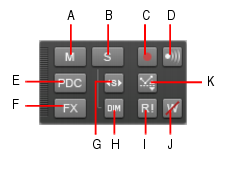 When working with multi-output synths keep in mind the MIDI and audio solo buttons are linked.
|
matt fresha
Max Output Level: -87 dBFS
- Total Posts : 168
- Joined: 2014/10/01 21:02:50
- Status: offline
Re: Slow tempo to record fast MIDI part? And Soloing track mutes whole project?
2014/10/03 15:45:47
(permalink)
Ahah! I figured it out. It's not the DAW doing this. Each time, I was trying to solo my Superior Drummer track. It turns it it's Superior Drummer doing this. Hopefully I don't run into this with other VSTs. I just need to figure out why SD is doing this.... EDIT: It's because I'm using a drum map. When I switch the output to "Superior Drummer 1", solo works fine. Now I just need to find out how to deal with this when I want to solo. Off to the manuals I go!
post edited by Vern C - 2014/10/03 15:55:44
|
scook
Forum Host
- Total Posts : 24146
- Joined: 2005/07/27 13:43:57
- Location: TX
- Status: offline
Re: Slow tempo to record fast MIDI part? And Soloing track mutes whole project?
2014/10/03 15:55:08
(permalink)
Are you assigning multiple audio tracks to Superior Drummer? If so, make sure to go into Superior Drummer and make the mixer assignments.
|
matt fresha
Max Output Level: -87 dBFS
- Total Posts : 168
- Joined: 2014/10/01 21:02:50
- Status: offline
Re: Slow tempo to record fast MIDI part? And Soloing track mutes whole project?
2014/10/03 16:16:04
(permalink)
Well, everything is assigned to the first SD ouput. (Stereo 1/2)
|
scook
Forum Host
- Total Posts : 24146
- Joined: 2005/07/27 13:43:57
- Location: TX
- Status: offline
Re: Slow tempo to record fast MIDI part? And Soloing track mutes whole project?
2014/10/03 16:28:40
(permalink)
Double check the out port in the drum map in the Drum Map Manager. This column may not be pointing where you expect. To change all out ports at the same time, position the cursor on the top output port (or where ever the port change needs to start in the map), while holding CTRL and SHIFT scroll down to the last output port (or where ever the port change needs to stop in the map) then click on the output port drop down and select a new assignment.
|
scook
Forum Host
- Total Posts : 24146
- Joined: 2005/07/27 13:43:57
- Location: TX
- Status: offline
Re: Slow tempo to record fast MIDI part? And Soloing track mutes whole project?
2014/10/03 16:32:55
(permalink)
Vern C
Well, everything is assigned to the first SD ouput. (Stereo 1/2)
Is this by design or do you want to use multiple audio outputs in SONAR? I nuked the dupe post BTW.
|
matt fresha
Max Output Level: -87 dBFS
- Total Posts : 168
- Joined: 2014/10/01 21:02:50
- Status: offline
Re: Slow tempo to record fast MIDI part? And Soloing track mutes whole project?
2014/10/03 17:37:22
(permalink)
scook
Vern C
Well, everything is assigned to the first SD ouput. (Stereo 1/2)
Is this by design or do you want to use multiple audio outputs in SONAR?
I nuked the dupe post BTW.
It's by design for now. I usually use a pre-made drumkit while tracking, then when I'm done, I will go back and customize the kit. I'll check out the output thing a little later when I get back to my first track in Sonar.
|
Bristol_Jonesey
Max Output Level: 0 dBFS

- Total Posts : 16775
- Joined: 2007/10/08 15:41:17
- Location: Bristol, UK
- Status: offline
Re: Slow tempo to record fast MIDI part? And Soloing track mutes whole project?
2014/10/03 17:56:39
(permalink)
Vern C
Ahah! I figured it out. It's not the DAW doing this. Each time, I was trying to solo my Superior Drummer track. It turns it it's Superior Drummer doing this. Hopefully I don't run into this with other VSTs. I just need to figure out why SD is doing this....
EDIT: It's because I'm using a drum map. When I switch the output to "Superior Drummer 1", solo works fine. Now I just need to find out how to deal with this when I want to solo. Off to the manuals I go!
This is a long standing issue with using drum maps and although there are workarounds, they are all fairly convoluted
CbB, Platinum, 64 bit throughoutCustom built i7 3930, 32Gb RAM, 2 x 1Tb Internal HDD, 1 x 1TB system SSD (Win 7), 1 x 500Gb system SSD (Win 10), 2 x 1Tb External HDD's, Dual boot Win 7 & Win 10 64 Bit, Saffire Pro 26, ISA One, Adam P11A,
|
matt fresha
Max Output Level: -87 dBFS
- Total Posts : 168
- Joined: 2014/10/01 21:02:50
- Status: offline
Re: Slow tempo to record fast MIDI part? And Soloing track mutes whole project?
2014/10/03 18:01:03
(permalink)
Bristol_JoneseyThis is a long standing issue with using drum maps and although there are workarounds, they are all fairly convoluted Can you give me the simplest workaround you know of? Even if it is convoluted, I need to do this because there's just too many notes in SD2 to try and use just an unlabeled PRV. Scook, I just checked the output in the Drum Map Manager and they all lead to the first output in SD2.
|
scook
Forum Host
- Total Posts : 24146
- Joined: 2005/07/27 13:43:57
- Location: TX
- Status: offline
Re: Slow tempo to record fast MIDI part? And Soloing track mutes whole project?
2014/10/03 18:02:10
(permalink)
I know there are issues using mute/solo in the Drum Grid Pane but don't recall problems with the Solo button on tracks.
|
scook
Forum Host
- Total Posts : 24146
- Joined: 2005/07/27 13:43:57
- Location: TX
- Status: offline
Re: Slow tempo to record fast MIDI part? And Soloing track mutes whole project?
2014/10/03 18:08:01
(permalink)
Vern C
Scook, I just checked the output in the Drum Map Manager and they all lead to the first output in SD2.
The drum map does not control the output of SD2. The drum map takes incoming MIDI data and sends it out to synth inputs. The synth controls where the output goes. If you are trying to use the M/S buttons in the Drum Grid Pane, you are better off using the mixer in SD2 if you are routing everything to a single stereo pair. I was under the impression you were using the solo button on an audio track.
post edited by scook - 2014/10/03 18:14:59
|
matt fresha
Max Output Level: -87 dBFS
- Total Posts : 168
- Joined: 2014/10/01 21:02:50
- Status: offline
Re: Slow tempo to record fast MIDI part? And Soloing track mutes whole project?
2014/10/03 18:48:47
(permalink)
scookI was under the impression you were using the solo button on an audio track. I am using the solo button on the audio track. I've the first SD2 output routed to an audio track, and I have the MIDI source track to go along with it. When I press 'solo' on the audio track, everything in the project is going silent, including the soloed track. The solo track on every other VSTi output (Halion Sonic, KONTAKT, etc) works fine. It's just Superior Drummer 2 that's having this issue. Now, am I doing this right? I'm setting the output of the midi track in the console view to the Metal Foundry drum map I was sent. That is the correct way to use the drum map, right?
|
matt fresha
Max Output Level: -87 dBFS
- Total Posts : 168
- Joined: 2014/10/01 21:02:50
- Status: offline
Re: Slow tempo to record fast MIDI part? And Soloing track mutes whole project?
2014/10/03 18:54:45
(permalink)
Okay, I finally found another thread from another user that's experiencing the same thing, but with Addictive Drums. I just used the suggestion in there of putting everything drum associated into it's own folder and solo'ing that. It's not ideal, but it works well. :) Thanks for all the help, guys. I actually learned a lot from this. Thanks again!
post edited by Vern C - 2014/10/03 19:04:10
|
scook
Forum Host
- Total Posts : 24146
- Joined: 2005/07/27 13:43:57
- Location: TX
- Status: offline
Re: Slow tempo to record fast MIDI part? And Soloing track mutes whole project?
2014/10/03 18:59:37
(permalink)
I think I know what is going on. Because there is a drum map, you need to solo both the audio and MIDI tracks associated with Superior Drummer. Drum maps break the automatic mute/solo link between audio and MIDI tracks. You may want to group them by right clicking on the solo buttons and assign them to a group. A folder will work but if you intend on use the console, grouping may work better for you.
post edited by scook - 2014/10/03 19:07:45
|
scook
Forum Host
- Total Posts : 24146
- Joined: 2005/07/27 13:43:57
- Location: TX
- Status: offline
Re: Slow tempo to record fast MIDI part? And Soloing track mutes whole project?
2014/10/03 20:56:13
(permalink)
Another solution since there you are using a single audio track would be to insert Superior Drummer using an instrument track. Then using the Track Inspector MIDI tab assign the MIDI output to the drum map. This create a single track for Superior Drums with one solo and one mute button, no need for folders or groups.
|
matt fresha
Max Output Level: -87 dBFS
- Total Posts : 168
- Joined: 2014/10/01 21:02:50
- Status: offline
Re: Slow tempo to record fast MIDI part? And Soloing track mutes whole project?
2014/10/03 21:32:07
(permalink)
Thank you scook!! The grouping method totally worked for me in the track view and console view. This is the most helpful any DAW forum has been for me and I'm only two days into Sonar. Great community! :)
|
scook
Forum Host
- Total Posts : 24146
- Joined: 2005/07/27 13:43:57
- Location: TX
- Status: offline
Re: Slow tempo to record fast MIDI part? And Soloing track mutes whole project?
2014/10/03 22:10:55
(permalink)
You are welcome. Glad you found an acceptable solution.
|
Kronosman
Max Output Level: -90 dBFS

- Total Posts : 32
- Joined: 2014/09/16 09:08:17
- Status: offline
Re: Slow tempo to record fast MIDI part? And Soloing track mutes whole project?
2014/10/04 09:28:45
(permalink)
About slowing tempos: in the pre-X versions of Sonar (and in Cakewalk) there were a set of "tempo scale" buttons. Button 1 decreased the tempo by 50%, Button 3 increased the tempo by 200%, and Button 2 returned to the original tempo. These were extremely useful for recording complex MIDI passages without fooling with the tempo map.
Unfortunately the Bakers removed this feature from the X series. I, and others, have asked that it be restored but to no avail. (There was one glitch in the feature: it wouldn't work as soon as any audio tracks were added.)
I've been forced to use a work-around when working with multiple tempo changes in large works: I cut the tempo information to a new file, save it, then reset the tempo in the original. After recording the tricky parts, I copy and paste the original tempo info back into the file. It's not as elegant as the scale buttons, but it works.
Sonar Artist, Windows 10 (64-bit), 20GB RAM, Audient iD4, Behringer X-Touch, Kronos 73, Kronos 61
|
matt fresha
Max Output Level: -87 dBFS
- Total Posts : 168
- Joined: 2014/10/01 21:02:50
- Status: offline
Re: Slow tempo to record fast MIDI part? And Soloing track mutes whole project?
2014/10/04 19:48:52
(permalink)
Kronosman
About slowing tempos: in the pre-X versions of Sonar (and in Cakewalk) there were a set of "tempo scale" buttons. Button 1 decreased the tempo by 50%, Button 3 increased the tempo by 200%, and Button 2 returned to the original tempo. These were extremely useful for recording complex MIDI passages without fooling with the tempo map.
Unfortunately the Bakers removed this feature from the X series. I, and others, have asked that it be restored but to no avail. (There was one glitch in the feature: it wouldn't work as soon as any audio tracks were added.)
I've been forced to use a work-around when working with multiple tempo changes in large works: I cut the tempo information to a new file, save it, then reset the tempo in the original. After recording the tricky parts, I copy and paste the original tempo info back into the file. It's not as elegant as the scale buttons, but it works.
Yeah, doing the slow tempo thing when working with multiple tempo changes was a concern of mine, but your idea sounds doable. Thanks for the suggestion.
|
Anderton
Max Output Level: 0 dBFS
- Total Posts : 14070
- Joined: 2003/11/06 14:02:03
- Status: offline
Re: Slow tempo to record fast MIDI part? And Soloing track mutes whole project?
2014/10/04 19:53:09
(permalink)
Vern C
Thank you scook!! The grouping method totally worked for me in the track view and console view. This is the most helpful any DAW forum has been for me and I'm only two days into Sonar. Great community! :)
This community doesn't show up on a spec sheet, but it's often cited as a reason why people either choose Sonar or switch to it. Sonar is a deep program, but because it has a lot of users, it's likely that someone knows the answer to just about anything.
|