digi2ns
Max Output Level: -48.5 dBFS

- Total Posts : 2694
- Joined: 2010/11/24 14:27:12
- Location: MICHIGAN
- Status: offline

Soft Synths and Perfect Space on ANY Buss do not like each other on my system
I have been playing with putting some drum tracks together. I noticed after I copied audio data to midi and pasted it on the synth track and assigned lets say C3 for the kick, during playback of the tracks, it was hit and miss as far as the notes actually playing even though the spots were there where they should have sounded. This continued as I added snare track, cymbals tracks, etc... Started getting real frustrated missing parts that should have or appeared to be visually Okay but no sound. After messing around a bit and retrying and retrying the copy and paste, I thought what about FX messing with it. So I reached up with the cursor and killed all FX from the ToolBar. Well well!!!. No problems at all. I turned FX back on and turned all FX on the Busses only OFF, then hit play with the Drum buss Solo'd and started turning them on 1 by 1. I did delete a couple I had up that I wasnt using and continued on this path trying to narrow down the culprit. Apparently one of the ones I deleted was the problem and was not even on the Drum Buss, I believe it was on a guitar track or the VOX. So the questionable thing is how can an effect on a buss not even in the mix or routing effect the output/what you should be hearing of a soft synth/drum and cause me to hammer down a pot of coffee while pulling my hair out  Not sure if this is a known bug or just something Im doing, but really all I did to correct it was deleted an unused FX on an entirely different buss. Weird
post edited by digi2ns - 2012/04/20 18:55:11
MIKE --Dell Studio XPS I7/870 2.93 Ghz, 8GB Mem, 2-2TB Barracuda HDs, 500 GB Ext.HDD, Win7/64 --X1 64 Pro Expanded, Dual 21" Monitors --PCR500 --MAUDIO FastTrack Ultra --Mackie 1604 VLZ PRO --Line6 X3 Live --Gibson, Fender, Takamine, Schecter, Washburn http://pogopoppa.wix.com/5thgear# http://soundcloud.com/digi2ns
|
digi2ns
Max Output Level: -48.5 dBFS
- Total Posts : 2694
- Joined: 2010/11/24 14:27:12
- Location: MICHIGAN
- Status: offline
Re:Soft Synth SD3 Observation/Bug With Busses and FX
2012/04/20 18:53:44
(permalink)
Okay, Apparently "Perfect Space" does NOT like to play well at all on ANY buss if you have any softsynths at all in the mix on my system.
Is anyone else experiencing this?
MIKE --Dell Studio XPS I7/870 2.93 Ghz, 8GB Mem, 2-2TB Barracuda HDs, 500 GB Ext.HDD, Win7/64 --X1 64 Pro Expanded, Dual 21" Monitors --PCR500 --MAUDIO FastTrack Ultra --Mackie 1604 VLZ PRO --Line6 X3 Live --Gibson, Fender, Takamine, Schecter, Washburn http://pogopoppa.wix.com/5thgear# http://soundcloud.com/digi2ns
|
Dave Modisette
Max Output Level: 0 dBFS

- Total Posts : 11050
- Joined: 2003/11/13 22:12:55
- Location: Brandon, Florida
- Status: offline
Re:Soft Synth SD3 Observation/Bug With Busses and FX
2012/04/20 19:20:09
(permalink)
Perfect Space will add a lot of latency to your system. Best to add that plug in after you have your tracking done.
|
digi2ns
Max Output Level: -48.5 dBFS
- Total Posts : 2694
- Joined: 2010/11/24 14:27:12
- Location: MICHIGAN
- Status: offline
Re:Soft Synth SD3 Observation/Bug With Busses and FX
2012/04/20 19:41:25
(permalink)
Thats kind of whats confusing me Dave. I have converted Audio tracks to Midi Tracks and inserted soft synths onto them. So the tracking is actually complete. I added the PS after all was done. So is there a process you think I need to do before inserting PS, not sure how to go about it after the fact. I need to learn more on this Softsynth to understand where Im going wrong. Dont have a clue on what this Bounce stuff is and if that has anything to do with it, I havent done anything as far as that goes on this project.
MIKE --Dell Studio XPS I7/870 2.93 Ghz, 8GB Mem, 2-2TB Barracuda HDs, 500 GB Ext.HDD, Win7/64 --X1 64 Pro Expanded, Dual 21" Monitors --PCR500 --MAUDIO FastTrack Ultra --Mackie 1604 VLZ PRO --Line6 X3 Live --Gibson, Fender, Takamine, Schecter, Washburn http://pogopoppa.wix.com/5thgear# http://soundcloud.com/digi2ns
|
digi2ns
Max Output Level: -48.5 dBFS
- Total Posts : 2694
- Joined: 2010/11/24 14:27:12
- Location: MICHIGAN
- Status: offline
Re:Soft Synth SD3 Observation/Bug With Busses and FX
2012/04/20 20:30:12
(permalink)
Trying to post an example 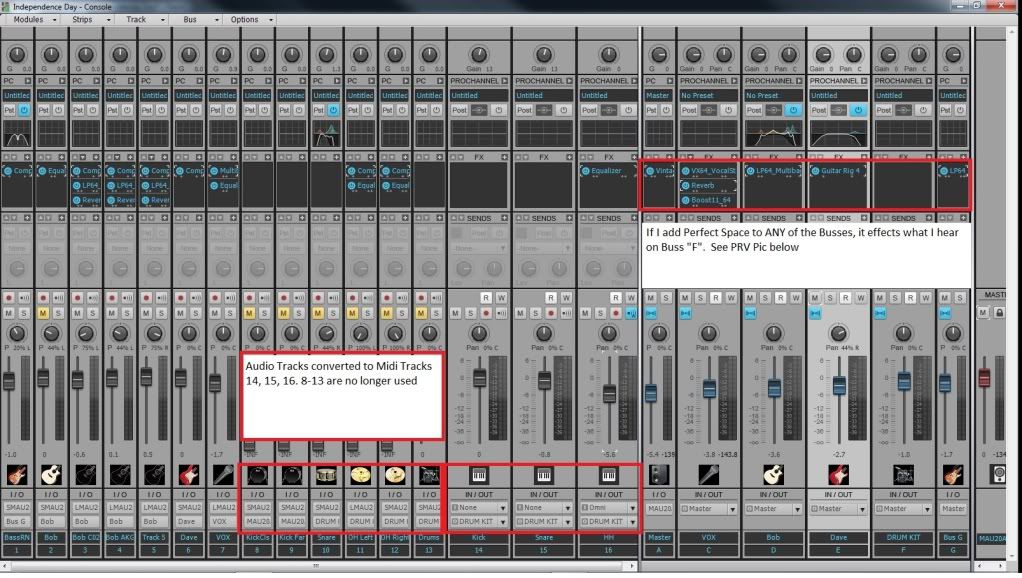 Sorry, got Track View next instead but same info, As seen in the boxes below the playback will be intermittent from note to note or a space of them for quite awhile will not sound. It might be just 1 track at a time or effect all 3 tracks. Most of the time its different spots as you repeat the playback. This is happening on a project that has all the tracking done and ready for Export. I tried to add the PS at the last minute to see if that made a difference-no change. ( I can add multiple PS (on every buss) to a Audio only project and not have any problems at all. Does it make any sense? 
MIKE --Dell Studio XPS I7/870 2.93 Ghz, 8GB Mem, 2-2TB Barracuda HDs, 500 GB Ext.HDD, Win7/64 --X1 64 Pro Expanded, Dual 21" Monitors --PCR500 --MAUDIO FastTrack Ultra --Mackie 1604 VLZ PRO --Line6 X3 Live --Gibson, Fender, Takamine, Schecter, Washburn http://pogopoppa.wix.com/5thgear# http://soundcloud.com/digi2ns
|
bvideo
Max Output Level: -58 dBFS

- Total Posts : 1707
- Joined: 2006/09/02 22:20:02
- Status: offline
Re:Soft Synth SD3 Observation/Bug With Busses and FX
2012/04/20 21:05:08
(permalink)
Usually when these midi skips are reported, the advice is to raise the default midi prepare buffer (in Edit > Preferences > MIDI - Playback and Recording) to 500 ms or a little bigger. Hope it helps you.
|
digi2ns
Max Output Level: -48.5 dBFS
- Total Posts : 2694
- Joined: 2010/11/24 14:27:12
- Location: MICHIGAN
- Status: offline
Re:Soft Synth SD3 Observation/Bug With Busses and FX
2012/04/20 21:24:41
(permalink)
bvideo
Usually when these midi skips are reported, the advice is to raise the default midi prepare buffer (in Edit > Preferences > MIDI - Playback and Recording) to 500 ms or a little bigger. Hope it helps you.
Thanks, I give it a look tomorrow.  If the Perfect Space causes this much in problems, Ill just use a different one. I let ya know what I find, I thought I had most of them setting jacked up to where things wouldnt be an issue but ya never know. 
MIKE --Dell Studio XPS I7/870 2.93 Ghz, 8GB Mem, 2-2TB Barracuda HDs, 500 GB Ext.HDD, Win7/64 --X1 64 Pro Expanded, Dual 21" Monitors --PCR500 --MAUDIO FastTrack Ultra --Mackie 1604 VLZ PRO --Line6 X3 Live --Gibson, Fender, Takamine, Schecter, Washburn http://pogopoppa.wix.com/5thgear# http://soundcloud.com/digi2ns
|
ducatibruce2
Max Output Level: -79 dBFS

- Total Posts : 557
- Joined: 2008/10/05 09:04:31
- Location: Tasdemonia, Oz
- Status: offline
Re:Soft Synth SD3 Observation/Bug With Busses and FX
2012/04/21 02:50:14
(permalink)
I've seen something similar with midi only projects, some midi going to external synths & returning as "live" audio & some midi going to soft synths. Various plugs on busses will cause either partial playing of the softsynth or the softsynth will play late relative to the "live" audio.
Haven't noticed the problem with Perfect Space here but TRacks3, Ozone and similar on busses cause problems here.
Upping the midi buffer has no effect here. I suspect somethings crept into Plugin Delay Compensation in somewhere X1 as I don't recall having the problem in 8.5.3 where the project originated & played fine with the bus plugins.
S8.5.3PE & X1d P Exp & X2P, Q6600 @3Ghz, 4GB DDR2, XP SP3 With Knobs: 2 x Yamaha i88x mlan (ASIO), RS7000, Motif ESR, Roland SI24, VSynth XT, Varios, Fantom XR, JunoD, HPD10, Korg PadKontrol No knobs: P5, DimPro, Rapture, Z3ta+, IK stuff, ReCycle, Komplete8
|
digi2ns
Max Output Level: -48.5 dBFS
- Total Posts : 2694
- Joined: 2010/11/24 14:27:12
- Location: MICHIGAN
- Status: offline
Re:Soft Synth SD3 Observation/Bug With Busses and FX
2012/04/21 11:28:15
(permalink)
OMG, Really????? I spent quite some time last night after DELETING all Perfect Space instance out, doing a mess of EQing and editing. Saved a mess of times throughout it. Closed out for the night. When I came back into it this morning, Perfect Space put itself back on a bunch of the busses and it lost all my EQing I did. (Ughhhhh) Not sure if its my new Dell (Nuff said there) or something going on in X1? Gotta keep my sense of humor
MIKE --Dell Studio XPS I7/870 2.93 Ghz, 8GB Mem, 2-2TB Barracuda HDs, 500 GB Ext.HDD, Win7/64 --X1 64 Pro Expanded, Dual 21" Monitors --PCR500 --MAUDIO FastTrack Ultra --Mackie 1604 VLZ PRO --Line6 X3 Live --Gibson, Fender, Takamine, Schecter, Washburn http://pogopoppa.wix.com/5thgear# http://soundcloud.com/digi2ns
|
stratman70
Max Output Level: -45 dBFS

- Total Posts : 3044
- Joined: 2006/09/12 20:34:12
- Location: Earth
- Status: offline
Re:Soft Synth SD3 Observation/Bug With Busses and FX
2012/04/21 11:31:04
(permalink)
digi2ns
Okay, Apparently "Perfect Space" does NOT like to play well at all on ANY buss if you have any softsynths at all in the mix on my system.
Is anyone else experiencing this?
I use PS everyday-bever any issues and I use koads of soft synths.
|
digi2ns
Max Output Level: -48.5 dBFS
- Total Posts : 2694
- Joined: 2010/11/24 14:27:12
- Location: MICHIGAN
- Status: offline
Re:Soft Synth SD3 Observation/Bug With Busses and FX
2012/04/21 11:39:45
(permalink)
Thanks Strat, Maybe something is going on with my Computer. Havent changed or done anything to it lately. It doesnt connect to internet. So just starting out getting into adding these midi tracks, maybe Im running into stuff thats been an unfound issue since installing Sonar, not that its a Sonar prob, just a LACK of knowledge on my part.
MIKE --Dell Studio XPS I7/870 2.93 Ghz, 8GB Mem, 2-2TB Barracuda HDs, 500 GB Ext.HDD, Win7/64 --X1 64 Pro Expanded, Dual 21" Monitors --PCR500 --MAUDIO FastTrack Ultra --Mackie 1604 VLZ PRO --Line6 X3 Live --Gibson, Fender, Takamine, Schecter, Washburn http://pogopoppa.wix.com/5thgear# http://soundcloud.com/digi2ns
|
stratman70
Max Output Level: -45 dBFS
- Total Posts : 3044
- Joined: 2006/09/12 20:34:12
- Location: Earth
- Status: offline
Re:Soft Synth SD3 Observation/Bug With Busses and FX
2012/04/21 11:45:54
(permalink)
digi2ns
OMG, Really????? I spent quite some time last night after DELETING all Perfect Space instance out, doing a mess of EQing and editing. Saved a mess of times throughout it. Closed out for the night.
When I came back into it this morning, Perfect Space put itself back on a bunch of the busses and it lost all my EQing I did. (Ughhhhh)
Not sure if its my new Dell (Nuff said there) or something going on in X1?
Gotta keep my sense of humor
Mike They are not going to appear back in the project on their own. Just sounds like you opened a project that still had PS and not the eq stuff. Please do not be offended, I mean to help. You seem to need to get a good handle on "midi" and Softsynths. The midinotes need to be in the scope of the softsynth. For instance: Had a midi track that refused to play all the midi notes I saw. Using Konttakt 4 Scarbee bass. Well, turned out the scarbee bass was set differently. It would not play a B2 note ior instance. So I rased the octave of the Track and now all the notes played. Could have adjusted in Scarbee also if I wanted to. Another time Steven Slate sdrums just would not play my Kick note. This was a mapping issue. The C3 in the midi track did not map to any kicks in Steven Slate drums. Lowered it to B2 and wala-sounded as it should. Middle C is different in many Daws. You might want to finds an articale and read about that. It's one of the issues I have had before. This is from Sonar X1 Help: Base Octave for Pitches. There is no industry standard for numbering octaves. By default, SONAR calls MIDI note 0 (the lowest possible note) C0. The Yamaha FB-01, for example, shows MIDI note 0 as C-2 ( C negative 2). To match SONAR to that standard, set Base Octave to –2
|