iamdunker
Max Output Level: -89 dBFS

- Total Posts : 84
- Joined: 2009/04/27 14:19:16
- Status: offline
Soft Synths greyed out when using track templates
Hello there guys. So a got an awesome track template set up to make starting a new project way easier. The template consits of 30 some odd tracks and two soft synths being Steven Slate Drums and Superior Drummer. So everything went fine for the first 10 or so uses of the templates, then something started happening. Either one or both soft synts would be "greyed out" and unusable. Almost as if they were bypassed or something. I have tried a few thing including screwing with midi settings and such. But it seems the midi stuff is working fine cause Sonar is getting messages from the controller. Any suggestions on how to recover these soft synths being as i have about 7-10 songs started with one of these being greyed out. Photo below. thx 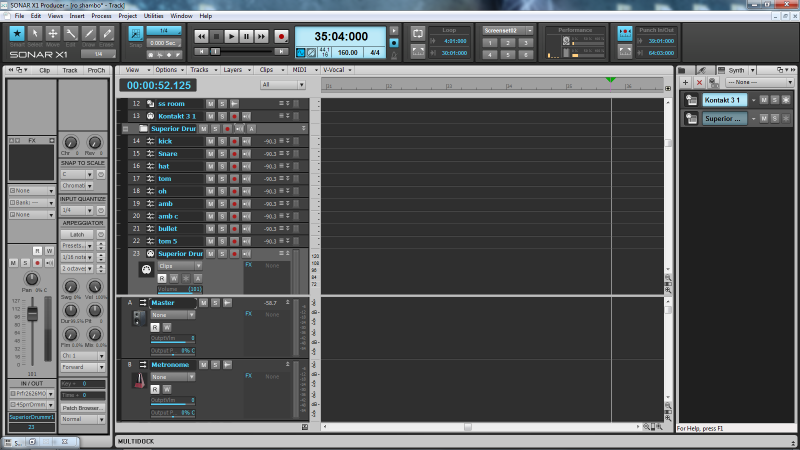
|
ltb
Max Output Level: -48 dBFS

- Total Posts : 2707
- Joined: 2005/06/19 13:34:08
- Status: offline

Re:Soft Synths greyed out when using track templates
2012/09/02 14:24:10
(permalink)
Select the greyed out vst, then click above on the 'Synth' tab & see if it's connected.
|
Bristol_Jonesey
Max Output Level: 0 dBFS

- Total Posts : 16775
- Joined: 2007/10/08 15:41:17
- Location: Bristol, UK
- Status: offline
Re:Soft Synths greyed out when using track templates
2012/09/02 15:03:35
(permalink)
And if that doesn't work, try using the "Replace Synth" option and replace it with SD again.
you might have to load your default kit again though, so it isn't foolproof by any means
CbB, Platinum, 64 bit throughoutCustom built i7 3930, 32Gb RAM, 2 x 1Tb Internal HDD, 1 x 1TB system SSD (Win 7), 1 x 500Gb system SSD (Win 10), 2 x 1Tb External HDD's, Dual boot Win 7 & Win 10 64 Bit, Saffire Pro 26, ISA One, Adam P11A,
|
iamdunker
Max Output Level: -89 dBFS
- Total Posts : 84
- Joined: 2009/04/27 14:19:16
- Status: offline
Re:Soft Synths greyed out when using track templates
2012/09/02 17:39:28
(permalink)
thx dudes, carl had the trick.
|
iamdunker
Max Output Level: -89 dBFS
- Total Posts : 84
- Joined: 2009/04/27 14:19:16
- Status: offline
Re:Soft Synths greyed out when using track templates
2012/09/02 19:13:59
(permalink)
so it "ungreyed" but it would make any noise. Where is this reload synth option Bristol has mentioned?
|
Bristol_Jonesey
Max Output Level: 0 dBFS
- Total Posts : 16775
- Joined: 2007/10/08 15:41:17
- Location: Bristol, UK
- Status: offline
Re:Soft Synths greyed out when using track templates
2012/09/03 03:41:08
(permalink)
In Track View, on the Midi Track containing your synth, right click the midi icon and you'll find it there.
CbB, Platinum, 64 bit throughoutCustom built i7 3930, 32Gb RAM, 2 x 1Tb Internal HDD, 1 x 1TB system SSD (Win 7), 1 x 500Gb system SSD (Win 10), 2 x 1Tb External HDD's, Dual boot Win 7 & Win 10 64 Bit, Saffire Pro 26, ISA One, Adam P11A,
|
bolav
Max Output Level: -90 dBFS

- Total Posts : 3
- Joined: 2016/05/07 21:37:14
- Status: offline
Re:Soft Synths greyed out when using track templates
2016/08/10 15:28:32
(permalink)
I have this same problem but when I go to synth options, the enable midi output is not checked. When I Check it, it does nothing but revert to being unchecked.
This problem happened when I replaced a synth that was no longer on my pc. I replaced it but it doen't work
|