alexoosthoek
Max Output Level: -23 dBFS

- Total Posts : 5238
- Joined: 2008/11/12 11:20:51
- Location: A'gus
- Status: offline
Soft synth: no sound(partly solved, thanks Karyn)
Win7 32 bit. Just out of nowhere all new inserted soft synth's are silent, the"older" ones work ok. Clicking a note in PRV: big silence, no meter activety. 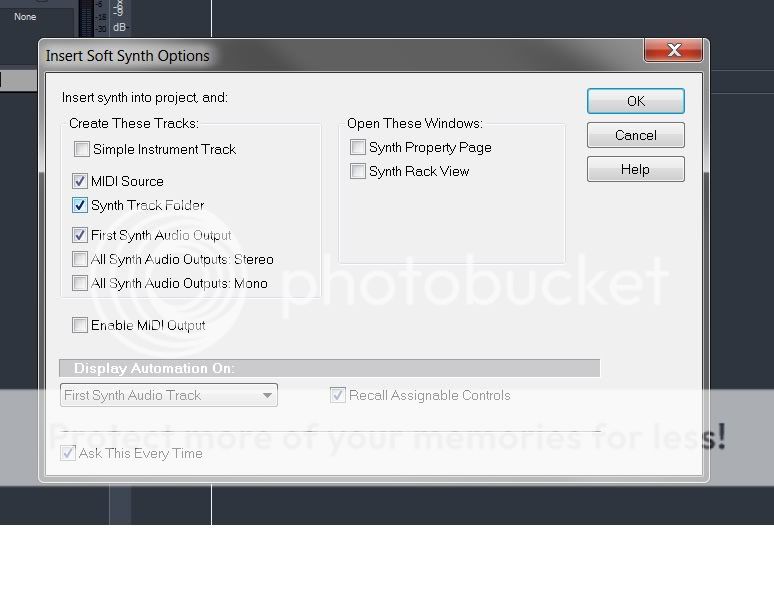 As far as I know nothing has changed, no internet connection. Edit: pls help, Ed is nagging me 
post edited by alexoosthoek - 2012/07/03 08:20:24
|
Karyn
Ma-Ma

- Total Posts : 9200
- Joined: 2009/01/30 08:03:10
- Location: Lincoln, England.
- Status: offline

Re:Soft synth: no sound
2012/07/03 07:00:35
(permalink)
Where are you sending the audio to?
Mekashi Futo. Get 10% off all Waves plugins.Current DAW. i7-950, Gigabyte EX58-UD5, 12Gb RAM, 1Tb SSD, 2x2Tb HDD, nVidia GTX 260, Antec 1000W psu, Win7 64bit, Studio 192, Digimax FS, KRK RP8G2, Sonar Platinum
|
alexoosthoek
Max Output Level: -23 dBFS
- Total Posts : 5238
- Joined: 2008/11/12 11:20:51
- Location: A'gus
- Status: offline
Re:Soft synth: no sound
2012/07/03 07:01:57
(permalink)
I tried master, a bus and sound card.
|
Karyn
Ma-Ma
- Total Posts : 9200
- Joined: 2009/01/30 08:03:10
- Location: Lincoln, England.
- Status: offline
Re:Soft synth: no sound
2012/07/03 07:06:52
(permalink)
I meant track wise...
You have Simple Inst Track unchecked, so you should have a midi track + audio.
Check the midi track is feeding the synth on the correct midi channel (or omni), check the synth is outputing to the audio track, and it's not muted, etc,
Mekashi Futo. Get 10% off all Waves plugins.Current DAW. i7-950, Gigabyte EX58-UD5, 12Gb RAM, 1Tb SSD, 2x2Tb HDD, nVidia GTX 260, Antec 1000W psu, Win7 64bit, Studio 192, Digimax FS, KRK RP8G2, Sonar Platinum
|
alexoosthoek
Max Output Level: -23 dBFS
- Total Posts : 5238
- Joined: 2008/11/12 11:20:51
- Location: A'gus
- Status: offline
Re:Soft synth: no sound
2012/07/03 07:10:11
(permalink)
|
Karyn
Ma-Ma
- Total Posts : 9200
- Joined: 2009/01/30 08:03:10
- Location: Lincoln, England.
- Status: offline
Re:Soft synth: no sound
2012/07/03 07:16:21
(permalink)
This is why the Simple Inst Track option is such a good feature...
Mekashi Futo. Get 10% off all Waves plugins.Current DAW. i7-950, Gigabyte EX58-UD5, 12Gb RAM, 1Tb SSD, 2x2Tb HDD, nVidia GTX 260, Antec 1000W psu, Win7 64bit, Studio 192, Digimax FS, KRK RP8G2, Sonar Platinum
|
alexoosthoek
Max Output Level: -23 dBFS
- Total Posts : 5238
- Joined: 2008/11/12 11:20:51
- Location: A'gus
- Status: offline
Re:Soft synth: no sound
2012/07/03 07:18:04
(permalink)
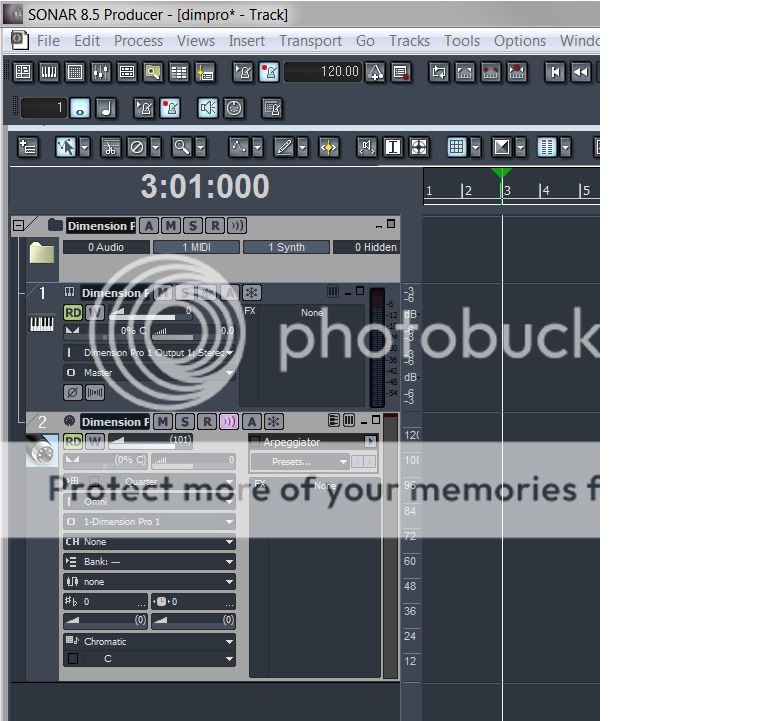 This is what it looks like.
|
Guitarhacker
Max Output Level: 0 dBFS

- Total Posts : 24398
- Joined: 2007/12/07 12:51:18
- Location: NC
- Status: offline
Re:Soft synth: no sound
2012/07/03 07:38:25
(permalink)
I have found that in some of my synths, I need to set the midi channels correctly inside the synth... or I get the same result...no sound. Kontakt and a few others are like that. If the internal synth settings don't match the track routings it refuses to work. And of course, be sure a sample set is loaded too. I have also had operating synths stop working and a simple restart of the complete system solved that... comm failure or something like it. When in doubt, always restart the complete system...computer & interface from a cold start.
post edited by Guitarhacker - 2012/07/03 07:40:34
My website & music: www.herbhartley.com MC4/5/6/X1e.c, on a Custom DAW Focusrite Firewire Saffire Interface BMI/NSAI "Just as the blade chooses the warrior, so too, the song chooses the writer "
|
Karyn
Ma-Ma
- Total Posts : 9200
- Joined: 2009/01/30 08:03:10
- Location: Lincoln, England.
- Status: offline
Re:Soft synth: no sound
2012/07/03 07:38:52
(permalink)
I opened a new blank project, inserted Dim Pro with same settings you used. I got this.... (it works) 
Mekashi Futo. Get 10% off all Waves plugins.Current DAW. i7-950, Gigabyte EX58-UD5, 12Gb RAM, 1Tb SSD, 2x2Tb HDD, nVidia GTX 260, Antec 1000W psu, Win7 64bit, Studio 192, Digimax FS, KRK RP8G2, Sonar Platinum
|
Karyn
Ma-Ma
- Total Posts : 9200
- Joined: 2009/01/30 08:03:10
- Location: Lincoln, England.
- Status: offline
Re:Soft synth: no sound
2012/07/03 07:41:30
(permalink)
You have selected a sound in Dim Pro haven't you?
Mekashi Futo. Get 10% off all Waves plugins.Current DAW. i7-950, Gigabyte EX58-UD5, 12Gb RAM, 1Tb SSD, 2x2Tb HDD, nVidia GTX 260, Antec 1000W psu, Win7 64bit, Studio 192, Digimax FS, KRK RP8G2, Sonar Platinum
|
alexoosthoek
Max Output Level: -23 dBFS
- Total Posts : 5238
- Joined: 2008/11/12 11:20:51
- Location: A'gus
- Status: offline
Re:Soft synth: no sound
2012/07/03 07:49:26
(permalink)
Karyn
You have selected a sound in Dim Pro haven't you?
Yes, I did not forget to do that :) I tried the simple instrument track, now I have sound again  @Herb: never had to do that, but I only use the ones that came with Sonar.
|
Karyn
Ma-Ma
- Total Posts : 9200
- Joined: 2009/01/30 08:03:10
- Location: Lincoln, England.
- Status: offline
Re:Soft synth: no sound
2012/07/03 07:53:00
(permalink)
You can un-link a simple inst track to give the normal audio/midi pairs, but I don't see any advantage in doing it...
Mekashi Futo. Get 10% off all Waves plugins.Current DAW. i7-950, Gigabyte EX58-UD5, 12Gb RAM, 1Tb SSD, 2x2Tb HDD, nVidia GTX 260, Antec 1000W psu, Win7 64bit, Studio 192, Digimax FS, KRK RP8G2, Sonar Platinum
|
alexoosthoek
Max Output Level: -23 dBFS
- Total Posts : 5238
- Joined: 2008/11/12 11:20:51
- Location: A'gus
- Status: offline
Re:Soft synth: no sound
2012/07/03 08:07:25
(permalink)
Tried the other option again, doesn't make any noise at all, no meter activety.
|
craigb
Max Output Level: 0 dBFS
- Total Posts : 41704
- Joined: 2009/01/28 23:13:04
- Location: The Pacific Northwestshire
- Status: offline
Re:Soft synth: no sound
2012/07/03 08:10:37
(permalink)
Time for all of you to head over to Beyond My DAW!
|
alexoosthoek
Max Output Level: -23 dBFS
- Total Posts : 5238
- Joined: 2008/11/12 11:20:51
- Location: A'gus
- Status: offline
Re:Soft synth: no sound
2012/07/03 08:18:46
(permalink)
|
SteveStrummerUK
Max Output Level: 0 dBFS
- Total Posts : 31112
- Joined: 2006/10/28 10:53:48
- Location: Worcester, England.
- Status: offline
Re:Soft synth: no sound
2012/07/03 08:23:52
(permalink)
|
Beagle
Max Output Level: 0 dBFS
- Total Posts : 50621
- Joined: 2006/03/29 11:03:12
- Location: Fort Worth, TX
- Status: offline
Re:Soft synth: no sound
2012/07/03 08:39:10
(permalink)
Karyn
You can un-link a simple inst track to give the normal audio/midi pairs, but I don't see any advantage in doing it...
the advantage comes when you are using multiple channels. simple instrument tracks do not work with multitimbral softsynths. I never use simple instrument tracks.
|
craigb
Max Output Level: 0 dBFS
- Total Posts : 41704
- Joined: 2009/01/28 23:13:04
- Location: The Pacific Northwestshire
- Status: offline
Re:Soft synth: no sound
2012/07/03 08:51:29
(permalink)
Beagle
I never use simple instrument tracks.
Don't you need bass tracks occasionally though?
Time for all of you to head over to Beyond My DAW!
|
Beagle
Max Output Level: 0 dBFS
- Total Posts : 50621
- Joined: 2006/03/29 11:03:12
- Location: Fort Worth, TX
- Status: offline
Re:Soft synth: no sound
2012/07/03 09:28:02
(permalink)
craigb
Beagle
I never use simple instrument tracks.
Don't you need bass tracks occasionally though?
Then I just ask Ed.
|
Karyn
Ma-Ma
- Total Posts : 9200
- Joined: 2009/01/30 08:03:10
- Location: Lincoln, England.
- Status: offline
Re:Soft synth: no sound
2012/07/03 11:56:15
(permalink)
Beagle
Karyn
You can un-link a simple inst track to give the normal audio/midi pairs, but I don't see any advantage in doing it...
the advantage comes when you are using multiple channels. simple instrument tracks do not work with multitimbral softsynths.
I never use simple instrument tracks.
You can still send the output from a standard midi track to the synth in a simple instrument track, so yes, you can use multi-timbral instruments in them.
Mekashi Futo. Get 10% off all Waves plugins.Current DAW. i7-950, Gigabyte EX58-UD5, 12Gb RAM, 1Tb SSD, 2x2Tb HDD, nVidia GTX 260, Antec 1000W psu, Win7 64bit, Studio 192, Digimax FS, KRK RP8G2, Sonar Platinum
|
Beagle
Max Output Level: 0 dBFS
- Total Posts : 50621
- Joined: 2006/03/29 11:03:12
- Location: Fort Worth, TX
- Status: offline
Re:Soft synth: no sound
2012/07/03 12:05:45
(permalink)
Karyn
Beagle
Karyn
You can un-link a simple inst track to give the normal audio/midi pairs, but I don't see any advantage in doing it...
the advantage comes when you are using multiple channels. simple instrument tracks do not work with multitimbral softsynths.
I never use simple instrument tracks.
You can still send the output from a standard midi track to the synth in a simple instrument track, so yes, you can use multi-timbral instruments in them.
I don't understand - you can't send separate MIDI tracks to separate channels using a simple instrument track. in other words, if I wanted to use all 16 channels of TTS-1, I could not use a simple instrument track for ONE instance of TTS-1. I'd have to use 16 separate instances if using simple instrument tracks.
|
Karyn
Ma-Ma
- Total Posts : 9200
- Joined: 2009/01/30 08:03:10
- Location: Lincoln, England.
- Status: offline
Re:Soft synth: no sound
2012/07/03 12:17:34
(permalink)
Drag/Drop TTS-1 to blank space in time line, allow Sonar to create simple inst track.
Open staff/piano roll and enter (say) piano part. (easy as TTS defaults to piano.
Create new midi track, route output to TTS-1 (which is actually in synth rack). set midi chan to 2.
Any midi on this new track will be played by the TTS in your simple inst track using chan 2.
The point being the synth is in the synth rack and NOT in the simple Instrument Track. You can send any data to it from any track/channel.
Mekashi Futo. Get 10% off all Waves plugins.Current DAW. i7-950, Gigabyte EX58-UD5, 12Gb RAM, 1Tb SSD, 2x2Tb HDD, nVidia GTX 260, Antec 1000W psu, Win7 64bit, Studio 192, Digimax FS, KRK RP8G2, Sonar Platinum
|
Beagle
Max Output Level: 0 dBFS
- Total Posts : 50621
- Joined: 2006/03/29 11:03:12
- Location: Fort Worth, TX
- Status: offline
Re:Soft synth: no sound
2012/07/03 12:24:05
(permalink)
ah - ok. never tried doing anything like that before.
but - I have to ask - what's the point? how is that really any better than separate MIDI / output tracks and the synth being in the synth rack?
|
Karyn
Ma-Ma
- Total Posts : 9200
- Joined: 2009/01/30 08:03:10
- Location: Lincoln, England.
- Status: offline
Re:Soft synth: no sound
2012/07/03 12:34:35
(permalink)
The synth is always in the synth rack.
Seperate audio/midi tracks are great if you're using multi-timbral regularly, but most of my use of soft synths would be "hmnmm, I need a piano.." drag one onto the project as S.I. then later add some strings from DimPro as S.I. Then another synth... etc.
All the Simple Instrument Track does is collate everything together in one place so all your edits and inputs automagically control the midi and all the output settings and routes and volumes and FX bins automagically work with the audio part.
You don't gain any extra functions by using it or not, it's just a neater layout method.
Mekashi Futo. Get 10% off all Waves plugins.Current DAW. i7-950, Gigabyte EX58-UD5, 12Gb RAM, 1Tb SSD, 2x2Tb HDD, nVidia GTX 260, Antec 1000W psu, Win7 64bit, Studio 192, Digimax FS, KRK RP8G2, Sonar Platinum
|
Beagle
Max Output Level: 0 dBFS
- Total Posts : 50621
- Joined: 2006/03/29 11:03:12
- Location: Fort Worth, TX
- Status: offline
Re:Soft synth: no sound
2012/07/03 12:49:16
(permalink)
Karyn
The synth is always in the synth rack. sorry - I misread you earlier. Seperate audio/midi tracks are great if you're using multi-timbral regularly, but most of my use of soft synths would be "hmnmm, I need a piano.." drag one onto the project as S.I. then later add some strings from DimPro as S.I. Then another synth... etc. and most of mine are multi - 99% of the time it's Kontakt with piano and organ and sometimes flute, strings, etc. All the Simple Instrument Track does is collate everything together in one place so all your edits and inputs automagically control the midi and all the output settings and routes and volumes and FX bins automagically work with the audio part.
You don't gain any extra functions by using it or not, it's just a neater layout method.
Ah, but IMO you're still LOOSING functions by using it! I'm not at my DAW to confirm exactly how it works by example, but, as an example, if I wanted to route 3 instruments thru TTS-1: using a simple instrument track I'd have 2 MIDI tracks and 1 Simple Ins track. But all outputs would be thru the Simple Ins track - no separate outputs for Simple Ins tracks, right? using the separate method I'd have 3 MIDI tracks and 3 output tracks (assuming I hid or deleted the other output track) and the extra functionality of having separate outputs for each instrument.
|
julibee
Max Output Level: -47 dBFS

- Total Posts : 2826
- Joined: 2008/03/28 17:38:15
- Location: San Marcos, CA
- Status: offline
Re:Soft synth: no sound
2012/07/03 13:58:15
(permalink)
Alex, I have often inserted a soft synth (properly) and can't get a sound out until I manually create a note in the piano roll. Then it works fine.
I have no idea why this is, but it's been across multiple versions of Sonar. I just know that if I can't hear my synth.... add a note, play it (press play), verify that it sounds. Then, I can almost always delete the manual note, and move to my midi keyboard. Weird.
|
bapu
Max Output Level: 0 dBFS

- Total Posts : 86000
- Joined: 2006/11/25 21:23:28
- Location: Thousand Oaks, CA
- Status: offline
Re:Soft synth: no sound
2012/07/03 14:00:04
(permalink)
alexoosthoek
This is what it looks like.
How did you get X1 to look like (and say) 8.5? Maybe I'll be glad you got it working. And now for some NagBap.....
|
alexoosthoek
Max Output Level: -23 dBFS
- Total Posts : 5238
- Joined: 2008/11/12 11:20:51
- Location: A'gus
- Status: offline
Re:Soft synth: no sound
2012/07/03 14:51:56
(permalink)
julibee
Alex, I have often inserted a soft synth (properly) and can't get a sound out until I manually create a note in the piano roll. Then it works fine.
I have no idea why this is, but it's been across multiple versions of Sonar. I just know that if I can't hear my synth.... add a note, play it (press play), verify that it sounds. Then, I can almost always delete the manual note, and move to my midi keyboard. Weird.
I tried that Jules, even VERY long notes :) , didn't work. No midi keyboard here, all mouse-clicks.
|
Ham N Egz
Max Output Level: 0 dBFS
- Total Posts : 15161
- Joined: 2005/01/21 14:27:49
- Location: Arpadhon
- Status: offline
Re:Soft synth: no sound
2012/07/03 14:54:17
(permalink)
craigb
Beagle
I never use simple instrument tracks.
Don't you need bass tracks occasionally though?
I see what you did there..
Green Acres is the place to be I dont twitter, facebook, snapchat, instagram,linkedin,tumble,pinterest,flick, blah blah,lets have an old fashioned conversation!
|
alexoosthoek
Max Output Level: -23 dBFS
- Total Posts : 5238
- Joined: 2008/11/12 11:20:51
- Location: A'gus
- Status: offline
Re:Soft synth: no sound
2012/07/03 14:57:12
(permalink)
|