Helpful Reply[Solved] Console Emulator & Saturation Knob Show Clipping On Empty Track

Author
olemon
Max Output Level: -75 dBFS
  • Total Posts : 768
  • Joined: 2011/10/27 05:35:19
  • Status: offline
2015/06/22 16:14:58 (permalink)

[Solved] Console Emulator & Saturation Knob Show Clipping On Empty Track

I recently learned about FX Chains and about how I could treat them as PC Modules.  While experimenting I did this....
 
On an empty track, Mix B, inserted an empty FX Chain as a PC module, added three plugins, named it and saved it.
Added Softube Saturation to the PC.
Added CE to the PC.
Saved that PC as a Preset.
 
On another empty track, Mix C, loaded the new PC Preset.
The Softube or the CE indicate clipping.
 
At first, only the Softube showed clipping, the CE did not.  I deleted the Softube module from that track's PC, but not from the actual preset and afterwards the CE showed clipping.  If I delete both the Softube and the CE and add them back, the CE shows clipping, the Softube does not....
 
 
Operator error or what?  Thanks.
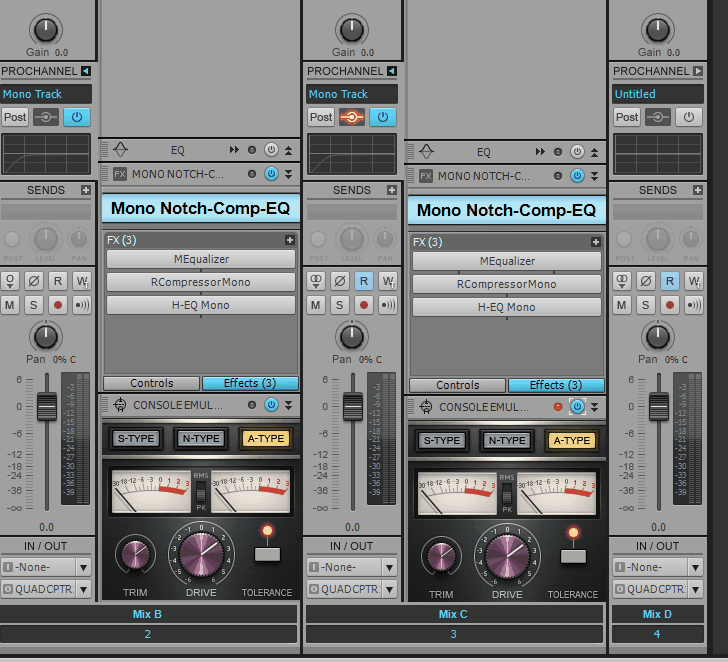


post edited by olemon - 2015/06/22 18:38:43

https://www.reverbnation.com/scottholson
 
Platinum, Studio One 3 Pro, Win 10 (x64), AMD FX-8350, ASUS M5A97 R2.0, 16GB, RME UCX, Digimax DP88, Faderport 8, Revive Audio Mod Studio Channel, Vintage Audio M72, Summit Audio TLA-50, KRK Rokit 5 G2 Monitors, Guitars
 
"If you wait till the last minute, it only takes a minute."
#1
scook
Forum Host
  • Total Posts : 24146
  • Joined: 2005/07/27 13:43:57
  • Location: TX
  • Status: offline
Re: Console Emulator & Saturation Knob Show Clipping On Empty Track 2015/06/22 16:32:24 (permalink)
The interleave settings are different for Mix B and Mix C. Mix B is set to mono. Mix C is set to stereo.
#2
olemon
Max Output Level: -75 dBFS
  • Total Posts : 768
  • Joined: 2011/10/27 05:35:19
  • Status: offline
Re: Console Emulator & Saturation Knob Show Clipping On Empty Track 2015/06/22 17:18:56 (permalink)
scook
The interleave settings are different for Mix B and Mix C. Mix B is set to mono. Mix C is set to stereo.


Thanks, Scook, that did it, but why?


I just tried the opposite.  Saved a PC preset from a stereo track, then loaded it on a new stereo track.  Fine.  Then set that track's interleave to mono.  That's also fine.
 
So it's illegal to save a preset on a Mono track and then load it to a Stereo track?  I didn't realized that first track was in mono...I must have changed it inadvertently before I saved that FX Chain and PC preset.
 
 
post edited by olemon - 2015/06/22 17:27:32

https://www.reverbnation.com/scottholson
 
Platinum, Studio One 3 Pro, Win 10 (x64), AMD FX-8350, ASUS M5A97 R2.0, 16GB, RME UCX, Digimax DP88, Faderport 8, Revive Audio Mod Studio Channel, Vintage Audio M72, Summit Audio TLA-50, KRK Rokit 5 G2 Monitors, Guitars
 
"If you wait till the last minute, it only takes a minute."
#3
scook
Forum Host
  • Total Posts : 24146
  • Joined: 2005/07/27 13:43:57
  • Location: TX
  • Status: offline
Re: Console Emulator & Saturation Knob Show Clipping On Empty Track 2015/06/22 17:40:33 (permalink) ☄ Helpfulby olemon 2015/06/22 18:37:04
ProChannel presets are not stereo or mono, the interleave is not part of the ProChannel. I have never tried using MEqualizer before mono plug-ins. Actually I don't have many dedicated mono plug-ins. Most are smart plug-ins like MEqualizer which match the track interleave. This may contribute to the problem because when the interleave is stereo MEqualizer is stereo then there are two mono plug-ins following it in the FX chain.
post edited by scook - 2015/06/22 17:58:47
#4
olemon
Max Output Level: -75 dBFS
  • Total Posts : 768
  • Joined: 2011/10/27 05:35:19
  • Status: offline
Re: Console Emulator & Saturation Knob Show Clipping On Empty Track 2015/06/22 18:00:36 (permalink)
Ah.  Okay.  Thanks.  Some of these Waves plugins have a mono option and I just grabbed them as I was thinking about the source audio, and not the output being mono or stereo.
 
Now I'll have to go study up on on that:)
 
This thread was helpful should anyone else be confused like me....  Bitflipper explains in detail.
 
http://forum.cakewalk.com/FindPost/2956296
 
 
post edited by olemon - 2015/06/22 18:48:23

https://www.reverbnation.com/scottholson
 
Platinum, Studio One 3 Pro, Win 10 (x64), AMD FX-8350, ASUS M5A97 R2.0, 16GB, RME UCX, Digimax DP88, Faderport 8, Revive Audio Mod Studio Channel, Vintage Audio M72, Summit Audio TLA-50, KRK Rokit 5 G2 Monitors, Guitars
 
"If you wait till the last minute, it only takes a minute."
#5
Jump to:
© 2025 APG vNext Commercial Version 5.1