TCGill
Max Output Level: -90 dBFS

- Total Posts : 21
- Joined: 2012/08/11 10:38:05
- Status: offline
[Solved] Playing Soft Synths in X3
Folks, I apologize at the beginning for the very simple nature of my question buy I've spent two days watching videos, reading Scott Garrigus' book and Cakewalk documentation but I'm still stuck. I have lots of experience recording live audio with Sonar but I have yet to be able to record using soft synths. I feel like I'm following the directions but have yet to hear a sound when I play my MIDI keyboard. Here's a screen capture of my current status. My basic audio path is good because when I play the project, I hear the audio track (Track 1) loud and clear. As you can see from the capture, Sonar is recognizing my MIDI signals as the level meters on Track 3 bounce when I play the keyboard. But there is no corresponding movement of the meters on Track 2 and no audio is produced.  Thanks in advance for your patience with my basic problem but it's been kicking my butt and I want to actually be able to create something.
|
John
Forum Host

- Total Posts : 30467
- Joined: 2003/11/06 11:53:17
- Status: offline

Re: Playing Soft Synths in X3
2014/11/02 11:03:30
(permalink)
What synth are you trying to trigger with MIDI?
|
TCGill
Max Output Level: -90 dBFS
- Total Posts : 21
- Joined: 2012/08/11 10:38:05
- Status: offline
Re: Playing Soft Synths in X3
2014/11/02 11:17:29
(permalink)
Hey, John. Thanks for the prompt reply.
Dimension Pro. (Were you able to see my screenshot?)
|
scook
Forum Host
- Total Posts : 24146
- Joined: 2005/07/27 13:43:57
- Location: TX
- Status: offline
Re: Playing Soft Synths in X3
2014/11/02 11:34:25
(permalink)
I cannot see the image. Trying to load the image directly takes me to my Google login page. If I login, access to the image is denied.
After adding DimPro to the project, did you select a program from the DimPro browser? DimPro does not load a default sound.
|
johnnyV
Max Output Level: -48.5 dBFS

- Total Posts : 2677
- Joined: 2010/02/22 11:46:33
- Location: Here, in my chair
- Status: offline
Re: Playing Soft Synths in X3
2014/11/02 11:43:02
(permalink)
Load TTs-1 as it's a easy one to use. It will default to a piano for all channels and drums for CH 10.
Open the tts-1 GUI mixer and click on the pre view icons at the bottom of each channel. This will confirm your synth has a output as it plays little snippets of the sound chosen.
If you hear nothing make sure the TTS-1 output is assigned to your master output.
Make sure the midi track your triggering has it's output assigned to the tts-1
Sonar X3e Studio - Waiting for Professional Scarlett 6i6Yamaha Gear= 01v - NSM 10 - DTX 400 - MG82cx Roland Gear= A 49- GR 50 - TR 505 - Boss pedalsTascam Gear= DR 40 - US1641 -Mackie Gear= Mix 8 - SRM 350's i5 Z97 3.2GHZ quad 16 Gig RAM W 8.1 home buildTaylor mini GS - G& L Tribute Tele - 72 Fender Princeton - TC BH 250 - Mooer and Outlaw Pedals Korg 05/RW
|
John
Forum Host
- Total Posts : 30467
- Joined: 2003/11/06 11:53:17
- Status: offline
Re: Playing Soft Synths in X3
2014/11/02 12:01:48
(permalink)
TCGill
Hey, John. Thanks for the prompt reply.
Dimension Pro. (Were you able to see my screenshot?)
I could not see your screenshot. Thats because you don't have enough posts to allow you to do that. Dim Pro is a great synth but be sure you have a sample loaded. Then route your MIDI track that receives your MIDI to the input of Dim Pro. Play a note and you should hear a sound. BTW welcome to the forum. I like the style of your posts. Though its a goto synth for trying things out TTS-1 is not a good sounding synth.
|
TCGill
Max Output Level: -90 dBFS
- Total Posts : 21
- Joined: 2012/08/11 10:38:05
- Status: offline
Re: Playing Soft Synths in X3
2014/11/02 12:05:39
(permalink)
I'll try another way to share my screenshot: https://www.flickr.com/photos/129172854@N08/15507013217/ scook: When I opened DimPro, I selected an acoustic bass patch. (If I maximize the DimPro window, the patch (Full Acoustic) is displayed in the "Program Browser" field. johnnyV, I loaded the TTS-1 and, BAM!, I instantly had a track the I could hear! I'm going to add my DimPro track back and compare the settings to try find out what's different.
|
scook
Forum Host
- Total Posts : 24146
- Joined: 2005/07/27 13:43:57
- Location: TX
- Status: offline
Re: Playing Soft Synths in X3
2014/11/02 12:22:41
(permalink)
When just beginning with DimPro try a full range instrument program like a piano or synth. Programs like bass and drums do not cover the entire keyboard range. TTS-1 by default loads a piano so there are fewer surprises with it.
|
mettelus
Max Output Level: -22 dBFS

- Total Posts : 5321
- Joined: 2005/08/05 03:19:25
- Location: Maryland, USA
- Status: offline
Re: Playing Soft Synths in X3
2014/11/02 12:33:30
(permalink)
+1, Dimension Pro can have sounds assigned to only certain keys and does not visually show you which are not mapped. For initial routing checks, a piano is best to use to check your setup (all keys will have a sound assigned to them).
ASUS ROG Maximus X Hero (Wi-Fi AC), i7-8700k, 16GB RAM, GTX-1070Ti, Win 10 Pro, Saffire PRO 24 DSP, A-300 PRO, plus numerous gadgets and gizmos that make or manipulate sound in some way.
|
TCGill
Max Output Level: -90 dBFS
- Total Posts : 21
- Joined: 2012/08/11 10:38:05
- Status: offline
Re: Playing Soft Synths in X3
2014/11/02 12:52:16
(permalink)
Update: Loading these synths from the Browser work as expected:
TTS-1
Dimension LE
But I still get the behavior I originally described when I try to load and use DimPro.
I loaded piano and organ patches for both DimLE and DimPro to make sure I wasn't getting a keyboard mapping issue that several of you mentioned.
Again, when I try to play the DimPro track, the signal meter on the MIDI track is active but not the associated synth track. It seems like it should just be a basic routing issue but when I compare the settings for what works and what doesn't, I can't find the difference.
Any more ideas?
|
scook
Forum Host
- Total Posts : 24146
- Joined: 2005/07/27 13:43:57
- Location: TX
- Status: offline
Re: Playing Soft Synths in X3
2014/11/02 13:06:15
(permalink)
It could be a routing issue, except for the synth the routing is the same for TTS-1, Dimension LE and DimPro. Does the stand alone DimPro play correctly?
|
John
Forum Host
- Total Posts : 30467
- Joined: 2003/11/06 11:53:17
- Status: offline
Re: Playing Soft Synths in X3
2014/11/02 13:25:45
(permalink)
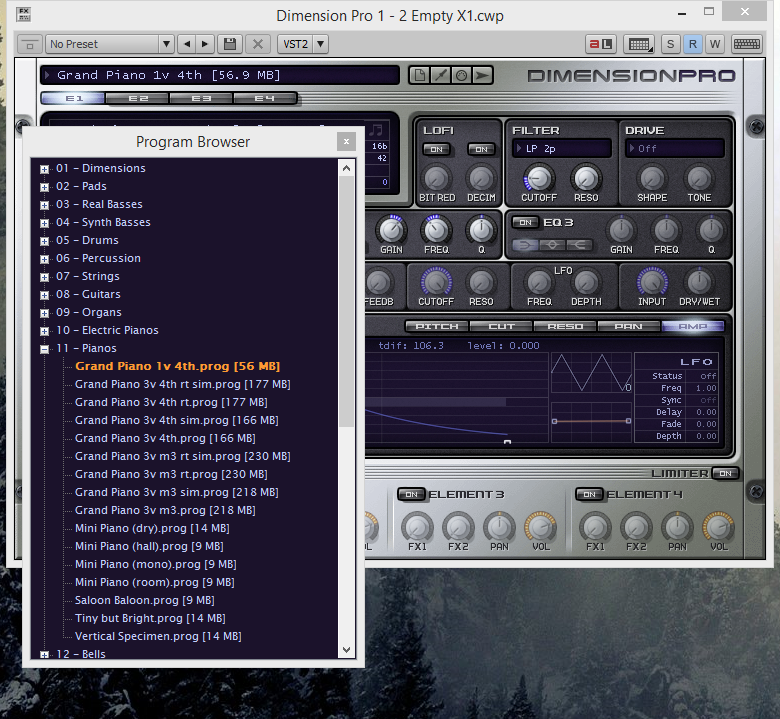 Notice the top input its where you right click to open the program browser for Dim Pro. Clicking on a program will load it.
|
rcrees
Max Output Level: -83 dBFS

- Total Posts : 392
- Joined: 2005/04/28 10:36:01
- Location: New York City
- Status: offline
Re: Playing Soft Synths in X3
2014/11/02 14:00:33
(permalink)
Make sure that the "input" of the audio track (in your stated case, track two) is set to DimPro, channel 1 and the "output" is set to either the main bus or your main audio outs.
You might also try loading an instance of DimPro and choosing "Instrument Track" instead of breaking the instance into two tracks (midi and audio). With everything in one track, X3 should set everything to your default midi/audio gear...
http://www.rcreesmusic.com Dell XPS 8300, Intel Core i7, 8gigs ram, AMD Radeon 6670, Two SATA II 500gig hard drives, one 250gig external USB drive, Focusrite Scarlett 2i2, M-Audio Keystation 61es, Windows 7 Home Premium, SONAR X3 Producer, many sample libraries including EastWest PLAYx64 Gold Complete, RA, Stormdrum and Choirs
|
TCGill
Max Output Level: -90 dBFS
- Total Posts : 21
- Joined: 2012/08/11 10:38:05
- Status: offline
Re: Playing Soft Synths in X3
2014/11/02 14:52:25
(permalink)
Well, guys, believe it or not, it appears it might have been a product registration problem. When I tried to play the stand alone version, I got prompted to enter my registration code. After having some problems doing that, I un-installed and re-installed it and completed the registration process. It works as advertised now.
(In my defense, I tried to complete the registration by including the codes from my account at Cakewalk. I got it to work this time by using the codes from a previous purchase.)
Sorry for the diversion but maybe it's a lesson learned for all of us.
Thanks to all for trying to help.
|
scook
Forum Host
- Total Posts : 24146
- Joined: 2005/07/27 13:43:57
- Location: TX
- Status: offline
Re: Playing Soft Synths in X3
2014/11/02 15:00:15
(permalink)
Glad you got it resolved. Please edit the subject in the original post and add [Solved] to the subject. This helps everyone know the issue is resolved and aids when searching for solutions.
|
cityrat
Max Output Level: -77 dBFS

- Total Posts : 671
- Joined: 2004/01/08 11:57:56
- Status: offline
Re: Playing Soft Synths in X3
2014/11/02 15:05:01
(permalink)
>>Well, guys, believe it or not, it appears it might have been a product registration problem. When I tried to play the stand alone version, I got prompted to enter my registration code. I believe I had the same (similar?) issue with Dimension Pro and Rapture when I installed long ago. I think they have/had to be started as stand alone then registered as an Admin for it to work. http://www.cakewalk.com/S...using-the-correct-code
Sonar Platinum | Windows 7 64 bit SP1 | Intel i5 3570 3.4GHz | 8GB RAM | Gigabyte GA-B75-D3H | OCZ SSD | RME 9632
|
John
Forum Host
- Total Posts : 30467
- Joined: 2003/11/06 11:53:17
- Status: offline
Re: Playing Soft Synths in X3
2014/11/02 16:09:38
(permalink)
Alls well that ends well!
|