boblentil
Max Output Level: -90 dBFS

- Total Posts : 5
- Joined: 2014/12/29 11:52:33
- Status: offline
[Solved] SONAR X3 Ignores ASIO Panel Latency Settings
I am trying to adjust my latency settings via Preferences -> Audio - Driver Settings -> ASIO Panel; however, the latency settings are locked at 10 ms and cannot be changed. (See the upper-right of the screenshot below.) Alternatively, I can adjust the latency settings by launching the ASIO control panel outside of SONAR; however, these changes don't seem to have any effect on the latency used by the program. (See the lower-right of the screenshot below.) My sound card is an HT OMEGA CLARO II, and I am using the latest drivers. I have tried using ASIO4ALL, but based on my experience with other DAWs, I can achieve better latency performance using the ASIO drivers for my sound card if they work as intended. Does anybody have any suggestions regarding how to resolve this issue? 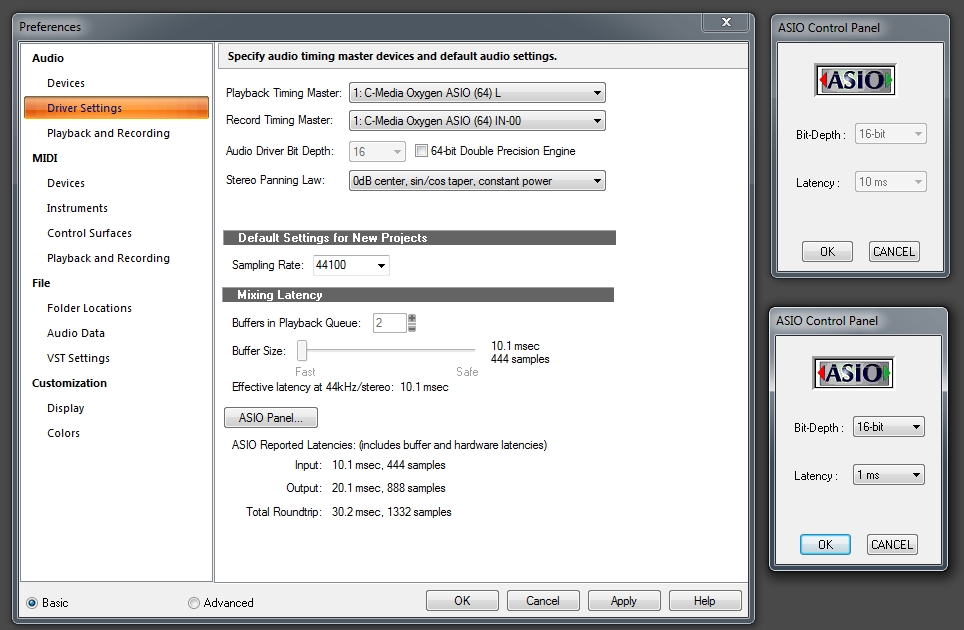
|
BobF
Max Output Level: 0 dBFS

- Total Posts : 8124
- Joined: 2003/11/05 18:43:11
- Location: Missouri - USA
- Status: offline

Re: SONAR X3 Ignores ASIO Panel Latency Settings
2014/12/29 12:31:57
(permalink)
When I make changes via my interface's panel, I have to click 'Apply' in Sonar for the changes to get picked up.
Sorry for stating the obvious ...
Bob -- Angels are crying because truth has died ...Illegitimi non carborundum --Studio One Pro / i7-6700@3.80GHZ, 32GB Win 10 Pro x64 Roland FA06, LX61+, Fishman Tripleplay, FaderPort, US-16x08 + ARC2.5/Event PS8s Waves Gold/IKM Max/Nomad Factory IS3/K11U
|
lawp
Max Output Level: -67 dBFS

- Total Posts : 1154
- Joined: 2012/06/28 13:27:41
- Status: offline
Re: SONAR X3 Ignores ASIO Panel Latency Settings
2014/12/29 12:37:49
(permalink)
Or set them outside sonar before launch
sstteerreeoo ffllllaanngge
|
boblentil
Max Output Level: -90 dBFS
- Total Posts : 5
- Joined: 2014/12/29 11:52:33
- Status: offline
Re: SONAR X3 Ignores ASIO Panel Latency Settings
2014/12/29 12:50:37
(permalink)
Thanks for the suggestions. I have tried both options and neither seems to make a difference. For example, I can set the latency to 1 ms or 80 ms before launching the program with no discernible effect on performance.
|
robert_e_bone
Moderator

- Total Posts : 8968
- Joined: 2007/12/26 22:09:28
- Location: Palatine, IL
- Status: offline
Re: SONAR X3 Ignores ASIO Panel Latency Settings
2014/12/29 12:53:52
(permalink)
Some audio interfaces need to be power cycled in order to load up new settings.
Bob Bone
Wisdom is a giant accumulation of "DOH!" Sonar: Platinum (x64), X3 (x64) Audio Interfaces: AudioBox 1818VSL, Steinberg UR-22 Computers: 1) i7-2600 k, 32 GB RAM, Windows 8.1 Pro x64 & 2) AMD A-10 7850 32 GB RAM Windows 10 Pro x64 Soft Synths: NI Komplete 8 Ultimate, Arturia V Collection, many others MIDI Controllers: M-Audio Axiom Pro 61, Keystation 88es Settings: 24-Bit, Sample Rate 48k, ASIO Buffer Size 128, Total Round Trip Latency 9.7 ms
|
Beepster
Max Output Level: 0 dBFS
- Total Posts : 18001
- Joined: 2012/05/11 19:11:24
- Status: offline
Re: SONAR X3 Ignores ASIO Panel Latency Settings
2014/12/29 13:21:37
(permalink)
I've never had much success changing my interface settings from within Sonar using the ASIO Panel button or even launching the interface software.
Basically I can't seem to change much of anything with Sonar open at all. Actually... I should reword that. In the past I
could never get it to work so I just stopped trying and instead do any interface setting changes directly from the device software.
So if I want to change my interface's buffer/latency settings I close Sonar (if it is already open), open my interface's software (I use a Scarlett 18i6 so I open the ScarlettMix software), change whatever needs to be changed and THEN (and only then) open my project.
Based on the wording of your posts it sounds like you may have already tried that but I can tell so if not try that exact procedure... Close Sonar, open interface software, change settings, reopen Sonar.
Cheers.
|
johnnyV
Max Output Level: -48.5 dBFS

- Total Posts : 2677
- Joined: 2010/02/22 11:46:33
- Location: Here, in my chair
- Status: offline
Re: SONAR X3 Ignores ASIO Panel Latency Settings
2014/12/29 13:50:16
(permalink)
Hmm, I just looked up your "interface" and it would seem it is not really what I would call a audio interface for using with Sonar. It looks like a $30 headphone device. So this is why you have a issue, it's drivers are just not up to it. http://www.cmedia.com.tw/XearOnlineDemo.aspx
Sonar X3e Studio - Waiting for Professional Scarlett 6i6Yamaha Gear= 01v - NSM 10 - DTX 400 - MG82cx Roland Gear= A 49- GR 50 - TR 505 - Boss pedalsTascam Gear= DR 40 - US1641 -Mackie Gear= Mix 8 - SRM 350's i5 Z97 3.2GHZ quad 16 Gig RAM W 8.1 home buildTaylor mini GS - G& L Tribute Tele - 72 Fender Princeton - TC BH 250 - Mooer and Outlaw Pedals Korg 05/RW
|
Splat 
Max Output Level: 0 dBFS
- Total Posts : 8672
- Joined: 2010/12/29 15:28:29
- Location: Mars.
- Status: offline
Re: SONAR X3 Ignores ASIO Panel Latency Settings
2014/12/29 14:05:49
(permalink)
Yup issue is driver or related, not Sonar. Sure you have the latest driver for the OS? (different drivers for/win 7&8).
As it's PCI update your motherboards Bios and chipset. You could also try uninstalling and reinstalling the drivers.
Regardless I'm not sure the card is up to the job, more an old HIFI enthusiasts card.
And make sure you have erradicated ASIO4ALL entirely..
Ta
Sell by date at 9000 posts. Do not feed. @48/24 & 128 buffers latency is 367 with offset of 38. Sonar Platinum(64 bit),Win 8.1(64 bit),Saffire Pro 40(Firewire),Mix Control = 3.4,Firewire=VIA,Dell Studio XPS 8100(Intel Core i7 CPU 2.93 Ghz/16 Gb),4 x Seagate ST31500341AS (mirrored),GeForce GTX 460,Yamaha DGX-505 keyboard,Roland A-300PRO,Roland SPD-30 V2,FD-8,Triggera Krigg,Shure SM7B,Yamaha HS5.Maschine Studio+Komplete 9 Ultimate+Kontrol Z1.Addictive Keys,Izotope Nectar elements,Overloud Bundle,Geist.Acronis True Image 2014.
|
boblentil
Max Output Level: -90 dBFS
- Total Posts : 5
- Joined: 2014/12/29 11:52:33
- Status: offline
Re: SONAR X3 Ignores ASIO Panel Latency Settings
2014/12/29 14:44:45
(permalink)
Thanks for the feedback. The sound card and latency settings appear to work fine in Ableton Live, which is why I thought this might be a SONAR issue. As an alternative, I hooked up my Focusrite Scarlett 2i4 audio interface, and it is functioning as expected. I will probably stick with that unless someone has a silver bullet solution.
|
Anderton
Max Output Level: 0 dBFS
- Total Posts : 14070
- Joined: 2003/11/06 14:02:03
- Status: offline
Re: SONAR X3 Ignores ASIO Panel Latency Settings
2014/12/29 14:48:41
(permalink)
boblentil
Thanks for the feedback. The sound card and latency settings appear to work fine in Ableton Live, which is why I thought this might be a SONAR issue.
Are you using the 32-bit version of Ableton Live?
|
boblentil
Max Output Level: -90 dBFS
- Total Posts : 5
- Joined: 2014/12/29 11:52:33
- Status: offline
Re: SONAR X3 Ignores ASIO Panel Latency Settings
2014/12/29 14:53:49
(permalink)
Anderton
boblentil
Thanks for the feedback. The sound card and latency settings appear to work fine in Ableton Live, which is why I thought this might be a SONAR issue.
Are you using the 32-bit version of Ableton Live?
Yes.
|
Anderton
Max Output Level: 0 dBFS
- Total Posts : 14070
- Joined: 2003/11/06 14:02:03
- Status: offline
Re: SONAR X3 Ignores ASIO Panel Latency Settings
2014/12/29 15:16:40
(permalink)
☼ Best Answerby boblentil 2014/12/29 15:49:54
I also should have asked if you're using the 64-bit version of SONAR...if so that might very well explain the difference if the product's 64-bit driver isn't as developed as one for 32-bit systems.
|
Splat
Max Output Level: 0 dBFS
- Total Posts : 8672
- Joined: 2010/12/29 15:28:29
- Location: Mars.
- Status: offline
Re: SONAR X3 Ignores ASIO Panel Latency Settings
2014/12/29 15:19:14
(permalink)
Sell by date at 9000 posts. Do not feed. @48/24 & 128 buffers latency is 367 with offset of 38. Sonar Platinum(64 bit),Win 8.1(64 bit),Saffire Pro 40(Firewire),Mix Control = 3.4,Firewire=VIA,Dell Studio XPS 8100(Intel Core i7 CPU 2.93 Ghz/16 Gb),4 x Seagate ST31500341AS (mirrored),GeForce GTX 460,Yamaha DGX-505 keyboard,Roland A-300PRO,Roland SPD-30 V2,FD-8,Triggera Krigg,Shure SM7B,Yamaha HS5.Maschine Studio+Komplete 9 Ultimate+Kontrol Z1.Addictive Keys,Izotope Nectar elements,Overloud Bundle,Geist.Acronis True Image 2014.
|
boblentil
Max Output Level: -90 dBFS
- Total Posts : 5
- Joined: 2014/12/29 11:52:33
- Status: offline
Re: SONAR X3 Ignores ASIO Panel Latency Settings
2014/12/29 16:01:34
(permalink)
Anderton
I also should have asked if you're using the 64-bit version of SONAR...if so that might very well explain the difference if the product's 64-bit driver isn't as developed as one for 32-bit systems.
That was indeed the issue. I switched to the 32-bit version of SONAR, and that solved the problem. Thanks.
|
John
Forum Host

- Total Posts : 30467
- Joined: 2003/11/06 11:53:17
- Status: offline
Re: SONAR X3 Ignores ASIO Panel Latency Settings
2014/12/29 16:17:36
(permalink)
My understanding is that Sonar has no control over ASIO settings. Notice in the screen shot the adjustment for the buffers are grayed out in Sonar's Preferences. The ASIO panel is where changes must be made. However, the handshake may not work depending on how that panel works with various DAWs.
If it doesn't send the data to Sonar than Sonar can't update itself. This could be due to the need to adjust the hardware manually. Some interfaces use the software ASIO panel to reflect how the hardware is set. Not to actually set it. I think this is what Beepster is referring to when he talks about needing to cycle on the hardware in some units.
I know that it all depends on the architecture of the hardware and how well drivers are written for it as to the ease of using software to adjust its settings.
I would try a WDM driver for this unit and see if that clears up the problem.
|
Anderton
Max Output Level: 0 dBFS
- Total Posts : 14070
- Joined: 2003/11/06 14:02:03
- Status: offline
Re: SONAR X3 Ignores ASIO Panel Latency Settings
2014/12/29 16:39:04
(permalink)
When Ableton introduced a 64-bit-compatible version, they nonetheless recommended installing it only if essential because at least at that time, many of the tools people used with Ableton Live were still 32-bit.
|
Beepster
Max Output Level: 0 dBFS
- Total Posts : 18001
- Joined: 2012/05/11 19:11:24
- Status: offline
Re: SONAR X3 Ignores ASIO Panel Latency Settings
2014/12/29 16:45:03
(permalink)
@John... I picked up Karl Rose's SWA X2/X3 vids when they were on special a while back and in the device setup section he talks about how the buffer slider and I think some of the other settings in preferences are for the other driver modes (WDM and the other one that is eluding me at the moment)... not ASIO. To me I just took that as the reason why I've never had much luck with those settings from within Sonar. The weird thing though is that I figured the ASIO Panel button would open the ScarlettMix software and I know that has work occasionally but mostly it hasn't.
Doesn't matter anyway because I have my foolproof method now and I prefer it anyway. I just figure the ScarlettMix software is ignoring Sonar for some reason and things get all wonky anyway when I change the interface settings with Sonar open anyway.
The OP was obviously having a 32/64 bit conflict though which seems to be solved so my post is not particularly helpful.
Meh.
Cheers.
|
John
Forum Host
- Total Posts : 30467
- Joined: 2003/11/06 11:53:17
- Status: offline
Re: SONAR X3 Ignores ASIO Panel Latency Settings
2014/12/29 17:16:17
(permalink)
Beepster
@John... I picked up Karl Rose's SWA X2/X3 vids when they were on special a while back and in the device setup section he talks about how the buffer slider and I think some of the other settings in preferences are for the other driver modes (WDM and the other one that is eluding me at the moment)... not ASIO. To me I just took that as the reason why I've never had much luck with those settings from within Sonar. The weird thing though is that I figured the ASIO Panel button would open the ScarlettMix software and I know that has work occasionally but mostly it hasn't.
Doesn't matter anyway because I have my foolproof method now and I prefer it anyway. I just figure the ScarlettMix software is ignoring Sonar for some reason and things get all wonky anyway when I change the interface settings with Sonar open anyway.
The OP was obviously having a 32/64 bit conflict though which seems to be solved so my post is not particularly helpful.
Meh.
Cheers.
All posts are helpful that try to stay on topic. Mine was more for why things seem the way they are. I don't think a 32 bit driver will load in a 64 bit OS. So that can't be the reason.
|
declan
Max Output Level: -81 dBFS

- Total Posts : 463
- Joined: 2003/11/06 17:45:59
- Status: offline
Re: SONAR X3 Ignores ASIO Panel Latency Settings
2014/12/29 19:35:06
(permalink)
I'll try to stay on topic here.  I use the FA-66 with the 64 bit Win 7 drivers. In 8.5 I used its ASIO drivers with 2.4ms effective latency. Since the X-series (I'm on X3e) the wave profiler doesn't recognize my ASIO drivers and now I'm using WDM with effective latency at 9.0ms. I still do occasionally notice the difference. I've brought this up before, but any ideas? Thanks.
|
robert_e_bone
Moderator
- Total Posts : 8968
- Joined: 2007/12/26 22:09:28
- Location: Palatine, IL
- Status: offline
Re: SONAR X3 Ignores ASIO Panel Latency Settings
2014/12/29 19:45:52
(permalink)
The wave profiler does not analyze ASIO drivers. It didn't do it in 8.5.3 either, unless my brain just cut out on me.
Bob Bone
Wisdom is a giant accumulation of "DOH!" Sonar: Platinum (x64), X3 (x64) Audio Interfaces: AudioBox 1818VSL, Steinberg UR-22 Computers: 1) i7-2600 k, 32 GB RAM, Windows 8.1 Pro x64 & 2) AMD A-10 7850 32 GB RAM Windows 10 Pro x64 Soft Synths: NI Komplete 8 Ultimate, Arturia V Collection, many others MIDI Controllers: M-Audio Axiom Pro 61, Keystation 88es Settings: 24-Bit, Sample Rate 48k, ASIO Buffer Size 128, Total Round Trip Latency 9.7 ms
|
robert_e_bone
Moderator
- Total Posts : 8968
- Joined: 2007/12/26 22:09:28
- Location: Palatine, IL
- Status: offline
Re: SONAR X3 Ignores ASIO Panel Latency Settings
2014/12/29 20:02:25
(permalink)
Also, some interfaces react to a user hitting the ASIO Control Panel button in Sonar, and some use an application completely outside Sonar to pull up the interface's UI control panel screen. My Presonus works like that - it has an application sitting and running down in the Windows System Tray with an application icon that I click on to bring up the interface control panel.
Bob Bone
Wisdom is a giant accumulation of "DOH!" Sonar: Platinum (x64), X3 (x64) Audio Interfaces: AudioBox 1818VSL, Steinberg UR-22 Computers: 1) i7-2600 k, 32 GB RAM, Windows 8.1 Pro x64 & 2) AMD A-10 7850 32 GB RAM Windows 10 Pro x64 Soft Synths: NI Komplete 8 Ultimate, Arturia V Collection, many others MIDI Controllers: M-Audio Axiom Pro 61, Keystation 88es Settings: 24-Bit, Sample Rate 48k, ASIO Buffer Size 128, Total Round Trip Latency 9.7 ms
|
declan
Max Output Level: -81 dBFS
- Total Posts : 463
- Joined: 2003/11/06 17:45:59
- Status: offline
Re: SONAR X3 Ignores ASIO Panel Latency Settings
2014/12/29 21:52:09
(permalink)
robert_e_bone
The wave profiler does not analyze ASIO drivers. It didn't do it in 8.5.3 either, unless my brain just cut out on me.
Bob Bone
Thanks for the responses Bob, it's much more likely its my brain on the fritz. I uninstalled/reinstalled my FA-66 drivers and I was able to select ASIO drivers in Preferences without an error message, but it increased the latency to 12ms, so I switched back to WDM. I do know I was able to lower/raise the latency slider in 8.5 (and before) and since I can't move it. The FA-66 does have its own control panel which controls buffer sizes for both ASIO & WDM, so I'll experiment further later tonight. Thanks again.
|
robert_e_bone
Moderator
- Total Posts : 8968
- Joined: 2007/12/26 22:09:28
- Location: Palatine, IL
- Status: offline
Re: SONAR X3 Ignores ASIO Panel Latency Settings
2014/12/29 22:49:20
(permalink)
I will circle back in a while then, to see if you have posted any new information on this. :)
Bob Bone
Wisdom is a giant accumulation of "DOH!" Sonar: Platinum (x64), X3 (x64) Audio Interfaces: AudioBox 1818VSL, Steinberg UR-22 Computers: 1) i7-2600 k, 32 GB RAM, Windows 8.1 Pro x64 & 2) AMD A-10 7850 32 GB RAM Windows 10 Pro x64 Soft Synths: NI Komplete 8 Ultimate, Arturia V Collection, many others MIDI Controllers: M-Audio Axiom Pro 61, Keystation 88es Settings: 24-Bit, Sample Rate 48k, ASIO Buffer Size 128, Total Round Trip Latency 9.7 ms
|