squonk2
Max Output Level: -90 dBFS

- Total Posts : 48
- Joined: 2015/09/25 20:57:22
- Status: offline

[Solved] Vocal will not pan
Trying to figure out my vocal panning situation. Been reading lots of posts on panning but can't seem to get any of my vocal tracks to pan.
My understanding of stereo vs mono in the sonar world is cloudy, so I will describe what I see and what I hear and maybe I can gain some clarity from the community. I recorded a vocal track. I can't recall if I recorded it in mono or stereo. When I play it I can see two distinct volume bars that respond independently and when I pan the track left, only the left bar shows and when I pan right, only the right bar shows. So this suggest to me that I have both left and right capability for the track. But when I listen to it, the sound does not go to the left or right, stays in both speakers even though the volume bar is showing only the left side playing. Tried bouncing it to a mono track and bouncing to a stereo track, no difference in sound. Tried sending to diff busses,no diff in sound. I am not sure what the various buttons should have on the pan issue, like "post", "iterleave" etc. but whatever I do I cannot hear a left or right pan.
|
tenfoot
Max Output Level: -53.5 dBFS

- Total Posts : 2186
- Joined: 2015/01/22 18:12:07
- Location: Qld, Australia
- Status: offline
Re: Vocal will not pan
2016/06/20 23:00:30
(permalink)
Often panning issues have to do with track routing and how you have your master bus outputs assigned. Make sure that your master output is sent to stereo hardware outputs on your sound card that are panned L\R and that your vocal track output is assigned to that master bus.
Bruce. Sonar Platinum 2017-09, Studio One 3.5.3, Win 10 x64, Quad core i7, RME Fireface, Behringer X32 Producer, Behringer X32 Rack, Presonus Faderport, Lemure Software Controller (Android), Enttec DMXIS VST lighting controller, Xtempo POK.
|
Anderton
Max Output Level: 0 dBFS

- Total Posts : 14070
- Joined: 2003/11/06 14:02:03
- Status: offline
Re: Vocal will not pan
2016/06/20 23:11:50
(permalink)
Possibly something downstream from your track, like the master or a bus, has the interleave set to mono. From help:
SONAR has a Mono/Stereo button in each track module in the Track Inspector and Console view. The buttons in the track modules force each track to play in either stereo or mono, but preserve the tracks’ pan positions in the stereo mix.
The Mono/Stereo button in each track forces the track’s audio signal to enter any patched plug-ins as either mono or stereo, whether or not the tracks are mono or stereo. This allows you to use either mono effects on a stereo track or stereo effects on a mono track.
To use a track’s Stereo/Mono button
Note: You may lose important stereo data by using mono effects with stereo tracks because your stereo tracks are summed to mono in order to pass through the effect. If you never want your stereo data to be summed to mono, select stereo.
1. Open the Track Inspector or Console view.
2. In the track you want to force to either mono or stereo for processing effects, click the Stereo/Mono button to the desired position.
Note: It is not possible to set a track’s Stereo/Mono button to Stereo if a mono plug-in is the first effect in the track’s FX Rack.
|
squonk2
Max Output Level: -90 dBFS
- Total Posts : 48
- Joined: 2015/09/25 20:57:22
- Status: offline
Re: Vocal will not pan
2016/06/21 21:29:49
(permalink)
Good suggestions, tried them all, still no pan function. What I can't understand is why i can see two distinct volume meter bars in my vocal track and when I move the pan dial left and right, visually the right bar or left bar is visible indicating the sound has been panned to the left or right, but there is no difference in the sound and it still comes out of both speakers. Any other thoughts what may be causing this ?
|
chuckebaby
Max Output Level: 0 dBFS
- Total Posts : 13146
- Joined: 2011/01/04 14:55:28
- Status: offline
Re: Vocal will not pan
2016/06/21 21:54:17
(permalink)
squonk2
Good suggestions, tried them all, still no pan function. What I can't understand is why i can see two distinct volume meter bars in my vocal track and when I move the pan dial left and right, visually the right bar or left bar is visible indicating the sound has been panned to the left or right, but there is no difference in the sound and it still comes out of both speakers. Any other thoughts what may be causing this ?
got any FX on that track ? (a send to a bus)
Windows 8.1 X64 Sonar Platinum x64 Custom built: Asrock z97 1150 - Intel I7 4790k - 16GB corsair DDR3 1600 - PNY SSD 220GBFocusrite Saffire 18I8 - Mackie Control
|
SimpleManZ
Max Output Level: -87 dBFS

- Total Posts : 157
- Joined: 2014/10/21 00:07:34
- Status: offline
Re: Vocal will not pan
2016/06/21 23:18:50
(permalink)
So what kind of mic you used. Sounds like your vocals is on 2 separate tracks.
Try setting up a new Test Project. Just one audio track feeding a master bus......
|
squonk2
Max Output Level: -90 dBFS
- Total Posts : 48
- Joined: 2015/09/25 20:57:22
- Status: offline
Re: Vocal will not pan
2016/06/22 10:08:29
(permalink)
Chuck: There is FX on the track, but have turned it off and tested and no change. The vocal track is being sent to a bus, but it's a stereo bus.
Simple: Using a Berringer powered studio mics. I have several tracks of vocals, but each is on it's own single track.
But good idea to set up a new test project w just one audio track feeding a master bus to see if that will pan, will try that.
|
chuckebaby
Max Output Level: 0 dBFS
- Total Posts : 13146
- Joined: 2011/01/04 14:55:28
- Status: offline
Re: Vocal will not pan
2016/06/22 12:58:24
(permalink)
squonk2
Chuck: There is FX on the track, but have turned it off and tested and no change. The vocal track is being sent to a bus, but it's a stereo bus.
Simple: Using a Berringer powered studio mics. I have several tracks of vocals, but each is on it's own single track.
But good idea to set up a new test project w just one audio track feeding a master bus to see if that will pan, will try that.
its got to be your routing to the bus or a stereo effect bleeding data through one or both sides. drag the audio to a new track feed to the master/no bus. this will help you eliminate the offender.
Windows 8.1 X64 Sonar Platinum x64 Custom built: Asrock z97 1150 - Intel I7 4790k - 16GB corsair DDR3 1600 - PNY SSD 220GBFocusrite Saffire 18I8 - Mackie Control
|
thedukewestern
Max Output Level: -83 dBFS

- Total Posts : 387
- Joined: 2008/04/14 12:06:59
- Location: NY
- Status: offline
Re: Vocal will not pan
2016/06/22 13:39:27
(permalink)
This brings to mind a few things. If it is a mono track recording - if there is a stereo effect - such as - reverb - on this track - you will need to set the track to stereo. If your track is routed to the master buss, does the master buss reflect the panning changes in its meter as well? If not - your problem lies between those points.
There were times, when I would open a session that I had started in my early days, with an older version of sonar - and sometimes a track would just not pan correctly... Im certain it was user error, etc.. in the session. What I would do to work around it was - clone the track in question, only... just the events... no automation, outputs.... just the events. then... I was free and clear of any old dooffus moves I may have done in the past.
Be the first one who thinks that you can Sonar Platinum, Windows 7 64 bit - clean install January 2016, Focusrite Pro 40, Outboard Pres, Native Instruments Komplete, Izotope, PSP, Melodyne, Vegetarian
|
Bristol_Jonesey
Max Output Level: 0 dBFS
- Total Posts : 16775
- Joined: 2007/10/08 15:41:17
- Location: Bristol, UK
- Status: offline
Re: Vocal will not pan
2016/06/23 12:01:21
(permalink)
squonk2
Good suggestions, tried them all, still no pan function. What I can't understand is why i can see two distinct volume meter bars in my vocal track and when I move the pan dial left and right, visually the right bar or left bar is visible indicating the sound has been panned to the left or right, but there is no difference in the sound and it still comes out of both speakers. Any other thoughts what may be causing this ?
Follow this process through. You say your track meters respond to whatever panning you set. Is this also visible in your busses and your Main Outs?
CbB, Platinum, 64 bit throughoutCustom built i7 3930, 32Gb RAM, 2 x 1Tb Internal HDD, 1 x 1TB system SSD (Win 7), 1 x 500Gb system SSD (Win 10), 2 x 1Tb External HDD's, Dual boot Win 7 & Win 10 64 Bit, Saffire Pro 26, ISA One, Adam P11A,
|
squonk2
Max Output Level: -90 dBFS
- Total Posts : 48
- Joined: 2015/09/25 20:57:22
- Status: offline
Re: Vocal will not pan
2016/06/24 00:01:00
(permalink)
Bristol, yes my track meters respond to whatever panning I set as also do my busses and your Main Outs - I can see the left and right meters respond accordingly in all.
|
thedukewestern
Max Output Level: -83 dBFS
- Total Posts : 387
- Joined: 2008/04/14 12:06:59
- Location: NY
- Status: offline
Re: Vocal will not pan
2016/06/24 00:27:38
(permalink)
OK - so - when you pan your track left - the right meter is empty on the master? What about the output beyond the master? It should be in the console view all the way to the right. If you open console view and press "F" it will "Fit" it into view. If all is well the output meters here should be identical to the master
Be the first one who thinks that you can Sonar Platinum, Windows 7 64 bit - clean install January 2016, Focusrite Pro 40, Outboard Pres, Native Instruments Komplete, Izotope, PSP, Melodyne, Vegetarian
|
chuckebaby
Max Output Level: 0 dBFS
- Total Posts : 13146
- Joined: 2011/01/04 14:55:28
- Status: offline
Re: Vocal will not pan
2016/06/24 07:14:31
(permalink)
squonk2
Bristol, yes my track meters respond to whatever panning I set as also do my busses and your Main Outs - I can see the left and right meters respond accordingly in all.
okay so im just taking a guess you have not tried my suggestion. chuckebaby
drag the audio to a new track feed to the master/no bus.
this will help you eliminate the offender.
1- create a new audio track / with no sends or no FX 2- set the output of that new audio track to the master bus section (with no sends or no FX on master bus either) 3- drag the clip in to the new audio track (the one you created in step #1) 4- look, listen, learn. You need to simplify things by stripping down the routing to a bare minimum. this is the best way to trouble shoot any issue in sonar (or anything in life for that matter)
Windows 8.1 X64 Sonar Platinum x64 Custom built: Asrock z97 1150 - Intel I7 4790k - 16GB corsair DDR3 1600 - PNY SSD 220GBFocusrite Saffire 18I8 - Mackie Control
|
Agentcalm
Max Output Level: -85 dBFS

- Total Posts : 257
- Joined: 2012/05/01 18:27:25
- Status: offline
Re: Vocal will not pan
2016/06/24 08:30:50
(permalink)
Sorry guys..Im most likely the least qualified guy here but at a guess...could the problem be starting with the input settings of the track. For example, I use an M Audio interface. Its a small device with just two inputs. When I add a new audio track my Sonar defaults the track to stereo input. If i have my mic plugged into the left port on the M Audio for example i have to change the input in the Inspector to left input. Could the issue be something along these lines? Mic plugged into a port but the Inspector view is set to stereo input? Sorry if Im way off base. Just throwing in my 2 cents.
|
squonk2
Max Output Level: -90 dBFS
- Total Posts : 48
- Joined: 2015/09/25 20:57:22
- Status: offline
Re: Vocal will not pan
2016/06/25 16:18:32
(permalink)
Duke: when I pan my track left the right meter is empty on the master. The output id identical to the master and right meter is empty same as master when I pan track left.
Chuck: Tried your suggestion, no difference, still no panning - can see the pan working visually as mentoned above, but nor in my speakers.
I have a feeling there may be something wrong with my audio interface setup, I just can't figure out what it is and why I would still see the left and right volume meters showing the panning if the setup was wrong ?
|
Bristol_Jonesey
Max Output Level: 0 dBFS
- Total Posts : 16775
- Joined: 2007/10/08 15:41:17
- Location: Bristol, UK
- Status: offline
Re: Vocal will not pan
2016/06/26 03:05:58
(permalink)
If your Main Outs (Interface) meters are responding correctly to your track panning but you're still getting the signal in both speakers then this surely points to a problem within your monitoring chain so you need to check your interface settings.
Sounds like there is a mono button somewhere which is engaged.
Are you connecting to your monitors via a mixing desk? If so this adds another level of complexity which needs to be investigated.
CbB, Platinum, 64 bit throughoutCustom built i7 3930, 32Gb RAM, 2 x 1Tb Internal HDD, 1 x 1TB system SSD (Win 7), 1 x 500Gb system SSD (Win 10), 2 x 1Tb External HDD's, Dual boot Win 7 & Win 10 64 Bit, Saffire Pro 26, ISA One, Adam P11A,
|
Bristol_Jonesey
Max Output Level: 0 dBFS
- Total Posts : 16775
- Joined: 2007/10/08 15:41:17
- Location: Bristol, UK
- Status: offline
Re: Vocal will not pan
2016/06/26 03:09:46
(permalink)
Note: I'm talking about your MAIN OUTS, not your Master Buss: 
CbB, Platinum, 64 bit throughoutCustom built i7 3930, 32Gb RAM, 2 x 1Tb Internal HDD, 1 x 1TB system SSD (Win 7), 1 x 500Gb system SSD (Win 10), 2 x 1Tb External HDD's, Dual boot Win 7 & Win 10 64 Bit, Saffire Pro 26, ISA One, Adam P11A,
|
squonk2
Max Output Level: -90 dBFS
- Total Posts : 48
- Joined: 2015/09/25 20:57:22
- Status: offline
Re: Vocal will not pan
2016/06/26 16:25:34
(permalink)
First of all, thanks everyone for great questions and ideas. The mystery continues... I've been checking through my sound board and monitor stream per the various comments to try to identify something in the sound chain. Have not solved things, but I have made a couple of observations that may be relevant. I am using a Presonus Firestudio Project as my Audio Interface. When I open the control board for the Pre Sonus and I pan any of the channels I can both see and hear distinct right and left panning. I also noticed that any one particular track in Sonar is sending sound through multiple tracks on the pre sonus control board. Maybe that's normal, my understanding of sound routing is obviously poor. In Sonar I am only using two main outs, one monitoring the vocal only and the other monitoring the rest of the tracks, nothing looks out of the ordinary here. I also inserted a new stero track as a test and routed through a new clean bus and it shows left and right panning visually but no audio diff. In face all the tracks in my project show the same symptom - can see panning visually in the meters, but no panning diff heard int he sound. Hopefully some of this info stimulates an idea out there. Included screen caps below as perhaps they will help. 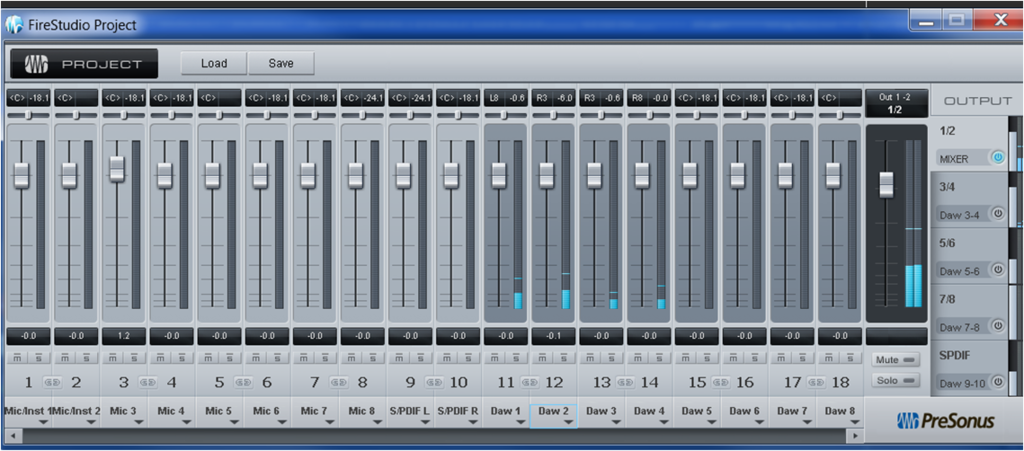 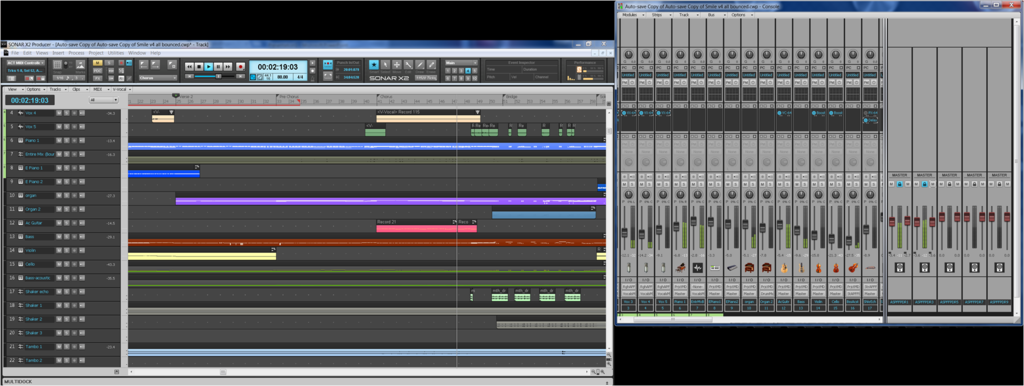
|
tenfoot
Max Output Level: -53.5 dBFS
- Total Posts : 2186
- Joined: 2015/01/22 18:12:07
- Location: Qld, Australia
- Status: offline
Re: Vocal will not pan
2016/06/26 23:16:50
(permalink)
☄ Helpfulby squonk2 2016/06/27 17:04:49
I don't use the firestudio , but you seem to have all of your daw tracks panned centre on it's control panel. For most purposes you should have all of your tracks in Sonar assigned to a single master bus in Sonar, then assign that master bus to two channels on the firestudio, one that is panned hard left, and the other panned hard right. You will then be able to pan tracks in Sonar.
Bruce. Sonar Platinum 2017-09, Studio One 3.5.3, Win 10 x64, Quad core i7, RME Fireface, Behringer X32 Producer, Behringer X32 Rack, Presonus Faderport, Lemure Software Controller (Android), Enttec DMXIS VST lighting controller, Xtempo POK.
|
gokidsmusic
Max Output Level: -89 dBFS

- Total Posts : 51
- Joined: 2010/11/09 16:29:40
- Location: NC
- Status: offline
Re: Vocal will not pan
2016/06/27 00:44:25
(permalink)
☄ Helpfulby squonk2 2016/06/27 17:04:40
tenfoot is on it, I believe. I had the same thing happen to me the first time I used my PreSonus AudioBox 1818. If your FireStudio mixer is like the AudioBox, clicking on the "links" between the channels pans the channels L/R automagically. Good luck!  *edited for spelling
Greg OliverWindows 10 64bit, AMD FX-9590, 16 Gb ram, AMD Radeon HD 7450, ASUS M5A99FXPro R2.0, 240Gb SSD system drive, 2- 1Tb Int, 480Gb & 240Gb SSD sample drives.Cakewalk by Bandlab, Sony Sound Forge 11PreSonus AudioBox 1818VSL, Tascam FW-1884, Melda (All), Waves (All), Sound Toys (All), Eventide (All), Nomad Factory (All), Overloud (All), Softube (Most), Boz (All), XLN (All), Steven Slate Drums & Trigger2 (All)
|
Boydie
Max Output Level: -83 dBFS
- Total Posts : 370
- Joined: 2010/02/28 14:55:04
- Status: offline
Re: Vocal will not pan
2016/06/27 02:56:44
(permalink)
I would agree that it is the Presonus driver setup causing the issue
You appear to recording both your LEFT and RIGHT inputs from your mic centre panned
I would go through and change your stereo inputs on your driver mixer so any tracks labelled "L" are panned hard left and any labelled "R" are panned hard right (via the little slider at the top of the track strip in your Presonus mixer)
To check out my music please visit: http://soundcloud.com/boydiemusic Twitter: https://twitter.com/BoydieMusic Specs: Vortex Laptop i7-3740QM (2.70GHz) 6MB, 32GB KINGSTON HYPER-X GENESIS 1600MHz SODIMM DDR3, 240GB INTEL® 520 SERIES SSD, 750GB SEAGATE MOMENTUS XT HYBRID, BluRay, USB 2 & 3, Firewire, Audio Interface: M-Audio Fast Track Ultra + Focusrite VRM Box
|
chuckebaby
Max Output Level: 0 dBFS
- Total Posts : 13146
- Joined: 2011/01/04 14:55:28
- Status: offline
Re: Vocal will not pan
2016/06/27 06:52:55
(permalink)
I have to say that seems really strange that the Firestudio's default settings would do this though no ?
unless maybe you made some adjustments to it previously. at any rate, maybe you guys are on to something and I don't want to take a way from that, just wanted to mention it seems odd.
by the way, what plug in is on that Vox track ?
Windows 8.1 X64 Sonar Platinum x64 Custom built: Asrock z97 1150 - Intel I7 4790k - 16GB corsair DDR3 1600 - PNY SSD 220GBFocusrite Saffire 18I8 - Mackie Control
|
thedukewestern
Max Output Level: -83 dBFS
- Total Posts : 387
- Joined: 2008/04/14 12:06:59
- Location: NY
- Status: offline
Re: Vocal will not pan
2016/06/27 07:19:37
(permalink)
☼ Best Answerby squonk2 2016/06/27 17:04:13
Oh yeah - its in the presonus - I've used the control one stuff - thats the firestudio right? the first two outputs are panned to the center thats the problem - DAW 1 and DAW 2. I think theres a way to stereo pair them by clicking the icon in between the bottom of the channel strip in the presonus between channel 11 and 12 there.. if not Pan em left and right that should fix it -and if you double click on the fader it should snap to zero so your output is always at unity Cheers
post edited by thedukewestern - 2016/06/27 07:44:14
Be the first one who thinks that you can Sonar Platinum, Windows 7 64 bit - clean install January 2016, Focusrite Pro 40, Outboard Pres, Native Instruments Komplete, Izotope, PSP, Melodyne, Vegetarian
|
squonk2
Max Output Level: -90 dBFS
- Total Posts : 48
- Joined: 2015/09/25 20:57:22
- Status: offline
Re: Vocal will not pan
2016/06/27 16:46:15
(permalink)
Eureka ! It was the Pre-Sonus. Stereo pair chan 11 & 12 and problem solved. What a diff in overall sound also, much fuller.
This forum is fantastic. The knowledge and effort of the community is really phenominal.
Thanks and cheers to all.
|
Bristol_Jonesey
Max Output Level: 0 dBFS
- Total Posts : 16775
- Joined: 2007/10/08 15:41:17
- Location: Bristol, UK
- Status: offline
Re: Vocal will not pan
2016/06/27 17:18:40
(permalink)
Hopefully this thread has been of use to other people as far as diagnosing a problem and thinking logically about how to solve it.
As soon as you revealed your main out meters were responding correctly you could completely eliminate Sonar and that the problem was outside and "downstream"
The next stage would have been your actual monitoring chain
CbB, Platinum, 64 bit throughoutCustom built i7 3930, 32Gb RAM, 2 x 1Tb Internal HDD, 1 x 1TB system SSD (Win 7), 1 x 500Gb system SSD (Win 10), 2 x 1Tb External HDD's, Dual boot Win 7 & Win 10 64 Bit, Saffire Pro 26, ISA One, Adam P11A,
|
Anderton
Max Output Level: 0 dBFS
- Total Posts : 14070
- Joined: 2003/11/06 14:02:03
- Status: offline
Re: Vocal will not pan
2016/06/27 17:37:10
(permalink)
Bristol_Jonesey
Hopefully this thread has been of use to other people as far as diagnosing a problem and thinking logically about how to solve it.
As soon as you revealed your main out meters were responding correctly you could completely eliminate Sonar and that the problem was outside and "downstream"
The next stage would have been your actual monitoring chain
True. If there's some fundamental, basic issue that no one else can confirm, the problem is almost certainly not with SONAR. If it wasn't possible to pan a mono track in the stereo field with SONAR, this forum would be filled with very upset people 
|