Latency applies to everything you hear.
This includes your recorded audio tracks as well as the synth audio output tracks.
Don't confuse the MIDI track with the synth audio output. Both are essential, but not the same thing. If you are using simple instrument tracks, the concept is difficult to grasp, becuase you cannot see the two separately.
As for your immediate problem, you are basically asking the computer to do too much too fast.
I'm going to recap some things already mentioned by Greg and Kalle, but here goes.
The buffer size and latency are just two ways of looking at the same thing, the buffer being the front end controlling factor, and latency being the back end result.
The E-MU sound cards that Kalle and I use reference latency when making adjustments in the ASIO panel. M-Audio references the buffer size. The end result is the same.
An increase in buffer size/latency reduces the CPU load.
Basically, it gives the CPU more time to process the sound data before it hands it over to the sound card to actually produce sound.
Pops and crackles are the first signs that your CPU is getting stressed.
If the CPU goes into the red, a dropout is virtually guaranteed.
I use a rule of thumb I learned early on. Track low, mix high.
Especially when recording soft synths live, low latency is crucial.
Minimize effects, and don't use heavy hitter plug-ins at all. Save those for the mixing stage.
When you are ready to start mixing, increase your latency/buffer size.
In your current project, if you significantly increase your latency, you should see a marked decrease in CPU usage, your crackles should go away, and dropouts should be eliminated.
You may also notice that the sound processing is more complete, and you have a fuller, smoother sound.
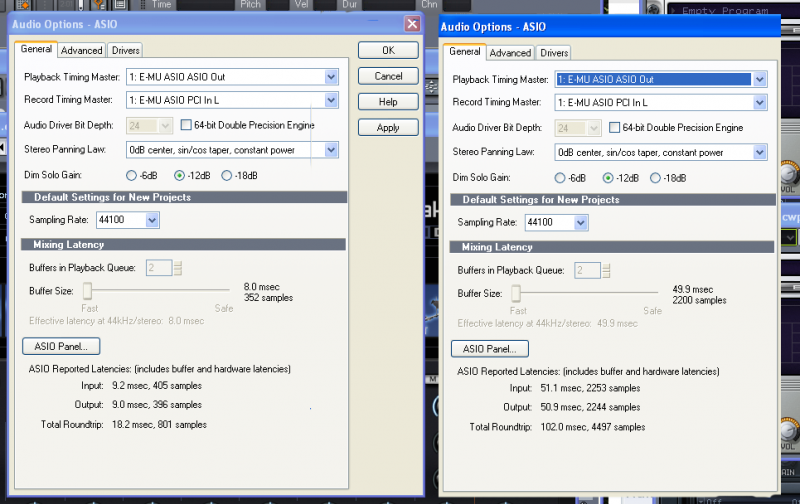
The view below shows my setting for recording on the left, and mixing on the right.
Note that there is a direct relationship between the buffer size and latency.
post edited by RobertB - 2013/04/23 01:04:46