rainbow219
Max Output Level: -90 dBFS

- Total Posts : 7
- Joined: 2012/07/30 05:36:50
- Status: offline
Sonar 8 mixing desk
Hi, i am new to this program, previously a user of Cubase.
Is there a section where i can alter the Volume, Bass, Treble of the channels? There does not seem to be an easy to use section for this as was in Cubase which was displayed as a mixing desk.
Many thanks, Andy.
|
Bristol_Jonesey
Max Output Level: 0 dBFS

- Total Posts : 16775
- Joined: 2007/10/08 15:41:17
- Location: Bristol, UK
- Status: offline

Re:Sonar 8 mixing desk
2012/07/30 06:19:18
(permalink)
View > Console
To alter the EQ, enable the Pro Channel on each channel.
Or..... in track view, just make sure the Inspector is visible ('i' is the shortcut to toggle on/off) and you'll find everything there
CbB, Platinum, 64 bit throughoutCustom built i7 3930, 32Gb RAM, 2 x 1Tb Internal HDD, 1 x 1TB system SSD (Win 7), 1 x 500Gb system SSD (Win 10), 2 x 1Tb External HDD's, Dual boot Win 7 & Win 10 64 Bit, Saffire Pro 26, ISA One, Adam P11A,
|
rainbow219
Max Output Level: -90 dBFS
- Total Posts : 7
- Joined: 2012/07/30 05:36:50
- Status: offline
Re:Sonar 8 mixing desk
2012/07/30 09:36:23
(permalink)
 thank you very much
|
rainbow219
Max Output Level: -90 dBFS
- Total Posts : 7
- Joined: 2012/07/30 05:36:50
- Status: offline
Re:Sonar 8 mixing desk
2012/07/30 09:55:23
(permalink)
still having problems, me being thick. any chance of a sceenshot as what to do.
Not sure how to enable the pro channel.
does it not display the volume/bass/treble as volume controls in a row as on a mixing desk?
|
Bristol_Jonesey
Max Output Level: 0 dBFS
- Total Posts : 16775
- Joined: 2007/10/08 15:41:17
- Location: Bristol, UK
- Status: offline
Re:Sonar 8 mixing desk
2012/07/30 10:12:22
(permalink)
If you've got the Inspector open, you can access the Pro Channel from there - at the top are 3 buttons labelled 'Clip', 'Track' and 'Pro Channel'
You can guess what they do........
I'd post a screenshot but I'm miles away from my studio
CbB, Platinum, 64 bit throughoutCustom built i7 3930, 32Gb RAM, 2 x 1Tb Internal HDD, 1 x 1TB system SSD (Win 7), 1 x 500Gb system SSD (Win 10), 2 x 1Tb External HDD's, Dual boot Win 7 & Win 10 64 Bit, Saffire Pro 26, ISA One, Adam P11A,
|
57Gregy
Max Output Level: 0 dBFS
- Total Posts : 14404
- Joined: 2004/05/31 17:04:17
- Location: Raleigh, North Carolina
- Status: offline
Re:Sonar 8 mixing desk
2012/07/30 11:07:55
(permalink)
Jonesey, is ProChannel available in SONAR 8? Rainbow, there are no 'tone' controls. like treble and bass, but you can use EQ to boost or cut the highs and lows. Click Views at the top and select Console. There may also be a mixer icon in the toolbars above the track view that you can click. You should get something like this: 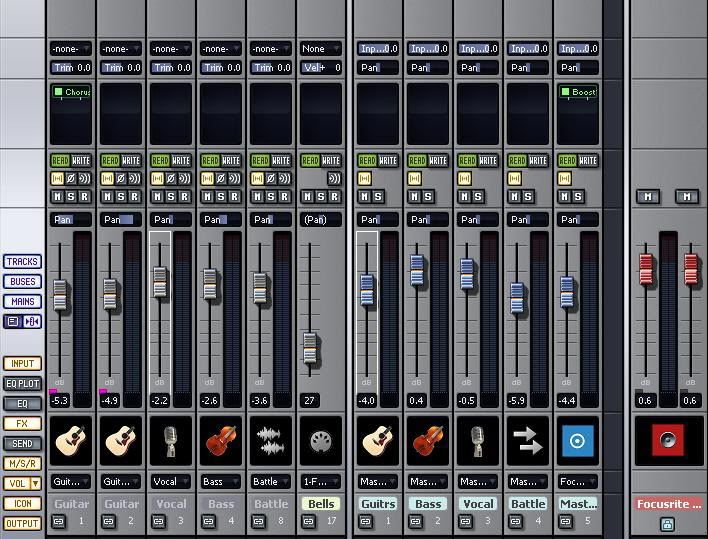 Press M on the computer keyboard to choose which tracks to see. Double-click the track names to change them to something other than "Track 1" etc. Right-click where I have the instrument pictures to insert an instrument icon. There is another icon on the left to narrow/widen the channel strips.
|
rainbow219
Max Output Level: -90 dBFS
- Total Posts : 7
- Joined: 2012/07/30 05:36:50
- Status: offline
Re:Sonar 8 mixing desk
2012/07/30 13:50:57
(permalink)
Thanks, I still coundn't find it so I presumed it was not available.
many thanks.
|
Bristol_Jonesey
Max Output Level: 0 dBFS
- Total Posts : 16775
- Joined: 2007/10/08 15:41:17
- Location: Bristol, UK
- Status: offline
Re:Sonar 8 mixing desk
2012/07/30 14:27:32
(permalink)
o Greg, PC isn't in 8.5  Sometimes I forget my own name as well. you need to insert an EQ plug like the Sonitus in the Fx bin, circled in red: 
CbB, Platinum, 64 bit throughoutCustom built i7 3930, 32Gb RAM, 2 x 1Tb Internal HDD, 1 x 1TB system SSD (Win 7), 1 x 500Gb system SSD (Win 10), 2 x 1Tb External HDD's, Dual boot Win 7 & Win 10 64 Bit, Saffire Pro 26, ISA One, Adam P11A,
|
RobertB
Max Output Level: 0 dBFS
- Total Posts : 11256
- Joined: 2005/11/19 23:40:50
- Location: Fort Worth, Texas
- Status: offline
Re:Sonar 8 mixing desk
2012/07/30 23:52:04
(permalink)
Actually, the Sonitus EQ is built into the Console view in Sonar 8(and SHS6) In this view, the EQ is inactive for the left channel input track, but has been turned on for the right channel ( by clicking on the VU meter icon). If you click on the grid panel, it opens the full view shown to the right. For the purpose of illustration, I have created a somewhat unrealistic curve. It's not as simple as a bass/treble control, but gives you vastly more control. 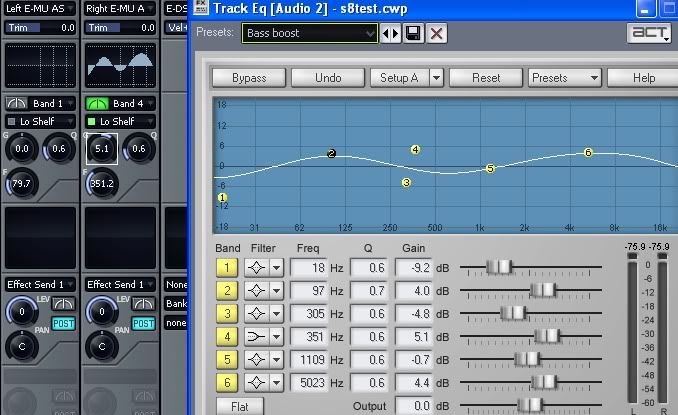 Hope that helps.
My Soundclick Page SONAR Professional, X3eStudio,W7 64bit, AMD Athlon IIx4 2.8Ghz, 4GB RAM, 64bit, AKAI EIE Pro, Nektar Impact LX61,Alesis DM6,Alesis ControlPad,Yamaha MG10/2,Alesis M1Mk2 monitors,Samson Servo300,assorted guitars,Lava Lamp Shimozu-Kushiari or Bob
|
rainbow219
Max Output Level: -90 dBFS
- Total Posts : 7
- Joined: 2012/07/30 05:36:50
- Status: offline
Re:Sonar 8 mixing desk
2012/07/31 15:42:43
(permalink)
excellent thank you all
|
rainbow219
Max Output Level: -90 dBFS
- Total Posts : 7
- Joined: 2012/07/30 05:36:50
- Status: offline
Re:Sonar 8 mixing desk
2012/08/02 11:39:53
(permalink)
hi Greg,
are there any basic tone controls with any of the other Sonar software?
many thanks with the help on the earlier posts.
Andy
|
57Gregy
Max Output Level: 0 dBFS
- Total Posts : 14404
- Joined: 2004/05/31 17:04:17
- Location: Raleigh, North Carolina
- Status: offline
Re:Sonar 8 mixing desk
2012/08/02 11:47:24
(permalink)
No, nothing like 'tone' controls that I know of, just various equalizers.
For audio, it's best to get the sound you want before recording, using an amp's or external mixer's controls to achieve that sound.
|
rainbow219
Max Output Level: -90 dBFS
- Total Posts : 7
- Joined: 2012/07/30 05:36:50
- Status: offline
Re:Sonar 8 mixing desk
2012/08/02 11:48:45
(permalink)
hi Greg,
also the Sonitus EQ that you have showed me, can you give me basic knowledge of how to alter bass/treble with this, i have not worked with this on a frequency level before only the basic gain/bass/treble controls.
Andy.
|
RobertB
Max Output Level: 0 dBFS
- Total Posts : 11256
- Joined: 2005/11/19 23:40:50
- Location: Fort Worth, Texas
- Status: offline
Re:Sonar 8 mixing desk
2012/08/02 23:53:50
(permalink)
To be honest, Andy, the best way to learn it is to just play around with it. Especially the filter shapes and the nodes on the screen. After a while, it starts to make sense. Save your project as a new version, and try different settings. You are going to horribly mangle a few attempts. Don't sweat it. You still have the original to start from. Another EQ you may find of interest is NyquistEQ, available here: http://www.dontcrack.com/freeware/downloads.php/id/3176/software/NyquistEq/ This has been a longtime personal favorite. It is a VST, and you would insert it in the FX bin of a bus or track. It is extremely flexible, and imho, somewhat more intuitive than the Sonitus EQ. There are also graphic EQ's, available at sites like KVR-Audio that you may like. Each EQ has certain characteristics that may or may not be a good fit for a given project, so it doesn't hurt to have a few in your arsenal. hth
My Soundclick Page SONAR Professional, X3eStudio,W7 64bit, AMD Athlon IIx4 2.8Ghz, 4GB RAM, 64bit, AKAI EIE Pro, Nektar Impact LX61,Alesis DM6,Alesis ControlPad,Yamaha MG10/2,Alesis M1Mk2 monitors,Samson Servo300,assorted guitars,Lava Lamp Shimozu-Kushiari or Bob
|