Alphadeus
Max Output Level: -90 dBFS

- Total Posts : 41
- Joined: 2007/09/16 05:55:55
- Status: offline

Sonar Platinum - Issue with Piano Roll
Hello, I uploaded a YouTube video (unlisted) demonstrating the issue I'm having with Cakewalk Sonar Platinum version 21.5.00 BUILD 32 Foxboro - x64. https://www.youtube.com/watch?v=D9QYXtgfwww The best way to describe it, is that in the piano roll, sometimes when switching tracks, the notes in the grid don't match up correctly with the keyboard on the left side. I auditioned a C, but when I wrote in that grid line, the notes played were B. To further demonstrate my issue, I couldn't highlight the notes by pressing C, only by pressing B. Switching tracks sometimes fixes it, but also sometimes makes the issue even worse, in one case, the notes on the grid were an octave lower than the keys on the left side. I apologize if this is a known issue, but this has just started happening to me today after updating sonar on July 13th, 2015. I used Rapture Pro to demonstrate the issue, but other instruments were in the file. I do not know if (or think) the instruments make a difference. This issue affects me greatly, because I do not know if when I come back to a track, it'll be the correct notes. Also, I often use the keyboard to audition/select notes, and it's making it difficult to work on a track. I am wondering if this issue affects other users. If there are any questions I need to answer (pc specs, and such) please let me know. Thank you.
|
Tunerman
Max Output Level: -87 dBFS

- Total Posts : 186
- Joined: 2010/03/18 20:08:57
- Location: Northern California
- Status: offline
Re: Sonar Platinum - Issue with Piano Roll
2015/07/13 09:31:01
(permalink)
Odd problem.....maybe try lowering the resolution of your monitor?
Could be some graphics issue. Honestly, I haven't a clue why this is happening to you,
but this is what I would check first if it happened on my system.
“When I sit at my worm-eaten piano, I envy no king in his happiness" -F.J.Haydn Sonar Platinum v22.9.2; W10-64; i7,950,3.06Gz;12GB ram;Korg BX3; Korg M1; Roland FP dp. Two grand pianos: 1929 Steinway M 5'7" & a 1913 Steinway B 6'11"; Focusrite PRO24 & 18i8; Yamaha NS10M, JBL LRS305. "Myrna's Love" - Slide show movie of a piano rebuilding process, with original music, recorded using Sonar 8.5. http://www.youtube.com/watch?v=ANU-lrom_Y0
|
Alphadeus
Max Output Level: -90 dBFS
- Total Posts : 41
- Joined: 2007/09/16 05:55:55
- Status: offline
Re: Sonar Platinum - Issue with Piano Roll
2015/07/13 09:47:49
(permalink)
I could maybe see how screen resolution could be an issue with what I demonstrated, but the other instances (where one was an entire octave off) suggest something else. Also, this only started happening today after updating to the latest build. I've written at least 4 songs in the past few days without issue with the piano roll. I've also written hundreds over the past 8 years using different versions of Sonar, and this is the first I've seen of this occurrence.
It's hard to reproduce, but if I work on a fresh track, and it happens again, I'll try to get a video of a more severe instance, where the keyboard is way off, instead of just a semitone.
Also, I'll look into screen resolution, but the little monitor I use for Piano Roll only has 2 settings (800x600 and 1024x768). I can also try dragging the window over to the main monitor next time it happens.
|
DRanck
Max Output Level: -78 dBFS

- Total Posts : 608
- Joined: 2013/05/31 18:35:32
- Location: Sarasota, FL USA
- Status: offline
Re: Sonar Platinum - Issue with Piano Roll
2015/07/13 09:56:52
(permalink)
I think this is the same issue that has been reported by myself and others. Try changing the zoom on the PRV. It seems to reset it for me.
My Sound CloudWebsiteYoutube ChannelThe way that I've always gone about making music, the rule of thumb, has just been to make what I love. Amy Lee Sonar Pro 64 (Newburyport), Akai Pro MPK 88, i7-4770K, ASUS Z87-PRO V, 32GB SDRAM 1866, SAMSUNG 840 EVO 500GB SSD, 2 - WD BLACK 2TB, Samsung USB 3.0 SSD, Win 10 Pro 64, Radeon R9 270 Video 2GB, Dell P2314T 23" Touchscreen, Gateway 23" monitor, Presonus USB Audio Interface, Surface Pro 2 w/ Xotopad as a control surface
|
2:43AM
Max Output Level: -68 dBFS

- Total Posts : 1147
- Joined: 2013/06/24 07:59:49
- Location: PHX
- Status: offline
Re: Sonar Platinum - Issue with Piano Roll
2015/11/15 15:11:13
(permalink)
I'm reviving this topic because I just now noticed that when you double-click a clip in the Track View to open the Piano Roll View in the Multidock, the zoom is all goofed up and the black/white keys don't align with the grid's shaded and white areas. Changing the vertical zoom does "snap it back" to the correct display, but this is a work-around to a problem because every time I double-click a clip to expand it to Piano Roll View, the display is botched up again. 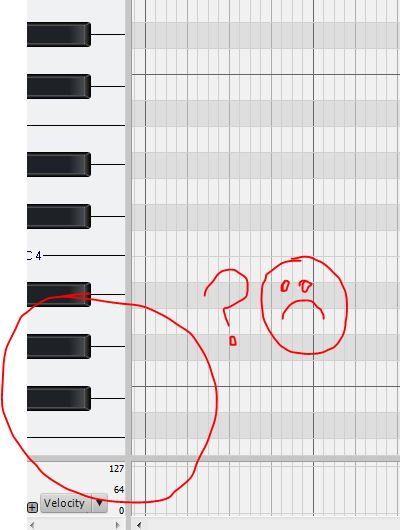 I am submitting a Problem Report.
post edited by 2:43AM - 2015/11/15 15:23:55
|
reberclark
Max Output Level: -88 dBFS

- Total Posts : 117
- Joined: 2006/08/30 23:45:05
- Status: offline
Re: Sonar Platinum - Issue with Piano Roll
2016/12/07 16:23:01
(permalink)
This is happening to me as well. I will try the zoom adjust but it is very confusing not to mention a big pain and a break in workflow.
In theory there is no difference between theory and practice, but in practice there is. SONAR Platinum 64bit, Windows 10 Pro 64bit, Polywell Core i7 x98 3.33GHz, 24GB RAM
|
reginaldStjohn
Max Output Level: -81 dBFS

- Total Posts : 485
- Joined: 2011/01/15 23:42:50
- Status: offline
Re: Sonar Platinum - Issue with Piano Roll
2016/12/07 16:33:15
(permalink)
Has someone reported this yet if it is reproducible?
AMD Phenom II x6, 8 GB Ram, 2 Internal SATA III HD Windows 10 Presonus Studio Live 16.0.2 Interface/Mixer Cakewalk Sonar Platinum Line6 Helix Guitar Processor Custom Made (El Bandito) Telecaster LTD ESP EC-1000 PRS El Torrero SE
|
Bristol_Jonesey
Max Output Level: 0 dBFS

- Total Posts : 16775
- Joined: 2007/10/08 15:41:17
- Location: Bristol, UK
- Status: offline
Re: Sonar Platinum - Issue with Piano Roll
2016/12/07 16:53:17
(permalink)
reberclark
This is happening to me as well. I will try the zoom adjust but it is very confusing not to mention a big pain and a break in workflow.
What version are you on? From what I've seen, this issue was fixed several updates ago.
CbB, Platinum, 64 bit throughoutCustom built i7 3930, 32Gb RAM, 2 x 1Tb Internal HDD, 1 x 1TB system SSD (Win 7), 1 x 500Gb system SSD (Win 10), 2 x 1Tb External HDD's, Dual boot Win 7 & Win 10 64 Bit, Saffire Pro 26, ISA One, Adam P11A,
|
SuperG
Max Output Level: -63 dBFS

- Total Posts : 1371
- Joined: 2012/10/19 16:09:18
- Location: Edgewood, NM
- Status: offline
Re: Sonar Platinum - Issue with Piano Roll
2016/12/07 18:39:38
(permalink)
It's not just the keyboard, when using the drum pane of the piano roll, the zoom level doesn't match either. You have to scroll up or down to get the window to refresh with the correct zoom.
|