greg54
Max Output Level: -79 dBFS

- Total Posts : 551
- Joined: 2011/01/27 18:13:52
- Status: offline
Sonar X3 and "Sends"
I was watching a video about Sonar and creating a bus, using "Sends" for plugins. In the video, each track had a "sends" near the top in the multidock - and a volume and pan knobs. As you can see below, mine does not. Not sure what the issue is or how to correct it. Any ideas? Thanks! Greg   " />
Intel Core i7 4770 quad core 16 GB DDR3, 1600 MHz SDRAM 1T SSD; 2T 7200 GB HD'sWindows 10 Professional 64 bit Solid State Logic SSL2 interface Sonar Platinum
|
gustabo
Max Output Level: -49.5 dBFS

- Total Posts : 2591
- Joined: 2009/01/05 17:32:38
- Status: offline

Re: Sonar X3 and "Sends"
2015/12/14 15:09:00
(permalink)
Click on Modules at the top left and select it.
Cakewalk by Bandlab - Win10 Pro x64 - StudioCat Platinum Studio DAW - 32 GB Ram - MOTU UltraLite-mk3
M-Audio Keystation 88ES - Akai MPD26 (hot-rodded) - Alesis DM10 - a few guitars, a few amps
Novation Launch Control - Korg nanoKONTROL2 - PreSonus FaderPort - DAW Remote HD on iPad
Adam A7X - Behritone C50A
PreSonus Monitor Station v2 (controlling the mons)
https://www.facebook.com/groups/sonarusergroup/
|
brundlefly
Max Output Level: 0 dBFS

- Total Posts : 14250
- Joined: 2007/09/14 14:57:59
- Location: Manitou Spgs, Colorado
- Status: offline
Re: Sonar X3 and "Sends"
2015/12/14 15:09:56
(permalink)
Go to the Modules tab, and enable Sends.
SONAR Platinum x64, 2x MOTU 2408/PCIe-424 (24-bit, 48kHz) Win10, I7-6700K @ 4.0GHz, 24GB DDR4, 2TB HDD, 32GB SSD Cache, GeForce GTX 750Ti, 2x 24" 16:10 IPS Monitors
|
greg54
Max Output Level: -79 dBFS
- Total Posts : 551
- Joined: 2011/01/27 18:13:52
- Status: offline
Re: Sonar X3 and "Sends"
2015/12/14 16:20:13
(permalink)
Thanks, guys! As usual, I feel completely stupid. :)
Greg
Intel Core i7 4770 quad core 16 GB DDR3, 1600 MHz SDRAM 1T SSD; 2T 7200 GB HD'sWindows 10 Professional 64 bit Solid State Logic SSL2 interface Sonar Platinum
|
Beepster
Max Output Level: 0 dBFS
- Total Posts : 18001
- Joined: 2012/05/11 19:11:24
- Status: offline
Re: Sonar X3 and "Sends"
2015/12/14 17:21:57
(permalink)
greg54
Thanks, guys! As usual, I feel completely stupid. :)
Greg
Don't. The Sends module should be shown by default so if it wasn't that would indeed be a bugger to figure out if you weren't aware of the context menu in the CV that shows/hides strip modules. However in the pic I'm seeing the Sends Modules ARE visible on the strips. They are just greyed out because no sends have been inserted/routed. In that case you just hit the little + sign to insert a new send on the track. There is also a broken image link to the left of that in my web browser so maybe that second image is just a screen capture of the vid and the first image shows the CV without the Sends module. My point? Don't feel dumb in the slightest because trying to find those modules and how to show/hide them is something you specifically need to know and it's kind of buried in a weird place.
|
John
Forum Host

- Total Posts : 30467
- Joined: 2003/11/06 11:53:17
- Status: offline
Re: Sonar X3 and "Sends"
2015/12/14 17:52:30
(permalink)
If the picture is of the OP's Console View the sends are listed below the FX bin. They are grayed out because none are activated. The + sign will bring a drop down menu for activating a send for that channel. Of course one also needs a buss to send too.
|
greg54
Max Output Level: -79 dBFS
- Total Posts : 551
- Joined: 2011/01/27 18:13:52
- Status: offline
Re: Sonar X3 and "Sends"
2015/12/14 19:33:34
(permalink)
I went to Modules, and checked the list under it. Input Gain/Pan Pro Channel FX bin Sends/bank/patch MSR Pan Control Volume These are all checked. Under them are "Icon" and "in/out," which are not checked. Beepster, John: I have hit the +, and there is no Send. It just shows the list of the different buses. I am confused. Thanks! Greg
post edited by greg54 - 2015/12/14 19:45:30
Intel Core i7 4770 quad core 16 GB DDR3, 1600 MHz SDRAM 1T SSD; 2T 7200 GB HD'sWindows 10 Professional 64 bit Solid State Logic SSL2 interface Sonar Platinum
|
greg54
Max Output Level: -79 dBFS
- Total Posts : 551
- Joined: 2011/01/27 18:13:52
- Status: offline
Re: Sonar X3 and "Sends"
2015/12/14 19:37:47
(permalink)
Beepster
However in the pic I'm seeing the Sends Modules ARE visible on the strips. They are just greyed out because no sends have been inserted/routed. In that case you just hit the little + sign to insert a new send on the track.
I am not seeing the Sends modules on each track. Aren't they supposed to have a Volume and Pan knob? I don't see that. I'm just not getting it. So simple and yet so not. Thanks for your patience! Greg
post edited by greg54 - 2015/12/14 19:51:39
Intel Core i7 4770 quad core 16 GB DDR3, 1600 MHz SDRAM 1T SSD; 2T 7200 GB HD'sWindows 10 Professional 64 bit Solid State Logic SSL2 interface Sonar Platinum
|
John
Forum Host
- Total Posts : 30467
- Joined: 2003/11/06 11:53:17
- Status: offline
Re: Sonar X3 and "Sends"
2015/12/14 20:01:31
(permalink)
|
Larry Jones
Max Output Level: -74 dBFS

- Total Posts : 834
- Joined: 2007/10/11 02:45:33
- Location: Southern California
- Status: offline
Re: Sonar X3 and "Sends"
2015/12/14 20:16:42
(permalink)
Next time you hit the plus button, look down at the bottom of that drop-down and find the "Insert Send Assistant." Follow those instructions and you'll be golden. Once you see how it works you can do it manually if you want, but the Assistant will get you started. Good luck.
SONAR Platinum 2017.10 • CbB • Win10 • i7/2600 • 16GB RAM • Focusrite Scarlett 6i6 • NVIDIA GeForce 8400GS
|
Beepster
Max Output Level: 0 dBFS
- Total Posts : 18001
- Joined: 2012/05/11 19:11:24
- Status: offline
Re: Sonar X3 and "Sends"
2015/12/14 20:28:27
(permalink)
☄ Helpfulby John 2015/12/14 21:17:14
Yup, John perfectly illustrated it in that pic. Those are your sends. They just haven't been activated yet.
The reason what you are seeing may be different from teh vid is because you seem to have your Console Strips set to "Narrow".
Now as far as that list of busses when you click the little + button... select one of the busses and now your send module will be outputting to that bus. You can add as many sends as you want on a track using that method going to any bus in the project.
For more info check out the Reference Guide under the section(s) regarding "Sends", "Console View", "Track Strips" or whatever else you can scrounge up using the various buzzwords we've brought up here.
Cheers!
|
greg54
Max Output Level: -79 dBFS
- Total Posts : 551
- Joined: 2011/01/27 18:13:52
- Status: offline
Re: Sonar X3 and "Sends"
2015/12/14 20:37:30
(permalink)
John
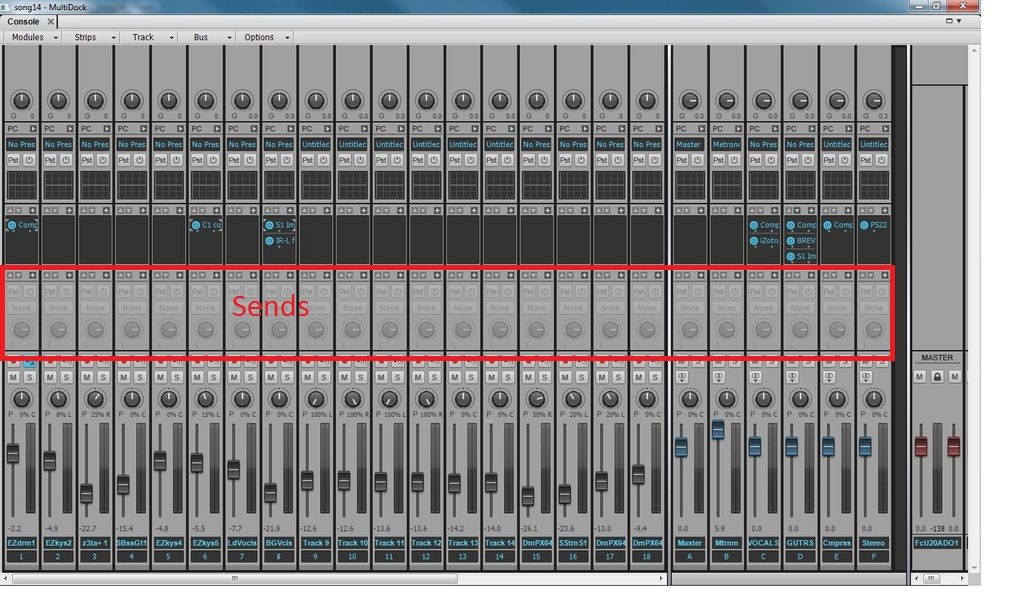
Ok, I thought "sends" was that it had to say "sends." Thanks! Greg
Intel Core i7 4770 quad core 16 GB DDR3, 1600 MHz SDRAM 1T SSD; 2T 7200 GB HD'sWindows 10 Professional 64 bit Solid State Logic SSL2 interface Sonar Platinum
|
greg54
Max Output Level: -79 dBFS
- Total Posts : 551
- Joined: 2011/01/27 18:13:52
- Status: offline
Re: Sonar X3 and "Sends"
2015/12/14 20:39:44
(permalink)
Beepster
Now as far as that list of busses when you click the little + button... select one of the busses and now your send module will be outputting to that bus. You can add as many sends as you want on a track using that method going to any bus in the project.
But I thought the Send on the channel strip had to say "sends" and had to have both a volume and pan knob? Thanks! Greg
Intel Core i7 4770 quad core 16 GB DDR3, 1600 MHz SDRAM 1T SSD; 2T 7200 GB HD'sWindows 10 Professional 64 bit Solid State Logic SSL2 interface Sonar Platinum
|
John
Forum Host
- Total Posts : 30467
- Joined: 2003/11/06 11:53:17
- Status: offline
Re: Sonar X3 and "Sends"
2015/12/14 20:51:42
(permalink)
It will have those things when you activate it. As shown they are inactive.
|
John
Forum Host
- Total Posts : 30467
- Joined: 2003/11/06 11:53:17
- Status: offline
Re: Sonar X3 and "Sends"
2015/12/14 21:01:18
(permalink)
If look at this picture which is a closeup of the sends modules in the CV. You will see both active and inactive sends and both narrow and normal width strips. 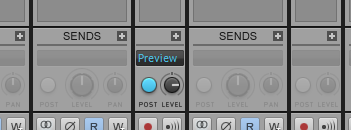 In it the send that is active is sending to the Preview buss.
post edited by John - 2015/12/14 21:13:51
|
greg54
Max Output Level: -79 dBFS
- Total Posts : 551
- Joined: 2011/01/27 18:13:52
- Status: offline
Re: Sonar X3 and "Sends"
2015/12/15 15:00:26
(permalink)
When I widened the track strips, I see the "Sends." Thanks, everyone!!
But . . I clicked on the "+" and went to "Insert Sends Assistant". .
In there is a list...
* Send to existing bus (which is checked)
* New Bus (new bus options - Stereo or Surround)
* Bus Option (which has my interface: Focusrite USB 2.0 Audio...)
* Bus name
* Choose Effect
* Pre Fader
* Match Track's Pan and Gain
What do I choose in here?
Thanks again!
Greg
Intel Core i7 4770 quad core 16 GB DDR3, 1600 MHz SDRAM 1T SSD; 2T 7200 GB HD'sWindows 10 Professional 64 bit Solid State Logic SSL2 interface Sonar Platinum
|
John
Forum Host
- Total Posts : 30467
- Joined: 2003/11/06 11:53:17
- Status: offline
Re: Sonar X3 and "Sends"
2015/12/15 15:13:24
(permalink)
OK I have never used the send assistant. I always add an aux buss and output the send to it.
|
Beepster
Max Output Level: 0 dBFS
- Total Posts : 18001
- Joined: 2012/05/11 19:11:24
- Status: offline
Re: Sonar X3 and "Sends"
2015/12/15 15:40:40
(permalink)
* Send to existing bus (which is checked) This allows you to choose a bus that you already have in the project. If you want to use a bus you have alread create to send the output of the Send to use this. * New Bus (new bus options - Stereo or Surround) This will create a new bus for you and automatically route the send to it. Use Stereo unless for some reason you need a "Surround Bus" (which is for 5.1 movie type surround sound which you likely don't want) * Bus Option (which has my interface: Focusrite USB 2.0 Audio...) This, I think, is just giving you the option to route out to your hardware instead of inside your project. It's for things like Headphone mixes or alternate Monitor configs (I think... don't quote me on that) * Bus name This is porbably just the option to name your new bus if you used the "New Bus" option. Can't remember. * Choose Effect This allows you to insert an effect (or multiple effects IIRC) into the FX Bin/Rack of the target bus... such as reverb. THis is just a convenience option for setting up reverb/compression busses. * Pre Fader This will set the Pre/Post Fader status of the send. Pre Fader = The output from the send to the bus will not be affected by any changes you make to the Track Fader on the TRACK the send appears on (this is usually what you will want). Post Fader = The track fader will affect the output level of the signal coming from the send into the target bus. * Match Track's Pan and Gain I've never really seen/used that but it sounds like it just sets your Send's Pan and Gain levels to the track's pan and gain levels. Seems kind of useless but maybe helpful in SOME cases. Meh\ Cheers. Edit: BTW... all that info is all in the Reference Guide and likely much more informative/concise than what I just posted above. It is worth a look if you really want to understand these things. Also it should be noted that the Sends modules in X3 look different than the one in John's most recent pic. There were some improvements/changes to Sends in Sonar 2015 so your sends will look a little different than that. They still work the same more or less (AFAIK).
post edited by Beepster - 2015/12/15 15:55:37
|
greg54
Max Output Level: -79 dBFS
- Total Posts : 551
- Joined: 2011/01/27 18:13:52
- Status: offline
Re: Sonar X3 and "Sends"
2015/12/15 16:09:12
(permalink)
John, Beepster: In other words, forget about using the "Insert Sends Assistant"...
It seems easier the way you guys use it.
Thanks for your help! I really appreciate it!
Greg
Intel Core i7 4770 quad core 16 GB DDR3, 1600 MHz SDRAM 1T SSD; 2T 7200 GB HD'sWindows 10 Professional 64 bit Solid State Logic SSL2 interface Sonar Platinum
|
Larry Jones
Max Output Level: -74 dBFS
- Total Posts : 834
- Joined: 2007/10/11 02:45:33
- Location: Southern California
- Status: offline
Re: Sonar X3 and "Sends"
2015/12/15 17:40:25
(permalink)
greg54
John, Beepster: In other words, forget about using the "Insert Sends Assistant"...
It seems easier the way you guys use it.
Thanks for your help! I really appreciate it!
Greg
I only mentioned the Assistant because you seemed to be struggling with the concept. The Assistant walks you through setting up a send and I figured after using it you'd see how it works and then you could do it whatever way you wanted. Hope you get it figured out.
SONAR Platinum 2017.10 • CbB • Win10 • i7/2600 • 16GB RAM • Focusrite Scarlett 6i6 • NVIDIA GeForce 8400GS
|
John
Forum Host
- Total Posts : 30467
- Joined: 2003/11/06 11:53:17
- Status: offline
Re: Sonar X3 and "Sends"
2015/12/15 17:49:07
(permalink)
Larry Jones
greg54
John, Beepster: In other words, forget about using the "Insert Sends Assistant"...
It seems easier the way you guys use it.
Thanks for your help! I really appreciate it!
Greg
I only mentioned the Assistant because you seemed to be struggling with the concept. The Assistant walks you through setting up a send and I figured after using it you'd see how it works and then you could do it whatever way you wanted. Hope you get it figured out.
To be fully candid here I never thought the send assistant was needed. If you can insert a track and figure out how to set its input and output a send is a breeze to set up. If you have ever used a hardware mixer the notion of a send is very straight forward. In Sonar a send is simply another form of output. More so now than ever with patch points and aux tracks.
|
Larry Jones
Max Output Level: -74 dBFS
- Total Posts : 834
- Joined: 2007/10/11 02:45:33
- Location: Southern California
- Status: offline
Re: Sonar X3 and "Sends"
2015/12/15 18:51:59
(permalink)
John
To be fully candid here I never thought the send assistant was needed. If you can insert a track and figure out how to set its input and output a send is a breeze to set up. If you have ever used a hardware mixer the notion of a send is very straight forward.
In Sonar a send is simply another form of output. More so now than ever with patch points and aux tracks.
Clearly the concept of sends and how to set them up is not as self-evident to everyone as it is to you. The OP was looking for a little help. I thought I'd offer some.
SONAR Platinum 2017.10 • CbB • Win10 • i7/2600 • 16GB RAM • Focusrite Scarlett 6i6 • NVIDIA GeForce 8400GS
|
John
Forum Host
- Total Posts : 30467
- Joined: 2003/11/06 11:53:17
- Status: offline
Re: Sonar X3 and "Sends"
2015/12/15 19:31:36
(permalink)
Larry i'm not against your contribution. Nor did I say it was wrong. I was promoting my viewpoint. Thats all. The OP can use what ever works. None of this is rocket science. 
|
greg54
Max Output Level: -79 dBFS
- Total Posts : 551
- Joined: 2011/01/27 18:13:52
- Status: offline
Re: Sonar X3 and "Sends"
2015/12/16 11:26:45
(permalink)
Larry, John: I appreciate both of your suggestions. Thank you!
Greg
Intel Core i7 4770 quad core 16 GB DDR3, 1600 MHz SDRAM 1T SSD; 2T 7200 GB HD'sWindows 10 Professional 64 bit Solid State Logic SSL2 interface Sonar Platinum
|
Larry Jones
Max Output Level: -74 dBFS
- Total Posts : 834
- Joined: 2007/10/11 02:45:33
- Location: Southern California
- Status: offline
Re: Sonar X3 and "Sends"
2015/12/16 15:56:02
(permalink)
You're welcome, Greg! Hope you have it working now.
SONAR Platinum 2017.10 • CbB • Win10 • i7/2600 • 16GB RAM • Focusrite Scarlett 6i6 • NVIDIA GeForce 8400GS
|
greg54
Max Output Level: -79 dBFS
- Total Posts : 551
- Joined: 2011/01/27 18:13:52
- Status: offline
Re: Sonar X3 and "Sends"
2015/12/16 18:00:14
(permalink)
Yes, it's working fine. :)
Greg
Intel Core i7 4770 quad core 16 GB DDR3, 1600 MHz SDRAM 1T SSD; 2T 7200 GB HD'sWindows 10 Professional 64 bit Solid State Logic SSL2 interface Sonar Platinum
|
greg54
Max Output Level: -79 dBFS
- Total Posts : 551
- Joined: 2011/01/27 18:13:52
- Status: offline
Re: Sonar X3 and "Sends"
2015/12/17 19:25:49
(permalink)
So...I have the Sends set up. And I installed the trial version of bx_stereomaker.
Maybe I'm doing it wrong, but I . . .
inserted a new stereo bus.
I put the bx_stereomaker in the bus.
I went to my mono vocal track and hit the + and sent that track to the new bus with the bx_stereomaker in it.
But the stereo effect doesn't work. I tried Waves PS22, and that stereo maker doesn't work. So evidently I'm going about this wrong. How do you get the stereo effect to work?
Thanks!
Greg
Intel Core i7 4770 quad core 16 GB DDR3, 1600 MHz SDRAM 1T SSD; 2T 7200 GB HD'sWindows 10 Professional 64 bit Solid State Logic SSL2 interface Sonar Platinum
|
John
Forum Host
- Total Posts : 30467
- Joined: 2003/11/06 11:53:17
- Status: offline
Re: Sonar X3 and "Sends"
2015/12/17 20:19:19
(permalink)
I wouldn't use as a send effect. You can use it on a buss and you will need to output the track to that buss. Its better as insert effect. Also I think the track interleave needs to be stereo.
|
greg54
Max Output Level: -79 dBFS
- Total Posts : 551
- Joined: 2011/01/27 18:13:52
- Status: offline
Re: Sonar X3 and "Sends"
2015/12/18 10:35:39
(permalink)
Hi John -
By "track interleave" do you mean when I scroll down on the instrument track to choose either R, L or Stereo when I record?
So even though I recorded in mono, I change it afterward to stereo to use the stereo effect plugin?
Thanks!
Greg
Intel Core i7 4770 quad core 16 GB DDR3, 1600 MHz SDRAM 1T SSD; 2T 7200 GB HD'sWindows 10 Professional 64 bit Solid State Logic SSL2 interface Sonar Platinum
|
Bristol_Jonesey
Max Output Level: 0 dBFS
- Total Posts : 16775
- Joined: 2007/10/08 15:41:17
- Location: Bristol, UK
- Status: offline
Re: Sonar X3 and "Sends"
2015/12/18 10:43:39
(permalink)
According to Brainworx:
"bx_stereomaker creates a virtual S signal with analog style filters using Brainworx legendary M/S stereo algorithms. This friendly plugin will take any mono signal and make it stereo while allowing you to balance the center position. You can even focus the process on specific frequency ranges in your signal. And you can solo the virtual S signal!"
So you shouldn't need to touch the interleave.
But where I do agree with John is that you should use this directly in the Fx bin of your vocal track - forget about bussing it for now.
CbB, Platinum, 64 bit throughoutCustom built i7 3930, 32Gb RAM, 2 x 1Tb Internal HDD, 1 x 1TB system SSD (Win 7), 1 x 500Gb system SSD (Win 10), 2 x 1Tb External HDD's, Dual boot Win 7 & Win 10 64 Bit, Saffire Pro 26, ISA One, Adam P11A,
|